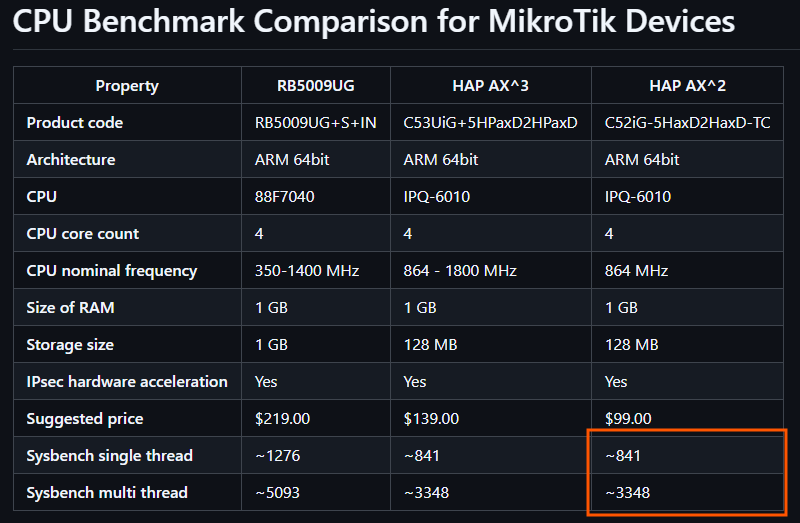
CPU benchmark

If you decide to experiment with containers at homelab, it is recommended to choose devices with:

  • ARM64
  • RAM > 1 GB

or use a CHR VM

At the moment, the most interesting models for homelab are:

  • hap ax2 (There is no USB port, you need to use a network drive)
  • hap ax3
  • RB5009

Maybe someone will need it.

I used a container with sysbench:

  • –test=cpu --threads=1
  • –test=cpu --threads=4
/container/add remote-image=mirror.gcr.io/zyclonite/sysbench cmd="--test=cpu --threads=1 run" interface=veth1 logging=yes name=sysbench root-dir=docker/sysbench 

RB5009 - CPU 88F7040

threads: 1 
CPU speed: 1276 events per second
threads: 4
sysbench: CPU speed: 5093.27 events per second

HAP AX3 - CPU IPQ-6010

threads: 1
sysbench: CPU speed: 841 events per second
threads: 4
sysbench: CPU speed: 3347.89 events per second

HAP AX2 - CPU IPQ-6010

threads: 1
sysbench: CPU speed 401.24 events per second
threads: 4
sysbench: CPU speed 1602.72 events per second

Conclusions

RB5009 (88F7040)

The leading device with performance 52% higher than the HAP AX3, but also 58% more expensive.

HAP AX3 (IPQ-6010)

Decent results with a good price-to-performance ratio.

HAP AX2 (IPQ-6010)
It has the same CPU but absolutely not the same performance as the ax³ IPQ-6010. Due to the smaller form factor the ax² is worse at dissipating heat, so the CPU clock is limited to the base frequency, while the ax³ can boost to 1800MHz. It shows about 48% of the HAP AX3 performance in single-threaded mode and about 48% in multi-threaded mode. Despite this, thanks to its low price ($99), it offers an acceptable price-to-performance ratio for basic tasks. However, the lack of a USB port makes it less attractive and there is no particular point in buying this device for running containers.


I will be glad if someone shares their results on other devices.

I’ll add it to github

2 Likes

It has the same CPU but absolutely not the same performance as the ax³. Due to the smaller form factor the ax² is worse at dissipating heat, so the CPU clock is limited to the base frequency, while the ax³ can boost to 1800MHz.

The forum’s favorite metric, the 512-byte-25-rule published test result is thus 25% higher on the ax³. Your benchmark if done on the ax² would probably also show similar gap.

Probably more. The forwarding performance is mainly characteristic of the memory bandwidth. The difference in raw cpu power is larger.

Yes, thank you. I didn’t have the ax² on hand, but hopefully someone else does and can run the container to show real test results.

Cool use case. You can use tmpfs, aka RAM disk, if devices have spare resources.

I had to temporary drop my backup partition to get it to unpack, but the result is closer to half the speed of the ax³, not the 75% predicted by @CGGXANNX:

events per second: 401.24

And with 4 threads:

events per second: 1602.72

This is with 7.19.1, which is merely what happened to be on it when I plugged it in. There is no design in the selection.

I also wanted to test on my devices, but unfortunately this image is arm64 only. And my devices are just arm. :expressionless_face:

You can use base Alpine base image

Supported architectures:

amd64, arm32v6, arm32v7, arm64v8, i386, ppc64le, riscv64, s390x


/container/add remote-image=mirror.gcr.io/alpine:3.22 interface=veth1 root-dir=docker/alpine logging=yes cmd="tail -f /dev/null"

The main thing is to ensure that the new container with veth1 has internet access, and then install sysbench manually.

run container


/container/start number=X

exec into container


/container/shell number=X

install sysbench


apk add --no-cache --purge --clean-protected -u ca-certificates sysbench=1.0.20-r3

start bench


sysbench --test=cpu --threads=1 run

Thanks for the results, updated the information

The first table on your GitHub page still needs an update:

1 Like

Thanks I fixed it