Next week we will publish an update of the documentation. Sorry about the delay.
Thanks for the reply.
Could you please publish NOW something updated (even in beta stage) on configuring VLANs? We have 20 CRS-125 here for the new network of one of our customers, users will start to work next week and we need to set up VLANs for them before! Just the grammar to set up VLAN and affect ports in terminal…
Almost Friday… any update on this?
YAY!
I have followed instruction from http://wiki.mikrotik.com/wiki/Manual:CRS_examples#Port_Based_VLAN but still leak happens in v6.9 
Playing with the configs makes switch crash so i could not try and false .
Anybody found a workaround ?
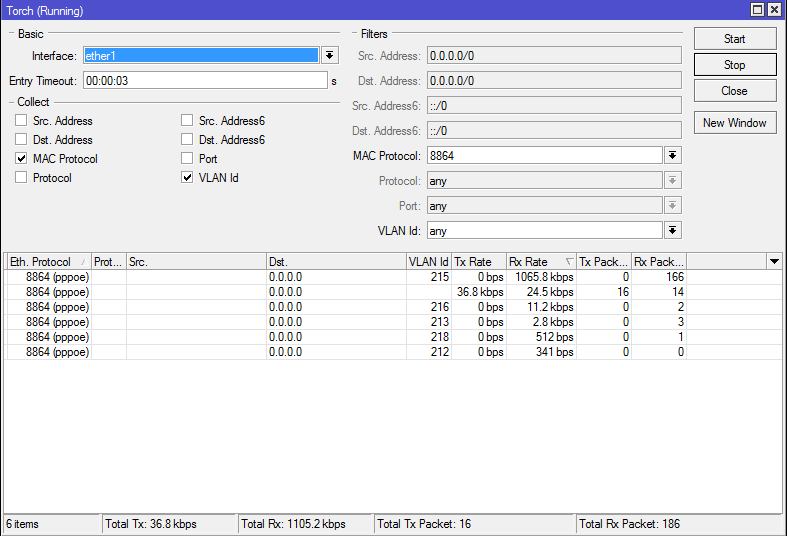
Please add some documentation about 1:1 Vlan Switching
Finally we have our new CRS125-24G-1S-RM in our hands, but switch menu changed. There is a menu about mirroring that makes none sense..
It seems cpu is mirroring all traffic to one port.
I couldn’t find examples and manuals in wiki can any one send a configuration example of where ether2 is fully mirrored to ether3 (ingress and egress) ?
example shown here: http://wiki.mikrotik.com/wiki/Manual:CRS_examples#Port-level_Isolation
does not match CLI commands, I checked isolated ports section,
I managed to do it via GUI, it is working well, but I have question, How should I make so that router was accessible on all ports,
I can only access it through master port(promiscuous)
I managed to do it via GUI, it is working well, but I have question, How should I make so that router was accessible on all ports,
I can only access it through master port(promiscuous)
Add switch1-cpu port to all port-profiles from which you want access to the router, for wiki example it is:
/interface ethernet switch port-isolation
add port-profile=1 ports=ether2,switch1-cpu type=dst
add port-profile=2 ports=ether2,ether7,ether8,switch1-cpu type=dst
add port-profile=3 ports=ether2,ether9,ether10,switch1-cpu type=dst
Hello Folks!
I can not get this vlan stuff working, the switch is leaking traffic all over like a hub, or not working at all.
All I want is a trunk line for my vlans coming from cisco trunk and then attach access ports to the vlans.
By guesswork the most suitable example should be “Port Based VLAN” (http://wiki.mikrotik.com/wiki/Manual:CRS_examples)
My trunk has vlans 10, 20, 100, 110, 200, 220coming in at ether2 and accessports connect to vlans is
10 → ether3, ether4, ether5
20 → ether6
100 → ether7, ether8
110 → ether9, ether10
200 → ether11
220 → ether 12 towards ether16
Can anyone share howto setup a switch with one trunk and vlans and accessports that does not leak traffic please ?
Are you running the newest version (6.12) of RouterOS? It fixes a lot of switch related CRS issues.
Hello Folks!
I am running 6.12.
Yesterday I got this from Microtik: You, probably, need to configure invalid VLAN filtering to block broadcasts from unwanted VLANs. Sample configuration is in the last section of this CRS example: http://wiki.mikrotik.com/wiki/Manual:CR … _filtering
I never heard about invalid vlan filtering, never had to do that in any Cisco or HP switch, there you simply configure your vlans and access ports, thats it. But I will give it a try.
Hello Folks!
I am very sorry RoS v6.13, the switch does still not work in this very basic accessport+vlan+trunk configuration. Not even the CRS example configurations work.
Anyone out there who ever got it working, and how did you solve it ?
How do we continue ?
I’m suffering the same issues. I even tried the examples and they don’t work!
Each new release I hope will fix it but each time I’m let down.
Hello Folks!
I receved something yesterday from MT support, I am currently in Stockholm so I can not test, but it look very promocing and will eventually work. I am back on Friday and will immediate write an report if it was successful and publish how.
great 
Okey, now I tested the suggested solution I was given from MT support.
The result:
It is NOT working when /interface ethernet switch set forward-unknown-vlan=no
It has to be /interface ethernet switch set forward-unknown-vlan=yes or no traffic is passed at all.
Leaking traffic ?:
I did connect one MT device to ether6 of my CRS switch, and logged in to it and then I did /tools packet sniffer
I let it run for one hour during prime time backup and lot of noice in all vlans, I was not able to pick up any traffic leaking, I saw only traffic belonging to that VLAN.
I will connect one network analyzer to ether6 and the other ports as well tomorrow and come back with that result as well.
But so far, it looks like it actually was working!
Here is my devices lab configuration:
Cisco2960 --- vlan trunk (20, 100, 200, 220, 300, 400) --- CRS ether1
Here is the Cisco2960 switch configuration, port 13 is connected to ether1 of the CRS switch.
swfredriksdal2#show interfaces fastEthernet 0/13 status
Port Name Status Vlan Duplex Speed Type
Fa0/13 Desktop trunk connected trunk a-full a-100 10/100BaseTX
swfredriksdal2#show ip interface fastEthernet 0/13
FastEthernet0/13 is up, line protocol is up
Inbound access list is not set
swfredriksdal2# show interfaces trunk
Port Mode Encapsulation Status Native vlan
Fa0/13 on 802.1q trunking 1
Port Vlans allowed on trunk
Fa0/13 20,100,200,220,300,400
Port Vlans allowed and active in management domain
Fa0/13 20,100,200,220,300,400
Port Vlans in spanning tree forwarding state and not pruned
Fa0/13 20,100,200,220,300,400
VLAN 20 comes from another switch, and it does not have any access ports in this switch.
swfredriksdal2#show vlan brief
VLAN Name Status Ports
200 dmz1 active Fa0/5, Fa0/10, Fa0/11, Fa0/12
Fa0/21
220 dmz3 active Fa0/15, Fa0/19, Fa0/20, Gi0/2
300 MGT active Fa0/6, Fa0/9, Fa0/18, Fa0/22
Fa0/24
310 mgt2 active Fa0/7, Fa0/8
320 mgt3 active
400 dmz2 active Fa0/2
Here is my CRS configuration:
/interface ethernet
set [ find default-name=ether6 ] master-port=ether1
set [ find default-name=ether7 ] master-port=ether1
set [ find default-name=ether8 ] master-port=ether1
set [ find default-name=ether9 ] master-port=ether1
set [ find default-name=ether10 ] master-port=ether1
set [ find default-name=ether11 ] master-port=ether1
Tagging should be set on ether1 because it is a VLAN trunk port.
Additionally, set switch1-cpu for VLAN200 to access IP address on VLAN
interface, the frames should be tagged on it as well.
/interface ethernet switch egress-vlan-tag
add tagged-ports=ether1 vlan-id=20
add tagged-ports=ether1 vlan-id=100
add tagged-ports=ether1,switch1-cpu vlan-id=200
add tagged-ports=ether1 vlan-id=220
add tagged-ports=ether1 vlan-id=300
add tagged-ports=ether1 vlan-id=400
/interface ethernet switch ingress-vlan-translation
add new-customer-vid=20 ports=ether6 sa-learning=yes
add new-customer-vid=100 ports=ether7 sa-learning=yes
add new-customer-vid=200 ports=ether8 sa-learning=yes
add new-customer-vid=220 ports=ether9 sa-learning=yes
add new-customer-vid=300 ports=ether10 sa-learning=yes
add new-customer-vid=400 ports=ether11 sa-learning=yes
VLAN mebership should be adjusted according to VLAN tagging.
VLAN id on ether1 and access port and for VLAN200 switch1-cpu port as well.
/interface ethernet switch vlan
add ports=ether1,ether6 vlan-id=20
add ports=ether1,ether7 vlan-id=100
add ports=ether1,ether8,switch1-cpu vlan-id=200
add ports=ether1,ether9 vlan-id=220
add ports=ether1,ether10 vlan-id=300
add ports=ether1,ether11 vlan-id=400
Other VLAN interfaces seem to be unnecessary because they do not have IP address.
/interface vlan
add interface=ether1 l2mtu=1584 name=vlan200 vlan-id=200
/ip address
add address=172.16.1.111/24 interface=vlan200 network=172.16.1.0
Putting no directly fully disables ALL traffic through the switch, it seems to work with yes, so far...
/interface ethernet switch
set forward-unknown-vlan=yes
Some tests
Pinging from CRS:
[admin@MikroTik] > ping 172.16.1.1
HOST SIZE TTL TIME STATUS
172.16.1.1 56 64 1ms
172.16.1.1 56 64 0ms
172.16.1.1 56 64 0ms
172.16.1.1 56 64 0ms
sent=4 received=4 packet-loss=0% min-rtt=0ms avg-rtt=0ms max-rtt=1ms
Pinging from PC:
Microsoft Windows [Version 6.0.6002]
Copyright (c) 2006 Microsoft Corporation. Med ensamrätt.
C:\Users\peter>ping 172.16.1.111
Skickar ping-signal till 172.16.1.111 med 32 byte data:
Svar från 172.16.1.111: byte=32 tid < 1 ms TTL=64
Svar från 172.16.1.111: byte=32 tid < 1 ms TTL=64
Svar från 172.16.1.111: byte=32 tid < 1 ms TTL=64
Svar från 172.16.1.111: byte=32 tid=1ms TTL=64
Ping-statistik för 172.16.1.111:
Paket: Skickade = 4, Mottagna = 4, Förlorade = 0 (0 %),
Ungefärlig överföringstid i millisekunder:
Lägsta = 0 ms, Högsta = 1 ms, Medel = 0 ms
C:\Users\peter>
Pinging the ether6 connected AP from CRS:
[admin@MikroTik SW1] > ping 192.168.1.35
HOST SIZE TTL TIME STATUS
192.168.1.35 56 63 1ms
192.168.1.35 56 63 0ms
192.168.1.35 56 63 0ms
sent=3 received=3 packet-loss=0% min-rtt=0ms avg-rtt=0ms max-rtt=1ms
Pinging the connected AP from the PC in another subnet, through the Cisco- > CRS -> AP:
C:\Users\peter>ping 192.168.1.35
Skickar ping-signal till 192.168.1.35 med 32 byte data:
Svar från 192.168.1.35: byte=32 tid=4ms TTL=63
Svar från 192.168.1.35: byte=32 tid=1ms TTL=63
Svar från 192.168.1.35: byte=32 tid=1ms TTL=63
Svar från 192.168.1.35: byte=32 tid=1ms TTL=63
Ping-statistik för 192.168.1.35:
Paket: Skickade = 4, Mottagna = 4, Förlorade = 0 (0 %),
Ungefärlig överföringstid i millisekunder:
Lägsta = 1 ms, Högsta = 4 ms, Medel = 1 ms
So far so good, as written above, I will do network analysis on the CRS switchports tomorrow and see if it leaks traffic like before. If not, I will say this configuration might work. Then next up will be load tests and stability tests.
Hello Folks!
More discoveries, the CRS sometimes hangs forever in starting services after a reboot, a power cycle usually brings it back to operation again.
So it looks like that older bug is not fully removed.
I will tell MT support about it as well because the device is rendered as useless in production with that defect.
Not yet any network analyzis.
Network analyzis done now.
The usual setup, redhat linux server hooked up to ether6 and another to ether8, then running TCPDUMP for 1 hour.
As far I could see, there was no leakage, only traffic that belonged to that vlan was visible and signalling traffic from switches and bridges in our network, for example spanning tree protocols and cisco discovery protocol and mikrotik own discovery protocol plus one and another broadcasts and dhcp stuff.
To test further, I added one more port to the CRS switch, ether12 ant attached it to vlan20:
/interface ethernet set ether12 master-port=ether1
/interface ethernet switch vlan add ports=ether1,ether6,ether12 vlan-id=20
/interface ethernet switch ingress-vlan-translation add new-customer-vid=20 ports=ether12 sa-learning=yes
Then I did move one of the servers to ether12 and did a ifdown && ifup command to get new IP from dhcp server.
Same test, tcpdump for 1 hour on eth0 on that server. same result as above, no visible leakage.
Next up is loadtests, to see what happens when we try to push the limit, if it still work, we will put one in production on test.
What now pussles me is that setting I was recommended to stop leakage:
/interface ethernet switch set forward-unknown-vlan=no
If you set it to yes, then all traffic stops and no more packages traverses the switch, anyone who can explain ?
I asked support yesterday late night, so eventually explanations comes in next week.
But so far, it looks promicing, lets hope it continues doing so.