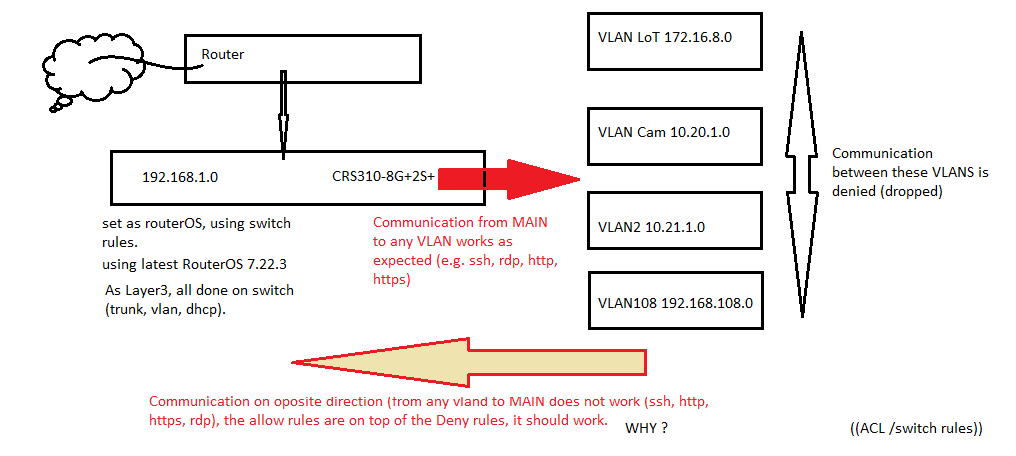
Hi, I am new to Mikrotik and I am having some issue understanding ACL/switch rules. I am moving from a cisco sg350 on which I use ACL rules between vlans (4 vlans), I am trying to recreate such setup on this CRS310-8G+2S+IN switch; I have read its better to use RouterOS for such task and taking advantage of HW offload.
Original setup, vlans, dhcp, trunk, etc. are working as expec
ted, when I try to implement ACL/switch rules then is where I am stuck, how does this differ from cisco?.
I start the rules placing the DROP/deny all at the bottom and start to give access to some ports (for now just a few to test (I need to add more from vlan to Home assistant later which reside on the main segment).
I deny access between VLANS - this works)
From MAIN/home segment I can access vlans (depending on what port I allow, e.g. rdp, ssh, http) and IT WORKS.
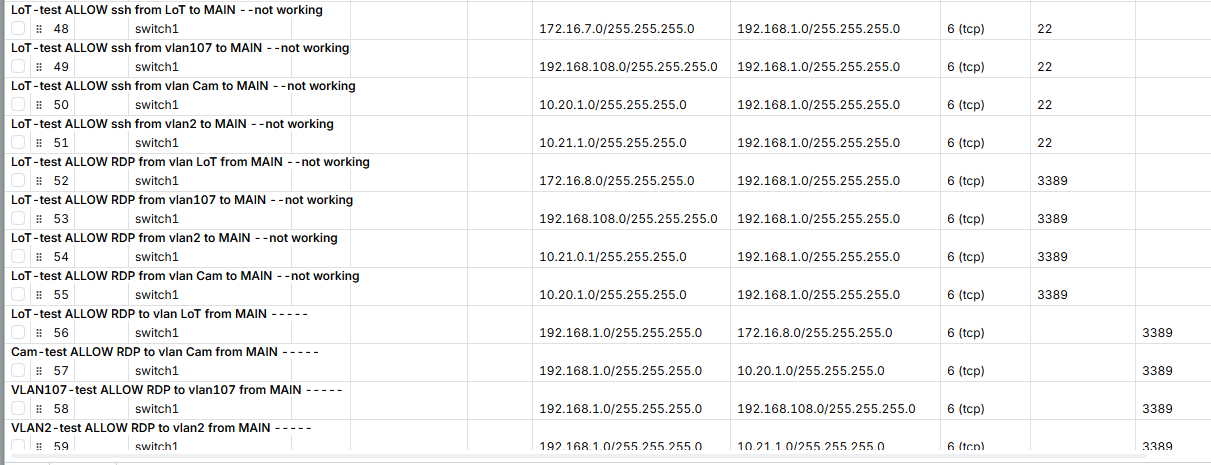
From VLANS to main segment does not work, even if I place a rule on top allowing it, this is where I am stuck, if I disable the ALL DROP rule(s) at the bottom it does work) so it seems its ignoring the top ALLOW rules. config attached. my main concern is the LoT vlan, I want/need to be able to allow some ports (to connect Home Assistant).
Why is this happening?
As a note, I have also configured it the other way around, to allow everything and drop some ports as needed, but this is not good because there are way too many ports to drop,
Is there something I am missing or a better way to do what I need? any suggestion are very much appreciated it. Thanks for reading.
I cannot upload config since I am a new user…
config is below, I formatted it and added some comments for better view:
2026-05-13 14:16:38 by RouterOS 7.22.3
model = CRS310-8G+2S+
/interface bridge
add admin-mac=04:XX:XX:XX:XX:EC auto-mac=no comment=defconf fast-forward=no name=bridge vlan-filtering=yes
/interface ethernet
set [ find default-name=sfp-sfpplus1 ] auto-negotiation=no speed=2.5G-baseT
set [ find default-name=sfp-sfpplus2 ] auto-negotiation=no speed=2.5G-baseT
/interface vlan
add interface=bridge name=Cam vlan-id=20
add interface=bridge name=LoT vlan-id=7
add interface=bridge name=MGMT vlan-id=99
add interface=bridge name=VLAN2 vlan-id=2
add interface=bridge name=VLAN107 vlan-id=107
/interface ethernet switch
set 0 l3-hw-offloading=yes
/ip pool
add name=dhcp_pool0 ranges=172.16.8.40-172.16.8.80
add name=dhcp_pool1 ranges=10.21.1.40-10.21.1.60
add name=dhcp_pool2 ranges=192.168.108.40-192.168.108.60
add name=dhcp_pool3 ranges=10.20.1.40-10.20.1.45
/ip dhcp-server
add address-pool=dhcp_pool0 comment="LoT dhcp VLAN -7- 172.16.7.0" interface=LoT name="LoT dhcp"
add address-pool=dhcp_pool1 comment="VLAN2 dhcp VLAN -2- 10.21.0.0" interface=VLAN2 name="VLAN2 dhcp"
add address-pool=dhcp_pool2 comment="VLAN107 dhcp VLAN -107- 192.168.107.0" interface=VLAN107 name="VLAN107 dhcp"
add address-pool=dhcp_pool3 comment="VLAN20 dhcp VLAN -20- 10.20.0.0" interface=Cam name="VLAN20 dhcp"
/interface bridge port
add bridge=bridge comment=defconf interface=ether1
add bridge=bridge comment=defconf interface=ether2
add bridge=bridge comment=defconf interface=ether3
add bridge=bridge comment=defconf interface=ether4
add bridge=bridge comment=defconf interface=ether5
add bridge=bridge comment=defconf interface=ether6
add bridge=bridge comment=defconf interface=ether7 pvid=7
add bridge=bridge comment=defconf interface=ether8
add bridge=bridge comment=defconf interface=sfp-sfpplus1
add bridge=bridge comment=defconf interface=sfp-sfpplus2
/interface ethernet switch l3hw-settings
set autorestart=yes
/interface bridge vlan
add bridge=bridge comment=LoT tagged=sfp-sfpplus1,sfp-sfpplus2,bridge untagged=ether7 vlan-ids=7
add bridge=bridge comment=VLAN2 tagged=sfp-sfpplus1,sfp-sfpplus2,bridge vlan-ids=2
add bridge=bridge comment=Cam tagged=sfp-sfpplus1,bridge vlan-ids=20
add bridge=bridge comment=VLAN107 tagged=sfp-sfpplus1,sfp-sfpplus2,bridge vlan-ids=107
add bridge=bridge comment=MGMT tagged=bridge,ether2,ether3,ether4,ether5,ether6,ether8 vlan-ids=99
=====> ALLOW rules from vlans (e.g. ssh and RDP) to MAIN segment (192.168.1.##) - these DO NOT WORK:
/interface ethernet switch rule
add comment="LoT-test ALLOW ssh from LoT to MAIN --not working" dst-address=192.168.1.0/255.255.255.0 dst-port=22 protocol=tcp src-address=172.16.7.0/255.255.255.0 switch=switch1
add comment="LoT-test ALLOW ssh from vlan107 to MAIN --not working" dst-address=192.168.1.0/255.255.255.0 dst-port=22 protocol=tcp src-address=192.168.108.0/255.255.255.0 switch=switch1
add comment="LoT-test ALLOW ssh from vlan Cam to MAIN --not working" dst-address=192.168.1.0/255.255.255.0 dst-port=22 protocol=tcp src-address=10.20.1.0/255.255.255.0 switch=switch1
add comment="LoT-test ALLOW ssh from vlan2 to MAIN --not working" dst-address=192.168.1.0/255.255.255.0 dst-port=22 protocol=tcp src-address=10.21.1.0/255.255.255.0 switch=switch1
add comment="LoT-test ALLOW RDP to vlan 1 from vlan 7 --not working" dst-address=192.168.1.0/255.255.255.0 dst-port=3389 protocol=tcp src-address=172.16.8.0/255.255.255.0 switch=switch1 vlan-id=7
add comment="LoT-test ALLOW RDP to vlan107 from vlan 7 --not working" dst-address=192.168.1.0/255.255.255.0 dst-port=3389 protocol=tcp src-address=192.168.108.0/255.255.255.0 switch=switch1 vlan-id=7
add comment="LoT-test ALLOW RDP to vlan2 from vlan 7 --not working" dst-address=192.168.1.0/255.255.255.0 dst-port=3389 protocol=tcp src-address=10.21.0.1/255.255.255.0 switch=switch1 vlan-id=7
add comment="LoT-test ALLOW RDP to vlan Cam from vlan 7 --not working" dst-address=192.168.1.0/255.255.255.0 dst-port=3389 protocol=tcp src-address=10.20.1.0/255.255.255.0 switch=switch1 vlan-id=7
=====> ALLOW rules (RDP, ssh, http), from MAIN segment to VLANS, these WORK as expected:
add comment="LoT-test ALLOW RDP to vlan LoT from MAIN -----" dst-address=172.16.8.0/255.255.255.0 dst-port=3389 protocol=tcp src-address=192.168.1.0/255.255.255.0 switch=switch1
add comment="Cam-test ALLOW RDP to vlan Cam from MAIN -----" dst-address=10.20.1.0/255.255.255.0 dst-port=3389 protocol=tcp src-address=192.168.1.0/255.255.255.0 switch=switch1
add comment="VLAN107-test ALLOW RDP to vlan107 from MAIN -----" dst-address=192.168.108.0/255.255.255.0 dst-port=3389 protocol=tcp src-address=192.168.1.0/255.255.255.0 switch=switch1
add comment="VLAN2-test ALLOW RDP to vlan2 from MAIN -----" dst-address=10.21.1.0/255.255.255.0 dst-port=3389 protocol=tcp src-address=192.168.1.0/255.255.255.0 switch=switch1
add comment="VLAN2-test ALLOW GUI to pihole .35 from MAIN -----" dst-address=10.21.1.35/0.0.0.225 dst-port=80 protocol=tcp src-address=192.168.1.0/255.255.255.0 switch=switch1
add comment="VLAN2-test ALLOW ssh to .35 pihole from MAIN -----" dst-address=10.21.1.35/0.0.0.255 dst-port=22 protocol=tcp src-address=192.168.1.0/255.255.255.0 switch=switch1
add comment="VLAN2-test ALLOW ssh to Proxmox .99 from MAIN -----" dst-address=10.20.1.99/0.0.0.255 dst-port=22 protocol=tcp src-address=192.168.1.0/255.255.255.0 switch=switch1
add comment="VLAN2-test ALLOW https to Proxmox .99 from MAIN -----" dst-address=10.20.1.99/0.0.0.255 dst-port=8006 protocol=tcp src-address=192.168.1.0/255.255.255.0 switch=switch1
add comment="LoT-test ALLOW icmp to vlan LoT from vlan MAIN -----" dst-address=172.16.8.0/255.255.255.0 protocol=icmp src-address=192.168.1.0/255.255.255.0 switch=switch1
add comment="Cam-test ALLOW icmp to vlan Cam from vlan MAIN -----" dst-address=10.20.1.0/255.255.255.0 protocol=icmp src-address=192.168.1.0/255.255.255.0 switch=switch1
add comment="VLAN107-test ALLOW icmp to vlan107 from vlan MAIN -----" dst-address=192.168.108.0/255.255.255.0 protocol=icmp src-address=192.168.1.0/255.255.255.0 switch=switch1
add comment="VLAN2-test ALLOW icmp to vlan2 from vlan MAIN -----" dst-address=10.21.1.0/255.255.255.0 protocol=icmp src-address=192.168.1.0/255.255.255.0 switch=switch1
=====> drop/deny http,https,ssh,icmp from vlan segments to its own router IP (MAIN segment (192.168.1.##) not listed here):
add comment="LoT-test Drop http GUI to vlan LoT ok" dst-address=172.16.8.1/0.0.0.225 dst-port=80 new-dst-ports="" protocol=tcp src-address=172.16.8.0/255.255.255.0 switch=switch1
add comment="LoT-test Drop https GUI to vlan LoT ok" dst-address=172.16.8.1/0.0.0.225 dst-port=443 new-dst-ports="" protocol=tcp src-address=172.16.8.0/255.255.255.0 switch=switch1
add comment="LoT-test Drop ssh vlan LoT router ok" dst-address=172.16.8.1/0.0.0.255 dst-port=22 new-dst-ports="" protocol=tcp src-address=172.16.8.0/255.255.255.0 switch=switch1
add comment="LoT-test Drop ping to vlan LoT router ok" dst-address=172.16.8.1/0.0.0.255 new-dst-ports="" protocol=icmp src-address= 172.16.8.0/255.255.255.0 switch=switch1
add comment="Cam-test Drop GUI to vlan Cam ok" dst-address=10.20.1.1/0.0.0.225 dst-port=80 new-dst-ports="" protocol=tcp src-address=10.20.1.0/255.255.255.0 switch=switch1
add comment="Cam-test Drop GUI to vlan Cam ok" dst-address=10.20.1.1/0.0.0.225 dst-port=443 new-dst-ports="" protocol=tcp src-address=10.20.1.0/255.255.255.0 switch=switch1
add comment="Cam-test Drop ssh vlan Cam router ok" dst-address=10.20.1.1/0.0.0.255 dst-port=22 new-dst-ports="" protocol=tcp src-address=10.20.1.0/255.255.255.0 switch=switch1
add comment="Cam-test Drop ping to vlan Cam router ok" dst-address=10.20.1.1/0.0.0.255 new-dst-ports="" protocol=icmp src-address=10.20.1.0/255.255.255.0 switch=switch1
add comment="VLAN107-test Drop GUI to vlan VLAN107 ok" dst-address=192.168.108.0/0.0.0.225 dst-port=80 new-dst-ports="" protocol=tcp src-address=192.168.108.0/255.255.255.0 switch=switch1
add comment="VLAN107-test Drop GUI to vlan VLAN107 ok" dst-address=192.168.108.0/0.0.0.225 dst-port=443 new-dst-ports="" protocol=tcp src-address=192.168.108.0/255.255.255.0 switch=switch1
add comment="VLAN107-test Drop ssh vlan VLAN107 router ok" dst-address=192.168.108.0/0.0.0.255 dst-port=22 new-dst-ports="" protocol=tcp src-address=192.168.108.0/255.255.255.0 switch=switch1
add comment="VLAN107-test Drop ping to vlan VLAN107 router ok" dst-address=192.168.108.1/0.0.0.255 new-dst-ports="" protocol=icmp src-address=192.168.108.0/255.255.255.0 switch=switch1
add comment="VLAN2-test Drop http GUI to vlan VLAN2 ok" dst-address=10.21.1.1/0.0.0.225 dst-port=80 new-dst-ports="" protocol=tcp src-address=10.21.1.0/255.255.255.0 switch=switch1
add comment="VLAN2-test Drop https GUI to vlan VLAN2 ok" dst-address=10.21.1.1/0.0.0.225 dst-port=443 new-dst-ports="" protocol=tcp src-address=10.21.1.0/255.255.255.0 switch=switch1
add comment="VLAN2-test Drop ssh vlan VLAN2 router ok" dst-address=10.21.1.1/0.0.0.255 dst-port=22 new-dst-ports="" protocol=tcp src-address=10.21.1.0/255.255.255.0 switch=switch1
add comment="VLAN2-test Drop ping to vlan VLAN2 router ok" dst-address=10.21.1.1/0.0.0.255 new-dst-ports="" protocol=icmp src-address=10.21.1.0/255.255.255.0 switch=switch1
=====> DROP/deny from vlans to vlan segments, not counting MAIN segment (192.168.1.##):
add comment="test Drop VLAN LoT TO and FROM VLAN107" dst-address=192.168.108.0/255.255.255.0 new-dst-ports="" src-address=172.16.8.0/255.255.255.0 switch=switch1
add comment="test Drop VLAN LoT TO and FROM VLAN2" dst-address=10.21.1.0/255.255.255.0 new-dst-ports="" src-address=172.16.8.0/255.255.255.0 switch=switch1
add comment="test Drop VLAN LoT TO and FROM VLAN Cam" dst-address=10.20.1.0/255.255.255.0 new-dst-ports="" src-address=172.16.8.0/255.255.255.0 switch=switch1
add comment="test Drop VLAN107 TO and FROM vlan Cam" dst-address=10.20.1.0/255.255.255.0 new-dst-ports="" src-address=192.168.108.0/255.255.255.0 switch=switch1
add comment="test Drop VLAN2 TO and FROM vlan VLAN107" dst-address=192.168.108.0/255.255.255.0 new-dst-ports="" src-address=10.21.1.0/255.255.255.0 switch=switch1
add comment="test Drop VLAN2 TO and FROM vlan VLAN Cam" dst-address=10.20.1.0/255.255.255.0 new-dst-ports="" src-address=10.21.1.0/255.255.255.0 switch=switch1
=====> DROP/deny from main segment 192.168.1## (called MAIN) to the other vlans:
add comment="test Drop VLAN LoT TO and FROM vlan MAIN -----" dst-address=172.16.8.0/255.255.255.0 new-dst-ports="" src-address=192.168.1.0/255.255.255.0 switch=switch1
add comment="test Drop VLAN Cam TO and FROM vlan MAIN -----" dst-address=10.20.1.0/255.255.255.0 new-dst-ports="" src-address=192.168.1.0/255.255.255.0 switch=switch1
add comment="test Drop VLAN2 TO and FROM vlan MAIN -----" dst-address=10.21.1.0/255.255.255.0 new-dst-ports="" src-address=192.168.1.0/255.255.255.0 switch=switch1
add comment="test Drop VLAN107 TO and FROM vlan MAIN -----" dst-address=192.168.108.0/255.255.255.0 new-dst-ports="" src-address=192.168.1.0/255.255.255.0 switch=switch1
/ip address
add address=192.168.1.247/24 comment=defconf interface=bridge network=192.168.1.0
add address=10.21.1.1/24 comment="VLAN 10.21.0.1 Seg. (VLAN2)" interface=VLAN2 network=10.21.1.0
add address=172.16.8.1/24 comment="VLAN 172.16.7.1 Seg. (LoT)" interface=LoT network=172.16.8.0
add address=10.20.1.1/24 comment="VLAN 10.20.0.1 Seg. (Cam)" interface=Cam network=10.20.1.0
add address=192.168.108.1/24 comment="VLAN 192.168.107.1 Seg. (VLAN107)" interface=VLAN107 network=192.168.108.0
add address=192.168.1.253/24 comment=MGMT interface=bridge network=192.168.1.0
/ip dhcp-server lease
add address=10.20.0.35 client-id=1:00:XX:XX:XX:XX:44 mac-address=00:XX:XX:XX:XX:44 server="VLAN20 dhcp"
/ip dhcp-server network
add address=10.20.1.0/24 comment=Cam dns-server=10.20.1.1 gateway=10.20.1.1
add address=10.21.1.0/24 comment=VLAN2 dns-server=10.21.1.1 gateway=10.21.1.1
add address=172.16.8.0/24 comment=Lot dns-server=172.16.8.1 gateway=172.16.8.1
add address=192.168.108.0/24 comment=VLAN107 dns-server=192.168.108.1 gateway=192.168.108.1
/ip dns
set allow-remote-requests=yes servers=192.168.1.1
/ip route
add comment="Route to outside" disabled=no distance=1 dst-address=0.0.0.0/0
gateway=192.168.1.1 routing-table=main suppress-hw-offload=no
/system clock
set time-zone-name=America/New_York