Maybe im mmissing something but it seems that hardware offload on the CRS317 running RouterOS 7.x (currently 7.19.4) doesn’t have a functioning L2 offload. I’m running a 10GB 802.11ad (2x10Gb) to a CCR2004 and the CRS317 is pushing 1.1-1.2Gbps over the LAG peaking the CPU around 92-97%. The CCR is doing fine and not bottlenecking at all but the CRS is barely able to do 1Gbps. I have a simple bridge with a couple vlans tagged to the uplink LAG and a few trinkets LAG’s to a few servers (also 2x10Gb)
I have hardware offload enabled on the ports however the HW Offload panel is not highlighted (greyed out in winbox) but via CLi it shows HW Offload Yes (assuming that’s simply saying it’s configured for that). The switch chip menu has no vlan settings on the ports so I’m a little confused as to if this model just can’t do switching with offload on RouterOS and I’m stuck with SwOS or there’s something I’m neglecting on the Road configuration.
Any help would be appreciated, I can post the config but it’s basically default with a bond and a couple vlans tagged and that’s it. (Bridge and interfaces added into the vlan tag)
I guess you mean L3 offload? That does work on my CRS317 and has been for a while. I do not use bonding, though.
From the manual:
CRS3xx, CRS5xx series switches, CCR2116, CCR2216 routers and 88E6393X, 88E6191X, 88E6190 switch chips support bridge hardware offloading with bonding interfaces. Only 802.3ad and balance-xor bonding modes are hardware offloaded, other bonding modes will use the CPU's resources. The built-in switch chip will always use Layer2+Layer3+Layer4 for a transmit hash policy, changing the transmit hash policy manually will have no effect.
Are you using one of the two supported modes for your bond?
Is the LAG a part of the CRS317's bridge? It can't be its own standalone interface, or else it'll be 100% CPU-bound.
What are you using to test? The CPU can only handle about 1Gbps, so if you're running a bandwidth test between the CRS317 and the CCR2004, you're pegging the 317's CPU. You'll have to have a computer or another router run a test through the CRS317, properly leveraging it as a switch.
Yup, added into the bridge like normal.
iperf between two machines, one behind the CCR2004 and one behind the CRS317 both with 10Gb links to one another. No speed testing done on either Mikrotik devices specifically because of it not a being a proper test.
Yeah I mentioned this on the first paragraph. 802.11ad, using balance-xor actually had worse speeds.
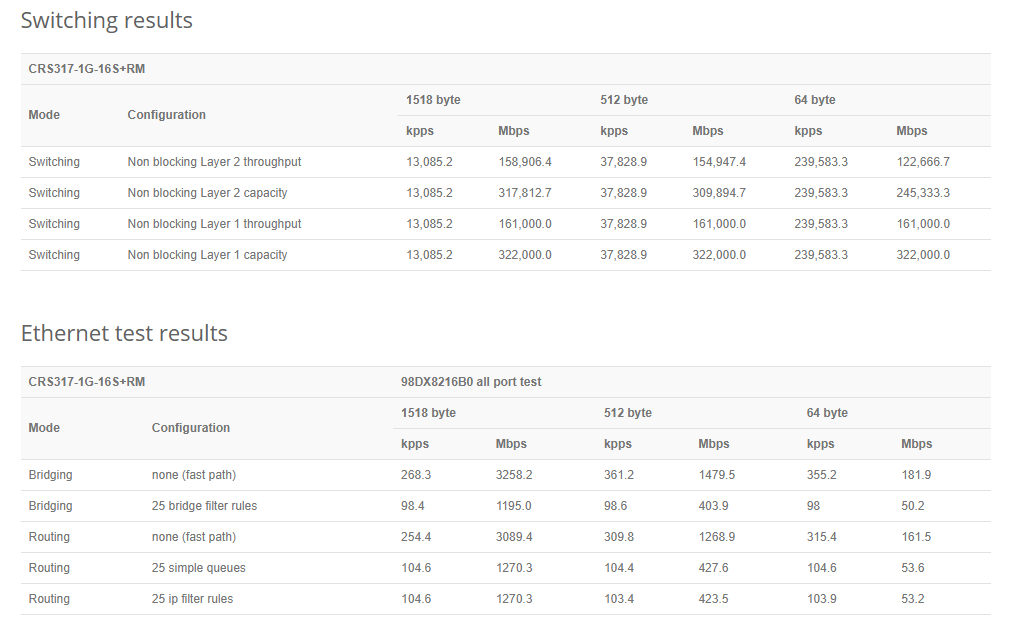
Nope I mean L2, this has one router in it's table and it's only for the management vlan which itself has an IP on. it's doing only layer 2 switching and according to the product it should be dishing out 10gb link speeds no issue:
Which leads me to making this and asking if this can only reach "switching" speeds using SwitchOS or can I achieve this without having to use SwitchOS. Lot of confusion for this product on the docs.
Alright quick follow up after I had some free time this morning to fiddle with it more.
I made two changes that seem to make it happy now and none of them are related to L2 offload to my knowledge.
Removed the bridge being tagged from a non relevant vlan (not a vlan being used for the iperf results).
Checked L3offload, unchecked L3offload, re checked L3 offload and left on.
Now it seems the CPU usage is completely fixed and I'm getting 10Gb speed across the links with like 1-2% CPU usage no problem. No clue whatsoever as to why these two things made it happy again but I'll take it.
L3 Offload gets confused if you make interface-related changes, such as IP addresses, add/remove VLAN interfaces (not VLANs tagged to bridge).
L3 offload shouldn't be needed or used in your situation if the 317 is just acting as a switch between the server(s) and the 2004/Internet. Unless it has IP address on VLAN interfaces and is routing to/from the 2004, at which point you'd see what you saw.
Also, I set my hashing on 802.3ad to L3/L4 on both sides and it balances beautifully.