Janos
October 2, 2025, 5:09am
1
Hi,
I saw yesterday that the CRS510 supports RoCE v2.
Here's an iperf run via the switch and one direct connected.
Connecting to host 10.0.100.6, port 5201
[  5] local 10.0.100.54 port 53462 connected to 10.0.100.6 port 5201
[ ID] Interval           Transfer     Bitrate         Retr  Cwnd
[  5]   0.00-1.00   sec  6.01 GBytes  51.6 Gbits/sec    0   4.15 MBytes
[  5]   1.00-2.00   sec  5.86 GBytes  50.3 Gbits/sec    0   4.15 MBytes
[  5]   2.00-3.00   sec  6.05 GBytes  52.0 Gbits/sec    0   4.15 MBytes
[  5]   3.00-4.00   sec  5.84 GBytes  50.1 Gbits/sec    0   4.15 MBytes
[  5]   4.00-5.00   sec  5.89 GBytes  50.6 Gbits/sec    0   4.15 MBytes
[  5]   5.00-6.00   sec  6.04 GBytes  51.8 Gbits/sec    0   4.15 MBytes
[  5]   6.00-7.00   sec  5.91 GBytes  50.8 Gbits/sec    0   4.15 MBytes
[  5]   7.00-8.00   sec  5.97 GBytes  51.3 Gbits/sec    0   4.15 MBytes
[  5]   8.00-9.00   sec  5.24 GBytes  45.0 Gbits/sec    0   4.15 MBytes
[  5]   9.00-10.00  sec  5.38 GBytes  46.2 Gbits/sec    0   4.15 MBytes
- - - - - - - - - - - - - - - - - - - - - - - - -
[ ID] Interval           Transfer     Bitrate         Retr
[  5]   0.00-10.00  sec  58.2 GBytes  50.0 Gbits/sec    0            sender
[  5]   0.00-10.00  sec  58.2 GBytes  50.0 Gbits/sec                  receiver


Connecting to host 172.21.21.155, port 5201
[  5] local 172.21.21.55 port 54188 connected to 172.21.21.155 port 5201
[ ID] Interval           Transfer     Bitrate         Retr  Cwnd
[  5]   0.00-1.00   sec  2.84 GBytes  24.4 Gbits/sec  476    816 KBytes
[  5]   1.00-2.00   sec  2.97 GBytes  25.5 Gbits/sec  818    790 KBytes
[  5]   2.00-3.00   sec  3.07 GBytes  26.4 Gbits/sec  720    426 KBytes
[  5]   3.00-4.00   sec  3.11 GBytes  26.7 Gbits/sec  2076    608 KBytes
[  5]   4.00-5.00   sec  2.90 GBytes  24.9 Gbits/sec  1497    745 KBytes
[  5]   5.00-6.00   sec  2.77 GBytes  23.8 Gbits/sec  400    443 KBytes
[  5]   6.00-7.00   sec  3.00 GBytes  25.8 Gbits/sec  1267    370 KBytes
[  5]   7.00-8.00   sec  2.97 GBytes  25.5 Gbits/sec  1149    682 KBytes
[  5]   8.00-9.00   sec  3.19 GBytes  27.4 Gbits/sec  1454    874 KBytes
[  5]   9.00-10.00  sec  2.85 GBytes  24.5 Gbits/sec  832    482 KBytes
- - - - - - - - - - - - - - - - - - - - - - - - -
[ ID] Interval           Transfer     Bitrate         Retr
[  5]   0.00-10.00  sec  29.7 GBytes  25.5 Gbits/sec  10689            sender
[  5]   0.00-10.00  sec  29.7 GBytes  25.5 Gbits/sec                  receiver
The cabling is done entirely with Oracle QSFP28 DACs.
ethtool -m enp1s0f0np0
        Identifier                                : 0x11 (QSFP28)
        Extended identifier                       : 0x00
        Extended identifier description           : 1.5W max. Power consumption
        Extended identifier description           : No CDR in TX, No CDR in RX
        Extended identifier description           :  High Power Class (> 3.5 W) not enabled
        Power set                                 : On
        Power override                            : On
        Connector                                 : 0x23 (No separable connector)
        Transceiver codes                         : 0x88 0x00 0x00 0x00 0x00 0x00 0x00 0x00
        Transceiver type                          : 100G Ethernet: 100G Base-CR4 or 25G Base-CR CA-L
        Encoding                                  : 0x05 (64B/66B)
        BR Nominal                                : 25500Mbps
        Rate identifier                           : 0x00
        Length (SMF)                              : 0km
        Length (OM3)                              : 0m
        Length (OM2)                              : 0m
        Length (OM1)                              : 0m
        Length (Copper or Active cable)           : 1m
        Transmitter technology                    : 0xa0 (Copper cable, unequalized)
        Attenuation at 2.5GHz                     : 2db
        Attenuation at 5.0GHz                     : 4db
        Attenuation at 7.0GHz                     : 2db
        Attenuation at 12.9GHz                    : 4db
        Vendor name                               : Volex Inc.
        Vendor OUI                                : 14:1b:bd
        Vendor PN                                 : VQ2830LP100L
        Vendor rev                                : 01
        Vendor SN                                 : Q28PL1020161S341
        Date code                                 : 200611
        Revision Compliance                       : SFF-8636 Rev 2.5/2.6/2.7
        Module temperature                        : 0.00 degrees C / 32.00 degrees F
        Module voltage                            : 0.0000 V
Settings for enp1s0f0np0:
        Supported ports: [ Backplane ]
        Supported link modes:   1000baseKX/Full
                                10000baseKR/Full
                                40000baseKR4/Full
                                40000baseCR4/Full
                                40000baseSR4/Full
                                40000baseLR4/Full
                                25000baseCR/Full
                                25000baseKR/Full
                                25000baseSR/Full
                                50000baseCR2/Full
                                50000baseKR2/Full
                                100000baseKR4/Full
                                100000baseSR4/Full
                                100000baseCR4/Full
                                100000baseLR4_ER4/Full
        Supported pause frame use: Symmetric
        Supports auto-negotiation: Yes
        Supported FEC modes: None        RS      BASER
        Advertised link modes:  1000baseKX/Full
                                10000baseKR/Full
                                40000baseKR4/Full
                                40000baseCR4/Full
                                40000baseSR4/Full
                                40000baseLR4/Full
                                25000baseCR/Full
                                25000baseKR/Full
                                25000baseSR/Full
                                50000baseCR2/Full
                                50000baseKR2/Full
                                100000baseKR4/Full
                                100000baseSR4/Full
                                100000baseCR4/Full
                                100000baseLR4_ER4/Full
        Advertised pause frame use: Symmetric
        Advertised auto-negotiation: Yes
        Advertised FEC modes: RS
        Speed: 100000Mb/s
        Lanes: 4
        Duplex: Full
        Auto-negotiation: on
        Port: Direct Attach Copper
        PHYAD: 0
        Transceiver: internal
        Supports Wake-on: d
        Wake-on: d
        Link detected: yes
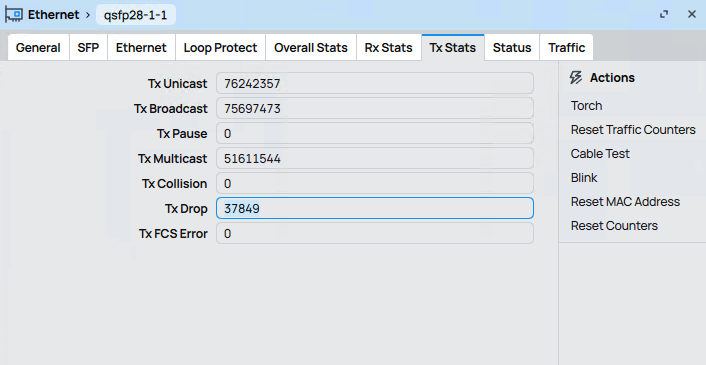
Since there are only tx drops, I assume it's a configuration issue.
Here the RDMA settings that are configured
Since this is my first post, I can't upload my config.
savage
October 2, 2025, 6:21am
2
0.05%... I wouldn't call it massive...
Config?
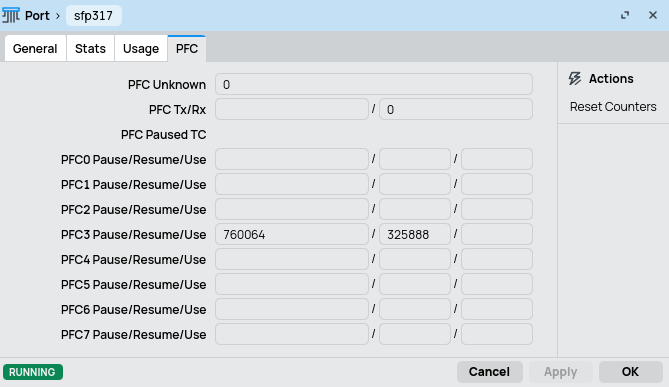
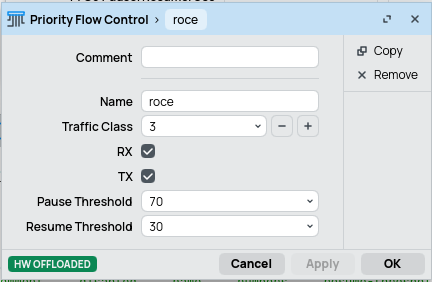
Hi, please show us your Switch/QoS/Port PFC page. An example:
You may lower PFC Pause Threshold to trigger PFC pause frames sooner. The following example sets it to 70%:
A quote from the documentation:
When choosing pause and resume thresholds, consider a delay in transmitting a PFC frame and processing it by the other side. For example, device A experienced congestion at time T, transmitted a PFC pause frame to device B, and B processed the frame and halted transmission at time T+D. During the delta time D, device B still kept sending traffic. If device A has configured the pause threshold to 100%, it has no free buffers available, and, therefore, packets may drop, which is unacceptable for lossless traffic classes. Lowering the pause threshold, let's say, down to 80% issues a PFC pause frame while still having free memory to accumulate traffic during the delta time D. The same applies to resume threshold. Setting it to 0% keeps the device idle during the delta time, lowering the overall throughput.
Janos
October 2, 2025, 11:13pm
4
Hi,
sorry for my late reply, I wanted to be a bit more prepared and tried to understand the topic a bit better, which didn't necessarily worked out.@raimondsp
savage:
Config?
# 2025-09-30 15:10:49 by RouterOS 7.19.1
# software id = QE99-LZJ7
#
# model = CRS510-8XS-2XQ
# serial number = HGZ0A3XZKCA
/interface bridge
add admin-mac=F4:1E:57:2E:D8:EB auto-mac=no comment=defconf name=bridgeLocal \
    vlan-filtering=yes
/interface ethernet
set [ find default-name=qsfp28-1-1 ] advertise=100G-baseSR4-LR4,100G-baseCR4 \
    fec-mode=fec91 l2mtu=9500
set [ find default-name=qsfp28-1-2 ] l2mtu=9500
set [ find default-name=qsfp28-1-3 ] l2mtu=9500
set [ find default-name=qsfp28-1-4 ] l2mtu=9500
set [ find default-name=qsfp28-2-1 ] advertise=100G-baseSR4-LR4,100G-baseCR4 \
    fec-mode=fec91 l2mtu=9500
set [ find default-name=qsfp28-2-2 ] l2mtu=9500
set [ find default-name=qsfp28-2-3 ] l2mtu=9500
set [ find default-name=qsfp28-2-4 ] l2mtu=9500
set [ find default-name=sfp28-1 ] auto-negotiation=no l2mtu=9500 speed=\
    10G-baseCR
set [ find default-name=sfp28-2 ] fec-mode=fec91 l2mtu=9500
set [ find default-name=sfp28-3 ] l2mtu=9500
set [ find default-name=sfp28-4 ] advertise=25G-baseSR-LR,25G-baseCR \
    fec-mode=fec91 l2mtu=9500
set [ find default-name=sfp28-5 ] l2mtu=9500
set [ find default-name=sfp28-6 ] l2mtu=9500
set [ find default-name=sfp28-7 ] l2mtu=9500
set [ find default-name=sfp28-8 ] l2mtu=9500
/interface ethernet switch qos priority-flow-control
add name=pfc-tc3 rx=yes traffic-class=3 tx=yes
/interface ethernet switch qos port
set qsfp28-1-1 egress-rate-queue3=100.0Gbps pfc=pfc-tc3 trust-l3=keep
set qsfp28-2-1 egress-rate-queue3=100.0Gbps pfc=pfc-tc3 trust-l3=keep
/interface ethernet switch qos profile
add name=roce traffic-class=3
add name=cnp traffic-class=6
/interface list
add name=WAN
add name=LAN
/port
set 0 name=serial0
/interface bridge port
add auto-isolate=yes bridge=bridgeLocal comment=defconf frame-types=\
    admit-only-untagged-and-priority-tagged interface=qsfp28-1-1 pvid=21 \
    restricted-tcn=yes tag-stacking=yes
add bridge=bridgeLocal comment=defconf interface=qsfp28-1-2
add bridge=bridgeLocal comment=defconf interface=qsfp28-1-3
add bridge=bridgeLocal comment=defconf interface=qsfp28-1-4
add bridge=bridgeLocal comment=defconf interface=qsfp28-2-1 pvid=21
add bridge=bridgeLocal comment=defconf interface=qsfp28-2-2
add bridge=bridgeLocal comment=defconf interface=qsfp28-2-3
add bridge=bridgeLocal comment=defconf interface=qsfp28-2-4
add bridge=bridgeLocal comment=defconf interface=sfp28-1
add bridge=bridgeLocal comment=defconf interface=sfp28-2
add bridge=bridgeLocal comment=defconf interface=sfp28-3
add bridge=bridgeLocal comment=defconf interface=sfp28-4 pvid=21
add bridge=bridgeLocal comment=defconf interface=sfp28-5
add bridge=bridgeLocal comment=defconf interface=sfp28-6
add bridge=bridgeLocal comment=defconf interface=sfp28-7
add bridge=bridgeLocal comment=defconf interface=sfp28-8
add bridge=bridgeLocal interface=ether1
/interface bridge vlan
add bridge=bridgeLocal comment=vlan21 tagged=sfp28-1,sfp28-2 untagged=\
    qsfp28-1-1,qsfp28-2-1,sfp28-4 vlan-ids=21
add bridge=bridgeLocal comment=Vlan22 tagged=sfp28-1,sfp28-2 vlan-ids=22
add bridge=bridgeLocal comment=Vlan23 tagged=sfp28-1,sfp28-2 vlan-ids=23
add bridge=bridgeLocal comment=Vlan24 tagged=sfp28-1,sfp28-2 vlan-ids=24
/interface ethernet switch
set 0 qos-hw-offloading=yes
/interface ethernet switch qos map ip
add dscp=26 profile=roce
add dscp=48 profile=cnp
/interface ethernet switch qos tx-manager queue
set 1 schedule=high-priority-group weight=1
set 3 ecn=yes shared-pool-index=1 weight=1
/interface list member
add interface=ether1 list=WAN
add interface=sfp28-1 list=LAN
add interface=sfp28-2 list=LAN
add interface=sfp28-3 list=LAN
add interface=sfp28-4 list=LAN
add interface=sfp28-5 list=LAN
add interface=sfp28-6 list=LAN
add interface=sfp28-7 list=LAN
add interface=sfp28-8 list=LAN
add interface=qsfp28-1-1 list=LAN
add interface=qsfp28-1-2 list=LAN
add interface=qsfp28-1-3 list=LAN
add interface=qsfp28-1-4 list=LAN
add interface=qsfp28-2-1 list=LAN
add interface=qsfp28-2-2 list=LAN
add interface=qsfp28-2-3 list=LAN
add interface=qsfp28-2-4 list=LAN
/interface ovpn-server server
add mac-address=FE:E2:C0:AC:B2:11 name=ovpn-server1
/ip address
add address=172.21.21.252/8 disabled=yes interface=ether1 network=172.0.0.0
add address=172.23.23.252/24 interface=sfp28-1 network=172.23.23.0
/ip dhcp-client
add disabled=yes interface=bridgeLocal
/ip dns
set servers=172.23.23.240
/system routerboard settings
set enter-setup-on=delete-key
/tool romon
set enabled=yes
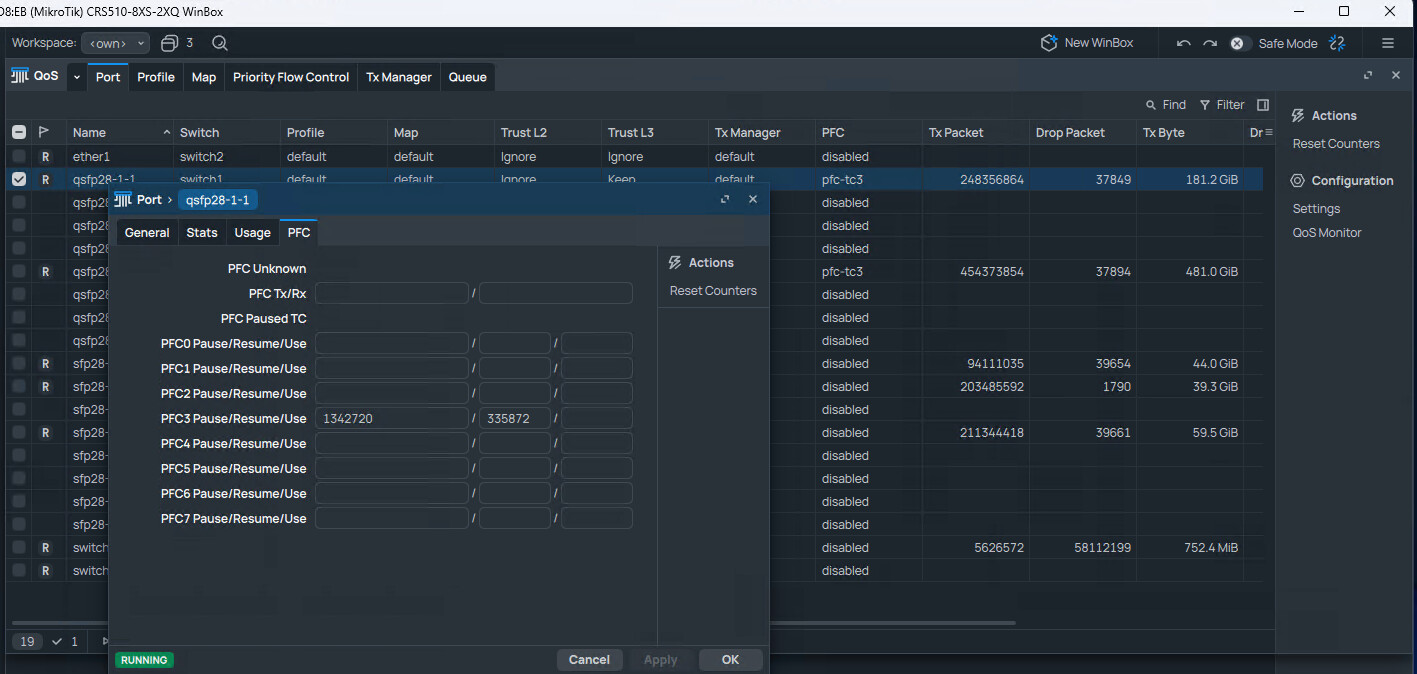
After the changes from the Mikrotik documentation it already looked like this
But I have adjusted it as you suggested and also changed the QoS profile to roce, but it is getting worse rather than better.
The ports were previously set to default because I thought the switch would automatically detect the traffic and apply the QoS profile accordingly.
I can only post one picture because the account is still new
Janos
October 3, 2025, 12:22am
5
I've now set the MTU on both 100Gb ports to 9000, just like on the direct connection.
ping -M do -s 8972 172.21.21.155
PING 172.21.21.155 (172.21.21.155) 8972(9000) bytes of data.
8980 bytes from 172.21.21.155: icmp_seq=1 ttl=64 time=0.097 ms
8980 bytes from 172.21.21.155: icmp_seq=2 ttl=64 time=0.092 ms


iperf3 -c 172.21.21.155
Connecting to host 172.21.21.155, port 5201
[  5] local 172.21.21.55 port 47984 connected to 172.21.21.155 port 5201
[ ID] Interval           Transfer     Bitrate         Retr  Cwnd
[  5]   0.00-1.00   sec  2.89 GBytes  24.8 Gbits/sec  2110    393 KBytes
[  5]   1.00-2.00   sec  3.17 GBytes  27.3 Gbits/sec  2404    419 KBytes
[  5]   2.00-3.00   sec  3.08 GBytes  26.5 Gbits/sec  2458    454 KBytes
[  5]   3.00-4.00   sec  3.02 GBytes  26.0 Gbits/sec  2494    481 KBytes
[  5]   4.00-5.00   sec  2.86 GBytes  24.6 Gbits/sec  2152   1.01 MBytes
[  5]   5.00-6.00   sec  2.94 GBytes  25.3 Gbits/sec  2377    411 KBytes
[  5]   6.00-7.00   sec  2.93 GBytes  25.2 Gbits/sec  2262    393 KBytes
[  5]   7.00-8.00   sec  2.92 GBytes  25.1 Gbits/sec  2135    472 KBytes
[  5]   8.00-9.00   sec  2.85 GBytes  24.5 Gbits/sec  1780    428 KBytes
[  5]   9.00-10.00  sec  2.93 GBytes  25.1 Gbits/sec  2216    437 KBytes
- - - - - - - - - - - - - - - - - - - - - - - - -
[ ID] Interval           Transfer     Bitrate         Retr
[  5]   0.00-10.00  sec  29.6 GBytes  25.4 Gbits/sec  22388            sender
[  5]   0.00-10.00  sec  29.6 GBytes  25.4 Gbits/sec                  receiver
This doesn't improve the iperf results though. Is the switch that slow, or is it my configuration?
Traffic goes via queue 1 by default. You can check Tx/Drop per-queue stats on the QoS / Port / Stats page.
You need to set DSCP=28 in the packets to map them to queue 3. Add -S 0x70 to the iperf3 command line. You can also try 0x71 to mark packets ECN-capable, but I'm unsure if iperf can handle congestion notifications.
Janos
October 3, 2025, 7:28am
7
Traffic is still going through Queue 1.
What do you think about the fact that it is always around 25Gb?
Tx/Drop counters after reset and one iperf3 run with -S 0x70
Server qsfp28-1-1
Client qsfp28-2-1
iperf3 -c 172.21.21.155 -S 0x70
Connecting to host 172.21.21.155, port 5201
[  5] local 172.21.21.55 port 34590 connected to 172.21.21.155 port 5201
[ ID] Interval           Transfer     Bitrate         Retr  Cwnd
[  5]   0.00-1.00   sec  3.01 GBytes  25.8 Gbits/sec  2671    430 KBytes
[  5]   1.00-2.00   sec  2.91 GBytes  25.0 Gbits/sec  1315    469 KBytes
[  5]   2.00-3.00   sec  3.04 GBytes  26.1 Gbits/sec  1327    468 KBytes
[  5]   3.00-4.00   sec  2.86 GBytes  24.6 Gbits/sec  2008    506 KBytes
[  5]   4.00-5.00   sec  3.35 GBytes  28.8 Gbits/sec  1943    560 KBytes
[  5]   5.00-6.00   sec  3.08 GBytes  26.4 Gbits/sec  1781    663 KBytes
[  5]   6.00-7.00   sec  3.22 GBytes  27.7 Gbits/sec  1542    687 KBytes
[  5]   7.00-8.00   sec  3.29 GBytes  28.3 Gbits/sec  1296    549 KBytes
[  5]   8.00-9.00   sec  3.01 GBytes  25.9 Gbits/sec  1961    505 KBytes
[  5]   9.00-10.00  sec  2.92 GBytes  25.1 Gbits/sec  1302    581 KBytes
- - - - - - - - - - - - - - - - - - - - - - - - -
[ ID] Interval           Transfer     Bitrate         Retr
[  5]   0.00-10.00  sec  30.7 GBytes  26.4 Gbits/sec  17146            sender
[  5]   0.00-10.00  sec  30.7 GBytes  26.4 Gbits/sec                  receiver
I noticed the ethtool reports the BR Nominal value of 25G:
BR Nominal : 25500Mbps
This is also strange:
Transmitter technology : 0xa0 (Copper cable, unequalized)
Try setting advertise=100G-baseCR4 (remove the LR4 option) and see if that helps.
Also check for other differences in ethtool output when changing from direct connection to the switch.
Janos
October 3, 2025, 8:24am
9
I removed the LR4 option and tried all FEC modes and set rate select to low, link is always stable, but always only 25Gb.
What do you think, new cables?
https://www.fs.com/de/products/285065.html?attribute=10128&id=4692895
root@kubu05:~# ethtool -m enp1s0f0np0
        Identifier                                : 0x11 (QSFP28)
        Extended identifier                       : 0x00
        Extended identifier description           : 1.5W max. Power consumption
        Extended identifier description           : No CDR in TX, No CDR in RX
        Extended identifier description           :  High Power Class (> 3.5 W) not enabled
        Power set                                 : On
        Power override                            : On
        Connector                                 : 0x23 (No separable connector)
        Transceiver codes                         : 0x88 0x00 0x00 0x00 0x00 0x00 0x00 0x00
        Transceiver type                          : 100G Ethernet: 100G Base-CR4 or 25G Base-CR CA-L
        Encoding                                  : 0x05 (64B/66B)
        BR Nominal                                : 25500Mbps
        Rate identifier                           : 0x00
        Length (SMF)                              : 0km
        Length (OM3)                              : 0m
        Length (OM2)                              : 0m
        Length (OM1)                              : 0m
        Length (Copper or Active cable)           : 1m
        Transmitter technology                    : 0xa0 (Copper cable, unequalized)
        Attenuation at 2.5GHz                     : 2db
        Attenuation at 5.0GHz                     : 4db
        Attenuation at 7.0GHz                     : 2db
        Attenuation at 12.9GHz                    : 4db
        Vendor name                               : Volex Inc.
        Vendor OUI                                : 14:1b:bd
        Vendor PN                                 : VQ2830LP100L
        Vendor rev                                : 01
        Vendor SN                                 : Q28PL1020161S341
        Date code                                 : 200611
        Revision Compliance                       : SFF-8636 Rev 2.5/2.6/2.7
        Module temperature                        : 0.00 degrees C / 32.00 degrees F
        Module voltage                            : 0.0000 V
root@kubu05:~#
root@kubu05:~# ethtool -m enp1s0f1np1
        Identifier                                : 0x11 (QSFP28)
        Extended identifier                       : 0x00
        Extended identifier description           : 1.5W max. Power consumption
        Extended identifier description           : No CDR in TX, No CDR in RX
        Extended identifier description           :  High Power Class (> 3.5 W) not enabled
        Power set                                 : Off
        Power override                            : Off
        Connector                                 : 0x23 (No separable connector)
        Transceiver codes                         : 0x88 0x00 0x00 0x00 0x00 0x00 0x00 0x00
        Transceiver type                          : 100G Ethernet: 100G Base-CR4 or 25G Base-CR CA-L
        Encoding                                  : 0x05 (64B/66B)
        BR Nominal                                : 25500Mbps
        Rate identifier                           : 0x00
        Length (SMF)                              : 0km
        Length (OM3)                              : 0m
        Length (OM2)                              : 0m
        Length (OM1)                              : 0m
        Length (Copper or Active cable)           : 1m
        Transmitter technology                    : 0xa0 (Copper cable, unequalized)
        Attenuation at 2.5GHz                     : 2db
        Attenuation at 5.0GHz                     : 4db
        Attenuation at 7.0GHz                     : 2db
        Attenuation at 12.9GHz                    : 4db
        Vendor name                               : Volex Inc.
        Vendor OUI                                : 14:1b:bd
        Vendor PN                                 : VQ2830LP100L
        Vendor rev                                : 01
        Vendor SN                                 : Q28PL1020161S231
        Date code                                 : 200610
        Revision Compliance                       : SFF-8636 Rev 2.5/2.6/2.7
        Module temperature                        : 0.00 degrees C / 32.00 degrees F
        Module voltage                            : 0.0000 V
root@kubu05:~# ethtool enp1s0f0np0
Settings for enp1s0f0np0:
        Supported ports: [ Backplane ]
        Supported link modes:   1000baseKX/Full
                                10000baseKR/Full
                                40000baseKR4/Full
                                40000baseCR4/Full
                                40000baseSR4/Full
                                40000baseLR4/Full
                                25000baseCR/Full
                                25000baseKR/Full
                                25000baseSR/Full
                                50000baseCR2/Full
                                50000baseKR2/Full
                                100000baseKR4/Full
                                100000baseSR4/Full
                                100000baseCR4/Full
                                100000baseLR4_ER4/Full
        Supported pause frame use: Symmetric
        Supports auto-negotiation: Yes
        Supported FEC modes: None        RS      BASER
        Advertised link modes:  1000baseKX/Full
                                10000baseKR/Full
                                40000baseKR4/Full
                                40000baseCR4/Full
                                40000baseSR4/Full
                                40000baseLR4/Full
                                25000baseCR/Full
                                25000baseKR/Full
                                25000baseSR/Full
                                50000baseCR2/Full
                                50000baseKR2/Full
                                100000baseKR4/Full
                                100000baseSR4/Full
                                100000baseCR4/Full
                                100000baseLR4_ER4/Full
        Advertised pause frame use: Symmetric
        Advertised auto-negotiation: Yes
        Advertised FEC modes: RS
        Speed: 100000Mb/s
        Lanes: 4
        Duplex: Full
        Auto-negotiation: on
        Port: Direct Attach Copper
        PHYAD: 0
        Transceiver: internal
        Supports Wake-on: d
        Wake-on: d
        Link detected: yes
root@kubu05:~# ethtool enp1s0f1np1
Settings for enp1s0f1np1:
        Supported ports: [ Backplane ]
        Supported link modes:   1000baseKX/Full
                                10000baseKR/Full
                                40000baseKR4/Full
                                40000baseCR4/Full
                                40000baseSR4/Full
                                40000baseLR4/Full
                                25000baseCR/Full
                                25000baseKR/Full
                                25000baseSR/Full
                                50000baseCR2/Full
                                50000baseKR2/Full
                                100000baseKR4/Full
                                100000baseSR4/Full
                                100000baseCR4/Full
                                100000baseLR4_ER4/Full
        Supported pause frame use: Symmetric
        Supports auto-negotiation: Yes
        Supported FEC modes: None        RS      BASER
        Advertised link modes:  1000baseKX/Full
                                10000baseKR/Full
                                40000baseKR4/Full
                                40000baseCR4/Full
                                40000baseSR4/Full
                                40000baseLR4/Full
                                25000baseCR/Full
                                25000baseKR/Full
                                25000baseSR/Full
                                50000baseCR2/Full
                                50000baseKR2/Full
                                100000baseKR4/Full
                                100000baseSR4/Full
                                100000baseCR4/Full
                                100000baseLR4_ER4/Full
        Advertised pause frame use: Symmetric
        Advertised auto-negotiation: Yes
        Advertised FEC modes: RS
        Link partner advertised link modes:  Not reported
        Link partner advertised pause frame use: No
        Link partner advertised auto-negotiation: Yes
        Link partner advertised FEC modes: Not reported
        Speed: 100000Mb/s
        Lanes: 4
        Duplex: Full
        Auto-negotiation: on
        Port: Direct Attach Copper
        PHYAD: 0
        Transceiver: internal
        Supports Wake-on: d
        Wake-on: d
        Link detected: yes
Janos
October 4, 2025, 5:37pm
10
I replaced the QSFP28 with QSFP+ cables and got for the first time more than 25Gb/s.
ethtool -m enp1s0f0np0
        Identifier                                : 0x0d (QSFP+)
        Extended identifier                       : 0x00
        Extended identifier description           : 1.5W max. Power consumption
        Extended identifier description           : No CDR in TX, No CDR in RX
        Extended identifier description           :  High Power Class (> 3.5 W) not enabled
        Power set                                 : On
        Power override                            : On
        Connector                                 : 0x23 (No separable connector)
        Transceiver codes                         : 0x08 0x00 0x30 0x00 0x40 0x00 0x80 0xd5
        Transceiver type                          : FC: 100 MBytes/sec
        Encoding                                  : 0x00 (unspecified)
        BR Nominal                                : 10000Mbps
        Rate identifier                           : 0x00
        Length (SMF)                              : 0km
        Length (OM3)                              : 0m
        Length (OM2)                              : 0m
        Length (OM1)                              : 0m
        Length (Copper or Active cable)           : 3m
        Transmitter technology                    : 0xa0 (Copper cable, unequalized)
        Attenuation at 2.5GHz                     : 8db
        Attenuation at 5.0GHz                     : 11db
        Attenuation at 7.0GHz                     : 8db
        Attenuation at 12.9GHz                    : 11db
        Vendor name                               : TE Connectivity
        Vendor OUI                                : 00:14:4f
        Vendor PN                                 : 7090944
        Vendor rev                                : 2
        Vendor SN                                 : 16311011
        Date code                                 : 16080300
        Revision Compliance                       : Revision not specified
        Module temperature                        : 0.00 degrees C / 32.00 degrees F
        Module voltage                            : 0.0000 V

# iperf3 -c 172.21.21.155
Connecting to host 172.21.21.155, port 5201
[  5] local 172.21.21.55 port 41326 connected to 172.21.21.155 port 5201
[ ID] Interval           Transfer     Bitrate         Retr  Cwnd
[  5]   0.00-1.00   sec  3.85 GBytes  33.0 Gbits/sec  216   1.24 MBytes
[  5]   1.00-2.00   sec  3.83 GBytes  32.9 Gbits/sec  178   1.18 MBytes
[  5]   2.00-3.00   sec  3.84 GBytes  32.9 Gbits/sec  116   1.29 MBytes
[  5]   3.00-4.00   sec  3.82 GBytes  32.8 Gbits/sec  108   1.14 MBytes
[  5]   4.00-5.00   sec  3.83 GBytes  32.9 Gbits/sec  132   1.18 MBytes
[  5]   5.00-6.00   sec  3.84 GBytes  33.0 Gbits/sec  456    847 KBytes
[  5]   6.00-7.00   sec  3.84 GBytes  33.0 Gbits/sec  243   1.11 MBytes
[  5]   7.00-8.00   sec  3.85 GBytes  33.1 Gbits/sec  225    956 KBytes
[  5]   8.00-9.00   sec  3.84 GBytes  33.0 Gbits/sec  228    908 KBytes
[  5]   9.00-10.00  sec  3.85 GBytes  33.1 Gbits/sec  243   1.10 MBytes
- - - - - - - - - - - - - - - - - - - - - - - - -
[ ID] Interval           Transfer     Bitrate         Retr
[  5]   0.00-10.00  sec  38.4 GBytes  33.0 Gbits/sec  2145            sender
[  5]   0.00-10.00  sec  38.4 GBytes  33.0 Gbits/sec                  receiver