CrowdSec reads logs, spots attacks and bans the source. On its own, a ban only takes effect where a bouncer applies it, usually on the same server. cs-routeros-bouncer takes the bans to the MikroTik: every decision becomes a dynamic entry in a RouterOS address list, and a rule in raw drops it on the way in, before connection tracking, NAT or anything behind the router sees it.
It has been running on my RB5009 since February. It came up in a couple of threads here, but I never presented it properly, so here it is.
GitHub: GitHub - jmrplens/cs-routeros-bouncer: CrowdSec bouncer for MikroTik RouterOS: manages address lists and firewall rules via the RouterOS API · GitHub
Docs (English and Spanish): https://jmrp.io/docs/cs-routeros-bouncer/
Also listed on the CrowdSec Hub: https://app.crowdsec.net/hub/author/jmrplens/remediation-components/cs-routeros-bouncer
What it writes on the router
With the default configuration, eight rules, the same four for IPv4 and IPv6:
/ip firewall raw
add chain=prerouting action=passthrough comment="crowdsec-bouncer:raw-prerouting-counting-v4 @cs-routeros-bouncer"
add chain=prerouting action=drop src-address-list=crowdsec-banned comment="crowdsec-bouncer:raw-prerouting-input-v4 @cs-routeros-bouncer"
/ip firewall filter
add chain=input action=passthrough comment="crowdsec-bouncer:filter-input-counting-v4 @cs-routeros-bouncer"
add chain=input action=drop src-address-list=crowdsec-banned comment="crowdsec-bouncer:filter-input-input-v4 @cs-routeros-bouncer"
The passthrough rules only count traffic for the metrics and can be turned off. The rules go to the top of their chains (or before/after a rule you name), and they are removed when the bouncer stops. A ban looks like this:
/ip firewall address-list
add list=crowdsec-banned address=203.0.113.7 timeout=3h59m50s comment="crowdsec-bouncer|crowdsec|crowdsecurity/ssh-bf|2026-10-05T10:10:12Z @cs-routeros-bouncer"
The entries are dynamic and carry the ban's remaining time as their timeout, so they expire on the router even if the bouncer is down, and they never end up in the saved configuration.
How it gets there:
- New bans and unbans arrive from the CrowdSec LAPI every 10 s, and each one is a single API call. With the in-memory cache an add takes 1–3 ms on the RB5009, and an unban removes the entry by its id when the bouncer already knows it, instead of searching the list.
- At start, and then every 15 min by default, it compares the router's lists with CrowdSec and fixes any difference: missing entries are added, stale ones removed. Entries in the same lists that it did not create are left alone.
- Missing entries are added in chunks of 100 per RouterOS script. On 7.8rc1 and later that is a single
/executecall, so nothing is stored and nothing reaches the router log. Before 7.8 it uses a temporary/system/script. - The API user needs only
read,write,api.
Everything is optional around that: IPv4 and IPv6 separately, the filter and raw tables separately, more chains (forward), reject instead of drop, connection-state, in-interface/interface-list, a whitelist list, blocking outgoing traffic to banned addresses, and rule logging with a prefix. The firewall rules page lists every rule each setting produces.
What it has stopped on mine
The drop rules have log=yes on my router, and the log goes to Loki. From 8 September to 4 October, with only my own CrowdSec's decisions (no community blocklist):
- 777,547 packets dropped from 7,088 banned addresses. That's 13,600 a day at the median, with days up to 93,000.
- 84% were TCP SYNs, mostly to random ports: the same scanners still knocking after the ban.
- 233,075 of them went to 80 and 443, which this router forwards to a reverse proxy. The
rawdrop happens before thedst-nat, so none of those packets reached it.
Packets dropped per day by the bouncer's rules on my RB5009, 2026-09-08 to 10-04, own CrowdSec decisions only. Counted from the router's own firewall log in Loki.

Most of those bans come from the router itself. CrowdSec can read the RouterOS log too: the a1ad/mikrotik collection on the Hub parses it and detects brute force and port scans, and I run a couple of my own scenarios on top. About 90% of the 2,590 active decisions on mine came from that log (scans of the router's management ports and hits on a few honeypot rules), the rest from the web server. So the router reports the attack, CrowdSec decides, and the bouncer blocks it on that same router.
What it costs the router
The heaviest moment is the first sync, when the lists are empty. Measured on the same RB5009 (RouterOS 7.24.4) with CrowdSec's community blocklist on, 17,361 entries:
First sync with the defaults on an RB5009, RouterOS 7.24.4: 17,361 entries written in 13.7 s at about 31% CPU (four cores), with a 45% peak over 100 ms. RAM steps up about 18 MiB when the bouncer connects and ends 16 MiB above where it started. CPU and RAM sampled at 10 Hz from inside the router with mikroscope.
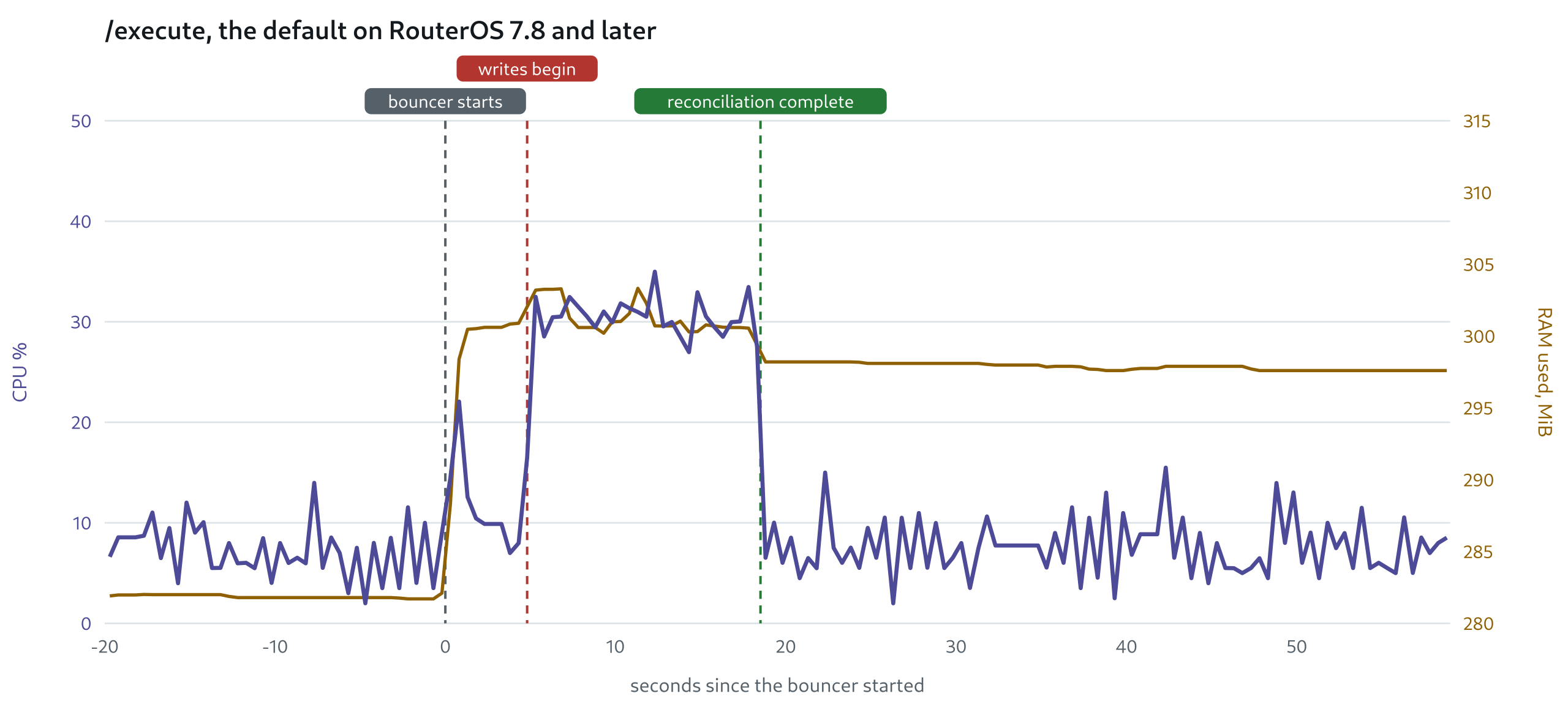
| Bulk-add method | Writing 17,361 entries | Mean CPU | CPU time above idle |
|---|---|---|---|
/execute (default, RouterOS 7.8+) |
13.7 s | 31% | 12.8 core·s |
stored /system/script (RouterOS < 7.8) |
24.1 s | 33% | 24.3 core·s |
bulk_add_method: api, one call per entry |
22.8 s | 35% | 26.5 core·s |
After that, a ban or unban is one API call. A periodic check that finds nothing to fix still reads both lists back: about 1.5 s of router work at this size, every 15 minutes by default. The bouncer itself uses about 30 MB of RAM and almost no CPU on the host it runs on, with 2,600 decisions.
Setting it up
On the router, a user with only read,write,api:
/user group add name=crowdsec policy=read,write,api,!sensitive,!ftp,!local,!ssh,!reboot,!policy,!test,!password,!sniff,!romon,!rest-api
/user add name=crowdsec group=crowdsec password=CHANGE_ME
On the CrowdSec host, cscli bouncers add cs-routeros-bouncer gives you the API key. Then the bouncer runs anywhere that reaches both (Docker, a systemd service, or a plain binary for Linux, FreeBSD, macOS or Windows), with this as its whole configuration:
crowdsec:
  api_url: "http://localhost:8080/"
  api_key: "the key from cscli"
mikrotik:
  address: "192.168.88.1:8728"   # 8729 with tls: true
  username: "crowdsec"
  password: "CHANGE_ME"
Or as environment variables in Docker:
docker run -d --name cs-routeros-bouncer --restart unless-stopped \
  -e CROWDSEC_URL=http://crowdsec:8080/ -e CROWDSEC_BOUNCER_API_KEY=... \
  -e MIKROTIK_HOST=192.168.88.1:8728 -e MIKROTIK_USER=crowdsec -e MIKROTIK_PASS=... \
  ghcr.io/jmrplens/cs-routeros-bouncer:latest
If you only want bans from your own machines and not the community blocklist, set crowdsec.origins: ["crowdsec", "cscli"].
Watching it
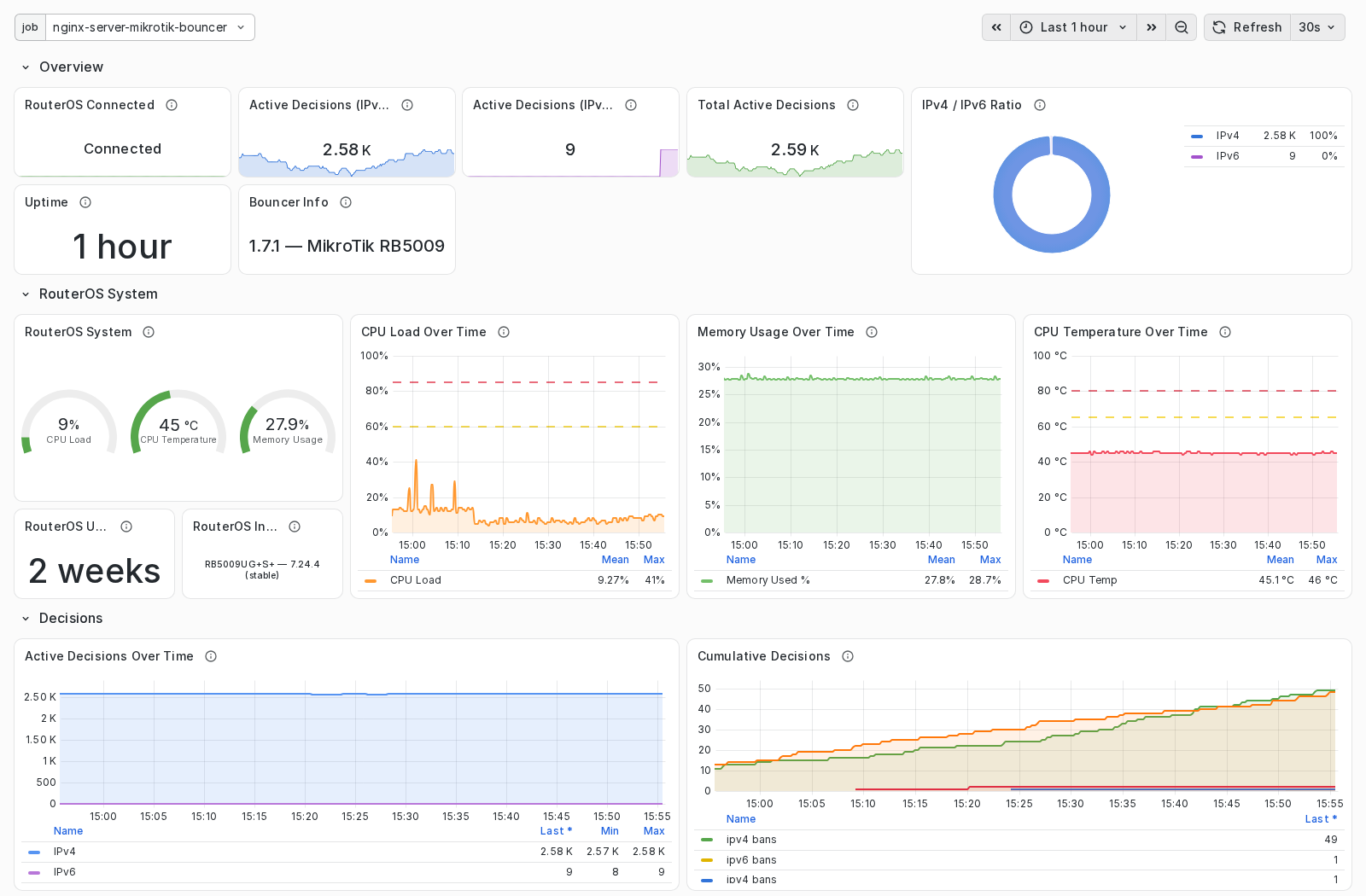
/metrics (Prometheus) and /health, plus a Grafana dashboard in the repository with the active decisions, what the rules dropped, and the router's own CPU, memory and temperature as read through the API. It also reports usage metrics back to CrowdSec, so the console shows what the router blocked.
The top of the bundled Grafana dashboard on my RB5009, last hour.
Where it has run, and what I'd like to hear
Only on my RB5009UG+S+, from RouterOS 7.21 to 7.24.4, with CrowdSec on a separate Linux host. Nothing in it is specific to that board, but I have no numbers from anything smaller. If you run it on a hAP ax², a hEX or a CHR, especially with the community blocklist on (15,000–25,000 entries), I'd like to know how long the first sync took and how the CPU looked. Bug reports and "this doesn't fit how I configure my firewall" are welcome too.
 For me, the best part is the visualization. A comprehensive, clear graphical representation of processes is a priority for me when deciding on hardware. I don't like working via CLI; it limits my overall view of the processes. "Donkeys" are a peculiar breed ...