Hello,
I tried to search around forum but no luck.
In SwOS version 2.7 i notice there is no uptime displayed ?
on SwOS 2.2 there was uptime under system tab.
Was this feature removed or its a bug I have in here?
Why would you remove uptime from dispay?
Thank you very much
k6ccc
February 14, 2018, 5:23am
2
I just looked at one of mine that got 2.7 yesterday. Sure enough, no uptime display,
k6ccc
February 14, 2018, 5:24am
3
Oh, I should note that mine is a CSS106-5G-1S
Knowing the uptime is an essential feature. Mikrotik add it please.
Buckeye
September 10, 2018, 11:36pm
5
Still missing on CSS106-5G-1S with SwOS 2.8 in the system tab. Hopefully they will add it. It is useful info.
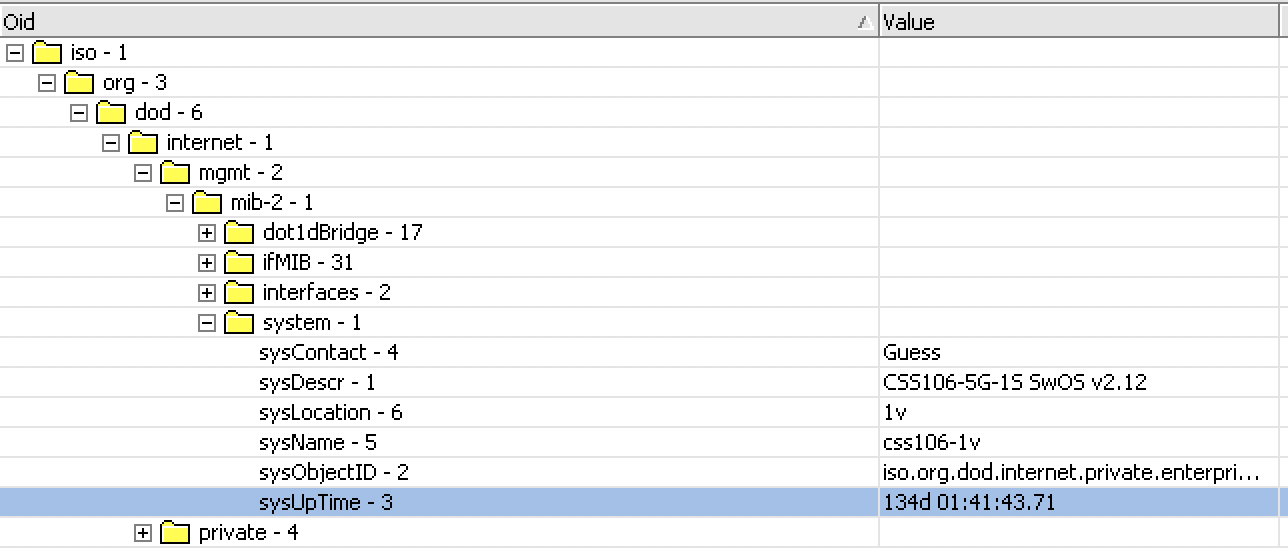
But it appears that it is available via snmp v2c in Timeticks
pi@TestPi3:~ $ snmpwalk -Os -c public -v 2c 192.168.28.40
eider
September 11, 2018, 5:27pm
6
Again, I really don’t know why it’s not present on web interface. It’s present in form of timeticks in response from /sys.b. Seems like an obvious thing to have there when switch itself reports it and especially if it was there before.
upt:0x0204c23d
0x0204c23d = 33866301 / 100 = 338663 = 94 hours = ~ 3 days, 22 hours
konst
January 27, 2021, 8:03am
7
Hi, all, any news on CSS106-5G-1S uptime ?
I got all zeros in TimeTicks on mines:
snmpwalk -os:.1.3.6.1.2.1.31.1.1.1.19.6 -op:.1.3.6.1.4.1.14988.1.1.3.8.0 -c:community -v:1 -r:10.0.1.1

OID=.1.3.6.1.2.1.31.1.5.0, Type=TimeTicks, Value=0:00:00.00
eddieb
January 27, 2021, 8:46am
8
try on .1.3.6.1.2.1.1.3.0
konst
January 27, 2021, 10:03am
9
Thank you very much, now it shows uptime:
snmpwalk -os:.1.3.6.1.2.1.1.2.0 -op:.1.3.6.1.2.1.1.5.0 -c:community -v:2c -r:10.0.1.1 -q
169 days, 5:00:14.11