Hoping somebody can help I have a CSS610-8G-2S+ that wont pass dhcp requests on VLAN1 along trunk to core switch. I have used packet capture and have confirmed that the switch does broadcast to other VLAN1 ports but not over the trunk. Other VLANs DHCP pass fine on the trunk. Anybody any ideas please?
Thanks in advance,
Can you give us a few more details about each port and what is supposed to be traversing them? Like are some suppose to be access ports with a single untagged vlan vs. which are tagged trunk ports?
I would update the config on the VLAN tab and set the “VLAN mode” and “VLAN receive” in accordance as to how each port is being used.
For example:
Trunk - VLAN Mode: strict, VLAN Receive: Only tagged, Default VLAN: whatever you want, Force VLAN ID: unchecked
Access port: VLAN Mode: strict, VLAN Receive: Only untagged, Default VLAN: appropriate vlan, Force VLAN ID: checked
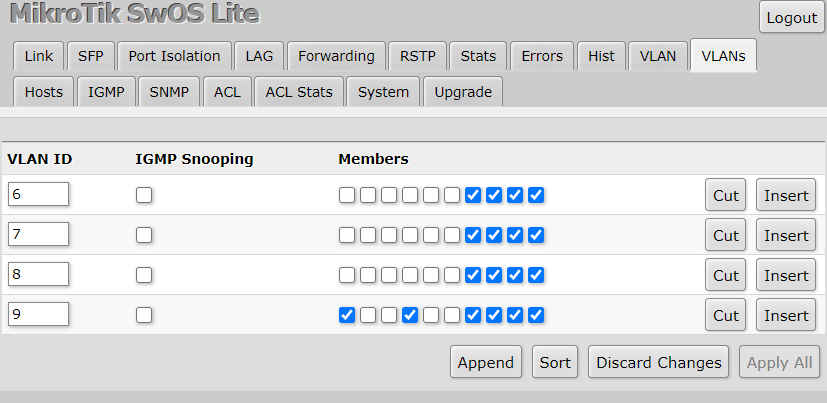
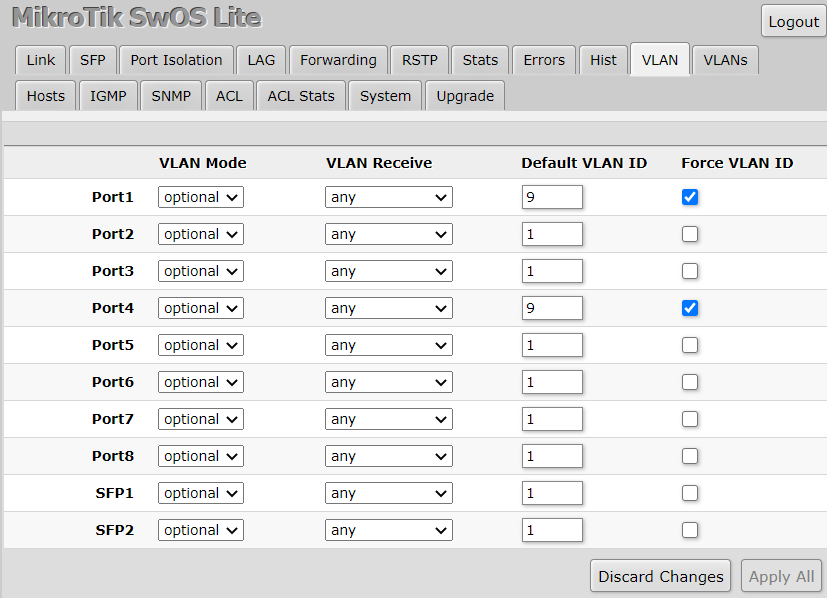
Thanks for the question so this switch in a build/test area where we configure new devices before installation. Ports Gi7&8 and Te1&2 are trunk ports to core switch, esxi host, wireless AP. Ports Gi1-6 are access ports and are assigned to whatever vlan is needed at the time.
I will try the settings you mentioned and report back, I just find it strange that this only happens on VLAN 1, all others work fine?
Sorry should have said am using 2.13rc12, sorry to hear about your packet loss I dont seem to be experiencing any on mine? have you tried different optics?
I’m using Mikrotik’s BaseT 10G SFP+, and I don’t have packet drop issues on other versions.
I remember having DHCP issues on the same client but thought that was the packet drop that was causing it…
Why are you forcing vlan id?
Also you don’t want to force vlan id 1 as this id is kinda special.
I have same switch and got it working well with multiple vlans, trunk ports, access ports etc. My trunk is on sfp+.
Vlans are working for me on all 2.13rc5+
There are already threads for css610 vlans where support team gives more details how this should be configured.
Thank you for your post both here and on other CSS610 threads,
From other threads the below seems to be the recommendation:
As for the VLANs, I would suggest trying these settings:
Disable the “Add Information Option” under the System menu
For access or untagged ports, use “VLAN Mode = optional”, “VLAN Receive = only untagged” and specify the “Default VLAN ID”.
For the trunk or tagged ports, use “VLAN Mode = strict”, “VLAN Receive = only tagged”.
Make sure to include all the necessary member ports for each VLAN ID under the VLANs menu.
When I first went to RC12 these were the settings i set, unfortunately they still give me the same result that DHCP broadcasts are not passed on the trunk if they are on VLAN 1.
Sorry had no access to my machine and was answering from my mobile previously.
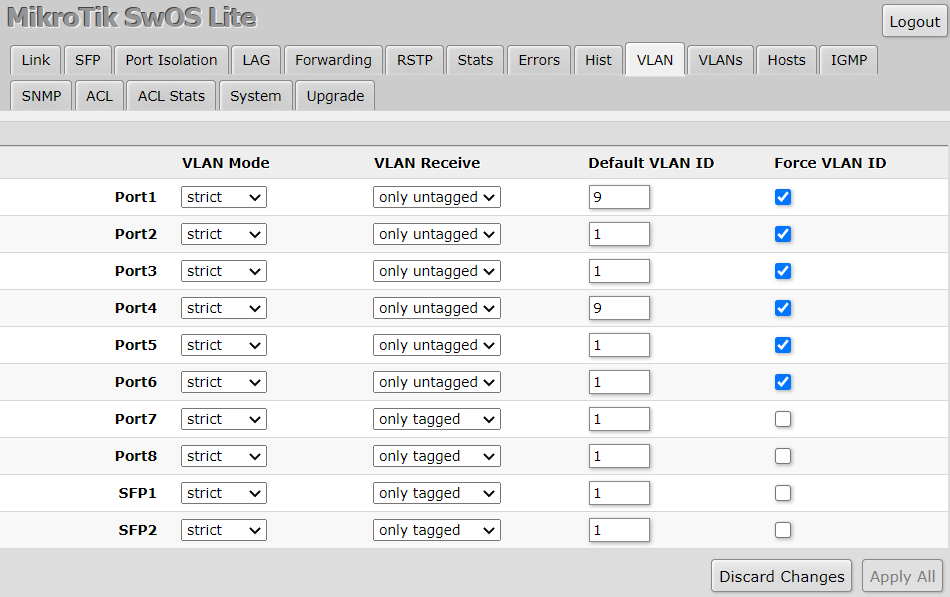
Attaching screenshots of my working config on 2.13rc12
eth 1 is my trunk from my router which serves multiple subnets and services for my vlans (DNS, DHCP etc).
Sfp+ are my trunks to other switches - so strict and only tagged.
eth 2-8 access ports, so they are marked as optional/only untagged. Default vlan is used to tag untagged traffic on ports.
For eth1 and sfp all marked as strict and only tagged, default vlan id is ignored as all packets are tagged already as per strict/only tagged config.
I do not have force vlan id anywhere as you can see, which only makes sense for tagged traffic if you want to retag packets with different vlan id. For untagged traffic it makes no difference if force is selected or not.
Following EdPa’s suggestion above I rebuilt the config from factory reset and added VLAN 1 manually and can now see DHCP requests on VLAN1 on the trunk.
Thank you all, and fingers crossed we get a proper release soon!
I’m running 2.13rc12 on a CSS610, trunked via SFP+1 to a CRS317 at 10GbE via a DAC.
VLANs are configured and working on the 1Gb copper ports; I get correct DHCP addresses when plugging a client in.
But when I plug a client into SFP+2, regardless of how I have VLANs set up, the CSS610 will not pass traffic to SFP+2, and the copper ports also stop working properly until I re-plug SFP+1 trunk.
What is happening here? It would be great to be able to use the second SFP+ port for a 10Gb-capable client.
Have you raised a case with support? the more people have problems with the CSS610 the more resources will be put to fixing it. Can you show us your two VLAN tabs from the webgui? Have you disabled “Add Information Option” under System / DHCP & PPPoE Snooping?
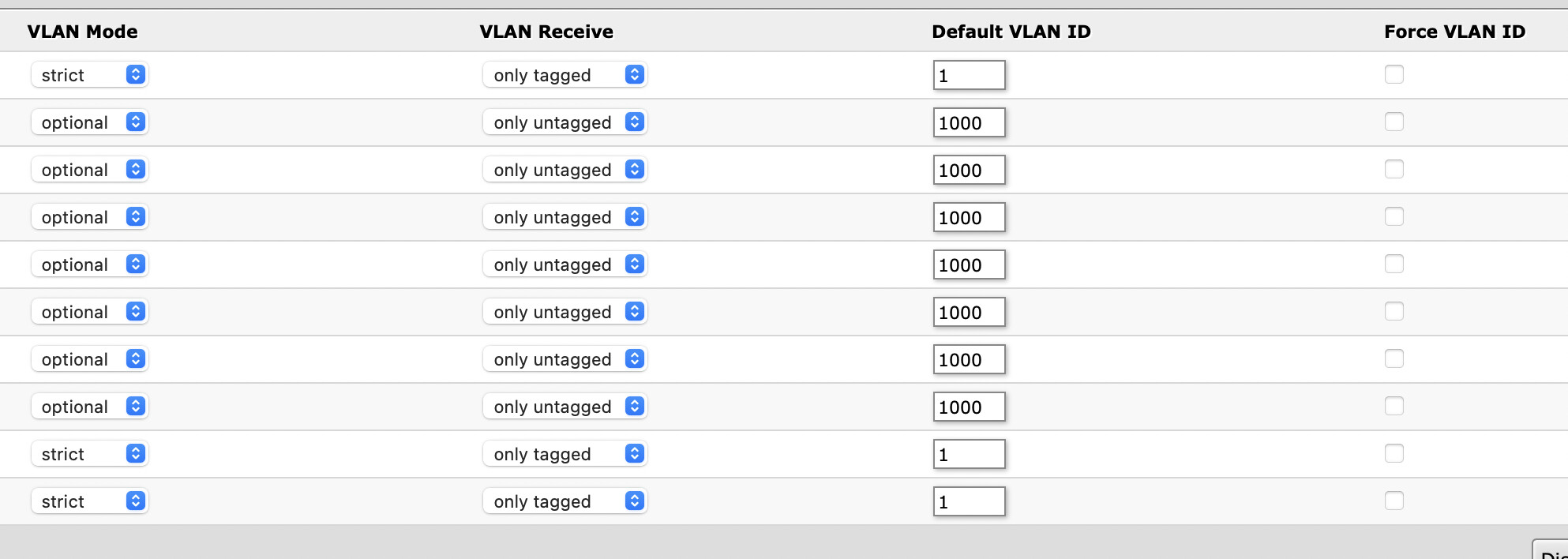
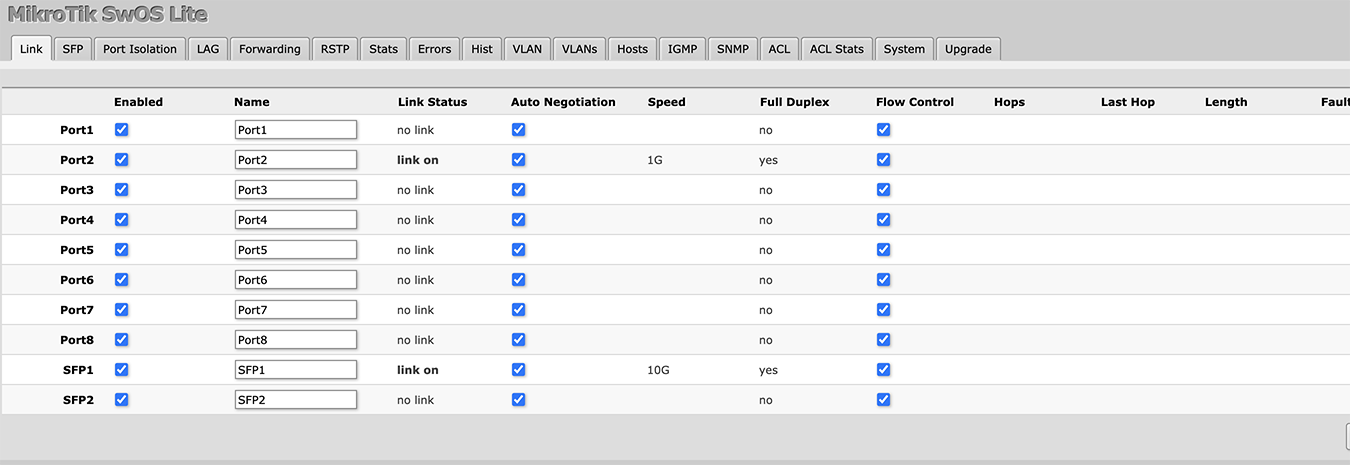
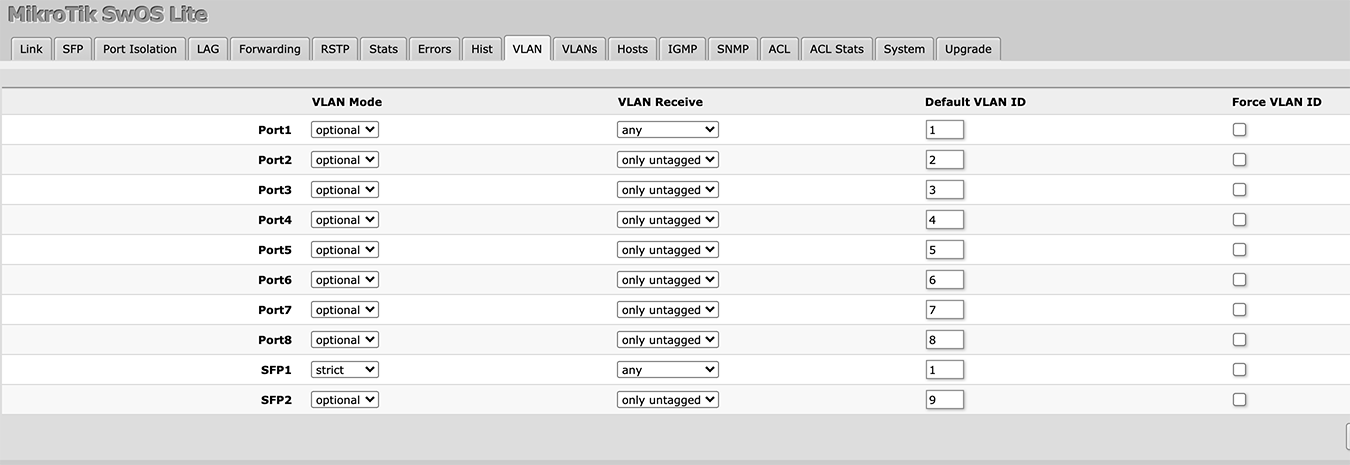
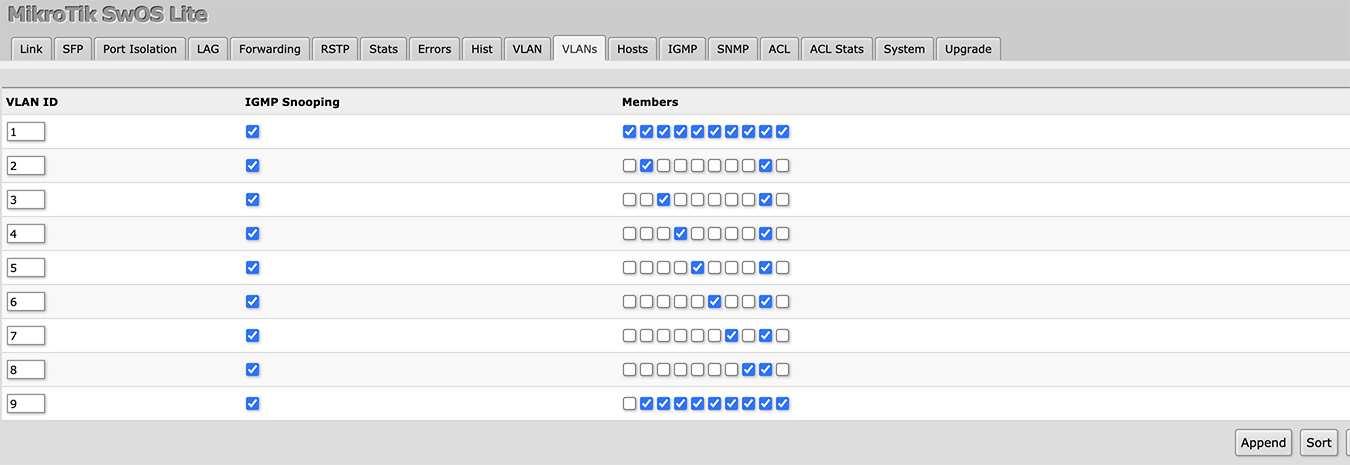
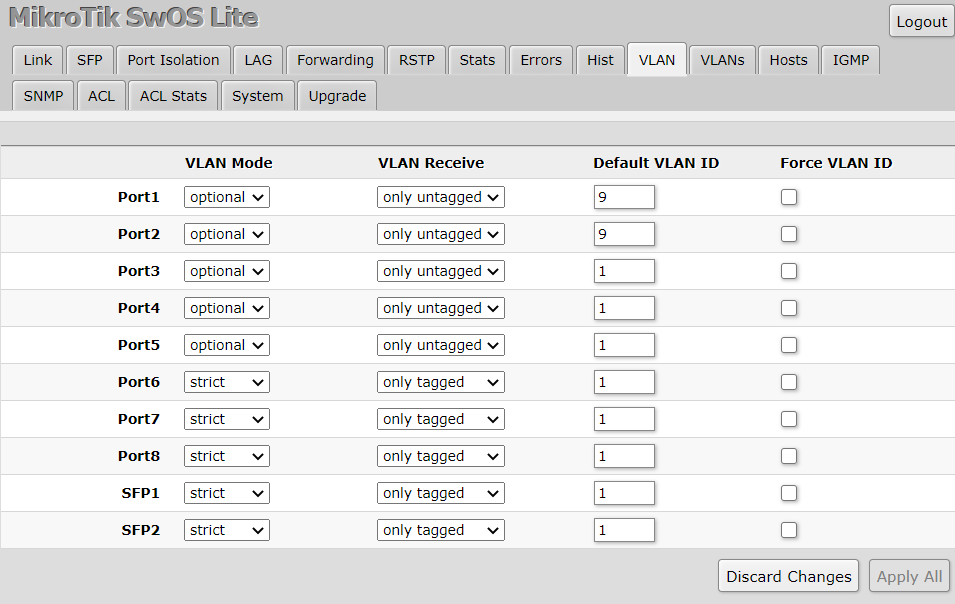
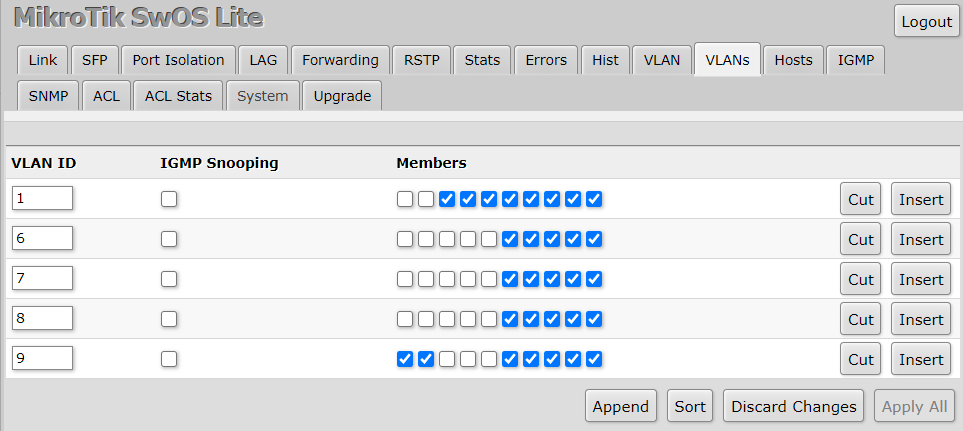
I’ve attached screenshots of the config; SFP+1 is configured as a trunk port passing VLANs 1-10 from a CRS317, and all copper ports and SFP+2 are configured as access ports, each with a different PVID.
As mentioned, with this config, all copper access ports work OK, but if I plug a client into SFP+2, the switch becomes unresponsive… Almost as if there is a loop somewhere, even though SFP+2 is configured identically to the copper ports.
I would start on the VLANs tab by un-assigning vlans 1&9 from the ports that don’t need them (I.E. VLAN 1 only select port 1 and SFP1. VLAN9 only select SFP1 and SFP2)
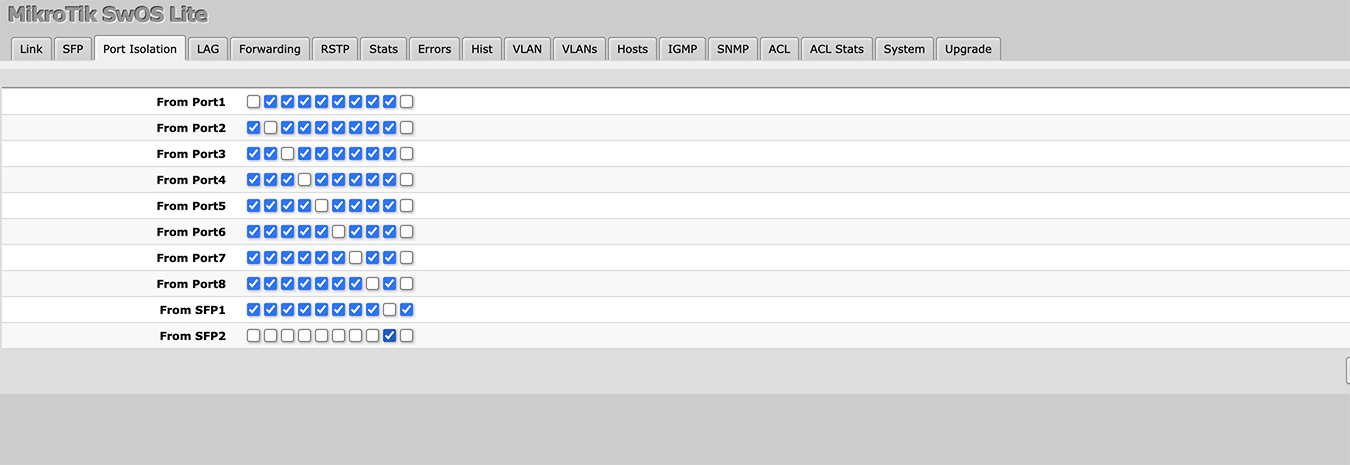
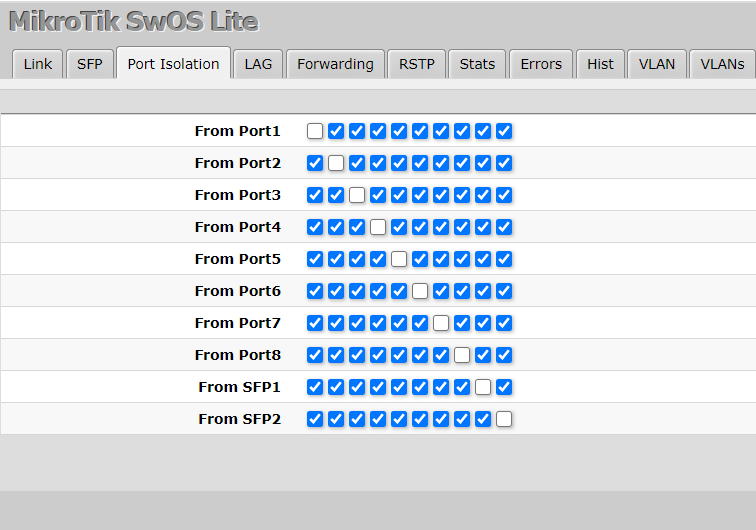
Also why are you blocking access to all ports other than SFP1 for SFP2? (Port Isolation tab?)
I currently have 4 trunk ports on 7,8,SFP1,SFP2 and ports 1-6 I assign as needed. I did previously have a client(access port) on SFP2 working fine(same as what you are trying to achieve) and i had just removed the extra VLANs on SFP2 and assigned a native VLAN ID on the VLAN tab.