I need to synchronize my router with an ntp server. As I am confused. I have set the ntp server in SNTP Client. Nothing seems to happen… Any suggestions???
Can you please share /system ntp client export
Provide a screen shot of the NTP Client page.
[admin@VI] > system ntp client export
mar/24/2021 03:15:38 by RouterOS 6.48.1
software id = V2G1-I8S1
model = 951Ui-2HnD
serial number = 45880238E3C3
/system ntp client
set enabled=yes primary-ntp=216.239.35.0 secondary-ntp=216.239.35.8
What does
/system ntp client print
show?
Are these IP really NTP servers?
Maybe try with the famous ntp pool names to see if your system works: 0.pool.ntp.org and 1.pool.ntp.org
once these works you know its the IP address.
If it does not work it might be you have no internet  , or firewall is blocking something.
They are Google NTP Severs
You should not use IP address. They might change without notice!
Better use time1.google.com etc. for instance
Again, please try with the pool.org to see if its an IP issue…
216.239.35.0…
I know for sure that is not an NTP server.
[Update]
Oops…nevermind (shame)
Tell Google that; it's time1.google.com. Yes, .0 is a perfectly legal address, depending on the netmask.
Not sure I understand your reasoning, but an IP ending with .0 is a perfectly legal IP Address. Seems also it is Google Time server

Snap!!! 
When I input 0.pool.ntp.org or any other server name Mikrotik replaces it by ip. In any case, in order to test if it is working I set the wrong time and date through system/clock. Then I enter NTPServers into Ntp Client. Date and time remain as set in system/clock. Am I doing something wrong???
2 things:
-
If you installed the “ntp” package, it changes the look/feel of the ntp client, and you will have to use scripts to make use of the FQDNs
-
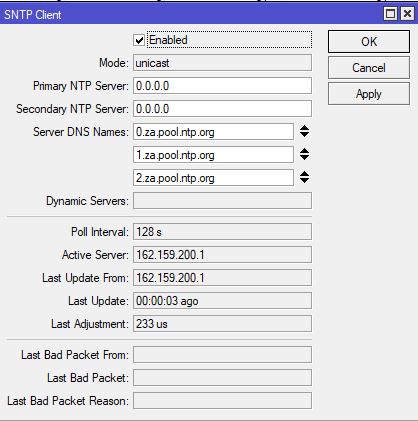
If not, then see screenshort below for using FQDNs with ntp client
Thank you allfor your time. WeWiNet you guessed correctly. Firewall was dropping it. I reallized what was going on once I noticed that NTP Client was not synchronizing…