DCHP Option 119 (domain search)

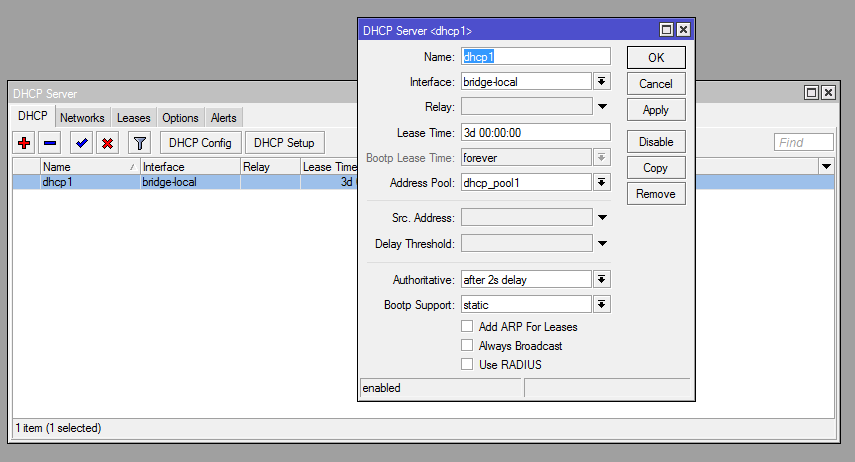
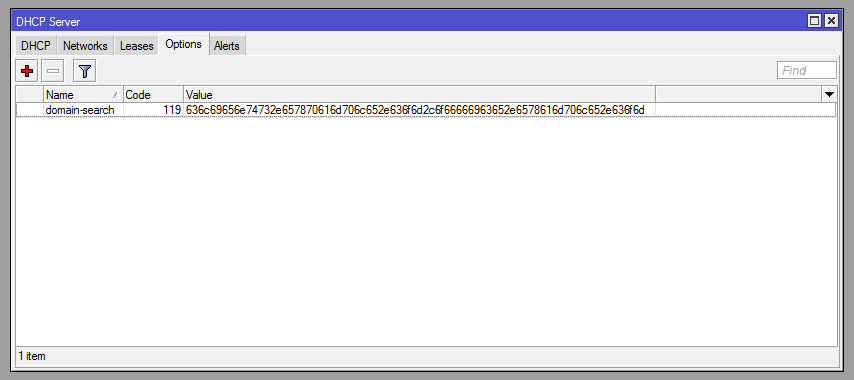
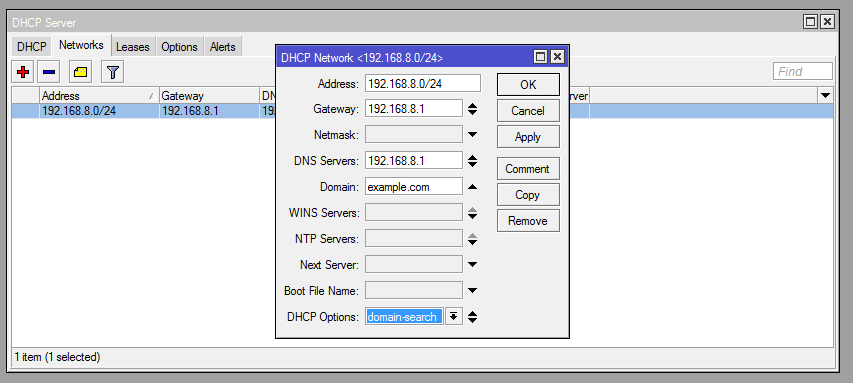
I try to set up dhcp option 119 (domain search) on my RouterOS 5.26 DHCP server by many ways but no one of them works. Screenshots of my last way in attachment of my message.

In my network I have main domain example.com and I want to set up as search domains clients.example.com and office.example.com. HEX value of “clients.example.com,office.example.com” is “636c69656e74732e657870616d706c652e636f6d2c6f66666963652e6578616d706c652e636f6d”.

I tested my settings on clients with Debian Linux 7 and Mac OS 10.8.5. All of them get only example.com to DNS search list. clients.example.com and office.example.com are skipped in my way.

Please help me with set up of option 119 on DHCP server (see screenshots).
dhcp-options.png
dhcp-network.png
dhcp-server.png

Is there any idea?

Bump.
Is there any adequate way of generating Value for DHCP Option 119 othen than studying RFC3397 and writing a script?
Honestly, I would think that by 2018 setting DHCP options would be a much simpler task.

Why can’t you just use string value?

[admin@MikroTik] /ip dhcp-server option> add name=119 code=119 value=“s’clients.example.com,office.example.com’”

Because RFC 3397 says he must not do that:

To enable the searchlist to be encoded compactly, searchstrings in the searchlist > MUST > be concatenated and encoded using the technique described in section 4.1.4 of “Domain Names - Implementation And Specification” [RFC1035]. In this scheme, an entire domain name or a list of labels at the end of a domain name is replaced with a pointer to a prior occurrence of the same name.

Even spreading the individual names into several occurrences of the Option 119 would not help as RFC3397 further says that the payload of all occurrences has to be concatenated and handled as a whole.


Is there any adequate way of generating Value for DHCP Option 119 othen than studying RFC3397 and writing a script?

Nope. What you actually have to study is RFC1035, but otherwise yes, a script is your only chance if you want a dynamic list. If you’re fine with a static list, you can do the encoding manually.
And unless you need to specify several subdomains of the same domain (like e.g. c.b.a and d.b.a), you don’t need the pointers which makes the job much simpler. Example:


my.test.com

and

your.domain.org

have no part in common, so you only provide the length of each substring as a byte right in front of it and indicate the end of each fqdn by a zero byte. Here we go:

/ip dhcp server option add name=domain-search code=119 value="0x02'my'0x04'test'0x03'com'0x000x04'your'0x06'domain'0x03'org'0x00"

/ip dhcp server option print detail
 0 name="domain-search" code=119 value="0x02'my'0x04'test'0x03'com'0x0004'your'0x06'domain'0x03'org'0x00"
   raw-value="026d79047465737403636f6d0004796f757206646f6d61696e036f726700"

The pointers are just a small bit more complex - to add ****

my.domain.org

to the list above, you would do the following:

ip dhcp-server option add name=domain-search code=119 value="0x02'my'0x04'test'0x03'com'0x0004'your'0x06'domain'0x03'org'0x0002'my'0xc012"

The 0xc0 says the following byte is a pointer to the rest of the name, which starts at 18th (0x12) byte from the beginning, counted from 0.
Tried to input your command - it doesn’t work

[code][admin@admin] > /ip dhcp-server option add name=domainsearch code=119 value=“0x02’my’0x04’test’0x03’com’0x000x04’your’0x06’domain’0x03’org’0x00”
failure: Unable to parse hex string!

[/quote]

There is a mistake in the first example, there should be just 0x0004 in the middle of the string instead of 0x000x04. In the second example this is fixed.

While I can configure it in Mikrotik 6.47.7, Windows 1809 does not get it, neither does any Apple iOS device

To make sure I have correct entry, I used this

In HKEY_LOCAL_MACHINE\SYSTEM\CurrentControlSet\Services\Tcpip\Parameters\Interfaces**********************

there is no entry in DhcpDomainSearchList for configured domain.home


C:\>ping folio
Ping request could not find host folio. Please check the name and try again.

C:\>ping folio.domain.home
Ping request could not find host folio.domain.home. Please check the name and try again.

Folio has Mikrotik DHCP supplied IP & I can see it in Leases