somebody decided, we are too successful in what we are doing and started regular DDoS on our business. I ve managed to mitigate it somehow (various UDP based amplifications attacks by simply not letting almost anything from UDP in), but I am failing to solve something, which should be really simple to solve.
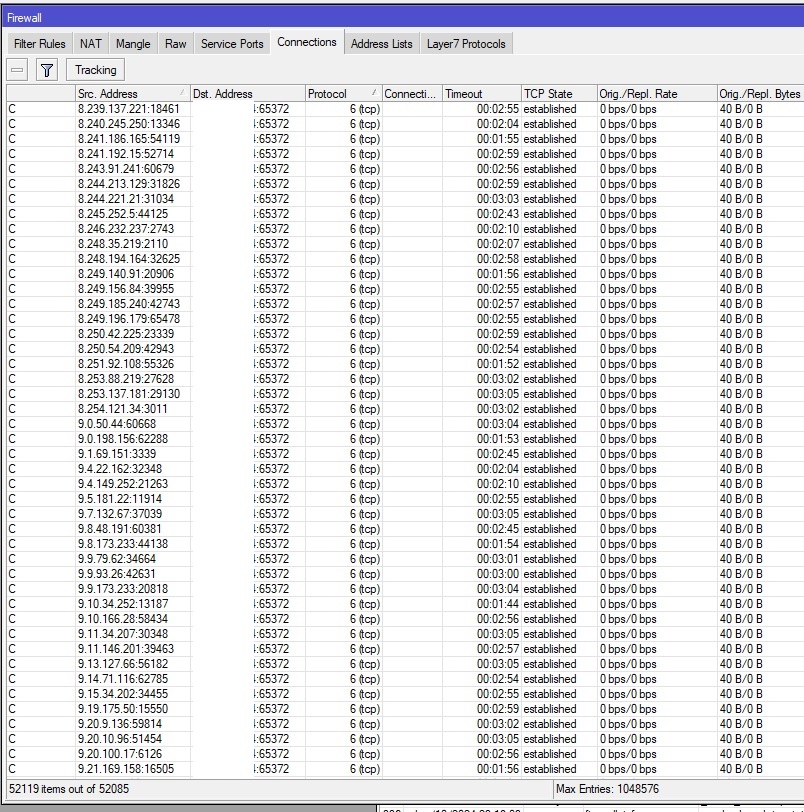
I have simple setup, public IP, NAT, several open ports for allowing some traffic inside, but each of them allows dstnat happen only based on list of IPs. So nothing goes inside the network. But there is attack, which is using tons of IPS and should be very simple to solve. I added simple rule for dropping everything not dst nated, but it didnt help. I tried rule for dropping everyhing forwarded except these several allowed ports. Also anti ddoes rule showed on wiki (didnt catch anything from this attack, just par of differenet one). I ve tried just to be sure to drop in prerouting everything going to this one attacked port (see attached picture), but connections are still established, zero bytes dropped (rule is on the top), and i dont understand why, there are tens of thousands of them, which causes our clients to disconnect several times during attack. Last week I am reading wiki, googling, but nothing helps. Any ideas? Thanks:
The router probably crashes after some time when the memory is full…
I only see different IPs:ports and a form of blacklist that after a while fills the memory and crashes the router.
The best way to protect yourself is to ignore attacks and leave your firewall configured well.
However, the best way would be to ask the ISP, which in these cases, at the cost of a little additional latency on that IP,
filters the traffic a priori, allowing only wanted (at least) traffic to reach the customer’s router.
Regarding my ISP (t-mobile), they told me, that they have some anti DDoS protection and cant do more for me more (so it was like we cant care less). Actually they even didnt notice, until I told them to check logs of traffic increase during that time, like if I have whole day cca 2mbit/second and than 6/Gbit/second, there is something suspicious. They dont even have basic monitoring to notify clients.
My other server on professional hosting was also under attack and they properly detected attack:
Impact: 146.15 Mbps/15.00 Kpps;6.42 Gbps/749.60 Kpps
Importance: High
Description: IP Fragmentation, UDP, NTP Amplification, DNS Amplification
But again they told me, we have some anti DDoS and we cant do more. This is lie, there are indeed specialized network devices like Radware DefensePro to filter such traffic meant for hostings with hundreds of gigs of bandwith like this. It is even more lie in that sense, that my amateurish attempts mitigated it quite a lot.
My first router (CRS125) was "fried" in several seconds and indeed crashed, so I ve bought more powerfull (CCR2116-). From totally unusable service for cca 30-40 minutes during each attack, we have now just several 1 seconds lags, and in worst case few disconnects of clients. Router does not crash, cpu load is not above 14 percent during attack and attack consumes only cca 2GB of memory, still 14GB free. I have feeling, that if I manage to solve this attack (to not let these connection establish), it will be almost invisible to users. It looks like this router has enough power to handle these small scale attacks (according to my ISP only 2-8Gbit/sec) and because my line is only 1000/1000mbit fiber, this makes limit what they can get on my router.
"Remove serial and any other private information from it and post the output in between code tags by using the </> button"
Yes, I will do it. I did it somehow and after taking care of UDP type attacks impact is quite low, but since I am new to that, I have feeling that it can be done in much better and systematic way. Thanks for help.
T-Mobile has indeed a feature for DDoS protection. A paid feature. Their reluctance is simply that they don’t want to provide it for free, even if that means that you are being disconnected due to the attack. Yes, ISP have a nasty tendency to leave people in a lurch.
One issue I see is that port tcp/65372 is exposed. If you are seeing a lot of established connections, it means these are available to the whole world. Could you limit them in the filter instead? Another change you can make is to more aggressively terminate the unacked connections (IP → Firewall → Connections → Tracking → TCP Unacked Timeout). By default, this is 5 minutes, which means that the connection will be kept in the half-open state, waiting for the final ACK, for 5 minutes. Consider diminishing this to 1 minute or even 30 seconds.
Looking at the addresses in the screenshot, this seems to be randomly generated, some are assigned to Level3, IBM, … Unluckily these big guys are attacking you.
This was first thing I asked. How much for something better. Sorry, we dont provide. Bye. Services in our country sucks.
Here is setup, I hope i didnt break anything, I had to censor lots of stuff (IPs, names, descriptions…). Also some parts are WIP, so some rules are useless, or redundant. My goal in this phase is to prevent all these TCP connections establish, but allow internet traffic from inside to work. Which is something I didnt managed to make working (only on UDP side), even I though I copied varios examples in wiki, forums, etc…I always cut internet off. There maybe some fundamental problem.
I have also question related to dynamic allowed lists. On my dstnat rule I have dynamic list of allowed IPs (duration cca 1 minute), to allow only verified IPs in. After this list expires, connection is still established (which is OK for me), but I dont understand why. I thought dstnat happens in prerouting phase and until packets are send to forwad or input phase, there are no fast forward, connection state or filtering rules applied..
Do I understand well, that it reestablishes nat entry in case of some timeoutst? That turning it off it makes it more strict for evalluating what is new connection (must have syn flag and does not match any existing connection)? Are there any negative consequences for turning this off (real life experience)? Thanks!
Actually this is what I am trying to do. One drop all rule in end of filtering, but still allowing internet to work via rules before that. On UDP I succeded, but not on TCP. Currently I am dropping everything except established connections (when i start to drop, internet from inside is not working). But that ddos was established connection…And I dont understand why, it is not going through nat to any server behind, because only verified IPs are dstnated.
The fasttrack, invalid, and established in the chain=forward should come on top, then the rules for the new packets.
The rule with the connection-nat-state=dstnat accepts everything coming from any network, as long as a dstnat was done. Consider changing it to reflect the NAT (source, real destination, real port).
Not really sure what the empty address-list is or what it does but it could be that it never matches.
/ip firewall raw
...
add action=drop chain=prerouting dst-address-list="" src-address-list=\
    ddos-attackers
Same a bit further
/ip firewall raw
...
add action=drop chain=prerouting comment=\
    "defconf: drop local if not from default IP range" in-interface-list=LAN \
    src-address=!192.168.0.0/16 src-address-list=""
The destination you obscured on the screenshot, destination port 65372, is it the IP of the Mikrotik itself or one of the NAT addresses?
The chain=input rulebase misses all the bits for fasttrack, established, invalid, related and so forth, and doesn’t have a global drop for the WAN.
This drops anything coming directly at the router from the identified DDoSers. Likely redundant with the ACL in the raw prerouting, but could catch stuff if the other one doesn’t work. I readded the default rules, plus a few ones for accepting local stuff, your remote management addresses and block everything else.
/ip firewall filter
add action=drop chain=input comment="Cybervermin B-Gone" in-interface-list=WAN src-address-list=ddos-attackers
add chain=input action=accept connection-state=established,related,untracked comment="default rule for accepting established connections, should be 0"
add chain=input action=drop connection-state=invalid comment="default rule for refusing invalid packets"
# Add this one if you manage the router from the 'ternet
add chain=input action=accept in-interface-list=WAN src-address-list=whereiadministerfrom comment="Remote management - consider using a VPN"
add chain=input action=accept in-interface-list=LAN comment="Local stuff, don't block"
add chain=input action=drop in-interface-list=!LAN comment="Block everything else not from the local network"