I bought from an online store. equipment Mikrotik ATL 18KIT. And it’s not cheap.
In the end, because of Mikrotik’s policy to glue passwords by default. I can’t access the hardware settings.
And strangely the label on the antenna and the hardware mac address don’t match. Is this a manufacturer’s error?
How to restore the password? Mikrotik is falling before my eyes every year!
The password on a sticker is a process which has been implemented and still may show some quirks.
Earlier versions had some characters which could easily be mistaken for others.
Try other characters: capital O or zero, capital i or 1 or lowercase l (the letter L), …
What I do ALL THE TIME is take a picture with camera set to x3 zoom.
Funiest thing I have seen (not really) was that swap of zero and capital O whereas in the MAC address zero was nicely written with slash through it (as was common in the old days).
When you say “the label on the antenna and the hardware mac address don’t match”, are you sure it is not the case that one is the ethernet MAC and the other (antenna) the WiFi MAC? Usually one sees both on the label for wireless-capable devices. You expect them to be different.
I can.t Attache photo this topic
This device no have wi-fi. Only 1 ethernet POE port!
You bought from an commercial online store and yet you come here seeking for help? You provide no photo nor did you provide any info what is written on the label. But you complain “it was not cheap”. Yeah, your car maybe was even More expensive - and where do you go in case of a problem? To the dealer or to the brand’s internet user forum?
Try zero or capital O as 4th character.
EDIT:
Now I see. There is a complete mismatch between MAC address in Winbox and what’s on the label.
Return to vendor !
Read topic up. I attache picture!
653O3QRAU6
@oskarsk
Already suggested that as well.
But … there is a complete mismatch between MAC address on sticker and winbox.
Definitely an error in the manufacturing process IMHO so the device should go back to vendor for swap.
Yes. You a right! I think make downgrade firmware. Netinstall 6.49.12.
This is work?
Try reset and my password, if not working contact distributor.
or
Use netinstall to remove config.
Min Ros version for this device 7.4.1
Thank you! I am very glad that there are good people on this forum!
The flap of the label, at the top right, is raised… Typical of when the label is removed and reattached.
Use netinstall with both the option to NOT keep the previous configuration AND not apply the default.
This way you can have access to the device without a password.
Once logged in via MAC address, it is possible to create an admin user with a known password,
then perform the reset-configuration with the “keep-user” option and apply the default configuration,
in order to have a device configured as new, but with the password known.
F1ReB4LL you won’t believe this but I got the other end of this sticker.
Just received my unit and after a hard reset, my default password on the sticker did not work!!!
After some googling I found you post with my MAC address and my password that works.
As from my side I got the sticker with your MAC address and your password.
Im attaching a picture if you still need it
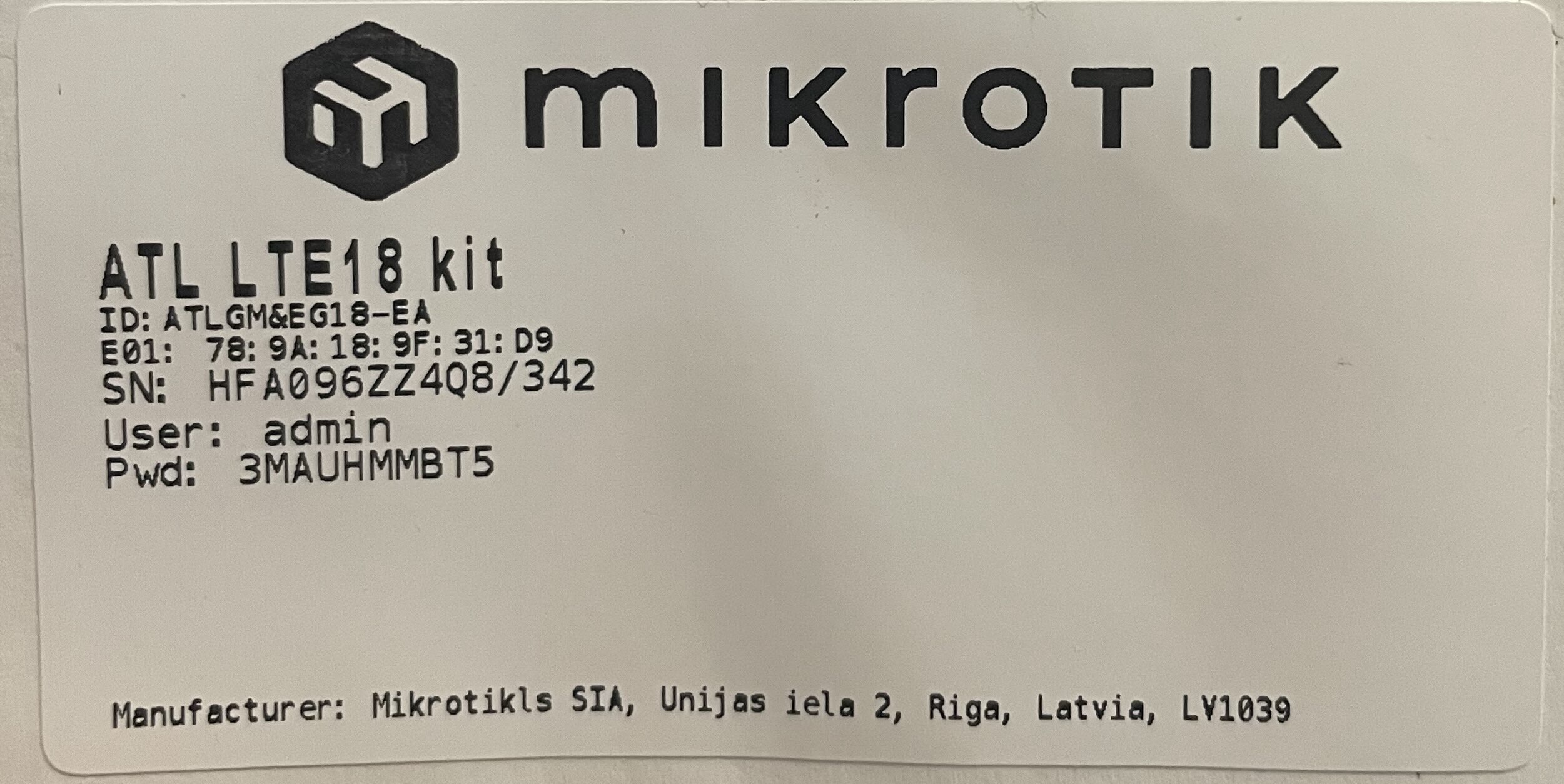
Almost incredible, though it happens in other fields as well 
https://en.wikipedia.org/wiki/Babies_switched_at_birth
This is fate, get married

Crazy the stickers got swapped. I just ran into another one of these. I could not get the reset to defaults to work correctly and netinstall wasn’t working right. The last segment of the mac address on the sticker did not match what winbox was detecting and winbox was showing 0.0.0.0 as the address. The sticker default password didn’t work either. Turns out I was able to get in using winbox and the old default blank password from before the stickers were a thing. Seems like they have some teething problems as these are the new Hex refresh units. Two were ok, one has the config all messed up including the above errors.
Create a text file: Config.rsc with this command line in it:
/user set [find name=admin] password=1234
Then started netinstall, put the device in netinstall mode with reset button. After it appearеd in the list: Loaded the appropriate firmware file, unchecked “Apply default config” option and checked “Configure script” option and loaded my Config.rsc file. And after successful installation the password was set to 1234
Hi
I have new mikrotik RBSXTsq5nd and default password forget
How to find default password?
Netinstall not change any things.
Thankyo