Being a beginner with router os, I configured my mikrotik routers internet connection using ppoe, and set my DSL modem to bridge mode. After opening a terminal I noticed a flood of login attempts. Only because I’d changed the login credentials first, basically by chance, did these login attempts fail… Seems like a pretty big vulnerability in the security for a beginner using quickset!?!
Yes, but this is caused by bad instructions on internet or people “experimenting” without studying the matter.
When you would have used quickset to setup PPPoE it would not be such a problem because there would be
an incoming firewall on the PPPoE.
But when you just configure the router as plain router, then remember PPPoE, watch a naive Youtube movie
on how to add a PPPoE interface, and do not adjust the firewall, yes then you are in trouble!
I have often proposed that the firewall is changed to do a default drop and accept only what is explicitly allowed
(like traffic from the LAN), but MikroTik won’t do that. So it is your own responsibility to drop incoming traffic
from any new interface that you add.
My point is why bother with a quickset if it fails to provide fundamental security? Just bugs me that people with specialised IT knowledge often say “lol amateur” rather than create solutions for beginners (specifically change login credentials on first login). -i used quickset and there were no such firewall rules for SSH/telnet etc as I remember
Hello,
RouterOS is much more configurable/flexible and powerful, thus not comparable to any of these ‘typical’ end-user-friendly routers and their GUIs - whether Webfig nor Winbox.
Even those ‘typical’ end-user-friendly routers allow weak or even NO admin/access password to be set if per user-choice.
Check
https://wiki.mikrotik.com/wiki/Manual:Initial_Configuration
and
https://wiki.mikrotik.com/wiki/Manual:Securing_Your_Router
greets
If you use QuickSet to change internet mode to “PPPoE”, the firewall is set on the PPPoE interface. I tested it, and this is what the QuickSet adds:
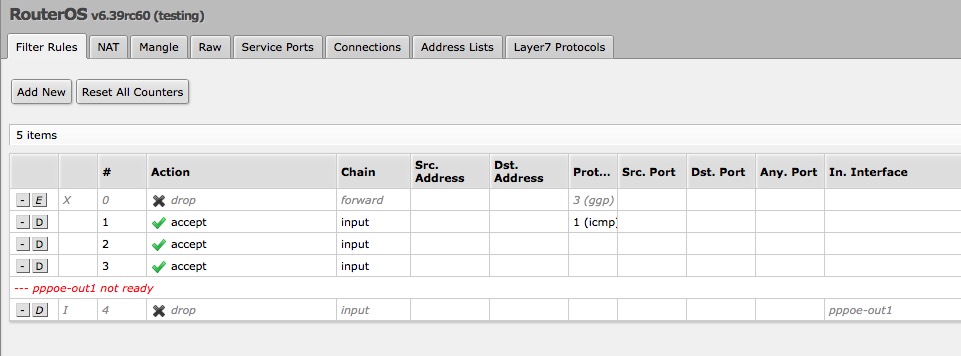
So as a beginner, I suggest using QuickSet and then using “Firewall router” in QuickSet.
But with quickset it works OK!
It only fails when you manually add the PPPoE
Cool thanks for the replies, I’ll check it out when I’m Infront of my computer