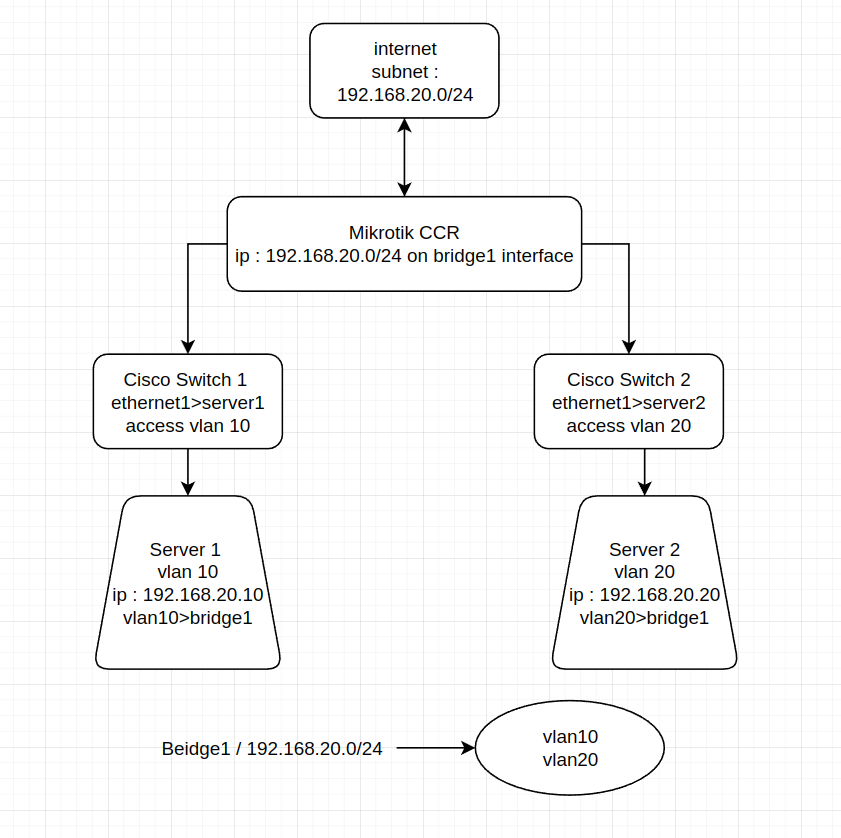
Hello
I have a problem that I unfortunately did not find by searching the internet.
I have a mikrotik CCR1072 router and also have 2 Cisco switches
The switches are connected to the servers as a vlan (server 1, 2)
Router > Switch1 > vlan10 > Server 1 > ip : 192.168.20.10
Router > Switch2 > vlan20 > Server 2 > ip : 192.168.20.20
The problem I have is the first server can not see the second server
From(192.168.20.10) icmp_seq=3 Destination Host Unreachable
From(192.168.20.10) icmp_seq=4 Destination Host Unreachable
From(192.168.20.10) icmp_seq=5 Destination Host Unreachable
In the router it is defined as 192.168.20.0/24
And also for some reason I put all the VLANs in one bridge.
in STP Setting (Bridge Interface)> protocol mode to “RSTP” and
Priority 8000 hex
Max Message Age : 00:00:20
Forward Delay : 00:00:15
Transmit Hold Count : 6
Max Hope : 20
I think the problem of the bridge please guide me.
Thanks
The problem is that you want to have same L3 subnet (192.168.20.0/24) overlaid over two L2 subnets (two VLANs). Which goes against the whole idea of having VLANs.
So you have to rethink your network layout. If you explain here why you have same IP subnet over two ethernet subnets (so what you’re trying to achieve), we may be able to advise you how to get there.
Hello
Thank you very much for your answer
The IPs I have are set to bgp on the router and I have not had any problems using them for several months.
My only problem is the internal connection between the servers.
I have an ip pool dedicated to virtual machines.
Example :
Server 1 > vm 192.168.50.15
Server 2 > vm 192.168.50.16
And any ip of my /24 IPs may be set on one of the servers.
In this scenario, I do not want to put the servers in a vlan.
My intention is to place the vlans on a bridge. Because I can not put all the IPs in one vlan.
in general :
What is the way for vlans in beidge to see each other in different subnets without any problems?
Different subnets should not be a problem, they will get routed (if there’s routed path between those VLANs). The problem in your original post (and the last post) is that both servers actually use IP addresses from same IP subnet (192.168.20.0/24) … unless you presented example which doesn’t reflect your actual case … and in this case please post accurate situation description. The problem does not lie in router, the problem is in how all IP stacks in all OSes work: if destination IP address falls in the same subnet as source address, then machines expect to be talking directly, without use of router (and BGP/OSPF/… doesn’t help here). The only thing you can do is play with proxy ARP functionality which works around this problem (but defeats having machines in different VLANs).
Hello
I drew a diagram and it was attached
Please check if possible.
I use several subnets / 24.
Sometimes Subnet 1 servers see Subnet 2. ( when in 2 switches)
But this shows that I have not set anything correctly.
Do I have to do a certain amount in the vlan settings?
The / 24 IPs are not set to vlan and are to bridge
Thanks
I can’t seem to pass you my single message here: you can’t use same IP subnet on different ethernet subnets (including VLANs) without extensive complications. As long as you insist on having 192.168.20.x addresses on all sides of your router, you’re on your own as far as I’m concerned.