Device Suggestion for AP+Station

Hello everyone. I'd like to ask a question to the experts here, in case anyone has a good idea that I could use ! If you got the time to take a look at my situation I'd greatly appreciate it !!!

Me and a buddy of mine, have launched a product, that uses:

  • An ESP32 Device as the main unit
  • An Android Tablet as the controller device with our own app.
  • An Android app for phones, as a secondary controller (remote).

Our set of devices communicate with each other using 3 protocols.

  1. Websockets for real-time commands/updates when the devices are on the same network
  2. HTTP Requests/API as a fallback solution (a Webserver is also available on the ESP32 device)
  3. MQTT (using our own Cloud Server) for Remote Access/Control

So, in short our products MUST be on a local network as a minimum, but preferably on a network that also has internet access although this, is not mandatory.
Internet access is good to have since it provides:

  1. MQTT (Remote) controlling of the device.
  2. Datalogging and Error Logging from us to find out issues with our devices, maybe even before they happen
  3. And most importantly, firmware updates to our boards.

[ some history ]
We first, designed the Controller board and App, to send UDP packets, on the broadcast address of the network, and then, upon receiving the reply, save that address, and use it for websockets.
But we faced 1 trillion problems, as we have no knowledge of how our client's networks are built and what devices they are using. Some of them have routers that don't allow UDP Broadcasts, some have Client Isolation turned on, so local peer-to-peer traffic is blocked, etc etc.
So, Mikrotik to the rescue, we now ship all our devices, bundled with a Mikrotik hAP Lite that is already pre-setup by us, and has a static IP set for the ESP32 board.
This way, the app always uses the same, pre-set, IP address to communicate with it.
We also have WAN setup on ETH1, so if the client connects an Ethernet cable from their current router there, both our devices get internet connectivity.
This works flawlessly but has some limitations.

[ the problem ]
SOME of our clients, sadly only have a Wireless connection available on-site.
And from what I've found online, the hAP Lite can't act as both a STATION and ACCESS POINT at the same time, and get WAN from the WiFi. It's one or the other. I've read that we need a device with Dual Radios for that.

That being said, even with a Dual Radio device, I'm not sure if the client will be using a 2.4G or 5G or a mix, and thus, I don't have a way to PRESET the device from factory.

The ULTIMATE solution would be to have some way, for our bundled router, to first and foremost act as the bridge between the two devices (the ESP32 and the APP) but also as the bridge between them and the client's network, whether that is wired, or wireless. BUT, we also need to keep the cost down. We can't ship with a 200$ device just for networking. :smiley:
Also, in our original solution (with using the client's router) our ESP32 device created its own hotspot that acted as a captive portal for first device config. It was easy and understandable.
A similar way would be really welcome. We can't expect our clients to install Winbox and setup a MT device. :smiley:

[ extra thoughts ]
I've thought about solutions using Raspberry Pi Zeros as gateways. I've also setup the ESP32 with dual STA, but that way it's the ONLY device to get internet. The tablet still stays offline.
I've thought about adding a local MQTT on a RPi and bridge that to the cloud MQTT.
I don't know which is best. Currently, the (only-wired) solution with Mikrotik works great, as it is super-fast, super-reliable, super-predictable, super-customizable, and as a bonus, I've also setup a Wireguard network that the Mikrotik connects to as a client, so I also have "local access" remotely for troubleshooting.
Anyway, ANY IDEAS are really welcome.
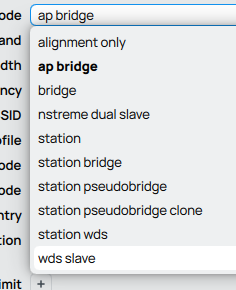
I don't think this is entirely accurate, I believe you can make a "slave" wifi interface, it is the speed of data transfer that will be low.

Incorrect, from my experience. I have configured both of mAP and mAP lite (nominal 300 Mb/s) with multiple radios, acting as both AP and station. The mAP is routinely used in this configuration with a PiKVM and I have used it also in travel.

@jaclaz @phascogale

I didn't know that.
Do I do that here ?

Is there any guide on how to set the device this way ?
Thanks for your replies !!!

Go to the appropriate WiFi or wireless menu in Winbox and click “New”. Now you are creating a slave wireless. You can keep doing this :slight_smile:

This is my configuration of a mAP from a couple of years ago, the one in use for the PiKVM. The mAP is still on 6.49 so if you are running 7 there will be some differences to the same end.

# RouterOS 6.49.17
# software id = NJ7I-ZZD1
# WiFi up, Ethernets down (slave WiFi,eth1,eth2). For PiKVM, travel or similar.
# Wireless Up, firewalled client, connects to Frabjous
# Wireless Down, (slave, inactive without Frabjous connection) \
#	SSID mapgrid with pw <pwd>
#
# model = RBmAP2nD
/interface bridge
add admin-mac=x.x.x.x.x.x auto-mac=no comment=defconf name=brg-map
/interface list
add comment=defconf name=WAN
add comment=defconf name=LAN
/interface wireless security-profiles
set [ find default=yes ] authentication-types=wpa2-psk mode=dynamic-keys \
    supplicant-identity=MikroTik wpa2-pre-shared-key=<key>
add authentication-types=wpa2-psk mode=dynamic-keys name=sec-wan \
    supplicant-identity="" wpa2-pre-shared-key=<key>
/interface wireless
set [ find default-name=wlan1 ] band=2ghz-b/g/n country=australia disabled=no \
    distance=indoors installation=indoor name=wan-map security-profile=\
    sec-wan ssid=Frabjous wireless-protocol=802.11 wps-mode=disabled
add disabled=no keepalive-frames=disabled mac-address=x.x.x.x.x.x \
    master-interface=wan-map multicast-buffering=disabled name=wLAN ssid=\
    mapgrid wds-cost-range=0 wds-default-cost=0 wps-mode=disabled
/ip pool
add name=pool-map ranges=192.168.120.10-192.168.120.250
/ip dhcp-server
add address-pool=pool-map disabled=no interface=brg-map name=dhcp-map
/interface bridge port
add bridge=brg-map comment=defconf interface=ether2
add bridge=brg-map comment=defconf interface=pwr-line1
add bridge=brg-map interface=ether1
add bridge=brg-map interface=wLAN
/ip neighbor discovery-settings
set discover-interface-list=LAN
/interface list member
add interface=wan-map list=WAN
add interface=brg-map list=LAN
/interface wireless connect-list
add interface=wan-map security-profile=sec-wan ssid=Nimrod
/ip address
add address=192.168.120.1/24 interface=brg-map network=192.168.120.0
/ip dhcp-client
add disabled=no interface=wan-map
/ip dhcp-server network
add address=192.168.120.0/24 dns-server=192.168.120.1 gateway=192.168.120.1

Any infelicitous configuration is owing to me but this is a working one. Frabjous and Nimrod are a couple of parent networks I am most likely to be using. Note that it is still a firewall, not a bridge/switch.

PS: I omitted from the listing firewall rules and some other normal stuff

:slight_smile: quote="bonamin, post:4, topic:267758"]
Do I do that here ?
[/quote]

No.

That seems to be Quickset which is better avoided.
(that would be Rule #4):
The twelve Rules of Mikrotik Club

But from that it seems that you are running a v6.x version, so the example configuration phascogale posted should apply without much changes.

@phascogale
You sure that the configuration you posted is complete (I am failing to see where the radios are set as station or station-bridge and ap-bridge)?

There is this blog post for a "travel router" configuration settings that could be another good reference/base:
https://www.justinho.com/blog/2017/07/15/hap-ac-lite.html

I will fire it up and check the config (in a couple of hours; retirement is leisure) just in case of error but I believe that is correct. There is no “-bridge” setting because this is not configured as a bridge but a firewall. Note the dhcp client and server settings for WAN and LAN respectively.

Elsewhere I have two map lite configured as ap-bridge and station-bridge with only dhcp-client settings (for management access) because they are pass-through bridges without any filter settings, connecting a security camera through a wall.

The Justin Ho example uses two radios rather than virtual radios as discussed here. I do the same with an ax2 as my larger travel option.

Yep, but he has one radio set as AP and one set as station.

In the configuration you posted, I don't understand how the two radios (one real and one virtual) are set.

What the OP needs Is one radio (real) as AP and one (virtual) as station so AFAICU a mix of the two.

Weird scenes.

  • I started the map. From my portable I connected to its downstream AP mapgrid, which already implied it was connected to Frabjous, which I verified with some internet access. Fully operational as configured.
  • Downloading the export and running it through my comparator with the previous (2024) export showed they were identical.
  • Looking at the primary and virtual wireless setups in Winbox, upstream (primary) is shown as station and downstream (virtual) as ap-bridge, as you queried and one would expect.
  • Neither term appears in a search of the export file, which is as presented here (plus firewall rules, identity, TZ).

Goodmorning boys !

I took the time to test a couple of setups after searching a lot.
And this is where I am now:

# 2026-01-14 09:40:24 by RouterOS 7.20.6
# software id = ZJSK-VYZ7
#
# model = RB941-2nD

/interface bridge
add comment="Local LAN" name=bridge-lan
/interface wireless security-profiles
set [ find default=yes ] supplicant-identity=MikroTik
add authentication-types=wpa2-psk mode=dynamic-keys name=upstream-wifi supplicant-identity=MikroTik
add authentication-types=wpa2-psk mode=dynamic-keys name=local-network supplicant-identity=MikroTik
/interface wireless
set [ find default-name=wlan1 ] band=2ghz-b/g/n disabled=no security-profile=upstream-wifi ssid=bonaFi
add disabled=no mac-address=F6:1E:57:F6:04:E5 master-interface=wlan1 name=wlan2-local security-profile=local-network ssid=Infrastructure
/ip pool
add name=dhcp-pool ranges=10.0.0.10-10.0.0.250
add name=mgmt-pool ranges=192.168.99.10-192.168.99.50
/ip dhcp-server
add address-pool=dhcp-pool interface=bridge-lan name=dhcp-lan
add address-pool=mgmt-pool interface=ether4 name=mgmt-dhcp
/interface bridge port
add bridge=bridge-lan interface=wlan2-local
add bridge=bridge-lan interface=ether2
add bridge=bridge-lan interface=ether3
/ip address
add address=10.0.0.1/24 interface=bridge-lan network=10.0.0.0
add address=192.168.99.1/24 interface=ether4 network=192.168.99.0
/ip dhcp-client
add interface=wlan1
/ip dhcp-server lease
add address=10.0.0.5 client-id=1:28:56:2f:76:7d:58 mac-address=28:56:2F:76:7D:58 server=dhcp-lan
/ip dhcp-server network
add address=10.0.0.0/24 dns-server=10.0.0.1 gateway=10.0.0.1
add address=192.168.99.0/24 gateway=192.168.99.1
/ip dns
set allow-remote-requests=yes servers=8.8.8.8,8.8.4.4
/ip firewall filter
add action=accept chain=input in-interface=ether4
add action=accept chain=input connection-state=established,related
add action=drop chain=input connection-state=invalid
add action=drop chain=input comment="Drop WAN access" in-interface=wlan1
add action=accept chain=forward connection-state=established,related
add action=drop chain=forward connection-state=invalid
/ip firewall nat
add action=masquerade chain=srcnat out-interface=wlan1
/system clock
set time-zone-name=Europe/Athens

So !
Using this setup, does actually work (techinically) as intended.
The device connects to my home's WiFi, it also creates its own WiFi, (Infrastructure) and devices can connect to that, get an IP and Internet access.

I did also make the ETH4 a management interface, so I don't keep loosing connectivity when I'm changing settings around.

There are only 2 problems I see:

  1. The CPU Util on the hAP lite, goes at 100% even if I look at it. :smiley:
    On a serious note, just running "export" command, takes 15 seconds.

  2. The Network performance isn't what I'd call blazing fast either. :smiley:
    The Infrastructure network, is pretty slow, (1-5Mbps).
    But ok, I can live with that. Both my App, and my Controller Board, don't require too much. They just exchange commands both with each other, and the net.

I am only mentioning these 2 problems, in case:

  • Something in my setup is broken and really needs a change. Then you could possibly help me. Maybe having the second network as a slave to the first really kills performance. I don't know. :frowning:

  • The device is actually behaving properly, and the problem is that it's not powerful enough. In that case, I can replace it with a better version. Maybe a hAP AC ? Has a lot more memory as well. Keeping the cost down is paramount, but if a couple more Euro Bills would solve all my problems, I am not negative.

Moreover, I know the AC has dual radios, meaning I can also dedicate each radio to its own task.
The problem here is that my ESP32 (ESP32-WROOM-32E) only supports 2.4G wireless. And that leaves me with the 5Ghz band to be used as the Station on the hAP. In which case, I'm thinking that I'll definitely stumble uppon users that do not actually have a 5Ghz wireless network, or that it's too weak to actually use.
If all else fails, there is always the option of 2 x 2.4G MT Devices acting as STA+AP but this just adds complexity that I'd like to avoid.

Again, THANK you for taking the time to look into my issue, and excuse my lack of knowledge. I'm neither a Network expert nor a RouterOS specialist. :frowning:

:slight_smile: phascogale
Strange, but with Mikrotik you never know.

Well, you updated it (why?) to 7.20.6.

Imagine to go back around 2006/2007, when you had an "average" computer running Windows XP just fine and you decided to upgrade it to Vista, you would have been instantly transported in a world where everything is slower, if you are too young for that imagine that your swimming pool has been filled with molasses instead of water ...

The RB941-2nd aka hap Lite is a now showing its age and the specific device model has never been a "powerful" one.

Since you don't need the added features of v.7 you should (IMHO) downgrade to latest v6 (6.49.18 if I recall correctly).

About speed, you are seemingly using the device as router, whilst I thought (in my perverted mind) you could use it configured as switch/bridge, but maybe I did not get all the requirements correctly, the firewall and natting do increase CPU usage, and the single radio (through the workaround of the two interfaces on it, one master and one slave or one "real" and one "virtual") is transmitting half the time and receiving the other half of the time.

The hAp lite (that I presume will be going soon in the "Discontinued" bin) is 25 $/€ list price, they can often be found for less, the AC lite is 59$/€ an alltogether different price level. In any case this latter still has 16 Mb storage that is simply "not enough" for v7 (though it has 64 Mb Ram which is double the - inadequate - 32 Mb the hap lite has).
For the same $/€ 59 you can get an Ax Lite that has 128 Mb storage and 256 Mb RAM, this is adequate to run v7 (but still has a single 2.4 GHz radio).

All this said, I don't believe that there is anywhere (yet) a local wi-fi that is only 5 GHz, some 2.4 GHz should be available everywhere and you don't need much speed, so the "right" device for you would be (IMHO) a mAP $/€45 which is essentially a smaller hap lite with only two ethernet ports, running v6.

As a matter of fact, there is another device (now discontinued) but some batches can still be found (with street prices below the 20$/€ mark), the hap Mini that could be suitable (still running v6).

Choosing the device depends also on how many of these devices you need, a device "born" with v7 such as the Ax lite is an investment in the future, it runs V7 decently, has ARM processor, plenty of storage and ram (more than actually strictly needed) while still having a decent price.

Now about your configuration, at first sight (and with all due respect :slightly_smiling_face:) it sucks :astonished_face:.

You EITHER need a firewall OR you don't.
If the first, don't try to be clever, start from the DEFAULT firewall, that would be Rule #8
The twelve Rules of Mikrotik Club
As is the default firewall will be 99% good and you can make MINOR modifications to it to adapt it to your needs.

The "proper" ways to make an off bridge port are described here (no need for a specific ether4 firewall rule, interface lists are used instead):
Once and for all COMPLETE Offbridge Port setup

Reiterating that my example is firewalled. I am not sure it would even work in a bridge scenario. I did not publish the FW rules because they are all default (other than modifications to conform with the anavite school of which I was an adherent decades before the label was conjured here).

Performance issues are more likely to be related to the old product even though the radio bandwidth is being shared. It is on record that v7 is slower than v6 though you can run v7 pretty happily on anything with 64 MB of RAM even with 16 MB of storage. My own example above is a mAP and I have it also on a mAP Lite which both meet that specification but are otherwise hardly over-powered. If the budget will handle a hAP AX Lite then go for it using the virtual radio strategy. It is far faster in radio terms as well as having a more powerful processor and more memory and storage.

Yep, it was me that didn't understand the need of a WAN and thought that a bridge might do (in which case, without nat and firewall, the CPU usage would be much less).

But a bridge-like setting should be possible, what other manufacturers call sometimes wifi extender or wifi repeater.

About that, I honestly thought that newer-is-better. Both in terms of optimization and in terms of stability/security.

I am 35 by the way, so I do remember Windows XP and Vista ( :face_vomiting: ) but in that case, my idea applies. For example Windows 8 was far better than Vista (and lighter). And not only that, but older versions of windows (as soon as Windows 10 right now) are End-of-Life products.

Moreover, I've seen quite a few Videos about Mikrotik products, and many of them recommended we upgrade our devices first. So this is what I did.

Apparently, this was wrong. Sorry but I'm still learning. If I knew wassup, I wouldn't be asking questions here. :smiley:

Well, I am confused again. What I want, is for a) to connect to my client's network but also b) have my devices communicate with each other with no packet drops. Speed is not really important as my app and controller exchange json messages. But latency and reliability are really important as messages need to be instant.

If, for example, I used a repeater, wouldn't traffic from DEVICE A, towards DEVICE B go like this:

DEV A > REPEATER > ROUTER > REPEATER > DEV B ?

If my client's router is in the way, I am definitely sure problems will arise.
I must be explaining something wrong, but in short, for me, DEVICE A <> DEVICE B communications are really important to be reliable and low-latency. Internet is, well, secondary. We do need it, but it's SECOND to the local connectivity between the devices.

I meant that if only my 5GHz radio was able to be used as a station, then I would be able to connect only to 5GHz networks and many clients DON'T have them. Not vice versa.

Lastly, about this, I honestly, don't even know how to setup the firewall myself, and I was definitely not trying to be clever. :smiley:
I honestly thought, the Rule #4 ( You do not use Quickset. ) meant I would have to ditch the default config, and start blank. Starting blank, and being a noob, I asked my buddy Claude what do I need to setup in terms of firewall. :frowning:
I honestly thought by "Quickset" you mean the settings that come pre-built.
Since when you buy the device you can get it running in a few seconds with the default settings.
Hence the "Quickset" confusion. I guess I misunderstood. In which case, wtf is quickset ?

At Home I run an RB5009 and I do Indeed use the default firewall. Never had any problems.
So again, not being smart, I'm just trying to get this thing working. HAHHAHAHAH
Excuse my lack of knowledge.

MIkrotik router-like devices with wireless (only the SOHO ones) come from factory with a default configuration.

Loosely with these features already set (they may vary a little depending on exact model):

  1. ether1 is WAN and runs a DHCP client
  2. ALL other ports, wired and non wired are assembled in a bridge that is LAN
  3. the bridge has an address of 192.168.88.1/24 and a DHCP server offering 192.168.88.10-192.168.88.254
  4. one or two wireless radios/interfaces with a random SSID
  5. a default firewall set of rules (actually usually 2, one for IPv4 and one for IPV6)
  6. a default nat rule LAN-> WAN
  7. a few other "normal" settings with less importance/relevance

So - in most cases - if you connect the ether1 to the ISP modem/router/adapter and a device to any of the other ether ports or to wireless, it will simply work.

BUT, very likely you don't want to have your LAN on 192.168.88.x, you want your own SSID and password, etc.

The quickset is intended as a sort of "wizard" to help you change these settings or - as you can see in the drop down list you posted earlier - also to change the "role" of the device.

The issue with Quickset is that it is EXTREMELY picky with what is ALREADY on the device, so, if you change something on the device BEFORE running Quickset, it is likely that the result will not be good, and - for the same reason - if you upgrade, the configuration (converted by the install) may be different (being essentially that of the previous OS version) from the one that would be installed by the upgraded version, and since the Quickset expect this latter one, the result of applying may as well not be good.

And in a few versions there were bugs in quickset itself, so you are not entirely guaranteed even if you run it exactly as it should: ONLY ONCE and starting from a reset configuration.

What most people (BTW very understandably) do would be instead:

  1. take the device out of the box
  2. connect to it
  3. run Quickset once <- and this run will very likely have good results
  4. fiddle here and there in the configuration
  5. try one or more other "role"(s) among the Quickset available ones <- and the results of this run will likely not be the wanted one
  6. run again Quickset choosing the"right" role <- any reasonable person would expect the result of this run to be the same as #3 above, but instead in most cases it results as a mish-mash
  7. at this point come to the forum and ask for assistance because something is not working as expected.

Hence Rule #4.

Now what you should do (or -better - what I would do if I were you) would be:

  1. downgrade to 6.49.19
  2. reset to default configuration
  3. start again from there

Running v6 (as opposed to v7) on a hap lite will be a completely different experience (it will be much more responsive) and you don't really-really need any of the added features of v7, many of which are exclusive to more powerful or different hardware.

About choosing between a routing or a switching configuration, this only depends on the kind of isolation that you want between your device(s) and the wireless network you find/connect to.

Surely routing allows you to have the safety of the firewall and nat, at the cost of some more CPU/resources usage, but I don't believe the impact (in v6) would be slowing the connection/bandwidth in any meaningful way, so it seems to me better/easier, you have an own, separate LAN for the slave radio and your ESP32 and the ether1 and wireless network you connect to with the master radio are WAN.

Conceptually, to minimize the risk of tampering with the device, I would use a /32 (if possible has to be tested with DHCP server, very likely it is not possible) or a /30 for the wireless LAN, the hap lite being 10.0.0.1 and your device 10.0.0.2, no other IP addresses possible and ether2 and 3 disabled, and if you can set your device to fixed IP you don't even need the DHCP server on the bridge.

For the same reason, I wouldn't run a DHCP server on ether4, butr rather have a /32 or a /30 on it (you need to know and set manually the IP on the device that you connect to ether4) .-

@bonamin If you will use the hap lite then do as jaclaz says, downgrading to 6.49.19 to squeeze out what speed you can. The routed solution using default firewall as in my code above is a working and quite efficient solution. Firewall rule hits are negligible and the CPU should handle what little will be thrown at it by the radio.

However, I strongly recommend that, budget permitting, you go with the hap ax lite. It is far more powerful with the radios offering far more speed and will achieve these greater speeds using ROS v7. With the release of 7.20.7 LTS, v6 is now obsolete (pretty much like the hap lite). I upgraded the little map to v7 LTS yesterday. It still functions perfectly well. I can publish the script for that if you wish, including firewall rules which are essentially default.

I've taken into account everything you guys said, and I will setup the devices as you suggested.

I can't seem to downgrade the hAP Lite, it says there is no space, so I think I'm gonna have to try Netinstall, right ?
That being said, it's just one test device. The others are still factory sealed in the box. So no upgrades on them from now on. :smiley:

Also, we (my partner and me) discussed it, and we are going to opt for the more recent (and powerful) versions of the device. Would you actually recommend the hAP AX Lite though, or the mAP would suffice ? The extremely small size is a nice feature to have to be honest.

For now, since we already have batch of hAP Lites, we are just going to ship these and new orders will have the bigger "badder" boy. :smiley:

PS. Again, our needs aren't all that much.
The tablet literally sends a JSON command over WebSocket and the controller replies with OK, or ERROR (in short). We are talking about sub-1kb commands and never faster than once per second (roughly). Only when the tablet is going to download an app-update will there be "significant" network traffic. The only important thing (REALLY important) to us, is that when the client clicks a button, the command actually reaches the controller 1) ON TIME 2) EVERY TIME. :wink:

Yep, one of the issues of installing v7 on a 16 Mb storage device, Netinstall is the only way.
Be warned that netinstalling can be tricky, and currently the most reliable way is using a Linux inside a VM, see:
https://tangentsoft.com/mikrotik/wiki?name=Run%20NetInstall%20in%20a%20VM

The Ax lite is about the best bang for the buck you can have among small, cheap devices capable of running v7 comfortably, both memory and storage are enough for upgrading/downgrading without needing netinstall, hopefully for a looong time.
BUT it is not really mini-size and the original case is - like the hap lite tc - a bit "strange" (but a new one can be 3D printed easily).

The mAP (running v6) is more than adequate for your use (and it can run - a bit stretched - v7 also as Phascogale just reported) and it is tiny - as I said previously it is essentially a hap lite with two ports less, BUT with double the RAM at 64 Mb, so once you will have tested the hap lite you can expect slightly better performance from the mAP, STILL it has 16 MB only of storage, so you will have to use netinstall [1] .
You could get a mAP and test it, I believe it will be satisfying your needs.

[1]the tricky part of netinstall is putting together the "right" environment for it, once you have it, it is even more convenient than normal upgrade/downgrade, so IMHO is not that bad in a lab/factory (while it remains a PITA for the casual/home user).

I upgraded three mAP Lites and two mAPs to v7.20.x from 6.49.19 directly, and any prior configuration carried over. Not sure what need there would be for Netinstall unless downgrading again? However, it will run very happily on 6.49. As for speed, their various uses are connecting a security camera through a garage wall to an NVR (2 map lites), two travel routers (map and map lite) and one mAP for PiKVM to talk to headless x64 boxes. These are all higher data demands than you appear to require, bonamin, and they work reliably for me. In normal use their 64MB is never strained, with either ROS major version.

I admit to a slight bias that I love the little mAPs despite their lack of modern speed. They keep on being useful.

Okay, that is enough for me..! I will purchase a couple of them to test them out, and I'll take it from there.

I did try it the VM way, but instructions are not clear enough. I already have an Alpine VM on my server, which runs my local NGINX and I thought that would be a breeze, but it wasn't :smiley:
Plus, if I have to use VIM one more time, I will shoot myself in the head.

[off-topic >> ]
by the way, just for the lols, and completely off-topic, but I have a weird setup to bypass CG-NAT.
Cloud VPS with NGINX listening on :80 > Wireguard Tunnel > VM on my Local Server running a secondary NGINX > Internal Services

I use an LHG-LTE18 as a modem and my ISP had 2 options, public-ip-apn and cg-nat-apn, and I had a setup where the LTE18 was using dual APNs, with 2 VLANs + Management, all passed through to the RB5009, and it worked like a charm. And as-all-good-things-come-to-an-end, by the time I set it up, my ISP removed the public-apn support all-together. Great news. :smiley:
So I turned to the VPS/wireguard/nginx solution, which works fine, but is paid.

I did also try Cloudflare tunnels at one point in time, but they don't play well with video streaming. It's actually against their policy