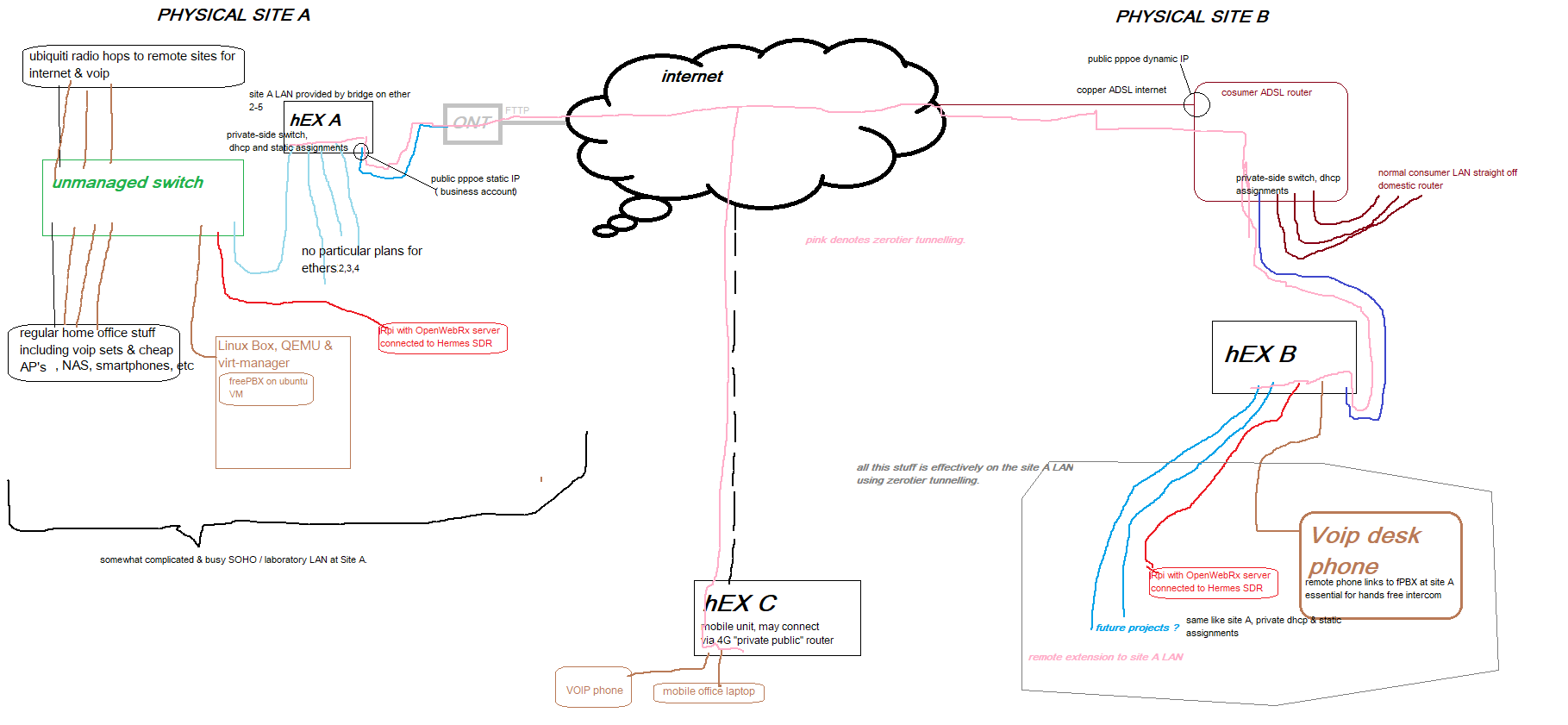
it got a bit more complex than MS Paint could handle really. sorry.
NB the third hex, hEX C is very much the final solution, not concerned with that at the moment.
Interesting, the only comment is I would replace the unmanaged with a managed switch. Good luck seems like a fun project!
Thx
what specifically might a managed switch bring to the party?
Did you, at any point, try to set static IP address on ether1 of "B" unit and see if the rest of traffic somehow manages to pass that port? I'm pretty sure there's a hardware problem which would likely show also for "normal" traffic, not only for DHCP packets ... but it would be interesting to find out that this is not the case 
I am assuming @anav interpreted the different colors as separate vlans.
If you have everything on the LAN side in one subnet and broadcast domain, then you don't need a managed switch. If you are using vlans and you want to treat some ports of the switch as access ports for different vlans, you will need a managed switch (i.e. a switch that is vlan-aware and can be configured)
Good point. cant remember, dont have it noted.
what DID work, as I remember, is that both of my A and B units would hook up successfully with the zerotier cloud service, and for both I was using ether1 to connect to internet. That probably does not truly equate to "passing traffic on ether1" though.
the unit is packaged up now awaiting RMA details. Vendor support dialed in last night & agreed faulty.
OK, that wasnt actually my intention.
I have messed around with VLAN's but probably don't really understand what the realworld benefits might be. I feel that WISPs run each subscriber on their own VLAN (?)
and quite what the mechanism of a VLAN is I am not sure but seems to be simply to do with tagging packets with an auxiliary VLAN flag somwhere in the payload, which may be different depending upon whose proprietaty VLAN hardware one is using.
and then it follows that if you want to get around any security inherent in a VLAN then you just replace the VLAN switch with a cheap switch that passes everything.
clearly I have wrong end of stick.
Am I missing something?
"disabled=yes" will prevent it getting an IP via DHCP here.
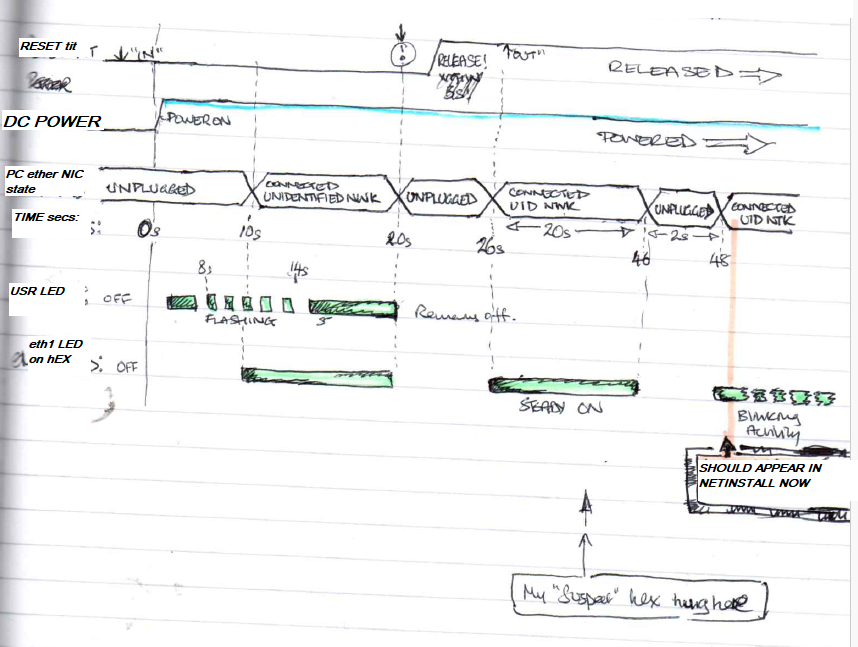
apologies, I think that config was taken at the wrong moment. since posting that I spent quite a few hours and established that the unadulterated default config out-of-the-box produced different behaviours on otherwise identical hardwares. likewise, netinstall wouldnt work on the suspect unit.
Probably that config (confusingly) reflected a moment when I had purposefully disabled the dhcp client on that interface for some testing reason.
Been there lots of times.
well curiosity got the better of me so I opened the RMA package up and checked.
the disabled=yes setting is NOT there.
This is basically the defconfig with a dhcp client applied to the default Bridge interface purely for testing purpose.
# 2025-09-28 09:35:58 by RouterOS 7.20
# software id = J95K-PZ6W
#
# model = E50UG
# serial number = xxx
/interface bridge
add admin-mac=F4:1E:57:7A:E6:73 auto-mac=no comment=defconf name=bridge
/interface list
add comment=defconf name=WAN
add comment=defconf name=LAN
/ip pool
add name=default-dhcp ranges=192.168.88.10-192.168.88.254
/disk settings
set auto-media-interface=bridge auto-media-sharing=yes auto-smb-sharing=yes
/interface bridge port
add bridge=bridge comment=defconf interface=ether2
add bridge=bridge comment=defconf interface=ether3
add bridge=bridge comment=defconf interface=ether4
add bridge=bridge comment=defconf interface=ether5
/ip neighbor discovery-settings
set discover-interface-list=LAN
/interface list member
add comment=defconf interface=bridge list=LAN
add comment=defconf interface=ether1 list=WAN
/interface ovpn-server server
add mac-address=FE:09:20:AF:57:DB name=ovpn-server1
/ip address
add address=192.168.88.1/24 comment=defconf interface=bridge network=\
    192.168.88.0
/ip dhcp-client
# Interface not active
add comment=defconf interface=ether1
add interface=bridge
/ip dhcp-server
add address-pool=default-dhcp interface=bridge name=defconf
/ip dhcp-server network
add address=192.168.88.0/24 comment=defconf dns-server=192.168.88.1 gateway=\
    192.168.88.1
/ip dns
set allow-remote-requests=yes
/ip dns static
add address=192.168.88.1 comment=defconf name=router.lan type=A
/ip firewall filter
add action=accept chain=input comment=\
    "defconf: accept established,related,untracked" connection-state=\
    established,related,untracked
add action=drop chain=input comment="defconf: drop invalid" connection-state=\
    invalid
add action=accept chain=input comment="defconf: accept ICMP" protocol=icmp
add action=accept chain=input comment=\
    "defconf: accept to local loopback (for CAPsMAN)" dst-address=127.0.0.1
add action=drop chain=input comment="defconf: drop all not coming from LAN" \
    in-interface-list=!LAN
add action=accept chain=forward comment="defconf: accept in ipsec policy" \
    ipsec-policy=in,ipsec
add action=accept chain=forward comment="defconf: accept out ipsec policy" \
    ipsec-policy=out,ipsec
add action=fasttrack-connection chain=forward comment="defconf: fasttrack" \
    connection-state=established,related hw-offload=yes
add action=accept chain=forward comment=\
    "defconf: accept established,related, untracked" connection-state=\
    established,related,untracked
add action=drop chain=forward comment="defconf: drop invalid" \
    connection-state=invalid
add action=drop chain=forward comment=\
    "defconf: drop all from WAN not DSTNATed" connection-nat-state=!dstnat \
    connection-state=new in-interface-list=WAN
/ip firewall nat
add action=masquerade chain=srcnat comment="defconf: masquerade" \
    ipsec-policy=out,none out-interface-list=WAN
/ip ipsec profile
set [ find default=yes ] dpd-interval=2m dpd-maximum-failures=5
/ipv6 firewall address-list
add address=::/128 comment="defconf: unspecified address" list=bad_ipv6
add address=::1/128 comment="defconf: lo" list=bad_ipv6
add address=fec0::/10 comment="defconf: site-local" list=bad_ipv6
add address=::ffff:0.0.0.0/96 comment="defconf: ipv4-mapped" list=bad_ipv6
add address=::/96 comment="defconf: ipv4 compat" list=bad_ipv6
add address=100::/64 comment="defconf: discard only " list=bad_ipv6
add address=2001:db8::/32 comment="defconf: documentation" list=bad_ipv6
add address=2001:10::/28 comment="defconf: ORCHID" list=bad_ipv6
add address=3ffe::/16 comment="defconf: 6bone" list=bad_ipv6
/ipv6 firewall filter
add action=accept chain=input comment=\
    "defconf: accept established,related,untracked" connection-state=\
    established,related,untracked
add action=drop chain=input comment="defconf: drop invalid" connection-state=\
    invalid
add action=accept chain=input comment="defconf: accept ICMPv6" protocol=\
    icmpv6
add action=accept chain=input comment="defconf: accept UDP traceroute" \
    dst-port=33434-33534 protocol=udp
add action=accept chain=input comment=\
    "defconf: accept DHCPv6-Client prefix delegation." dst-port=546 protocol=\
    udp src-address=fe80::/10
add action=accept chain=input comment="defconf: accept IKE" dst-port=500,4500 \
    protocol=udp
add action=accept chain=input comment="defconf: accept ipsec AH" protocol=\
    ipsec-ah
add action=accept chain=input comment="defconf: accept ipsec ESP" protocol=\
    ipsec-esp
add action=accept chain=input comment=\
    "defconf: accept all that matches ipsec policy" ipsec-policy=in,ipsec
add action=drop chain=input comment=\
    "defconf: drop everything else not coming from LAN" in-interface-list=\
    !LAN
add action=fasttrack-connection chain=forward comment="defconf: fasttrack6" \
    connection-state=established,related
add action=accept chain=forward comment=\
    "defconf: accept established,related,untracked" connection-state=\
    established,related,untracked
add action=drop chain=forward comment="defconf: drop invalid" \
    connection-state=invalid
add action=drop chain=forward comment=\
    "defconf: drop packets with bad src ipv6" src-address-list=bad_ipv6
add action=drop chain=forward comment=\
    "defconf: drop packets with bad dst ipv6" dst-address-list=bad_ipv6
add action=drop chain=forward comment="defconf: rfc4890 drop hop-limit=1" \
    hop-limit=equal:1 protocol=icmpv6
add action=accept chain=forward comment="defconf: accept ICMPv6" protocol=\
    icmpv6
add action=accept chain=forward comment="defconf: accept HIP" protocol=139
add action=accept chain=forward comment="defconf: accept IKE" dst-port=\
    500,4500 protocol=udp
add action=accept chain=forward comment="defconf: accept ipsec AH" protocol=\
    ipsec-ah
add action=accept chain=forward comment="defconf: accept ipsec ESP" protocol=\
    ipsec-esp
add action=accept chain=forward comment=\
    "defconf: accept all that matches ipsec policy" ipsec-policy=in,ipsec
add action=drop chain=forward comment=\
    "defconf: drop everything else not coming from LAN" in-interface-list=\
    !LAN
/system routerboard settings
set auto-upgrade=yes
/tool mac-server
set allowed-interface-list=LAN
/tool mac-server mac-winbox
set allowed-interface-list=LAN
I wouldn't add interface=bridge to "/ip dhcp-client"
Were you able to reset to default config?
Okay, so lets treat the switch as a switch............
/interface bridge
add admin-mac=01:23:45:67:89:00 auto-mac=no comment=defconf name=bridge
/interface list
add name=LAN
/port
set 0 name=serial0
/interface bridge port
add bridge=bridge comment=defconf interface=ether1
add bridge=bridge comment=defconf interface=ether2
add bridge=bridge comment=defconf interface=ether3
add bridge=bridge comment=defconf interface=ether4
add bridge=bridge comment=defconf interface=ether5
/interface list member
add interface=bridge list=LAN
/ip dhcp-client
add interface=bridge disabled=yes
/ip address
add address=192.168.50.5/24 interface=bridge network=192.168.50.0
/ip neighbor discovery-settings
set discover-interface-list=LAN
/ip dns
set server=192.168.50.1   {optional}
/ip route
add dst-address=0.0.0.0/0 gateway=192.168.50.1  routing-table=main {optional}
/system clock
set time-zone-name=America/New_York
/tool mac-server
set allowed-interface-list=none
/tool mac-server mac-winbox
set allowed-interface-list=LAN
yes, could reset to default config.
what do you mean?
I get that it’s not a great idea for anything else, but at the time I was trying to work out why ether1 wouldnt get a dhcp assignment, so I was just trying to see if the dhcp client would work anywhere
Be aware that if you put a dhcp client on a bridge interface or a vlan interace under the bridge, the interface will always be “up”. The practical implication of this is that the router won’t see the interface go down. So the router won’t initiate a dchp renew when the link of a bridge member is toggled. In other words, it behaves like putting a switch between the interface and the dhcp server. This isn’t usually a problem, but it you are in a lab situation, and assume that pulling the enternet cable going to switch-port and plug it into a different dhcp server will cause the router to obtain a new address, you may be surprised when the router keeps its original address (at least until the lease is renewed, or you initiate a renew from the router e.g. on ether1 the following will renew (look at print detail to see the remaining release time before and after the renew)
ip dhcp-client print detail
ip dhcp-client renew ether1
ip dhcp-client print detail
Finally achieved this using OpenVPN. seems like ZeroTier probably won’t be able to offer Layer-2-connection emulation which is what I was shooting for.
so far I have implemented OpenVPN client/server to provide what appears to be effectively a layer 2 link between Site B and Site A. quite cool, but not sure how much practical value it is.
good for my imediate objective which was to have a remote extension to my workbench where gadgets can be plugged in by non-technical personnell, appear in my DHCP lease table, then I can “take it from there”.