dhcp-relay on one interface only

I have a Mikrotik hAP ac^2 (192.168.88.1) connected to an internet router (192.168.3.1)
In the factory default configuration, devices connected to any mikrotik interface get an 192.168.88.xxx IP, they have internet access and can ping any device on either 192.168.88.0 or 192.168.3.0 network.

I want to setup ether3 so that it has internet access but gets DHCP from internet router so devices will be accessible from 192.168.3.0 network (I don’t care if they are also accessible from 192.168.88.0 network)
I created a new bridge1 and changed ether3 from bridge to bridge1, then added dhcp-relay1 on bridge1.
I do get a 192.168.3.xxx IP but no internet and no ping in either direction.
I reverted to default configuration (I think) and attach the export file.
Any pointers or help is appreciated.

P.S.
also how to enable mikrotik interface not only from 192.168.88.1 but from it’s other IP (192.168.3.xxx) also?
help.rsc (6.56 KB)

There is no need of a second bridge, as a matter of fact it is usually advised to have a single bridge, you can take ether3 interface out of bridge “bridge” and use it “self-standing”, without adding a bridge.

What probably caused the no ping and no internet is the firewall, it is based on interface lists, you have (default, correct) two lists for LAN and WAN:

/interface list
add comment=defconf name=WAN
add comment=defconf name=LAN

Then, you have only two interfaces as list members (default, correct):

/interface list member
add comment=defconf interface=bridge list=LAN
add comment=defconf interface=ether1 list=WAN

You should add the ether3 removed form bridge and added to list LAN, i.e. have this:

/interface bridge port
add bridge=bridge comment=defconf interface=ether2
add bridge=bridge comment=defconf interface=ether3
add bridge=bridge comment=defconf interface=ether4
add bridge=bridge comment=defconf interface=ether5
add bridge=bridge comment=defconf interface=wlan1
add bridge=bridge comment=defconf interface=wlan2

/interface list member
add comment=defconf interface=bridge list=LAN
add comment=defconf interface=ether1 list=WAN
add comment=myconf interface=ether3 list=LAN

The re-add the dhcp-relay on ether3.


I am not sure to understand the question.
Right now you have a dhcp server on bridge “bridge” serving addresses in the range 192.168.88.10-192.168.88.254 on a network 192.168.88.0/24:

/ip pool
add name=default-dhcp ranges=192.168.88.10-192.168.88.254
/ip dhcp-server
add address-pool=default-dhcp interface=bridge name=defconf
/ip dhcp-server network
add address=192.168.88.0/24 comment=defconf dns-server=192.168.88.1 gateway=
192.168.88.1

And a static address on it of 192.168.88.1:

/ip address
add address=192.168.88.1/24 comment=defconf interface=bridge network=
192.168.88.0

These are the defaults, devices with dhcp client enabled connected to any port of the bridge will get an address in this range/network.
What do you want instead (or in addition)?

Thank you jaclaz for the help.
I did as you suggested but it still doesn’t work.
DHCP relay reports an error:

/ip dhcp-relay
# No IP address on interface
add dhcp-server=192.168.3.1 disabled=no interface=ether3 name=relay1

As for my second question, I phrased it wrong, what I meant to say was:

how to access mikrotik configuration webpage not only at 192.168.88.1 but also at it’s other IP (192.168.3.165)?

Correction, the page at 192.168.3.165 is served to a pc connected to mikrotik (on ether2 with IP 192.168.88.251) but not to a pc connected directly to the 192.168.3.0 network.
I can ping 192.168.3.165 from both networks.
help1.rsc (6.67 KB)

The error message should be telling what the issue is:

No IP address on interface

Try adding a static IP address to the ether3 interface, in the same range as the “parent” DHCP server, i.e. 192.168.3.0/24 but outside of its pool (usually a DHCP server excludes a number of addresses besides its own from the range leased). Let’s say you have 192.168.3.2 free:

/ip address
add address=192.168.3.2/24 comment=myconf interface=ether3

BEFORE doing the above, check your current routes:

/ip route print

then add the address and check the routes again, there should be an added dynamic rule (DAC) for the 192.168.3.0/24 network

Alternatively you can try adding a dhcp client to ether3, i.e.:

/ip dhcp-client
add comment=myconf interface=ether3

About the:

I can ping 192.168.3.165 from both networks.

try instead of ping a traceroute and see which (different) intermediate hops you have in the one and the other case.

Unfortunately neither method worked.
Tried the first one, but PC connected to ether3 didn’t get an IP

/ip address add address=192.168.3.5/24 comment=myconf interface=ether3
/ip route print
      DST-ADDRESS      GATEWAY      DISTANCE
DAd+ 0.0.0.0/0        192.168.3.1         1
DAc+ 192.168.3.0/24   ether1              0
DAc+ 192.168.3.0/24   ether3              0
DAc  192.168.88.0/24  bridge              0

The second method (dhcp client instead of hardcoded ip)

/ip dhcp-client add comment=myconf interface=ether3

results in perpetual “searching…” in Status column of ether3 interface (in WinBox DHCP Client page)

Trace route result from both networks is the same:

tracert 192.168.3.165
Tracing route to 192.168.3.165 over a maximum of 30 hops
  1     1 ms    <1 ms    <1 ms  192.168.3.165
Trace complete.

Hmmm, I see. :frowning:
In hindsight it is obvious :blush: , my bad, ether3 is not “connected” to anything, and when you add an address to it, a new route is created that goes in ECMP with the one already created by the connection on ether1, so it is essentially mixing up LAN with WAN.

Maybe making the ether1 a /30 would solve the conflict, but I would have to try it, I am not sure at all it can work this way.

But do you need the 192.168.88.0/24 network?

The simplest way out would be to simply change the Mikrotik DHCP server on bridge (or on ether3) to a subset of 192.168.3.0/24 and limit the router DHCP to the rest, i.e. loosely:

     /ip pool
    add name=my-dhcp ranges=192.168.3.10-192.168.3.254
    /ip dhcp-server
    add address-pool=my-dhcp interface=bridge name=myconf
    /ip dhcp-server network
    add address=192.168.3.0/24 comment=myconf dns-server=192.168.3.2 gateway=\
    192.168.3.1 
    /ip address
    add address=192.168.3.2/24 comment=myconf interface=bridge network=\
    192.168.3.0

But still you would have LAN and WAN on the same network, and it won’t be a router anymore :open_mouth:

So, no, don’t do it..

You could probably get away introducing a VRF, but maybe it is better to take a step back and understand why you want LAN devices on the same subnet as the modem/router if you put the Mikrotik in the middle.

OK, first of all thanks for your help and for your time.
I need this kind of topology because (1) I have some “remote” IoT sensors which will be connected to the Mikrotik and I want bidirectional access to them from PCs on the “main” network (192.168.3.0).
Additionally (2), on one of the Mikrotic interfaces (most probably WiFi) I need access to the internet for a PC which should be completely isolated from other devices on both 192.168.3.0 and 192.168.88.0 nets.
(3) I also want to be able to configure the mikrotik from a PC on the 192.168.3.0 network.
That’s basically it. I know the Mikrotik is probably overkill but I wanted to leave room for future ideas/uses.
I was expecting (1) and (3) to be moderately easy and (2) to be the hard one with VLANS, firewall rules and such…

But then, you have a switch connected to ether3 ( in order to connect more than one device to it)?

And on the “other” side (WAN, ether1) you have only the modem/router?

I am struggling to understand if the Mikrotik role should be that of a router or that of a switch ( or maybe a mix of the two)?

If the latter, than It could be a case where a second bridge (with ether1 and ether3 in it), let’s call It a WAN bridge Is needed.
But then It should be a “dumb” switch within the device, something like:
http://forum.mikrotik.com/t/switch-bridge-on-wan-side/153331/1
but then you won’t need a DHCP relay as the modem/router DHCP server will be reachable directly.

No, another switch is not needed in my case, ether3 was just a test, I would apply the same settings on ether4 and wlan1, to cover all my devices (most are wifi 2.4 GHz).
I also think that maybe a mix switch/router is what I need, but my expertise is hardware (electronic circuits) so I need to do some serious studying on networks to complete this task.
BTW I found out why I was able to ping the Mikrotik from 192.168.3.0 but didn’t get the webpage, It was the “defconf: drop all not coming from LAN” firewall filter, disabled it and I can now configure it from 192.168.3.0
Anyway I’ll try out some stuff in the following days and come back with specific questions.
Thanks again

Yes, but it is not clear (to me) if the Mikrotik needs to have some role as a router, and if yes, if it is also needed as firewall, you shouldn’t remove or disable any rule in the default firewall set unless it is not needed at all as a firewall.

Once you have a more detailed plan, can you provide a sketch of your network topology? Even without losing time drawing it in a program,a photo of a hand drawn sketch would do.

There is this thread here that seems very similar to your intended setup:
http://forum.mikrotik.com/t/mikrotik-as-secondary-router-one-lan-port-bridged-to-wan/176360/1
but the proposed solution has not been tested (and it uses VLANs[1]) and it should anyway be modified because of the switch chip of your device.

Using two bridges. let’s say bridgeLan with in it ether2,4,5 and bridgeWLAN with inside it ether1 and ether3 should work, but it is probably “wrong”.


[1] Whhhosh! (that is the noise of the VLANs going way over my head)

Ok, so I managed to get the setup suggested by anav :slight_smile: on the other thread working (on a CHR in GNS3), there were a couple typos and a missing setting (the vlan filtering enabled on the bridge, obvious, but it took me a lot of time to find it :blush: ), and it is now adapted to the present thread addresses.

There are two VLANs, one is ISP-LAN, vlan 3, for the “WAN” (when seen from the AC2), addresses 192.168.3.0/24, using the DHCP server on the ISP router at 192.168.3.1.
The other is AC2-LAN, vlan 88 for the LAN, addresses 192.168.88.1/24, using the default Mikrotik DHCP server.
Ether5 has been taken out of the bridge and marked as LAN to allow Winbox MAC address in case of locking oneself out (in CHR in GNS3 there is no such issue, but in the real world it is easy enough to get locked out, partiuclarly when fiddling with VLANs).
Ether1 is connected to the ISP router.
A device with a DHCP client connected to ether3 will get an IP address directly from the ISP router DHCP server, no relay.
Ether2 and ether4 are the LAN and a device with a DHCP client connected to either of them will get an IP address form the Mikrotik DHCP server.
In this base config there are no wlan1 and wlan2 as they do not exist in CHR.
It remains to be seen how this basic setup needs to be modified to use /interface ethernet switch settings (that are not in CHR) to be better on an AC2, or other Atheros 8327 device, as suggested by CGGXANNX.

I am attaching the “full” .rsc, but here are the most relevant parts:

/interface bridge
add comment=defconf name=bridge protocol-mode=stp vlan-filtering=yes

/interface vlan
add comment=myconf interface=bridge name=AC2-LAN vlan-id=88
add comment=myconf interface=bridge name=ISP-LAN vlan-id=3

/interface list
add comment=defconf name=WAN
add comment=defconf name=LAN

/ip pool
add name=default-dhcp ranges=192.168.88.10-192.168.88.254

/ip dhcp-server
add address-pool=default-dhcp interface=AC2-LAN name=defconf

/interface bridge port
add bridge=bridge interface=ether2 pvid=88
add bridge=bridge frame-types=admit-only-untagged-and-priority-tagged interface=ether3 pvid=3
add bridge=bridge frame-types=admit-only-untagged-and-priority-tagged interface=ether4 pvid=88
add bridge=bridge interface=ether1 pvid=3

/interface bridge vlan
add bridge=bridge tagged=bridge untagged=ether1,ether3 vlan-ids=3
add bridge=bridge tagged=bridge untagged=ether2,ether4 vlan-ids=88

/interface list member
add comment=myconf interface=ISP-LAN list=WAN
add comment=myconf interface=AC2-LAN list=LAN
add comment=myconf interface=ether5 list=LAN

/ip address
add address=192.168.88.1/24 comment=myconf interface=AC2-LAN network=192.168.88.0

/ip dhcp-client
add comment=myconf interface=ISP-LAN

/ip dhcp-server network
add address=192.168.88.0/24 comment=defconf dns-server=192.168.88.1 gateway=192.168.88.1

vlandhcp.rsc (3.68 KB)

First of all I am terribly sorry jaclaz :blush: I didn’t respond earlier.
When I realized this is a daunting task, I put it on the back burner and got busy with other stuff.
I didn’t check the thread, and I guess the forum doesn’t send email notifications on new posts or they went to spam.
Anyway think you are right to suggest that my situation is similar to that of viewtopic.php?t=208072
Here’s a rough topology
Capture.PNG
The basic idea is that the MikroTik AC2 will connect to the internet through the ZTE F670L and allow devices to connect to it’s network (192.168.88.0/24) (default functionality) as well as allow connection to 192.168.1.0/24 devices.
Most of my IoT devices do not require internet connection but some of them do, ideally IoT devices should belong to their own VLAN, although a couple (e.g. 192.168.1.60) are connected to the ISP router so I guess they can’t be on a VLAN created on MicroTik.
In ZTE ZXHN F670L there is “Static Routing” and “Policy Routing” sections under “Routing”, “IP4” but I don’t know what settings would allow the device with blue WiFi icon (currently 192.168.1.60) to connect to the IoT VLAN. Anyway that is something to tackle after everything else works.
So I started reading up on your posts and those of the other thread and I might even try some of those things tomorrow.
Thanks again.

Since you changed the network 192.168.3.x (which in the example was connected to VLAN 3) DO NOT be tempted, now that you have 192.168.1.x to use VLAN 1 (use any other number BUT 1), in case of doubt, check the first few Rules of the Mikrotik Club :wink: :
http://forum.mikrotik.com/t/the-twelve-rules-of-mikrotik-club/182164/1

I will stick to 192.168.3.0/24 for all tests (I currently have 2 ISP networks, but I will be keeping one of them).
I’ve tried some things per your suggestions and here are my observations:
The following were executed from a PC on ether5 port of AC2 (using Winbox of course).

/interface vlan
add comment=myconf interface=bridge name=AC2-LAN vlan-id=88
add comment=myconf interface=bridge name=ISP-LAN vlan-id=3

/ip dhcp-server add address-pool=default-dhcp interface=AC2-LAN name=myconf

that last command resulted in: “No IP address on interface” so I added

/ip address add address=192.168.3.7/24 comment=myconf interface=AC2-LAN

/interface bridge port print
Flags: I - INACTIVE; H - HW-OFFLOAD
Columns: INTERFACE, BRIDGE, HW, PVID, PRIORITY, HORIZON
#    INTERFACE  BRIDGE  HW   PVID  PRIORITY  HORIZON
;;; defconf
0 IH ether2     bridge  yes     1  0x80      none   
;;; defconf
1 IH ether4     bridge  yes     1  0x80      none   
;;; defconf
2  H ether5     bridge  yes     1  0x80      none   
;;; defconf
3    wlan1      bridge          1  0x80      none   
;;; defconf
4 I  wlan2      bridge          1  0x80      none   
;;; defconf
5 IH ether3     bridge  yes     1  0x80      none   

/interface bridge port set [find interface=ether2] pvid=88 comment=myconf
/interface bridge port set [find interface=ether3] frame-types=admit-only-untagged-and-priority-tagged pvid=3 comment=myconf
/interface bridge port set [find interface=ether4] frame-types=admit-only-untagged-and-priority-tagged pvid=88 comment=myconf

after this all ports (ether2, ether3, ether4, ether5) did have internet and the IP from any port was 192.168.88.254 no matter which VLAN they “belong” to.

/interface bridge port add bridge=bridge interface=ether1 pvid=3 comment=myconf

after this all ports (ether2, ether3, ether4, ether5) did have internet but the IP from any port was 192.168.3.79 (IPs tested after ipconfig /release, /renew)

/interface bridge port print
Flags: I - INACTIVE; H - HW-OFFLOAD
Columns: INTERFACE, BRIDGE, HW, PVID, PRIORITY, HORIZON
#    INTERFACE  BRIDGE  HW   PVID  PRIORITY  HORIZON
;;; myconf
0 IH ether2     bridge  yes    88  0x80      none   
;;; myconf
1 IH ether4     bridge  yes    88  0x80      none   
;;; defconf
2  H ether5     bridge  yes     1  0x80      none   
;;; defconf
3    wlan1      bridge          1  0x80      none   
;;; defconf
4 I  wlan2      bridge          1  0x80      none   
;;; myconf
5 IH ether3     bridge  yes     3  0x80      none   
;;; myconf
6  H ether1     bridge  yes     3  0x80      none

MikroTik was power cycled resulting in:
ether2(vlan 88): IP is 192.168.88.250, can’t ping any 192.168.3.x device except 192.168.3.7 (AC2-LAN) and 192.168.3.165 (ether1)
ether3(vlan 3) : IP is 192.168.3.79, can’t ping any 192.168.88.x device and 192.168.88.252 (wlan2) can’t ping any 192.168.3.x device except 192.168.3.7 (AC2-LAN) and 192.168.3.165 (ether1)
ether4(vlan 88): same IP and behavior as ether3! (shouldn’t this be getting 192.168.88.x IP from VLAN 88 like ether2?)
ether5(vlan 1) : same IP and behavior as ether3!
I forgot to check internet connectivity though
Re-testing
ether2(vlan 88): No internet, IP is 192.168.88.250, same as before.
ether3(vlan 3) : No internet, IP is 192.168.88.250, flipped !
ether4(vlan 88): internet OK, IP is 192.168.3.79, flipped !
ether5(vlan 1) : No internet, IP is 192.168.88.250, flipped !
It seems no matter to which port the PC is connected, it gets an IP from the ISP or from AC2 network randomly!
If IP belongs to the ISP network it has internet, otherwise it doesn’t.

/interface bridge port add bridge=bridge interface=ether1 pvid=3 comment=myconf

If this is disabled or deleted, all ports get internet no matter in which random network they get assigned to.
Also after disabling, PCs on either network can ping the other network.
I am thoroughly confused.

/interface bridge port print
Flags: X - DISABLED, I - INACTIVE; H - HW-OFFLOAD
Columns: INTERFACE, BRIDGE, HW, PVID, PRIORITY, HORIZON
#    INTERFACE  BRIDGE  HW   PVID  PRIORITY  HORIZON
;;; myconf
0 IH ether2     bridge  yes    88  0x80      none   
;;; myconf
1 IH ether4     bridge  yes    88  0x80      none   
;;; defconf
2  H ether5     bridge  yes     1  0x80      none   
;;; defconf
3    wlan1      bridge          1  0x80      none   
;;; defconf
4 I  wlan2      bridge          1  0x80      none   
;;; myconf
5 IH ether3     bridge  yes     3  0x80      none   
;;; myconf
6 X  ether1     bridge          3  0x80      none

I didn’t try anything else because I don’t understand what’s going on.

Post your whole export, there may be something else somewhere else interfering.
Your settings (minus wlans) should be substantially identical to the .rsc I posted.

There are many differences.
I didn’t do all of your suggestions because I got confused and stopped.
It may of course be the case that all changes have to be applied first for it to work, but when you haven’t done something before you are reluctant to venture off.
help3.rsc (7.58 KB)

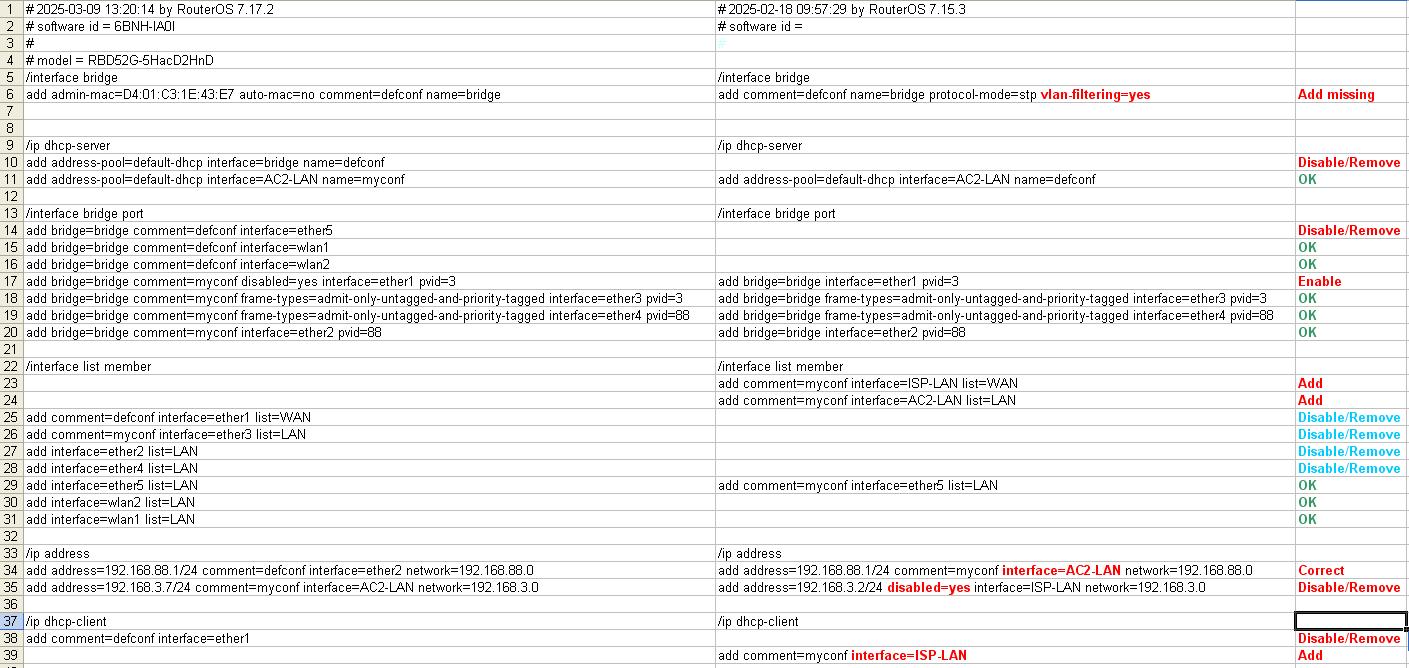
Yep, I understand :slight_smile: but a Mikrotik configuration, generally and a VLAN based one more specifically, depends on a zillion settings spread around as if they were shot by a shotgun, you cannot expect anything to partially work with partial settings.

See the attached, in RED are the differences that must be corrected to have the config (hopefully) working, the GREEN OK ones are OK, in LIGHT BLUE things that should be corrected but that shouldn’t matter, can be cleaned later.
vlan_diff.JPG

jaclaz thanks a lot for your detailed instructions, much appreciated.
I applied all including the blue ones.
Now the situation is this:
WinBox can’t connect on ether5 unless via IP6 fe80::d601:c3ff:fe1e:43e7%8
PC at ether5 gets no IP (IP4 is 169.254.74.6 and has no internet)
PC at at ether4 gets IP 192.168.88.250, it has internet access and can ping both networks.
PC at at ether3 gets IP 192.168.3.79, it has internet access but can’t ping AC2 network
PC at at ether2 gets IP 192.168.88.250, it has internet access and can ping both networks.
Can’t connect to either wifi (2.4 or 5.0) (no IP obtained), for the same reasons as ether5 I guess, although all 3 belong to LAN interface list.
At least the assigned IPs make sense now!
help4.rsc (7.73 KB)

Yes, it seems fine (in the sense that it does what it should do).

Ether 1 is WAN, ok, and on VLAN3, so it is connected to ISP-LAN.
Ether2 and ether4 are LAN, ok, (because they “belong” to AC2-LAN) and VLAN 88 and PC connected to them get an IP from the Mikrotik internal DHCP server 192.168.88.x, which is running on interface AC2-LAN (which is the VLAN interface on bridge with VLAN 88).
Ether 3 is WAN, ok, (because it “belongs” to ISP-LAN) and VLAN3, and PC connected to it gets an IP from the ISP router DHCP server 192.168.3.x, which arrives through interface ISP-LAN
Ether5 is LAN, ok, (directly in /interface list member) and that’s it, if you connect to it with winbox (via MAC Address) you should be able to manage the router. It doesn’t provide an IP because there is nothing running on it providing one and it is not a member of either VLAN3 or VLAN88 (or - it is the same - not of either ISP-LAN or AC2-LAN). Check that even as is it works for accessing the router and - for the moment - leave it as is, it is your emergency access should something go wrong when further fiddling with VLANs.

Wifi interfaces are currently in the same situation as ether5:
Wlan1 and wlan2 are LAN, ok, (directly in /interface list member) and that’s it.

Now you have to add them to either the VLAN3 or the VLAN88 (I believe you want to have them on VLAN88 aka AC2-LAN).

Check the settings you have relative to ether2 and 4 (that are already VLAN88/AC2-LAN), and do the same for wlan1 and wlan2, i.e.:
/interface bridge port
add bridge=bridge comment=myconf interface=wlan1 pvid=88
add bridge=bridge comment=myconf interface=wlan2 pvid=88

/interface list member
add disabled=yes interface=wlan2 list=LAN
add disabled=yesinterface=wlan1 list=LAN

Wifi connected devices should start getting an IP in the 192.168.88.x range, coming from the Mikrotik DHCP server.

The question (to which I have no answer :confused: ) is whether these two ports (and eher2) should have “frame-types=admit-only-untagged-and-priority-tagged” (like ether4 currently has) or not.