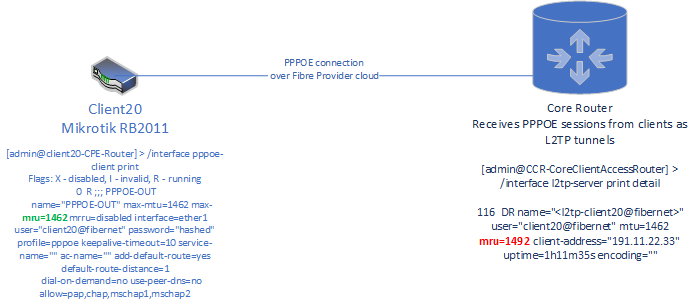
The setup is very unusual. If the client is a PPPoE one whilst the server is an L2TP one, and the fibre provider has no knowledge of usernames and passwords, it means they forward the PPP traffic between the PPPoE session terminated at their RAS and the L2TP session they open as clients towards your L2TP server. Since this is some proprietary implementation, anything may happen during this process, and some information may be lost. On the other hand, since the MTU at client side is 1462, you should never receive a larger payload packet than that from the client, even though the server shows a MRU of 1492.
Plus it may as well be a RouterOS bug. I’d have to see a sniff of the actual LCP exchange.
Other than that, the mangle rule you use to “fix MTU” doesn’t actually fix MTU but adjusts TCP MSS to be in accord with the available MTU.
I have in one of my places a provider that uses MikroTik gear, auto mtu/mru for PPPoE never worked right on that one.
I thought it’s something on my end, but I’ve tried replicating the setup, (configuring a pppoe server on another Tik) but I never got the two devices to auto negotiate the proper mtu/mru.
For example, with that MikroTik gear ISP (me as a client) if I increase the ethernet interface MTU with 12 bytes over the 8 required by RFC4638, so having Ethernet MTU set to 1520 for all of it to auto magically work (yes, MikroTik requires 12 magic padding bytes), MRU on my end negotiated to 1500, while MTU was stuck on 1480 (hardcoded on the ISPs end) but MRU of 1500 on my end is broken, as in, it doesn’t work, it’s also limited to 1480 (tested) => somehow the auto negotiation is broken.
On other providers the MTU/MRU negotiation runs ok, as in even with Ethernet MTU set to 1520, the MikroTik client auto sets MTU and MRU to 1492, which the ISP supports (when rfc4638 is not enabled).
So this must be some sort of bug on MikroTik PPPoE server, or some config I’ve missed (and that ISP).
I’ve tried reporting the 12 bytes padding issue, no dice, they don’t care. “set the proper value manually”.
I doubt they will take a look on this issue too.
LE: edited 1420 → 1520, donno how I wrote it badly, TWICE.