Hi everybody,
I’ve several VLAN. All is ok, only the speed among themselves isn’t good!
e.g.
VLAN 10 <> VLAN 10 = ~115Mbit/s
VLAN 10 <> VLAN 30 = ~35Mbit/s
What is here wrong
Hi everybody,
I’ve several VLAN. All is ok, only the speed among themselves isn’t good!
e.g.
VLAN 10 <> VLAN 10 = ~115Mbit/s
VLAN 10 <> VLAN 30 = ~35Mbit/s
What is here wrong
That is almost no information.
But still, VLAN10<>VLAN 10 is switching, vLAN10<>VLAN30 is routing (different subnets) in most cases (depends on your config, but that is not known here)
Switching may happen in the switch chip, routing is always over the CPU (and in many cases uses the Firewall as well), but again depends on your config.
/export hide-sensitive file=anynameyouwish
Yes, OK it was a minimal info. Sorry
here is my config …
# nov/09/2020 06:23:48 by RouterOS 6.47.7
# software id = UJP9-7QYV
#
# model = RouterBOARD 3011UiAS
# serial number = XXXXXXXXXXXX
/caps-man channel
add band=2ghz-g/n control-channel-width=20mhz frequency=2412 name=channel_01 \
    tx-power=-3
add band=2ghz-g/n control-channel-width=20mhz frequency=2437 name=channel_06 \
    tx-power=-3
add band=2ghz-g/n control-channel-width=20mhz frequency=2462 name=channel_11 \
    tx-power=-3
add band=5ghz-n/ac control-channel-width=20mhz frequency=5180 name=channel_36 \
    tx-power=-2
add band=5ghz-n/ac control-channel-width=20mhz frequency=5220 name=channel_44 \
    tx-power=-2
add band=5ghz-n/ac control-channel-width=20mhz frequency=5260 name=channel_52 \
    tx-power=-2
/interface bridge
add admin-mac=6C:3B:6B:37:FC:FC auto-mac=no name=Bridge-VLAN vlan-filtering=\
    yes
/interface ethernet
set [ find default-name=ether1 ] name=eth-01_WAN
set [ find default-name=ether2 ] name=eth-02_Bonding-1_Slave
set [ find default-name=ether3 ] name=eth-03_Bonding-1_Slave
set [ find default-name=ether4 ] name=eth-04_
set [ find default-name=ether5 ] name=eth-05_
set [ find default-name=ether6 ] name=eth-06_
set [ find default-name=ether7 ] name=eth-07_
set [ find default-name=ether8 ] name=eth-08_
set [ find default-name=ether9 ] name=eth-09_
set [ find default-name=ether10 ] name=eth-10_
/interface vlan
add interface=Bridge-VLAN name=vlan-10 vlan-id=10
add interface=Bridge-VLAN name=vlan-20 vlan-id=20
add interface=Bridge-VLAN name=vlan-30 vlan-id=30
add interface=Bridge-VLAN name=vlan-60 vlan-id=60
add interface=Bridge-VLAN name=vlan-99 vlan-id=99
/interface bonding
add mode=802.3ad name=Bonding-1 slaves=\
    eth-02_Bonding-1_Slave,eth-03_Bonding-1_Slave transmit-hash-policy=\
    layer-2-and-3
/caps-man datapath
add bridge=Bridge-VLAN client-to-client-forwarding=yes name=PRI_Privat \
    vlan-id=30 vlan-mode=use-tag
add bridge=Bridge-VLAN name=SEC_Gast vlan-id=60 vlan-mode=use-tag
/caps-man security
add authentication-types=wpa2-psk encryption=aes-ccm group-encryption=aes-ccm \
    name=PRI_Privat
add authentication-types=wpa2-psk encryption=aes-ccm group-encryption=aes-ccm \
    name=SEC_Gast
/interface bridge port
add bridge=Bridge-VLAN interface=Bonding-1
/ip neighbor discovery-settings
set discover-interface-list=!dynamic
/interface bridge vlan
add bridge=Bridge-VLAN tagged=Bridge-VLAN,Bonding-1 vlan-ids=10
add bridge=Bridge-VLAN tagged=Bridge-VLAN,Bonding-1 vlan-ids=30
add bridge=Bridge-VLAN tagged=Bridge-VLAN,Bonding-1 vlan-ids=60
add bridge=Bridge-VLAN tagged=Bridge-VLAN,Bonding-1 vlan-ids=99
add bridge=Bridge-VLAN tagged=Bridge-VLAN,Bonding-1 vlan-ids=20
/ip address
add address=10.1.10.1/24 interface=vlan-10 network=10.1.10.0
add address=10.1.30.1/24 interface=vlan-30 network=10.1.30.0
add address=10.1.60.1/24 interface=vlan-60 network=10.1.60.0
add address=10.1.99.1/24 interface=vlan-99 network=10.1.99.0
add address=10.1.20.1/24 interface=vlan-20 network=10.1.20.0
/ip dhcp-server network
add address=10.1.10.0/24 dns-server=10.1.20.2 domain=XXXXXXXX.lo gateway=\
    10.1.10.1
add address=10.1.20.0/24 dns-server=1.1.1.1,8.8.8.8 domain=XXXXXXXX.lo \
    gateway=10.1.20.1
add address=10.1.30.0/24 dns-server=10.1.20.2 domain=XXXXXXXX.lo gateway=\
    10.1.30.1
add address=10.1.60.0/24 dns-server=1.1.1.1,8.8.8.8 gateway=10.1.60.1
add address=10.1.99.0/24 dns-server=10.1.20.2 domain=XXXXXXXX.lo gateway=\
    10.1.99.1
/ip dns
set servers=10.1.20.2,1.1.1.1,8.8.8.8
/ip firewall address-list
add address=10.1.10.22 list="Winbox Connect"
add address=10.1.99.11 list=CAPs
add address=10.1.99.14 list=CAPs
add address=10.1.10.0/24 list=vlans
add address=10.1.30.0/24 list=vlans
add address=10.1.99.0/24 list=vlans
add address=10.1.99.15 list=CAPs
add address=10.1.30.100/30 list="Winbox Connect"
add address=10.1.20.0/24 list=vlans
add address=10.1.60.0/24 list=GUEST
/ip firewall filter
add action=drop chain=input connection-state=invalid
add action=accept chain=input connection-state=established,related
add action=accept chain=input dst-port=8080,8291 protocol=tcp \
    src-address-list="Winbox Connect"
add action=accept chain=input log-prefix=PING src-address-list=vlans
add action=accept chain=input dst-port=5246,5247 protocol=udp \
    src-address-list=CAPs
add action=drop chain=input log-prefix="DROP- "
add action=drop chain=forward connection-state=invalid
add action=fasttrack-connection chain=forward connection-state=\
    established,related
add action=accept chain=forward in-interface=eth-01_WAN log-prefix=FWD
add action=accept chain=forward src-address-list=vlans
add action=accept chain=forward comment="*** Guest LAN/WLAN ***" \
    dst-address-list=!vlans dst-port=53,80,443 protocol=tcp src-address-list=\
    GUEST
add action=accept chain=forward dst-address-list=!vlans dst-port=53 protocol=\
    udp src-address-list=GUEST
add action=drop chain=forward
/ip firewall nat
add action=dst-nat chain=dstnat comment="*** Proxmox proxy ***" dst-port=80 \
    in-interface=eth-01_WAN protocol=tcp to-addresses=10.1.10.41 to-ports=80
add action=dst-nat chain=dstnat dst-port=443 in-interface=eth-01_WAN \
    protocol=tcp to-addresses=10.1.10.41 to-ports=443
add action=dst-nat chain=dstnat comment="*** PLEX ***" dst-port=32400 \
    in-interface=eth-01_WAN protocol=tcp to-addresses=10.1.10.44 to-ports=\
    32400
add action=dst-nat chain=dstnat comment="*** Cloud Turnserver ***" disabled=\
    yes dst-port=3478 in-interface=eth-01_WAN protocol=tcp to-addresses=\
    10.1.10.47 to-ports=3478
add action=dst-nat chain=dstnat disabled=yes dst-port=3478 in-interface=\
    eth-01_WAN protocol=udp to-addresses=10.1.10.47 to-ports=3478
add action=dst-nat chain=dstnat comment="*** Proxmox mx1 ***" dst-port=25 \
    in-interface=eth-01_WAN log-prefix=MX1-25 protocol=tcp to-addresses=\
    10.1.10.48 to-ports=25
add action=dst-nat chain=dstnat dst-port=465 in-interface=eth-01_WAN \
    protocol=tcp to-addresses=10.1.10.48 to-ports=465
add action=dst-nat chain=dstnat dst-port=587 in-interface=eth-01_WAN \
    log-prefix=TTL protocol=tcp to-addresses=10.1.10.48 to-ports=587
add action=dst-nat chain=dstnat dst-port=993 in-interface=eth-01_WAN \
    protocol=tcp to-addresses=10.1.10.48 to-ports=993
add action=dst-nat chain=dstnat comment="*** raspberry DNS1 ***" dst-port=\
    1194 in-interface=eth-01_WAN protocol=udp to-addresses=10.1.20.2 \
    to-ports=1194
add action=dst-nat chain=dstnat comment="*** Proxmox proxy ***" \
    dst-address-type=local dst-port=80 protocol=tcp to-addresses=10.1.10.41 \
    to-ports=80
add action=dst-nat chain=dstnat dst-address-type=local dst-port=443 protocol=\
    tcp to-addresses=10.1.10.41 to-ports=443
add action=dst-nat chain=dstnat comment="*** PLEX ***" dst-address-type=local \
    dst-port=32400 protocol=tcp to-addresses=10.1.10.44 to-ports=32400
add action=dst-nat chain=dstnat comment="*** Cloud Turnserver ***" disabled=\
    yes dst-address-type=local dst-port=3478 protocol=tcp to-addresses=\
    10.1.10.47 to-ports=3478
add action=dst-nat chain=dstnat disabled=yes dst-address-type=local dst-port=\
    3478 protocol=udp to-addresses=10.1.10.47 to-ports=3478
add action=dst-nat chain=dstnat comment="*** Proxmox mx1 ***" \
    dst-address-type=local dst-port=25 log-prefix=MX1-25-loc protocol=tcp \
    to-addresses=10.1.10.48 to-ports=25
add action=dst-nat chain=dstnat dst-address-type=local dst-port=465 protocol=\
    tcp to-addresses=10.1.10.48 to-ports=465
add action=dst-nat chain=dstnat dst-address-type=local dst-port=587 \
    log-prefix="TTL loc" protocol=tcp to-addresses=10.1.10.48 to-ports=587
add action=dst-nat chain=dstnat dst-address-type=local dst-port=993 protocol=\
    tcp to-addresses=10.1.10.48 to-ports=993
add action=dst-nat chain=dstnat comment="*** raspberry DNS1 ***" \
    dst-address-type=local dst-port=1194 protocol=udp to-addresses=10.1.20.2 \
    to-ports=1194
add action=masquerade chain=srcnat out-interface=eth-01_WAN
add action=masquerade chain=srcnat src-address=10.1.10.0/24
add action=masquerade chain=srcnat dst-address=10.1.10.44
/ip service
set telnet disabled=yes
set ftp disabled=yes
set www port=8080
set ssh disabled=yes
set api disabled=yes
set api-ssl disabled=yes
/ip ssh
set forwarding-enabled=remote
/lcd
set backlight-timeout=never default-screen=informative-slideshow enabled=no \
    time-interval=daily touch-screen=disabled
/system clock
set time-zone-name=Europe/Berlin
/system identity
set name=MT-RB-01
/system logging
add topics=e-mail
/system ntp client
set enabled=yes primary-ntp=85.236.36.4 secondary-ntp=37.221.199.157
/system ntp server
set broadcast=yes enabled=yes
/tool e-mail
set address=10.1.10.53 from="" port=587 start-tls=yes user=\
    no-reply@XXXXXXXXX.de
/tool romon
set enabled=yes
yes yes. copy & paste …
here my routing table
Flags: X - disabled, A - active, D - dynamic,
C - connect, S - static, r - rip, b - bgp, o - ospf, m - mme,
B - blackhole, U - unreachable, P - prohibit
 #      DST-ADDRESS        PREF-SRC        GATEWAY            DISTANCE
 0 ADS  0.0.0.0/0                         XXX.XXX.XXX.XXX             1
 1 ADC  10.1.10.0/24       10.1.10.1       vlan-10                   0
 2 ADC  10.1.20.0/24       10.1.20.1       vlan-20                   0
 3 ADC  10.1.30.0/24       10.1.30.1       vlan-30                   0
 4 ADC  10.1.60.0/24       10.1.60.1       vlan-60                   0
 5 ADC  10.1.99.0/24       10.1.99.1       vlan-99                   0
 6 ADC  XXX.XXX.XXX.XXX/30   XXX.XXX.XXX.XXX   eth-01_WAN                0
So you have your RB3011 configured as router-on-a-stick … only using single bonded connection towards … I assume some managed switch? … and WAN interface via ether1.
Which more or less means that the “VLAN 10 <> VLAN 10” doesn’t actually pass your RB3011 and RB shouldn’t affect the testing result … BTW, how do you measure throughput? The number (115Mbps) is odd one, not any of usual wire speeds, it should either be 100Mbps (or just slightly less) over 100Mbps link or something between 900 and 1000Mbps over 1Gbps link. Which means something else is probably limiting the speed …
The “VLAN 10 <> VLAN 30” is actually routed over RB3011 … but should be quite higher, official test results indicate that this unit should be able to route at around 800Mbps. The firewall config (with fasttrack enabled) doesn’t seem to be the limiting factor. However I’m not sure about bonding, as it’s done in software it could limit max throughput to certain extent. You should check CPU usage using CPU profiler to see if CPU is not the bottleneck.
But, again, it very much depends on the way you test, some tests are very sensible to delays (and not necessarily linearly, could have some local maxima and minima).
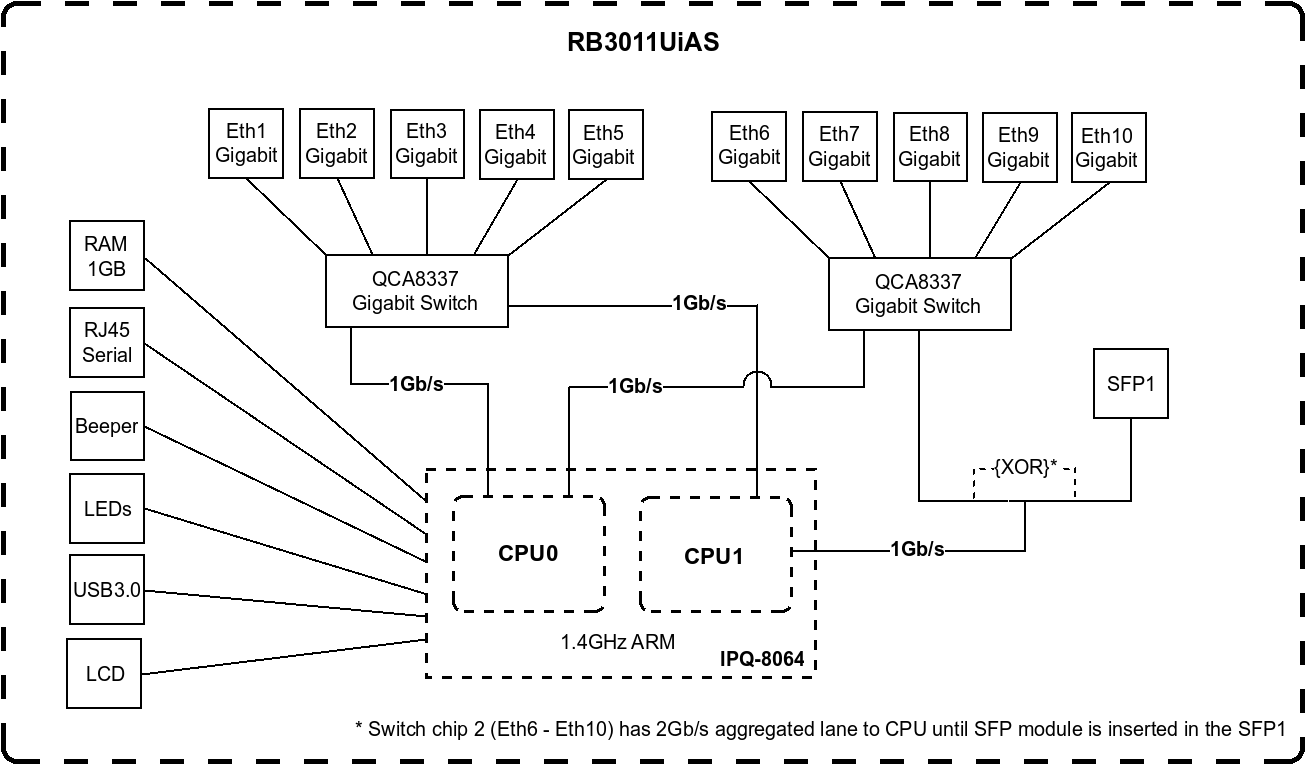
BTW, you may want to move one of your links (either WAN or bond) to ethernet port group 6-10 … if you look at block diagram, you’ll see that there are two switch chips built in, each with direct interconnect towards CPU … and you should distribute load between both switch chips (currently you don’t).