Interesting, it looks like with fasttrack you are already at the limit of your internet connection, so no further improvement needed.
However, using raw rules to disable connection tracking is not an efficient way to bypass fasttrack! You should either put the negated condition to the fasttrack rule itself (if the condition is simple enough), or if the condition is more complex, add accept rule with the condition before the fasttrack rule. Alternatively, you can add mangle mark-connection mangle rules, chain prerouting, connection-state=new, plus the condition (in this case src-address=10.172.1.0/24). And then add connection-mark=no-mark as extra condition to the fasttrack rule.
Or for a quick test, just disable the rule  .
.
Just disabled fasttrack rule on both ends:
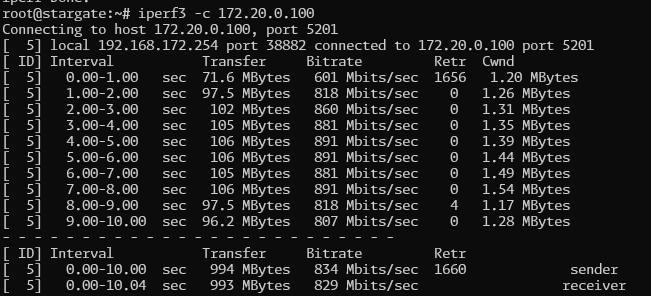
Definitely a more consistent speed for each test. CPU usage peaking around 50%
I’ve already try to set fixed cpu speed and it work well. But what about the life of the rb5009?
I’m running at default setting for the cpu speed and trying to think the cause is fasttrack or other any other filter… Still searching for but no time to spend.
In my case, when I can transfer files at 5MB/s between both side, I’m happy… With 1Gbits/s… Great no in 2025 lol ?
Playing with CPU speed is a temporary solution… not a correct solution.
I’m not too concerned about the life of the RB5009 - it has a nice big heatsink. The one I locked the speed to 1400Mhz on is in a data centre. Current temperature is 40 degrees C.
Is the speed still ok if you set the frequency to auto but temporarily disable the fasttrack rule?
I didn’t have a chance to check that. Won’t have a chance for a while unfortunately as the connection is in demand.