Hello!
I have one question. The option Verify DoH Certificate is mandatory?
Because I set https://cloudflare-dns.com/dns-query and everything works fine!
The verify DoH certificate option helps somehow?
Thank you
Hello @normis
Verify doh certification is mandatory? because I can use cloudflare doh still if uncheck that
What’s the purpose of that feature?
Thank you
- If you want to learn more about certificates type in a search engine : What digital certificates are and how they work. And you will find many guides that explain the mechanism more or less in a complex way.
- Essentially what I can tell you in a few words and with my little experience ,is that digital signature verification is a procedure that is used to make sure of the integrity and originality of the dns .
- If you leave it out, in case of a cyber attack, anyone can disrupt the DNS by replacing it… At first, enabling DoH certificate verification caused memory saturation on some routers like mine, but you will find everything written above this post if you have the constant to read everything.
is planned to upgrade DoH? to configure several servers at the same time. And priority will be given to those servers that respond to DNS queries faster.
For example in in Keenetic, can be used no more than 8 servers
@evbocharov,
if you have a router with a lot of memory you can install docker on (or a raspberry) RoS 7.6 and following and run pihole or adguardhome and you can configure a lot of alternative dns I did that:
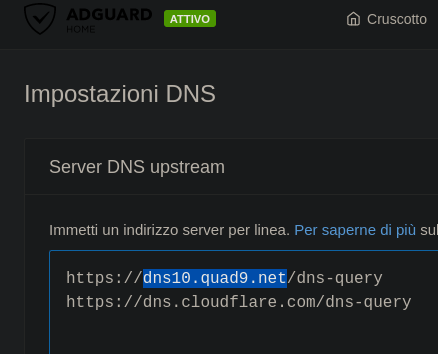
it is really all very simple.
But I still have some problem in ros ,from dhcp lease in fact I can’t get it to switch between options automatically in case of a malfunction .
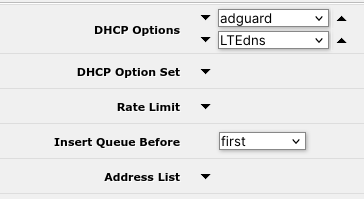
When i reconfig default settings DNS MT now is stable, without errors in log.
Your scheme is crutch.
I use dhcp server in MT.
I didn’t quite understand if you resolved , or not.
I ask you this , if you simulate the DoH dns drop ; does your LAN still resolve addresses ( and if so, what dns does it use) or does it crash?
when DoH dns drop - LAN not resolve addresses
If i use 2 ip’s ???
/ip dns static add address=1.1.1.1 name=cloudflare-dns.com
/ip dns static add address=104.16.248.249 name=cloudflare-dns.com
@evbocharov,
so you also noticed that this :

does not always correspond to the truth ?
Hello. What does mean these settings?
/certificate settings
set crl-download=yes
crl-store=system
crl-use=yes
If i use a https://curl.se/ca/cacert.pem and google doh.
Thank you
It is sad. But on all pieces of hw under the control of ROS 7. today they turned off the use of DoH. Errors keep popping up! It’s time to admit to the support service that it doesn’t work stably.
Let’s hope they get it to work.
I want to use Cloudflare as my DNS provider with DoH enabled.
I’m using a MikroTik Chateau 5G AX.
Questions:
0. General Questions
0.1. If I’m using Safe Mode in Winbox and enter commands inside the terminal, are they also reverted like changes on the UI?
1. Certificate
1.1. It’s not mandatory to import the certificate, right?
Step1: /tool fetch url=https://cacerts.digicert.com/DigiCertGlobalRootCA.crt.pem
Step2: /certificate import file-name=DigiCertGlobalRootCA.crt.pem passphrase=""
Step3: /ip dns set verify-doh-cert=yes
1.2. As I understand it, the certificate is automatically recognised and validated by RouterOS. Is that correct?
1.3. If it is mandatory to manually import the certificate, the certificate will expire someday. What are the required steps to automate the import to avoid an invalid cert?
2. Implementation
2.1. If needed I need to download the certificate first as mentioned, as there might occour DNS resolving issues, right?
If the cert is not installed I get this error inside the log:
DoH server connection error: SSL: ssl: no trusted CA certificate found (6)
And I can’t connect to the internet anymore.
2.2. As the Chateau 5G AX is an “LTE based” device my provider would give me an DNS server, therefore I need to go to
Interface > LTE > LTE APNs > Disable Peer DNS
to avoid having a Dynamic DNS server entrie under
IP > DNS
So far so good? Anything I missed in this step?
2.3. Afterwards under
IP > DNS > Servers
I have to enter
1.1.1.1
1.0.0.0
2606:4700:4700::1111
2606:4700:4700::1001
Is that correct?
2.4. For DoH under
IP > DNS > Servers
I have to enter
https://1.1.1.1/dns-query
and enable the tick
“Verify DoH Certificate”
2.5. And under
IP > DNS > Static
Add the entries
Name: cloudflare-dns.com
Type: A
Address: 1.1.1.1

Name: cloudflare-dns.com
Type: A
Address: 1.0.0.1

Name: cloudflare-dns.com
Type: AAAA
IP v6 Address: 2606:4700:4700::1111

Name: cloudflare-dns.com
Type: AAAA
IP v6 Address: 2606:4700:4700::1001
Is everything correct this way?
1.1 Yes and no. You can skip certificate, set verify-doh-cert=no and it will work. But the point of certificates is to ensure that nobody between you and target server can read or change what you both send and receive. If you don’t verify certificates, anyone on the way can fiddle with your data. You probably don’t want that.
1.2 If you’ll have the right root certificate and you’ll tell RouterOS to use it (verify-doh-cert=yes), then it will recognize that it’s the right certificate for given server. And it will tell you if not.
1.3 This is something without foolproof solution. Root certificates have very long validity, e.g. this one is good until 2031. That is, until something happens. Server’s operator might decide to get certificate from different CA and then you’d need different root certificate. Or CA loses their key and will be forced to make new root certificate (this one is quite unlikely). Or an algorithm will be broken and there will have to be completely different certificates. Regular OSes like Windows handle this by including root certificates from trusted CAs in system updates. RouterOS so far doesn’t do anything like that. Perhaps it would be good idea if it did, but there are many CAs and they would either have to decide themselves what are trusted, or they would have to take that from someone else.
2.1 If you want it completely safe, you can’t do it on router, because it initially doesn’t have any certificate to verify the one used by https server you’d download this one from. But you can easily download it using your web browser and upload it to router.
2.2 Yes. But AFAIK RouterOS should prefer DoH if you configure it.
2.3 No
2.4 Yes
2.5 No (or yes, if in 2.4 you use https://cloudflare-dns.com/dns-query)
A more radical solution is to use the CloudFlare container’s “proxy-dns” option, in a container.
What this does for you is run a DNS resolver on the container’s IP address & can either use directly in DHCP or indirectly via ROS DNS (e.g. /ip/dns/servers= cloudflared proxy-dns container’s IP). Inside the Cloudflare container, it use DoH to send the request to CloudFlare. To setup you can follow @Normis’s video on CloudFlare, but instead of doing anything in CloudFlare ZeroTrust, you just need to change the “tunnel XXXX” in the cmd to “proxy-dns”. (If you want both, you may need to run two containers, but dunno).
See https://developers.cloudflare.com/1.1.1.1/encryption/dns-over-https/dns-over-https-client/
Container is here: https://hub.docker.com/r/cloudflare/cloudflared
Sounds like more reasons to put zerotrust cloudflare tunnel as an options package for ALL MT devices not just those can hold complex containers… Doh apparently not so easy based on reading this thread.
@anav, LOL. I was just waiting for your pitch… I would have guessed an hour, but I couldn’t even edit my post before you commented. But I’d more sympathetic if you’d actually even tried or used the service 
- And, I’m still waiting for Mikrotik DNS to support PTR records, so static DNS-SD can be configured in RouterOS (e.g. unicast version of mDNS). The RFC is from 2013.
Hello normis could you please check my thread too I’m lost on DoH part tnx
http://forum.mikrotik.com/t/mikrotik-router-and-the-doh-cache-server-cannot-connect-to-internet-when-using-double-wan-and-route-mark-toghether/162862/1
Hello everybody. Can somebody please help me with my problems.
Here is my config
/ip dhcp-client set WAN use-peer-dns=no

/ip firewall nat add chain=dstnat action=redirect protocol=tcp dst-port=53 comment="Redirect port 53"
/ip firewall nat add chain=dstnat action=redirect protocol=udp dst-port=53

/ip dns static
add address=1.1.1.1 name=cloudflare-dns.com
add address=1.0.0.1 name=cloudflare-dns.com
add address=104.16.248.249 name=cloudflare-dns.com
add address=104.16.249.249 name=cloudflare-dns.com
add address=1.1.1.2 name=security.cloudflare-dns.com
add address=1.0.0.2 name=security.cloudflare-dns.com
add address=1.1.1.3 name=family.cloudflare-dns.com
add address=1.0.0.3 name=family.cloudflare-dns.com
When I configured Cloudflare as my DOH server everything was fine:
/ip dns set servers=1.1.1.1
/tool fetch url="https://cacerts.digicert.com/DigiCertGlobalRootCA.crt.pem"
/certificate import file-name=DigiCertGlobalRootCA.crt.pem
/ip dns set verify-doh-cert=yes use-doh-server=https://cloudflare-dns.com/dns-query
/system ntp client set enabled=yes servers=time.cloudflare.com
/ip dns set servers=""
/ip/dns/cache flush
Next to it I tried to change my DOH server to
https://family.cloudflare-dns.com/dns-query
or
https://1.1.1.3/dns-query
but no luck, looks lite it requires another certificate. A lot of SSL-related errors appeared. The first question is where and how can I get this certificate?
At the end when I tried to use config for NextDNS, my “Free HDD space” went to 0. These certificates occupied all my free space (1000KB, AC2, ROS 7.10.2 )!!!
I was forced to make a NetInstall and restore using backup.
/tool fetch url=https://curl.se/ca/cacert.pem
/certificate import file-name=cacert.pem passphrase=""
/ip dns static add name=dns.nextdns.io address=45.90.28.0 type=A
/ip dns static add name=dns.nextdns.io address=45.90.30.0 type=A
/ip dns set use-doh-server=“https://dns.nextdns.io/asdf23/mikrotik.lite22” verify-doh-cert=yes
/ip dns set servers=""
/ip/dns/cache flush
So the second question. How can I import certificate specifically for Nextdns and avoid this huge list from curl.se? Can somebody please explain me how to do that?
Thanks in advance!
For the https://family.cloudflare-dns.com/dns-query you should use DigiCert Global Root G2:
https://cacerts.digicert.com/DigiCertGlobalRootG2.crt.pem
Yeh, it works, thank you!