Like I already said, you can set up your own DOH server in a trusted country with a trusted ISP and then configure DOH client in the country where you don’t feel safe.
There are also many reasons to not trust anyone with your private data.
That is why I do it myself and ask the authorative directly. The Dutch government does not like it when you do that through a VPN provider. I have to use the DoT server of my ISP for those specific domains.
Hi all,
Has anyone gotten opendns’s doh server to work?
As I said above I tried but was getting resolution errors despite importing the certificate.
Sure. Quick and simple (and unsecure *) way:
/tool fetch url=https://cacerts.digicert.com/DigiCertGlobalRootCA.crt.pem
/certificate import file-name=DigiCertGlobalRootCA.crt.pem
/ip dns set use-doh-server=https://doh.opendns.com/dns-query verify-doh-cert=yes
(*) The problem is that fetch does not verify certificate, and even though there is an option for it, it won’t work when there’s no root certificate on router. Chicken and egg problem. So better download the file using browser and upload it to router.
@Sob,
Many many thanks. I have DNS over https working. Website lookups are slow so I am not sure if I will keep this configuration. I want to though so lets see.
Pranav
slimprice,
cloudflare has the fastest dns, then there is google, and all the other .Open dns here at my place is very slow.
Anyone else getting this? Seems that if its time to get an updated cert file…it cant. Its a chicken/egg scenario where it cant get the info to do the fetch to update the cert. Easy fix is to just add in another dns entry like 1.1.1.1 and immediately DNS query works, it grabs does the fetch and then all is good. I can take out the 1.1.1.1 until once again it gets caught in the loop trying to query but it cant…
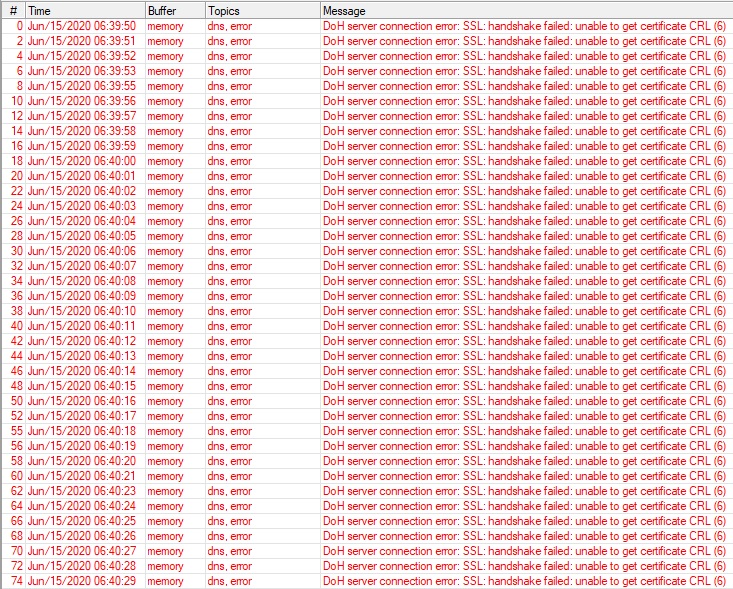
how to solve this ?
try to follow this holy man’s guidance,
https://jcutrer.com/howto/networking/mikrotik/mikrotik-dns-over-https
In the Holy book you see, Normis, only Google and Cloudflace is being mentioned.
As I predicted.
Seems pretty close to what I have already done. I may have to go back to plan “B” and make the URL 1.1.1.1 instead of cloudflare-dns.com
So here is my current DNS config. When I reboot the RB2011 it goes into infinity with handshake failures. Its trying to validate the CRL’s but yet, it should already have it in certificates memory as being valid. I suspect that the certificates setting needs to be changed to perhaps not download the CRL or even use the CRL? Also not sure if the CRL store should be RAM or System. In order to fix the problem I did have to add DNS server 1.1.1.1 to my settings .
From what I can tell, a reboot invalidates the CRL’s and the router needs to go back out and validate all of them. If you do a /system certificates and you check the CRL tab, all of those CRL’s are red. So you are stuck until validation takes place and they go black on the screen and then the DNS server will start caching entries.
So I am kinda lost here as to how it really should be set up so that a reboot does not force me to log in manually to add a DNS entry of 1.1.1.1 just to download/validate what I have in my router all the time.
 /ip dns print
                      servers:
              dynamic-servers:
               use-doh-server: https://1.1.1.2/dns-query
              verify-doh-cert: yes
        allow-remote-requests: yes
          max-udp-packet-size: 4096
         query-server-timeout: 2s
          query-total-timeout: 10s
       max-concurrent-queries: 500
  max-concurrent-tcp-sessions: 20
                   cache-size: 2048KiB
                cache-max-ttl: 3d
                   cache-used: 30KiB
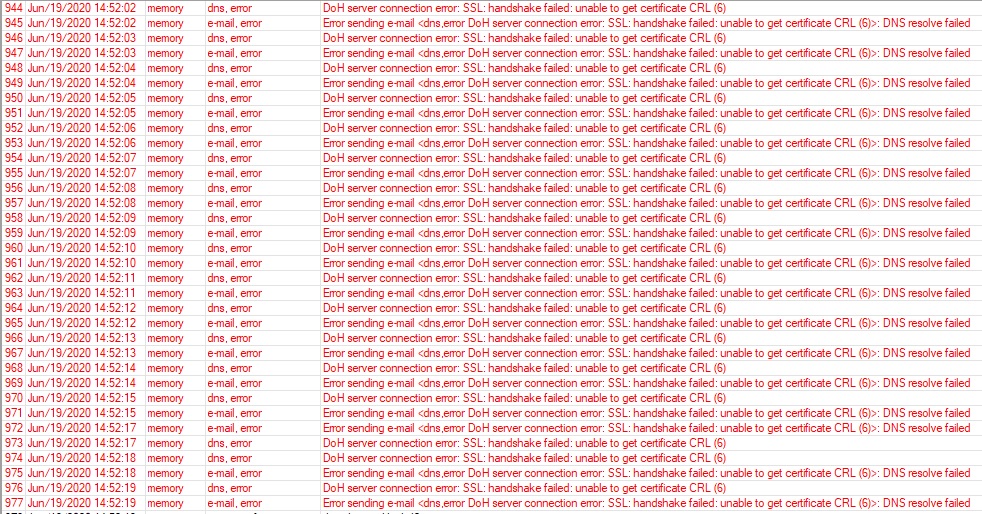
Above shows the errors immediately after the RB2011 reboot
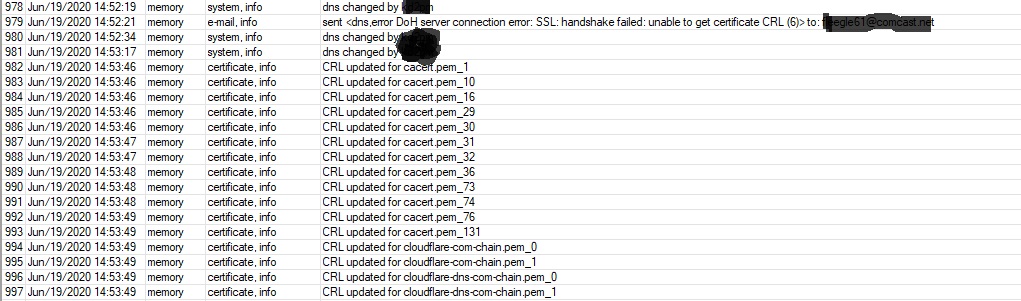
Above shows the updates to the files once I add DNS 1.1.1.1 as a server.
remove all those certificates and use just this one:
/tool fetch url=https://cacerts.digicert.com/DigiCertGlobalRootCA.crt.pem
/certificate import file-name=DigiCertGlobalRootCA.crt.pem passphrase=””
I did and there is no CRL and I am still logging the same DNS error
DoH server connection error: SSL: handshake failed: unable to get certificate CRL (6)
I believe I have to go back and get the PEM file for Cloudflare-DNS and load that back in as well…I believe one cant work without the other
So its definitely an issue on a reboot that if you dont have a standard DNS server like 1.1.1.1 assigned as well as the DOH server…the DOH cannot and will not allow itself to validate the CRL’s and thus it has to use the 1.1.1.1 to get those downloaded and then the DOH appears to be happy.
It also appears to me that you do need the cloudflare-dns.com and DigiCert Global Root CA certs for things to behave…if not, it continues to log DOH server errors.
.
.
same experience here:
using the avail v4 adresses gives warnings (maybe a google by-the-side-sausage ??)
... seems there's loadbalancing inbetween, which is fetching "dns.google" [or any of the alternate names ... because the pure ip servers do NOT]
.
question: what would be issue with local static translation ?
.
update ##... dns64.dns.google is not working ... guess thats for v6
.
[admin@tikki] > ping www.cisco.com
invalid value for argument address:
    invalid value of mac-address, mac address required
    invalid value for argument ipv6-address
    while resolving ip-address: could not get answer from dns server
                                                                      (1 messages discarded)
23:29:09 echo: dns,warning <html lang=en>
23:29:09 echo: dns,warning   <meta charset=utf-8>
23:29:09 echo: dns,warning   <meta name=viewport content="initial-scale=1, minimum-scale=1, width=device-width">
23:29:09 echo: dns,warning   <title>Error 404 (Not Found)!!1</title>
23:29:09 echo: dns,warning   <style>
23:29:09 echo: dns,warning     *{margin:0;padding:0}html,code{font:15px/22px arial,sans-serif}html{background:#fff;color:#222;padding:15px}body{margin:7% auto 0;max-width:390px;min-height:
180px;padding:30px 0 15px}* > body{background:url(//www.google.com/images/errors/robot.png) 100% 5px no-repeat;padding-right:205px}p{margin:11px 0 22px;overflow:hidden}ins{color:#777;text-
decoration:none}a img{border:0}@media screen and (max-width:772px){body{background:none;margin-top:0;max-width:none;padding-right:0}}#logo{background:url(//www.google.com/images/branding/g
ooglelogo/1x/googlelogo_color_150x54dp.png) no-repeat;margin-left:-5px}@media only screen and (min-resolution:192dpi){#logo{background:url(//www.google.com/images/branding/googlelogo/2x/go
oglelogo_color_150x54dp.png) no-repeat 0% 0%/100% 100%;-moz-border-image:u
23:29:09 echo: dns,warning rl(//www.google.com/images/branding/googlelogo/2x/googlelogo_color_150x54dp.png) 0}}@media only screen and (-webkit-min-device-pixel-ratio:2){#logo{background:ur
l(//www.google.com/images/branding/googlelogo/2x/googlelogo_color_150x54dp.png) no-repeat;-webkit-background-size:100% 100%}}#logo{display:inline-block;height:54px;width:150px}
23:29:09 echo: dns,warning   </style>
23:29:09 echo: dns,warning   <a href=//www.google.com/><span id=logo aria-label=Google></span></a>
23:29:09 echo: dns,warning   <p><b>404.</b> <ins>That\E2\80\99s an error.</ins>
23:29:09 echo: dns,warning   <p>The requested URL <code>/dns-query</code> was not found on this server.  <ins>That\E2\80\99s all we know.</ins>
23:29:09 echo: dns,warning
[admin@tikki] >
.
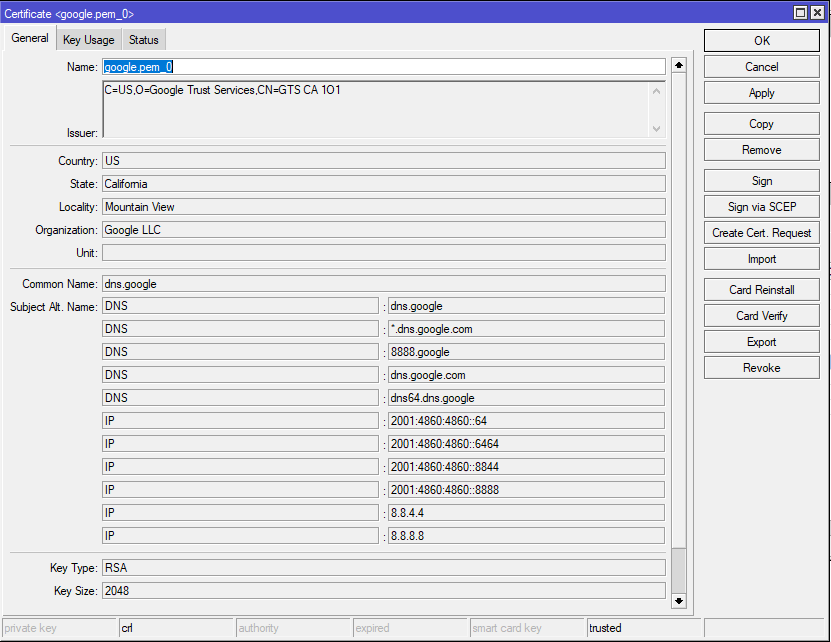
dns64.dns.google can’t be resolved to a IP address:
;; AUTHORITY SECTION:
dns.google.             48      IN      SOA     ns1.zdns.google. dns-admin.google.com. 2684358593 21600 3600 1209600 300
.
not v4 … right
.
foo@pike:~# dig -x 2001:4860:4860::64

; <<>> DiG 9.10.3-P4-Debian <<>> -x 2001:4860:4860::64
;; global options: +cmd
;; Got answer:
;; ->>HEADER<<- opcode: QUERY, status: NOERROR, id: 35978
;; flags: qr rd ra; QUERY: 1, ANSWER: 1, AUTHORITY: 0, ADDITIONAL: 1

;; OPT PSEUDOSECTION:
; EDNS: version: 0, flags:; udp: 4000
;; QUESTION SECTION:
;4.6.0.0.0.0.0.0.0.0.0.0.0.0.0.0.0.0.0.0.0.6.8.4.0.6.8.4.1.0.0.2.ip6.arpa. IN PTR

;; ANSWER SECTION:
4.6.0.0.0.0.0.0.0.0.0.0.0.0.0.0.0.0.0.0.0.6.8.4.0.6.8.4.1.0.0.2.ip6.arpa. 21598 IN PTR dns64.dns.google.

;; Query time: 43 msec
;; SERVER: 192.168.100.10#53(192.168.100.10)
;; WHEN: Sat Jun 20 11:32:24 CEST 2020
;; MSG SIZE  rcvd: 131

foo@pike:~#
I’m using DoH with 1.1.1.1 server and RB3011 with ROS 6.47 about a week.
Since this morning i have problem with 1.1.1.1:
I got only “12:15:40 dns,error DoH server connection error: SSL: internal error (6)” message. I try’d 9.9.9.9 and it’s works fine (still)
Don’t know: this is issue with my ISP, CF or Mikrotik