I get this error. Anybody have any idea how I fix it?
/tool fetch url="https://curl.haxx.se/ca/cacert.pem"
failure: unable to resolve hostname
I fix it but i unable to make doh work. I still see isp dns in torch.
My DoH setting
/tool fetch url=https://cacerts.digicert.com/DigiCertGlobalRootCA.crt.pem
/certificate import file-name=cacert.pem passphrase=””
/ip dns set servers=""
/ip dns set use-doh-server=https://family.cloudflare-dns.com/dns-query verify-doh-cert=yes

/ip firewall filter
add action=accept chain=input src-port=443 protocol=tcp src-address-list=Cloudflare-DNS
add action=accept chain=input dst-port=53 in-interface=!ether1-wan protocol=udp
add action=drop chain=input

/ip firewall nat
add action=dst-nat chain=dstnat dst-port=53 in-interface=ether2-lan protocol=tcp to-addresses=192.168.68.1 to-ports=53
I added 2 static DNS entries for family.cloudflare-dns.com to address: 104.18.209.237 and 104.18.210.237.
Also added 104.18.209.237 and 104.18.210.237 to address list named Cloudflare-DNS
And 192.168.68.1 is gateway for Ether 2
Everything works well, but did i miss something in my settings? I need your opinion.
What ports does RouterOS use for DoH?
Stricly TCP 443 only?
Seems in some cases port 53, 853 is used: https://en.wikipedia.org/wiki/DNS_over_HTTPS#Deployment_scenarios
You would probably be better off using the Anycast addresses 1.1.1.3 and 1.0.0.3. That way, if CF ever changes those specific servers, you won’t be out of service.
I use the 1.1.1.2 / 1.0.0.2 security.cloudflare-dns.com static DNS entries and it is fine.
What if i just add 1.1.1.3 and 1.0.0.3 as family.cloudflare-dns.com static DNS entries, so i have four static DNS entries for family.cloudflare-dns.com (104.18.209.237, 104.18.210.237, 1.1.1.3, 1.0.0.3)? It’s fine?
I think you missunderstand the concept. In your LAN, the clients query your edge router as DNS-resolver unencrypted via port 53.
The outgoing DNS query from your router to the public DoH-DNS server is encrypted and sent via port 443.
The public DoH-DNS resolves the query itself unencrypted via port 53 (or via TLS over port 853).
This means DoH is no real end-to-end encryption. But it is a security benefit over all.
So yes, the DoH part uses strictly port 443.
Dear Concern,
I have successfully configured the system. It is showing me Verify that DoH is enabled and working. When I am torching WAN interface it is not showing me 1.1.1.1:443(http) rather showing me 1.1.1.1:53(dns). I dont know why it is happening. Is it any config error? Please let me know what to do if I want to solve the issue.
I have successfully configured the system. It is showing me Verify that DoH is enabled and working. When I am torching WAN interface it is not showing me 1.1.1.1:443(http) rather showing me 1.1.1.1:53(dns). I dont know why it is happening. Is it any config error? Please let me know what to do if I want to solve the issue.
Dear All
has anybody tested IPV6 DNS over HTTPS?
ROS keeps trying to use WAN1 for DoH even though WAN1 is down/disabled and WAN2 is active and reachable. Normal DNS works fine, only DoH keeps trying WAN1 even if the interface itself is manually disabled.
Steps to reproduce the bug

It seems to be working already as per the connection tracking in the firewall on IPv6, I can see DoH traffic to Cloudflare initiated by the client devices using advertised DNS from RouterOS.
Yes. I’ve tested with:
/ip dns set use-doh-server=https://dns64.cloudflare-dns.com/dns-query verify-doh-cert=yes
Unfortunately, It does not work.
Even though ipv6 works OK.
[admin@MikroTik] > put [resolve dns64.cloudflare-dns.com]
2606:4700:4700::64
[admin@MikroTik] > ping 2606:4700:4700::64
  SEQ HOST                                     SIZE TTL TIME  STATUS
    0 2606:4700:4700::64                         56  61 24ms  echo reply
    1 2606:4700:4700::64                         56  61 24ms  echo reply
    2 2606:4700:4700::64                         56  61 23ms  echo reply
    sent=3 received=3 packet-loss=0% min-rtt=23ms avg-rtt=23ms max-rtt=24ms
IPv4 DoH (
/ip dns set use-doh-server=https://cloudflare-dns.com/dns-query verify-doh-cert=yes
) works OK too.
dns64.cloudflare-dns.com is for NAT64 networks. In most cases ISPs give native IPv6 with CGNATted IPv4 or public IPv4.
_https://cloudflare-dns.com/dns-query_ would be the correct one to use, it works for both IPv4 and native IPv6.
I got everything working with nextdns. Here is what i did.
make sure you change for your config id): for Example if your id is “99b212” you can give … /ip dns set use-doh-server=https://dns.nextdns.io/99b212 verify-doh-cert=yes
if you want to display the device name just add it in the last after putting “/” like this … /ip dns set use-doh-server=https://dns.nextdns.io/99b212/mikrotik
tool fetch url=https://curl.haxx.se/ca/cacert.pem
/certificate import file-name=cacert.pem passphrase=""
/ip dns set servers=
/ip dns static add name=dns.nextdns.io address=45.90.28.0 type=A
/ip dns static add name=dns.nextdns.io address=45.90.30.0 type=A
/ip dns static add name=dns.nextdns.io address=2a07:a8c0:: type=AAAA
/ip dns static add name=dns.nextdns.io address=2a07:a8c1:: type=AAAA
/ip dns set use-doh-server=“https://dns.nextdns.io/<id>” verify-doh-cert=yes
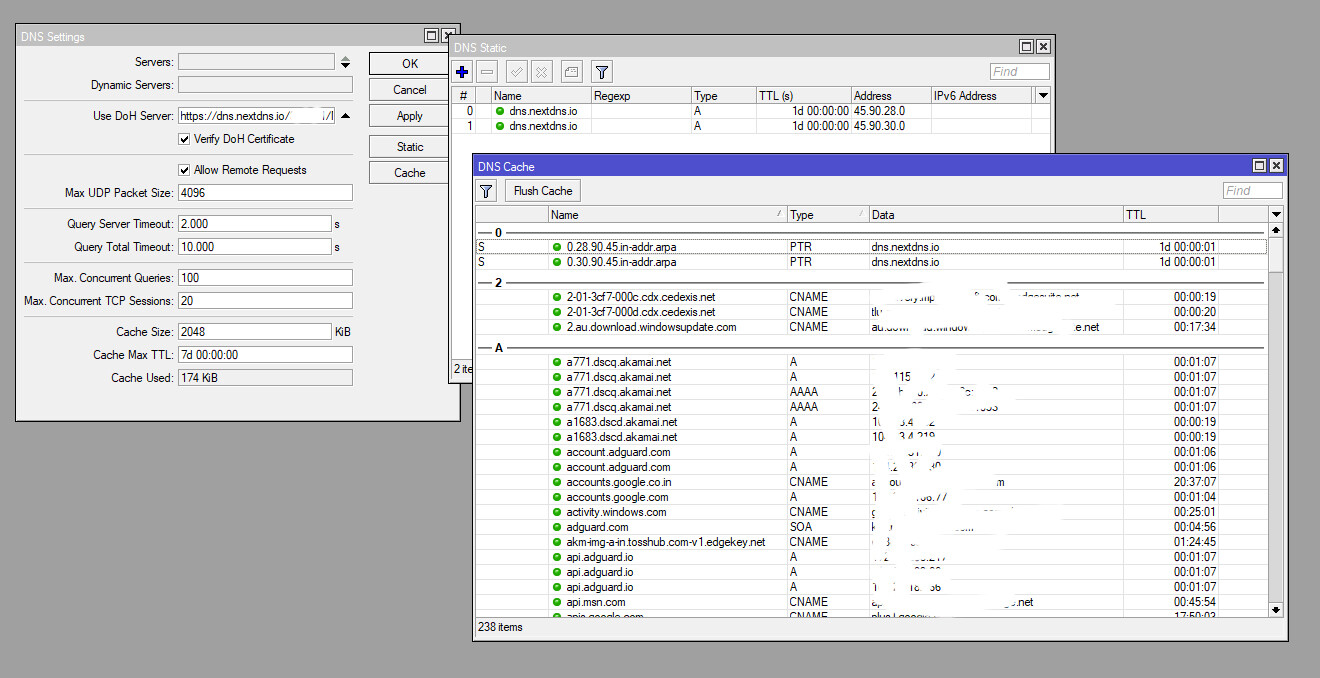
Why do you import all 138 CA certificates? Isn’t it better do import only the one needed?
Why do you import all 138 CA certificates? Isn’t it better do import only the one needed?
I did not find anything specific in the certificate list which points to “nextdns”. so i imported all. How can i find the one which is used by nextdns?
Just try with this one:
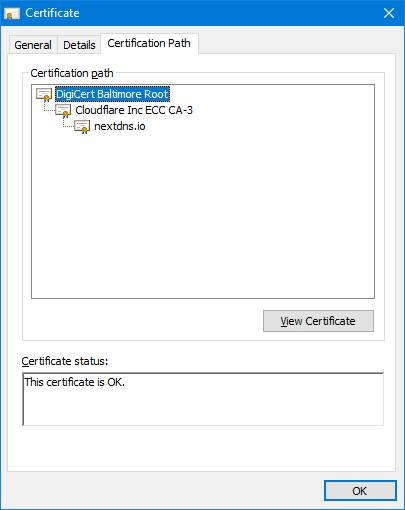
I am not finding anything like that in the certificates list. I tried to remove everything except the name 'digicert". But thats not working. it does not starts with this name. its something else.
Is it possible, that i’m getting “DoH server connection error: Idle timeout - waiting data” because i’m using two different ISPs at the same time on one PC with two ethernet adapters and two different routers and they don’t know anything about each other?
2nd router is not Mikrotik and it’s not logging any problems about DoH.
Other than that log message i’m not having any problems with internet connectivity, whether it is any router separately or both at the same time. Both are configured properly for using DoH.
I’m just curious about that log message, nothing more. Everything’s working just fine.
Thanks.
/ip dns set servers=8.8.8.8,8.8.4.4
/system ntp client set enabled=yes primary-ntp=time.google.com
/tool fetch url=https://pki.goog/roots.pem
/certificate import file-name=roots.pem passphrase=""
/ip dns set use-doh-server=https://dns.google/dns-query verify-doh-cert=yes
/ip dns set allow-remote-requests=yes cache-max-ttl=1d use-doh-server=https://dns.google/dns-query verify-doh-cert=yes
/ip dns static
add address=8.8.8.8 name=dns.google
add address=8.8.4.4 name=dns.google
/ip dns set servers=""
/system script add dont-require-permissions=no name=Certificate_Google policy=ftp,reboot,read,write,policy,test,password,sniff,sensitive,romon source="/tool fetch url=https://pki.goog/roots.pem\r\n/certificate import file-name=roots.pem passphrase="""
/system script add dont-require-permissions=no name=DNS_Flush_Cache policy=ftp,reboot,read,write,policy,test,password,sniff,sensitive,romon source="/ip dns cache flush"
/system scheduler add comment="Google Certificate Update" interval=1w name=Certificate_Google_Update on-event=Certificate_Google policy=ftp,reboot,read,write,policy,test,password,sniff,sensitive,romon start-date=dec/06/2019 start-time=05:20:00
/system scheduler add comment="DoH Cache Flush" interval=1d name="DNS Cache Flush" on-event=DNS_Flush_Cache policy=ftp,reboot,read,write,policy,test,password,sniff,sensitive,romon start-date=dec/06/2019 start-time=05:30:00
>