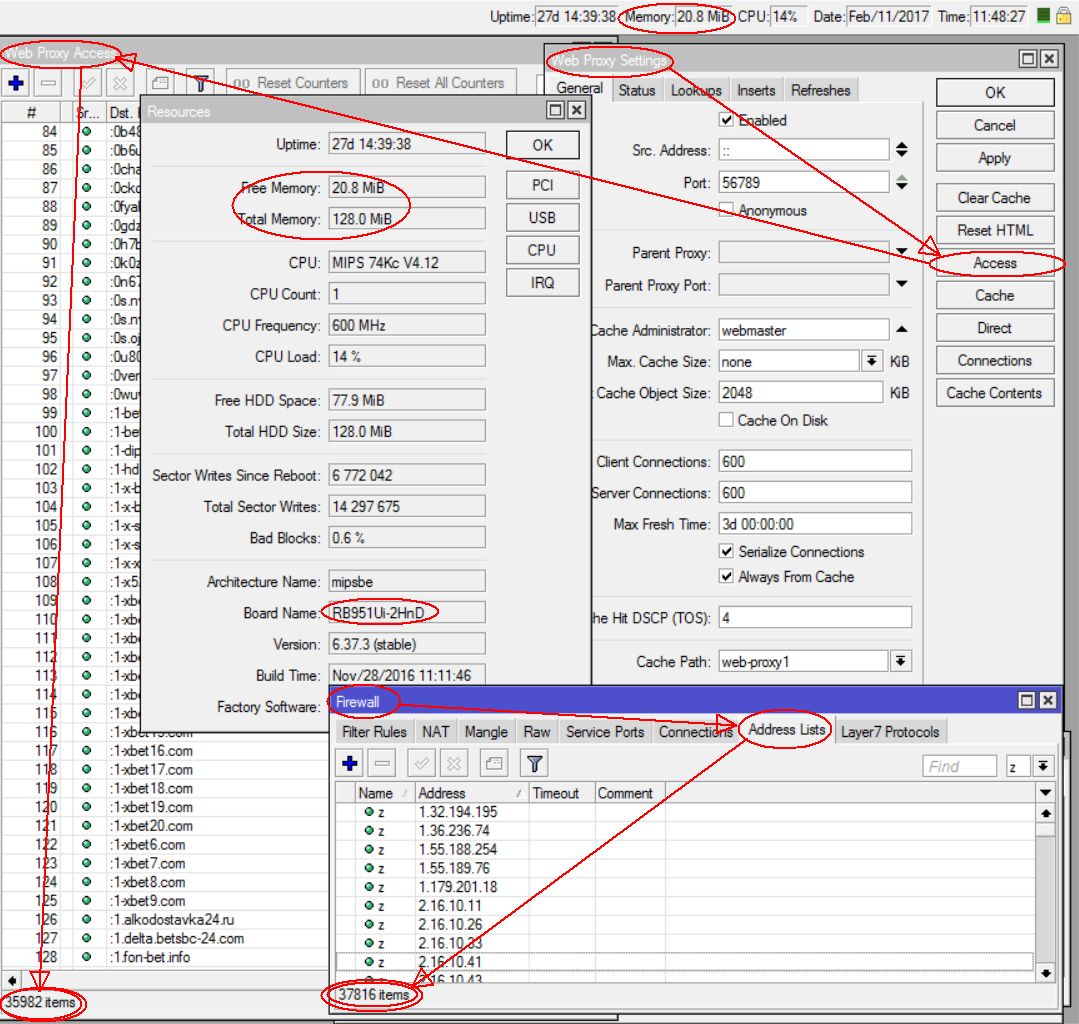
I’ve managed only about 1500… but I need 37’000+ for now (and growing).
Yes, it’s for strong traffic filtering purpose (sad, but that’s government law) with fast growing “black lists”.
Not found any option to control or check this limit. It’s not DNS cache size (doesn’t rise static records limit), but what?
But alternative ways are to setup aside / connect via Internet another dedicated PC-based (not ROS obviously) DNS server or maybe setup MetaRouter with more capable DNS simple server and redirect requests to it. Both ways are not good, AFAIK, because of unstable work and eating extra resourses (RB951U, 20MB free of 128MB RAM only, migrating to RB750Gr3).
Transparent webproxy does this work for now, but can’t manage HTTPS connections (why?) and loads CPU up to 100%, so I want to reject blocked domains somewhen earlier, returning 127.0.0.1 for DNS requests to that ones.
I would like to know the answer of this question too.
Furthermore, i would like to know the limits for static A entries and regex DNS entries.
One dirty hack workaround is to daisy chain Mikrotik DNS forwarders, but it adds DNS query response latency.
For example:
DNS resolver->mikrotik1 DNS forwarder->mikrotik2 DNS forwarder->mikrotik3 DNS forwarder->DNS client
It took several minutes and it was eating memory like crazy (and CPU too). According to System->Resources, memory went down by 149 MB. And DNS cache itself showed 128 MB used. That seems a little too much. Even though each static record adds two records in cache (A and PTR), it’s over 3kB per added static record. Reboot did not help. It took several minutes before DNS cache started and in the end it again showed 128MB used cache.
I think it’s safe to say that RouterOS was not made for this and dedicated non-RouterOS DNS resolver is the only way. You should have one (or better more) anyway if you’re ISP.
its more bound/limited by available memory.
in result you can load things like p lowe adblock list in say 64Mb RAM devices and add malwaredomain.com atop of that on devices with 128Mb and 256Mb.
its will cost Considerable amount of CPU power and time to add and notably decrease boot-up time, which isn’t big deal because huge uptime of most.
Embedded web proxy always DOES this work with about 36K regexps (& about 38K IPs in firewall address list).
Of course, it eats RAM (we need to store all that strings at last), but why DNS records have to eat more RAM than webproxy records?
And IMHO DNS internal procedures are simplier than proxy due to protocol design.
It is possible to use > dnsmasq > to block Web advertising by using a list of known banner-ad servers, all resolving to 127.0.0.1 or 0.0.0.0, in > /etc/hosts > or an additional > hosts > file. > The list can be very long, dnsmasq has been tested successfully with > one million names> . > That size file needs a 1GHz processor and about 60Mb of RAM.
This is exactly what I would like to do. I’m doing it on my workstation, but it would be nice to have it on a custom device. Maybe MikroTik could make a purpose build DNS box?
I’ve tested creating static DNS records on RB2011 with 128MB RAM onboard.
Device crashed under above 27K records (not regexp’s – plain names!) when free memory remains less than 5MB.
I wonder how webproxy can manage 37K regexp’s? The same content, the same strings and much more work to filter them every request.
What’s wrong with DNS server there?
P.S. And it adds/removes that DNS records soooo veeeerrrryyy ssssllooooowww, eating 100% CPU with great risk to whatchdog reboot…
Please, MT, give us access/method to simply add hosts file.
Proxy resolves one by one.
DNS resolves them many at a time, when TTL is reached, so you could get huge chunks of DNS names that need to be resolved at once.
I wouldn’t suggest to import 30000 static entries in a home router.
The question is, if the memory that it needs isn’t too much. If you look at what I tried to import (third post in this thread), there are names with 17-21 character, plus 4 bytes for IPv4 address. Multiply that three times (one for static record and another two for created A and PTR in cache) and you get 63-75 bytes per record. This of course does not mean much, obviously there will always be some overhead. But 128MB / 40k = almost 3.3kB per record, that’s a huge difference.
I can’t see any A or PTR type records in DNS cache for my static DNS records created… are they hidden?
And why that STATIC records have to be cached at all – if they are STATIC and always active?
Well, I can’t repeat this on 6.37.3 (in production now) but can use Filter (Static-is-yes) on testing 6.38.1.
Yes, it creates A and PTR records for every static record. I wonder if dnsmasq does the same with large /etc/hosts file?
What is stated in the /etc/hosts file will create a PTR. If you want to avoid that you can use “host-record” in the config file of DNSMasq. If here are more than one IP addresses with same name then only the first PTR is generated.
This “host-record” is read before the /etc/hosts file.
About the PTR it is maybe nice to be able to select if will be shown or not show in the listing. This can be for all PTR records at once or each each separate entry.