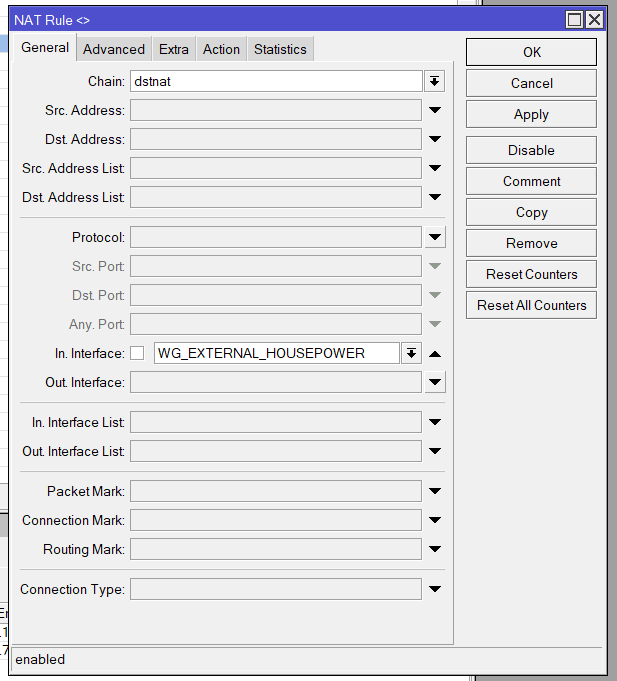
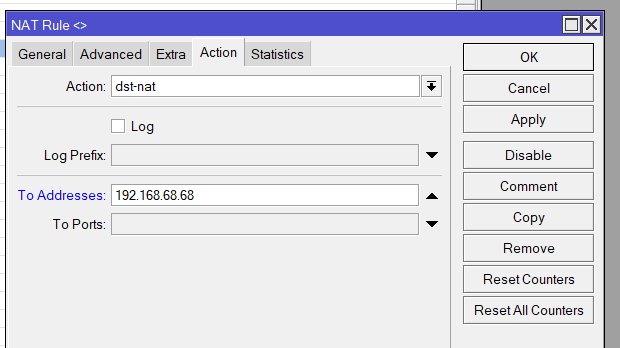
Yes,you are right, here is the complete configuration, I took the time to clean everything at the security level.
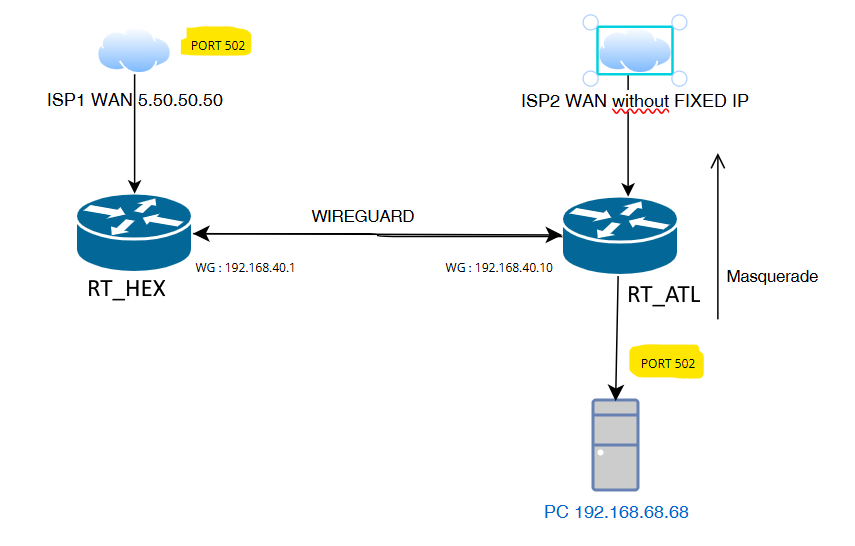
Please find the new platform of test with this configuration, same issue:
Public IP ISP1 port 502 >>> RT_HEX forward to 443 trough wireguard >>> RT_ATL forward to PC port 443
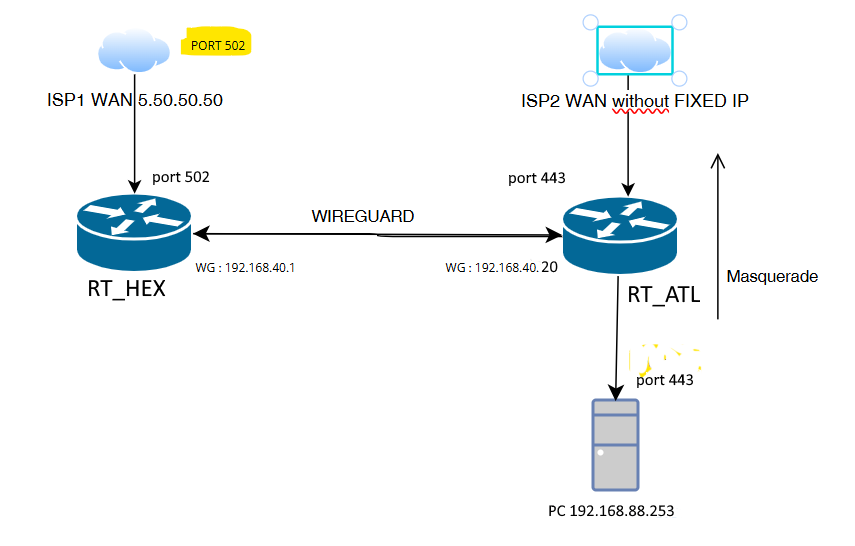
Config of HEX:
# 2024-10-29 12:32:40 by RouterOS 7.13.2
# software id = x
#
# model = RB750Gr3
# serial number = xxxxxxxxxxxxxx
/interface bridge
add name="Bridge _LAN_CLIENT" port-cost-mode=short
/interface ethernet
set [ find default-name=ether1 ] comment="LAN et WLAN_FH" name=\
    ETH1_xxxxx
set [ find default-name=ether2 ] name=ETH2_xxxxx
set [ find default-name=ether3 ] name=ETH3_xxxxx
set [ find default-name=ether4 ] comment=WAN name=ETH4_WAN_FM
set [ find default-name=ether5 ] name=ETH5_WAN_BT
/interface wireguard
add comment="WG pour les pors NAT de clients externes" listen-port=14231 mtu=\
    1420 name=EXTERNAL_WG
add listen-port=13231 mtu=1420 name=Wireguard_xxxxx
add disabled=yes listen-port=51820 mtu=1420 name=wireguard_xxxxx
/disk
set sd1 type=hardware
add parent=sd1 partition-number=1 partition-offset=512 partition-size=\
    "1 977 613 824" type=partition
/interface list
add name=LAN
add name=WAN
/interface wireless security-profiles
set [ find default=yes ] supplicant-identity=MikroTik
/ip dhcp-server option
add code=6 name=DNS_nextDNS value="'xxxxxxx'"
/ip hotspot profile
set [ find default=yes ] login-by=cookie,http-chap,trial
add hotspot-address=192.168.20.1 html-directory=flash/hotspot name=hsprof1
/ip pool
add name=dhcp_CLIENTS ranges=192.168.20.20-192.168.20.240
add name=dhcp_CLIENT_xxxxx ranges=192.168.10.20-192.168.10.240
add name=dhcp_houxxxxx ranges=192.168.0.110-192.168.0.190
/ip dhcp-server
add address-pool=dhcp_CLIENTS interface="Bridge _LAN_CLIENT" name=\
    DHCP_ETH2_LAN_CLIENT_FH
add address-pool=dhcp_CLIENT_xxxxx interface=ETH3_xxxxx \
    lease-time=10m name=DHCP_ETH3_xxxxx
add address-pool=dhcp_houxxxxx interface=ETH1_xxxxx lease-time=10m \
    name=DHCP_houxxxxx
/port
set 0 name=serial0
/routing table
add disabled=yes fib name=Clients_FH_WIREGUARD
add disabled=no fib name=DL_SYNO
add disabled=no fib name=Vers_FIBRE_FREE
add disabled=no fib name=Vers_FIBRE_BT
add disabled=no fib name=DL_xxxxx
/system logging action
add name=versSYSLOG remote=192.168.0.241 target=remote
/interface bridge port
add bridge="Bridge_LAN_CLIENT" interface=ETH2_xxxxx \
    internal-path-cost=10 path-cost=10
/ip firewall connection tracking
set enabled=yes tcp-established-timeout=1m
/ip neighbor discovery-settings
set discover-interface-list=!dynamic
/interface detect-internet
set detect-interface-list=all
/interface list member
add interface=ETH2_xxxxx list=LAN
add interface=ETH4_WAN_FM list=WAN
add interface=ETH1_xxxxx list=LAN
add interface=ETH5_WAN_BT list=WAN
add interface=ETH3_xxxxx list=LAN
/interface wireguard peers
add allowed-address=0.0.0.0/0 endpoint-address=xxxx endpoint-port=\
    51820 interface=Wireguard_xxxxx preshared-key=\
    "xxxx" public-key=\
    "xxxx"
add allowed-address=0.0.0.0/0 comment=Marseille disabled=yes \
    endpoint-address=fr-mrs.prod.xxxxx.com endpoint-port=51820 interface=\
    wireguard_xxxxx public-key=\
    "xxxx"
add allowed-address=0.0.0.0/0 comment=Paris disabled=yes endpoint-address=\
    fr-par.prod.xxxxx.com endpoint-port=51820 interface=\
    wireguard_xxxxx public-key=\
    "xxxx"
add allowed-address=0.0.0.0/0 comment=Bordeaux endpoint-address=\
    fr-bod.prod.xxxxx.com endpoint-port=51820 interface=\
    wireguard_xxxxx public-key=\
    "xxxx"
add allowed-address=192.168.40.10/32 comment="PEERS xxxxxxx" \
    interface=EXTERNAL_WG persistent-keepalive=10s public-key=\
    "xxxx"
add allowed-address=192.168.40.20/32 comment="PEERS TEST!! xxxxxx" \
    interface=EXTERNAL_WG persistent-keepalive=10s public-key=\
    "xxxx"
/ip address
add address=192.168.20.1/24 interface=ETH2_xxxxx network=\
    192.168.20.0
add address=192.168.0.250/24 interface=ETH1_xxxxx network=\
    192.168.0.0
add address=192.168.120.1/24 interface=ETH5_WAN_BT network=192.168.120.0
add address=192.168.10.254/24 interface=ETH3_xxxxx network=\
    192.168.10.0
add address=10.201.123.3/24 interface=Wireguard_xxxxx network=10.201.123.0
add address=10.14.0.2/16 interface=wireguard_xxxxx network=10.14.0.0
add address=192.168.40.1/24 interface=EXTERNAL_WG network=192.168.40.0
/ip cloud advanced
set use-local-address=yes
/ip dhcp-client
add add-default-route=no interface=ETH4_WAN_FM use-peer-dns=no
add add-default-route=no interface=ETH5_WAN_BT
/ip dhcp-server lease
xxxxxxx
xxxxxxx
xxxxxxx
    server=DHCP_houxxxxx
/ip dhcp-server network
add address=192.168.0.0/24 comment=DHCP_houxxxxx dns-server=192.168.0.250 \
    gateway=192.168.0.250
add address=192.168.10.0/24 comment=DHCP_xxxxx dns-server=8.8.8.8,8.8.4.4 \
    gateway=192.168.10.254
add address=192.168.20.0/24 comment=DHCP_CLIENTS_FH dns-server=\
    8.8.8.8,8.8.4.4 gateway=192.168.20.1
/ip dns
set allow-remote-requests=yes servers=8.8.8.8,8.8.4.4
/ip firewall address-list
add address=195.154.0.0/16 list=Vers_FIBRE_FREE
add address=192.168.0.241 list=LAN_vers_FREE
add address=8.8.8.8 list=ICMP_fk
add address=192.168.0.186 comment=xxxxx disabled=yes list=Vers_xxxxx
add address=192.168.0.0/16 comment=xxxxx list=Lan_Prive
add address=192.168.0.203 list=Vers_xxxxx
add address=192.168.0.0/24 disabled=yes list=Vers_xxxxx
/ip firewall filter
add action=accept chain=input connection-state=established,related,untracked
add action=accept chain=input comment=WINBOX dst-port=8291 protocol=tcp
add action=accept chain=input comment=WINBOX dst-port=8291 in-interface-list=\
    LAN protocol=tcp
add action=accept chain=input protocol=icmp
add action=accept chain=input dst-port=2000-2500 protocol=tcp
add action=accept chain=input comment=WG_EXTERNAL_CLIENTS dst-port=14231 \
    protocol=udp
add action=drop chain=forward comment="block invalid" connection-state=\
    invalid
add action=drop chain=input comment="block all not LAN" in-interface-list=\
    !LAN
add action=accept chain=forward comment="IPSEC policy" ipsec-policy=in,ipsec
add action=accept chain=forward comment="IPSEC policy" ipsec-policy=out,ipsec
add action=fasttrack-connection chain=forward comment=\
    "Laisser le FASTTRACK pour booster le debit (450 -> 800 mbits)" \
    connection-state=established,related disabled=yes hw-offload=yes
add action=accept chain=forward comment=\
    "Accept establiched related untracked" connection-state=\
    established,related,untracked
add action=drop chain=forward comment="drop invalid" connection-state=invalid
add action=drop chain=forward comment="block all WAN non DSTNATED" \
    connection-nat-state=!dstnat connection-state=new in-interface-list=WAN
add action=drop chain=forward comment="BLOCK LAN CLIENT vers LAN houxxxxx" \
    in-interface="Bridge _LAN_CLIENT" out-interface=ETH1_xxxxx
add action=drop chain=forward comment="BLOCK LAN CLIENT vers LAN houxxxxx" \
    in-interface=ETH3_xxxxx out-interface=ETH1_xxxxx
add action=drop chain=forward comment="BLOCK LAN xxxxx vers LAN CLIENT" \
    in-interface=ETH3_xxxxx out-interface="Bridge _LAN_CLIENT"
/ip firewall mangle
add action=mark-routing chain=prerouting comment=\
    "Forcer le xxxxxx a passer par FREE car connexion entrante par FREE" \
    connection-mark=Connexions_FIBRE_FREE dst-address=!192.168.0.0/16 \
    in-interface-list=LAN new-routing-mark=Vers_FIBRE_FREE passthrough=no
add action=mark-connection chain=prerouting comment=\
    "Forcer le xxxxxx a passer par FREE car connexion entrante par FREE" \
    new-connection-mark=Connexions_FIBRE_FREE passthrough=no \
    src-address-list=LAN_vers_FREE
add action=mark-connection chain=prerouting in-interface=ETH5_WAN_BT \
    new-connection-mark=Connexions_FIBRE_BT passthrough=no
add action=mark-routing chain=prerouting connection-mark=Connexions_FIBRE_BT \
    in-interface-list=LAN new-routing-mark=Vers_FIBRE_BT passthrough=no
add action=mark-routing chain=prerouting comment=\
    "Pour forcer xxxxxxx vers fibre FREE" dst-address=!192.168.0.0/16 \
    new-routing-mark=Vers_FIBRE_FREE passthrough=no src-address=192.168.0.10
add action=mark-routing chain=prerouting comment=\
    "Pour forcer xxxxxxx vers fibre FREE" dst-address-list=Liste_vers_FREE \
    new-routing-mark=Vers_FIBRE_FREE passthrough=no
add action=mark-routing chain=prerouting comment=\
    "Pour forcer xxxxxxxx vers fibre FREE" disabled=yes dst-address=\
    !192.168.0.0/16 new-routing-mark=Vers_FIBRE_FREE passthrough=no \
    src-address=192.168.0.241
add action=mark-routing chain=prerouting comment="xxxxx trafic" \
    dst-address-list=!Lan_Prive new-routing-mark=DL_xxxxx passthrough=no \
    src-address-list=Vers_xxxxx
add action=change-mss chain=forward comment="xxxxx MSS-MTU" new-mss=\
    clamp-to-pmtu passthrough=yes protocol=tcp tcp-flags=syn
/ip firewall nat
add action=dst-nat chain=dstnat comment=FILTRE_xxxxxx disabled=yes \
    protocol=tcp src-address=192.168.0.90 to-addresses=0.0.0.0
add action=masquerade chain=srcnat comment=\
    "Masquerade pour forcer DL vers WG " ipsec-policy=out,none out-interface=\
    Wireguard_xxxxx src-address-list=Vers_xxxxx time=\
    0s-1d,sun,mon,tue,wed,thu,fri,sat
add action=masquerade chain=srcnat comment=\
    "Masquerade pour forcer DL vers WG " disabled=yes ipsec-policy=out,none \
    out-interface=wireguard_xxxxx src-address-list=Vers_xxxxx time=\
    0s-1d,sun,mon,tue,wed,thu,fri,sat
add action=masquerade chain=srcnat ipsec-policy=out,none out-interface=\
    ETH5_WAN_BT
add action=masquerade chain=srcnat out-interface=ETH4_WAN_FM
add action=dst-nat chain=dstnat disabled=yes dst-port=1010 in-interface-list=\
    WAN protocol=tcp to-addresses=192.168.0.210 to-ports=80
add action=dst-nat chain=dstnat comment=\
    "EXTERNAL CLIENT // BT vers WG CLIENT" dst-port=502 \
    in-interface=ETH5_WAN_BT protocol=tcp to-addresses=192.168.40.20 \
    to-ports=443
/ip hotspot user
add name=admin
/ip route
add comment=WAN_NOMINAL_FIBRE_FREE disabled=no distance=5 dst-address=\
    0.0.0.0/0 gateway=xx.xx.xx.xx pref-src="" routing-table=main scope=30 \
    suppress-hw-offload=no target-scope=10 vrf-interface=ETH4_WAN_FM
add comment="Route vers WG xxxxx" disabled=no distance=2 dst-address=\
    0.0.0.0/0 gateway=10.201.123.1 pref-src="" routing-table=DL_xxxxx \
    scope=30 suppress-hw-offload=no target-scope=10
add comment=WAN_SECONDAIRE_FIBRE_BT disabled=no distance=5 dst-address=\
    0.0.0.0/0 gateway=192.168.120.254 pref-src="" routing-table=main scope=30 \
    suppress-hw-offload=no target-scope=10 vrf-interface=ETH5_WAN_BT
add comment="Pour les forc\E9s vers FIBRE_BT" disabled=no distance=2 \
    dst-address=0.0.0.0/0 gateway=192.168.120.254 pref-src="" routing-table=\
    Vers_FIBRE_BT scope=30 suppress-hw-offload=no target-scope=10
add comment="Pour les forc\E9s vers FIBRE_FREE" disabled=no distance=2 \
    dst-address=0.0.0.0/0 gateway=xx.xx.xx.xx pref-src="" routing-table=\
    Vers_FIBRE_FREE scope=30 suppress-hw-offload=no target-scope=10
add comment="Route vers WG xxxxx" disabled=no distance=2 dst-address=\
    0.0.0.0/0 gateway=192.168.120.254 pref-src="" routing-table=DL_SYNO \
    scope=30 suppress-hw-offload=no target-scope=10
add comment="Route vers WG xxxxx" disabled=no distance=2 dst-address=\
    0.0.0.0/0 gateway=wireguard_xxxxx pref-src="" routing-table=\
    DL_xxxxx scope=30 suppress-hw-offload=no target-scope=10
/ip service
set www disabled=yes
/ip smb
set enabled=yes interfaces=ETH1_xxxxx
/ip smb shares
set [ find default=yes ] disabled=yes
add directory=SD_HEX name=share1
/ip smb users
add name=test read-only=no
/routing rule
add action=lookup-only-in-table comment=SUPERVISION disabled=no src-address=\
    192.168.0.209/32 table=DL_SYNO
add action=lookup-only-in-table comment=SUPERVISION disabled=no src-address=\
    192.168.0.203/32 table=DL_SYNO
/snmp
set enabled=yes trap-interfaces=ETH1_xxxxx trap-version=2
/system clock
set time-zone-name=Europe/Paris
/system identity
set name="houxxxxx - XXXXX"
/system logging
add action=versSYSLOG prefix=sys topics=info
/system note
set show-at-login=no
/system ntp client
set enabled=yes
/system ntp server
set broadcast=yes enabled=yes manycast=yes multicast=yes
/system ntp client servers
add address=0.fr.pool.ntp.org
add address=1.fr.pool.ntp.org
/tool bandwidth-server
set allocate-udp-ports-from=20000 authenticate=no
Config of ATL:
# 2024-10-30 10:11:05 by RouterOS 7.15.3
# software id = xxxxxxxxxxxxx
#
# model = D53G-5HacD2HnD
# serial number = xxxxxxxxxxx
/caps-man configuration
add datapath.local-forwarding=yes mode=ap name=xxxxxxxxxxxx_CFM \
    security.authentication-types=wpa-psk,wpa2-psk .encryption=aes-ccm \
    .group-encryption=aes-ccm ssid=xxxxxxxxxxx_CFM
/interface bridge
add name=BRIDGE_GUEST
add admin-mac=D4:01:C3:AB:3F:FC auto-mac=no comment=defconf name=bridge
/interface ethernet
set [ find default-name=ether4 ] advertise=\
    10M-baseT-half,10M-baseT-full,100M-baseT-half,100M-baseT-full name=\
    ether4_100M
/interface wireguard
add listen-port=14231 mtu=1420 name=WG_xxxxxxxx
add listen-port=13231 mtu=1420 name=wireguard1
/caps-man security
add authentication-types=wpa-psk,wpa2-psk encryption=aes-ccm name=\
    SEC_xxxxxxxxxxxxxxx
/interface list
add comment=defconf name=WAN
add comment=defconf name=LAN
/interface lte apn
add apn=free name=FREE
add apn=sl2sfr
/interface lte
set [ find default-name=lte1 ] allow-roaming=yes apn-profiles=sl2sfr band="" \
    network-mode=lte,5g nr-band="" sms-read=no
/interface wireless security-profiles
set [ find default=yes ] authentication-types=wpa2-psk comment=defconf \
    disable-pmkid=yes mode=dynamic-keys supplicant-identity=MikroTik
add name=SANSPASS supplicant-identity=""
/ip pool
add name=DHCP_special_masque ranges=192.168.88.130-192.168.88.253
/ip dhcp-server
add address-pool=DHCP_special_masque interface=bridge name=defconf
/queue type
add fq-codel-ecn=no kind=fq-codel name=fq-codel-ethernet-default
/queue interface
set ether1 queue=fq-codel-ethernet-default
set ether2 queue=fq-codel-ethernet-default
set ether3 queue=fq-codel-ethernet-default
set ether4_100M queue=fq-codel-ethernet-default
set ether5 queue=fq-codel-ethernet-default
/interface bridge port
add bridge=bridge comment=defconf interface=ether1
add bridge=bridge comment=defconf interface=ether2
add bridge=bridge comment=defconf interface=ether3
add bridge=bridge comment=defconf interface=ether4_100M
add bridge=bridge comment=defconf interface=ether5
add bridge=bridge comment=defconf interface=wlan1
add bridge=bridge comment=defconf interface=wlan2
/ip neighbor discovery-settings
set discover-interface-list=LAN
/interface list member
add comment=defconf interface=bridge list=LAN
add comment=defconf interface=lte1 list=WAN
/interface wireguard peers
add allowed-address=192.168.32.0/24 endpoint-address=xxxxxxxxx.fr \
    endpoint-port=13231 interface=wireguard1 name=peer1 persistent-keepalive=\
    1m public-key="xxxxxxxxxxxxxxxxx"
add allowed-address=0.0.0.0/0,192.168.40.0/24 endpoint-address=\
    xxxxxxxxxxxxxx.fr endpoint-port=14231 interface=\
    WG_xxxxxxxx name=peer2 persistent-keepalive=10s public-key=\
    "xxxxxxxxxxxxxxxxxxxxxxxxxxxxxx"
/ip address
add address=192.168.88.1/24 comment=defconf interface=bridge network=\
    192.168.88.0
add address=192.168.32.98/24 interface=wireguard1 network=192.168.32.0
add address=192.168.40.20/24 interface=WG_xxxxxxxx network=192.168.40.0
/ip dhcp-server lease
add address=192.168.88.253 client-id=1:e0:63:da:81:2:47 mac-address=\
    E0:63:DA:81:02:47 server=defconf
/ip dhcp-server network
add address=192.168.88.0/24 dns-server=8.8.8.8,8.8.4.4 gateway=192.168.88.1
/ip dns
set allow-remote-requests=yes servers=8.8.8.8,8.8.4.4
/ip dns static
add address=192.168.88.1 comment=defconf name=router.lan
/ip firewall filter
add action=accept chain=input comment=WINBOX dst-port=8291 protocol=tcp
add action=accept chain=forward dst-address=192.168.88.253
add action=accept chain=input comment=\
    "defconf: accept established,related,untracked" connection-state=\
    established,related,untracked
add action=drop chain=input comment="defconf: drop invalid" connection-state=\
    invalid
add action=accept chain=input comment="defconf: accept ICMP" protocol=icmp
add action=accept chain=input comment=\
    "defconf: accept to local loopback (for CAPsMAN)" dst-address=127.0.0.1
add action=drop chain=input comment="defconf: drop all not coming from LAN" \
    disabled=yes in-interface-list=!LAN
add action=accept chain=forward comment="defconf: accept in ipsec policy" \
    ipsec-policy=in,ipsec
add action=accept chain=forward comment="defconf: accept out ipsec policy" \
    ipsec-policy=out,ipsec
add action=fasttrack-connection chain=forward comment="defconf: fasttrack" \
    connection-state=established,related disabled=yes hw-offload=yes
add action=accept chain=forward comment=\
    "defconf: accept established,related, untracked" connection-state=\
    established,related,untracked
add action=drop chain=forward comment="defconf: drop invalid" \
    connection-state=invalid
add action=drop chain=forward comment=\
    "defconf: drop all from WAN not DSTNATed" connection-nat-state=!dstnat \
    connection-state=new disabled=yes in-interface-list=WAN
/ip firewall mangle
add action=log chain=postrouting dst-address=192.168.88.253
add action=log chain=prerouting src-address=192.168.88.253
/ip firewall nat
add action=masquerade chain=srcnat comment="defconf: masquerade" \
    ipsec-policy=out,none out-interface=lte1
add action=dst-nat chain=dstnat disabled=yes dst-port=8299 protocol=tcp \
    to-addresses=192.168.88.135 to-ports=8291
add action=dst-nat chain=dstnat dst-address=192.168.40.0/24 in-interface=\
    WG_xxxxxxxx to-addresses=192.168.88.253
add action=src-nat chain=srcnat disabled=yes src-address=192.168.88.253 \
    to-addresses=192.168.40.1
/ip hotspot profile
set [ find default=yes ] html-directory=hotspot
/ipv6 firewall address-list
add address=::/128 comment="defconf: unspecified address" list=bad_ipv6
add address=::1/128 comment="defconf: lo" list=bad_ipv6
add address=fec0::/10 comment="defconf: site-local" list=bad_ipv6
add address=::ffff:0.0.0.0/96 comment="defconf: ipv4-mapped" list=bad_ipv6
add address=::/96 comment="defconf: ipv4 compat" list=bad_ipv6
add address=100::/64 comment="defconf: discard only " list=bad_ipv6
add address=2001:db8::/32 comment="defconf: documentation" list=bad_ipv6
add address=2001:10::/28 comment="defconf: ORCHID" list=bad_ipv6
add address=3ffe::/16 comment="defconf: 6bone" list=bad_ipv6
/ipv6 firewall filter
add action=accept chain=input comment=\
    "defconf: accept established,related,untracked" connection-state=\
    established,related,untracked
add action=drop chain=input comment="defconf: drop invalid" connection-state=\
    invalid
add action=accept chain=input comment="defconf: accept ICMPv6" protocol=\
    icmpv6
add action=accept chain=input comment="defconf: accept UDP traceroute" \
    dst-port=33434-33534 protocol=udp
add action=accept chain=input comment=\
    "defconf: accept DHCPv6-Client prefix delegation." dst-port=546 protocol=\
    udp src-address=fe80::/10
add action=accept chain=input comment="defconf: accept IKE" dst-port=500,4500 \
    protocol=udp
add action=accept chain=input comment="defconf: accept ipsec AH" protocol=\
    ipsec-ah
add action=accept chain=input comment="defconf: accept ipsec ESP" protocol=\
    ipsec-esp
add action=accept chain=input comment=\
    "defconf: accept all that matches ipsec policy" ipsec-policy=in,ipsec
add action=drop chain=input comment=\
    "defconf: drop everything else not coming from LAN" in-interface-list=\
    !LAN
add action=accept chain=forward comment=\
    "defconf: accept established,related,untracked" connection-state=\
    established,related,untracked
add action=drop chain=forward comment="defconf: drop invalid" \
    connection-state=invalid
add action=drop chain=forward comment=\
    "defconf: drop packets with bad src ipv6" src-address-list=bad_ipv6
add action=drop chain=forward comment=\
    "defconf: drop packets with bad dst ipv6" dst-address-list=bad_ipv6
add action=drop chain=forward comment="defconf: rfc4890 drop hop-limit=1" \
    hop-limit=equal:1 protocol=icmpv6
add action=accept chain=forward comment="defconf: accept ICMPv6" protocol=\
    icmpv6
add action=accept chain=forward comment="defconf: accept HIP" protocol=139
add action=accept chain=forward comment="defconf: accept IKE" dst-port=\
    500,4500 protocol=udp
add action=accept chain=forward comment="defconf: accept ipsec AH" protocol=\
    ipsec-ah
add action=accept chain=forward comment="defconf: accept ipsec ESP" protocol=\
    ipsec-esp
add action=accept chain=forward comment=\
    "defconf: accept all that matches ipsec policy" ipsec-policy=in,ipsec
add action=drop chain=forward comment=\
    "defconf: drop everything else not coming from LAN" in-interface-list=\
    !LAN
/system clock
set time-zone-name=Europe/Paris
/system identity
set name="xxxxxxxxxxxxxxx"
/system note
set show-at-login=no
/system routerboard mode-button
set enabled=yes on-event=dark-mode
/system watchdog
set ping-start-after-boot=20m watch-address=8.8.8.8
/tool mac-server
set allowed-interface-list=LAN
/tool mac-server mac-winbox
set allowed-interface-list=LAN
 ,
,