Downgrading RouterOS below the factory firmware version is possible!

Today I discovered something curious that I couldn’t find in any documentation or forum.

I bought an RB750Gr3, and it came with factory firmware 7.19.6 and RouterOS 7.22.

I have a program that automatically generates configurations for new clients with everything I need, but I developed it based on RouterOS 6.4.x. When I tried to import the config.rsc, it would not load.

So I accepted that I would need to adapt the config.rsc for RouterOS 7.22, and I started pasting the configuration section by section, fixing errors as they appeared.

I had to adapt the route-mark issue with mangle and static routes.

I also had to adapt the NTP Client service configuration.

Then I got to the scheduler settings and received the error: “failure: not allowed by device-mode”.

I started researching what this “device-mode” was and discovered that mine was set to “home” mode, and I needed to change it to “advanced” mode so it would allow the creation of scripts and schedulers.

When I ran the command to show which device-mode my RB750Gr3 was configured with, I received a list of what was and was not allowed, but right in the header there was a line that caught my attention:

/system/device-mode print

mode: home

allowed-versions: 7.13+,6.49.8+

flagged: no

flagging-enabled: yes

...

That line saying “allowed-versions” and showing the minimum versions 7.13+ and 6.49.8+ really intrigued me.

I continued my configuration until the end, and after everything was working and I had ensured the service I needed was running, I decided to test a downgrade to the latest long-term v6 release, which is 6.49.19.

I uploaded the .npk, went to Packages → Downgrade, it rebooted, and to my surprise, it came back with RouterOS 6.49.19. I imported my original config.rsc without any problems.

Now look at this image:
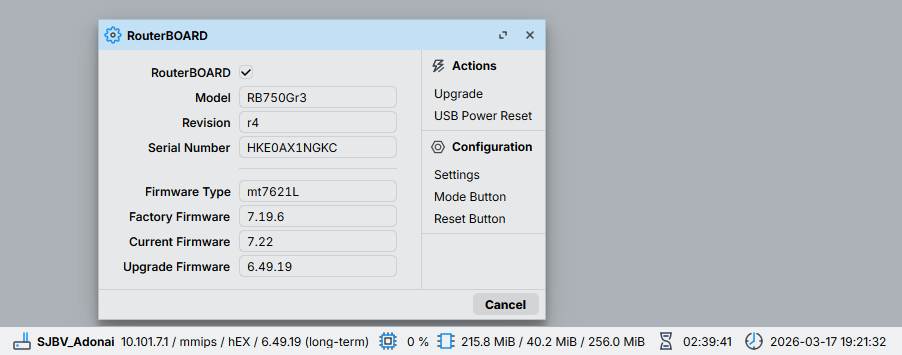
Interesting that the factory firmware is 7.19.6, and the command said I could install 7.13+ on v7 and 6.49.8+ on v6.

RouterOS was successfully downgraded to 6.49.19, but the firmware would not follow that downgrade.

Now with version 6.49.19, the command /system device-mode print only returns one line: mode: enterprise, and I no longer have access to that information about supported versions.

I just wanted to share this with you all, because apparently the rule that a downgrade cannot be done below the factory firmware is no longer an absolute truth.

And there may be many people who are not prepared to deal with this change from v6 to v7 overnight.

Best regards

1 Like

Mikrotik always supported downgrading to a software version that was older but compatible with the device on a hardware level. Because the rb750gr3 has had no changes, it still runs v6 fine. It's still maintained, so there's nothing inherently bad in doing so. (But I'd prepare my script for v7 :slight_smile: )

Downgrades on many devices are restricted because of a hardware change, where proper drivers are simply not available in older versions. These are completely blocked.

The "allowed-versions" from device-mode is not about this. They are a restriction for the sake of security. This can be turned off in the device-mode, and it's controlled by the "install-any-version" flag.

All of this deals with the software version and not with the firmware version.

As @lurker888 wrote: screenshot is about firmware (the "UEFI" part) ... and I highly doubt that it will allow you to downgrade it (press "Upgrade" button and see yourself).

The device-mode is about ROS (the "OS" part") ... "factory-software" from /system/resource/print indicates (but seemingly not always enforced) the lowest ROS version, supported on certain device (really old devices don't have this info "burned in").

For me, this topic just has a clickbait title.

Downgrade from factory firmware 7.x to 6.49.x is possible!

FALSE

The (current/running) Firmware can not downgraded past Factory Firmware.
(it is possible to update the factory firmware in some cases, but that's another story)

About SOFTWARE, instead,
you can downgrade only till the written version in system/resource as @mkx indicated


And where was this thing ever written?

Here you contradict the title itself...

1 Like

Well that is true, but “Factory software” is not necessarily the same as “the software it came with”.

There is a field “Factory software” in System→Resources and THAT is the minimally supported version, the field label is a bit misleading because it happens that devices are shipped with a higher version than what is there. For his RB705Gr3 that may well have been 6.xx as those were originally shipped with 6.xx versions. So he can download to 6.49 without issue in this case.

It does not matter that the device came with 7.19.6 but it indeed cannot be downgraded below what is in “Factory software” in System→Resources. The System→Device Mode does not matter.

Okay, thank you, now I understand the difference between ROS and Firmware. However, in other materials I consulted, I always saw the general idea that it wasn't possible to downgrade below the Factory Firmware, and I understood this as a firmware/ROS combination.

I'll change the text and leave it here, as other people may also have this question.

I will definitely adapt my deployment script for RouterOS V7, but I will do it carefully and after a lot of testing.
Thank you for the clarification.

There is a difference (or there may be a difference) in minimal version for RouterOS and Firmware.

It isn’t possible to downgrade below either. But it could be that minimal RouterOS version is lower than minimal Firmware version and you could downgrade RouterOS an keep the firmware version as it was.

E.g. I have an RB4011 where “factory software” is 6.44.6 and “factory firmware” 6.47.9. I think it came with a 6.47.10 RouterOS, at least that is the oldest export I have from it. But it could run RouterOS 6.44.6.

(of course it is running 7.22 now)

It would welcome it when MikroTik provided a webpage or program that can convert a version 6 config (or any older config) to a new version 7 config. The router itself can do it, but it would be nice to have it available in a separate environment so you can load the config from another router when buying something new.