Hello All.
Looks like DST do not activate automatically starting from v3.4
The way to make it active is push Apply button (???).
Anybody can confirm?
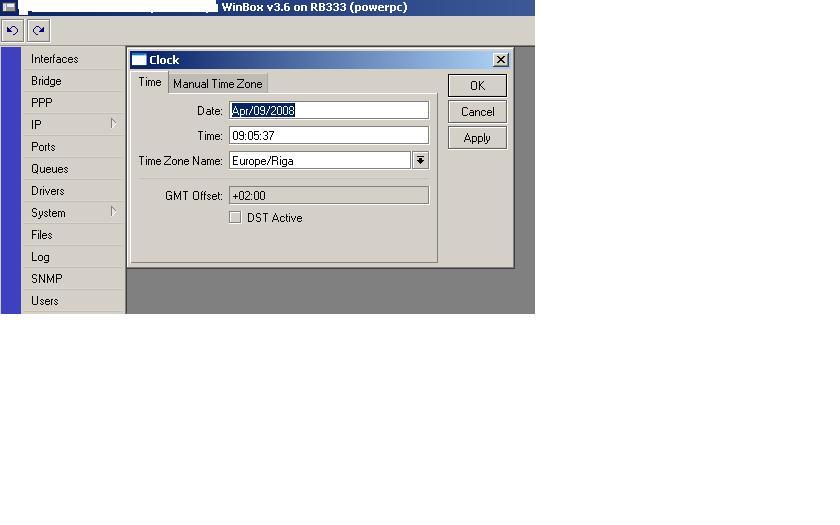
Thank you for the report.
We aware of this problem.
I have problem with DST on MikroTik RouterOS 3.6 + RouterBOARD 333 too. A router works as NTP server. It activated DST successfully.
 > /system clock print
            time: 13:18:06
            date: apr/09/2008
  time-zone-name: "Europe/Moscow"
      gmt-offset: +04:00
      dst-active: yes
 > /system ntp client print
        enabled: yes
           mode: unicast
    primary-ntp: 195.2.64.5
  secondary-ntp: 62.117.76.140
         status: synchronized
 > /system ntp server print
    enabled: yes
  broadcast: no
  multicast: no
   manycast: no
Four more routers synchronize their clocks with the first router. Two of them activated DST, but two not.
 > /system clock print
            time: 12:18:58
            date: apr/09/2008
  time-zone-name: "Europe/Moscow"
      gmt-offset: +03:00
 > /system ntp client print
             enabled: yes
                mode: unicast
         primary-ntp: 10.1.0.1
       secondary-ntp: 0.0.0.0
       poll-interval: 15m
       active-server: 10.1.0.1
    last-update-from: 10.1.0.1
  last-update-before: 13m37s660ms
     last-adjustment: -18ms926us
 > /system clock print
            time: 13:19:57
            date: apr/09/2008
  time-zone-name: "Europe/Moscow"
      gmt-offset: +04:00
      dst-active: yes
 > /system ntp client print
             enabled: yes
                mode: unicast
         primary-ntp: 10.1.0.1
       secondary-ntp: 0.0.0.0
       poll-interval: 15m
       active-server: 10.1.0.1
    last-update-from: 10.1.0.1
  last-update-before: 8m3s620ms
     last-adjustment: -24ms259us
 > /system clock print
            time: 12:20:48
            date: apr/09/2008
  time-zone-name: "Europe/Moscow"
      gmt-offset: +03:00
 > /system ntp client print
             enabled: yes
                mode: unicast
         primary-ntp: 10.1.0.1
       secondary-ntp: 0.0.0.0
       poll-interval: 15m
       active-server: 10.1.0.1
    last-update-from: 10.1.0.1
  last-update-before: 9m26s680ms
     last-adjustment: -23ms781us
 > /system clock print
            time: 13:21:46
            date: apr/09/2008
  time-zone-name: "Europe/Moscow"
      gmt-offset: +04:00
      dst-active: yes
 > /system ntp client print
             enabled: yes
                mode: unicast
         primary-ntp: 10.1.0.1
       secondary-ntp: 0.0.0.0
       poll-interval: 15m
       active-server: 10.1.0.1
    last-update-from: 10.1.0.1
  last-update-before: 13m8s760ms
     last-adjustment: -3ms765us
Look at the post above.