Hello,
I have a problem connecting to a Microtik via winbox on with my secondary wan ip.
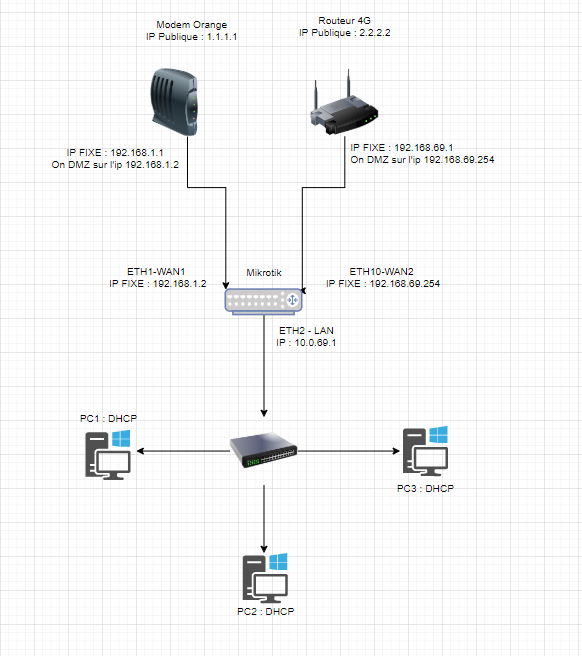
Currently I have two internet boxes which are connected to mikrotik RB2011UiAS
Modem1 has 1.1.1.1 as static public ip and lan IP 192.168.1.1/24.
The 4G router has 2.2.2.2 as static public ip and LAN IP on 192.168.69.1/24
Currently these two boxes are connected to my mikrotik with static ip on ether1 wan1 and ether10 wan2
A DMZ has been configured on the two internet boxes so i can passthrought (don’t ask me to do bridge because dosen’t have the option on both internet modems)
My problem is that I cannot connect to my mikrotik from winbox through the public IP 2.2.2.2 even though the packets pass through this link and the PCs have internet access.
But on the other hand I can connect to public IP 1.1.1.1 without problems.
No rule is created to connect to Winbox. I just activated the Winbox service:
Do I understand correctly that you are trying to connect to Mikrotik using external IP addresses (1.1.1.1.1 / 2.2.2.2.2) not from your local network?
If you are trying to connect from your local network, you should learn what Hairpin NAT is.
Without knowing what you have and how it’s set up, it’s impossible to advise anything. Please attach a text version of your configurations. At the same time - remove “critical” information from these files before publishing them on the forum: serial numbers, external IP addresses and gateways, etc.
Yes i want to connect using my external ip.
So to explain. My mikrotik router has 2 wan ports. and the other lan ports are in one bridge (LAN)
On both wan interfaces i have an static ip adress wan1 : 1.1.1.1 GW : 1.1.1.254 and wan2 : 2.2.2.2.GW 2.2.2.254
The wan1 is connected to my isp router on dmz.
The wan2 is connected to an 4g router also on dmz.
My route distance on wan1 is 1 and wan2 is 100.
My problem is when i have both wan interfaces conencted i can’t acces on mikroitk externally from wan2 but i can acces from my wan1 ?
But if a disconnect wan1 i can acces to my mikrotik from wan2 and the pc have the 2.2.2.2 as external ip.
So my question is, do i need to do an firewall rule so i can acces to wan2 ?
I have other routers (non mikrotik routers) who have exact same config on the wan side and i can acces correctly from both external ip ?
The problem is that your requirement is not clearly stated.
Do you mean, I wish to access my Router while at a remote location?
OR
Do you mean I wish to access my router while on the LAN of ISP1 modem/router or on the LAN of the ISP2 modem/router.
(hint they are not strictly modems if they get a static IP and then NAT you a different IP)
If you mean the first one, then the answer is, stop trying to do something that is a security risk. Ensure you vlan into the router and then access winbox.
If its the latter option, you should be able to reach the router with either so would have to see config
/export file=anynameyouwish ( minus router serial number, any public WANIP information, keys )
NOTE: DMZ is not necessarily required, if you can forward ports on the ISP modem/router its probably better to do that for the few ports you may need forwarded ( DMZ is a lazy approach and less secure in a way )
Sounds like he needs to packet mark and mangle so when he comes in on the secondary ISP… The routing table send it back out the port it came in on rather than the default.
Why would you encourage someone to come in clear text to the router for management purposes, me thinks your dehydrated. ( or lost a bounce in your step )
To simply explain why panisk0 pointed policy routing out:
When you have both WANs active and the traffic comes on WAN2 then router sends it back using WAN1 as it has lower “distance” so the trafic comes back from a different connection. Stack up masquarades, different external IPs … straight conslusion is “man in the middle attack”.
You have to inform router (mark packets) coming from WAN#N to go back the same interface. Other brands have that magic built-in and you are not aware what’s going on. Is it better? Worse? It’s a win-win as MT lets you have the power over all aspects of routing but it implies more configuration to be done.
 ( or lost a bounce in your step )