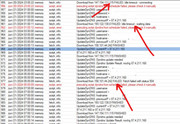
Your statement is correct, but the cli command does not return any address. If it would return multiple, I could select the correct one (in this use case that would be strange) . But it returns nothing for any interface. It did work until 7.12
False… and define what is “latest versions” for you.
[vmtest@] > :put ([/tool fetch url=“https://upgrade.mikrotik.com/routeros/NEWESTa7.stable” as-value output=user]->“data”)
7.13 1702545848
The script is bad implemented at the start, if it just download from one “url” is not needed any mode/src/etc. frills
And at the time I write, http**s**://checkip.dyndns.org/ do not work at all, not even on other systems
Kitty has claws, do not mess with it, even with only one eye open you will get hurt, thinking your script knowledge is somehow better, such a comedian. You do know that cat is just Yoda in disguise.
uff I can't get used to those manners but I like him...
My answer is based on my own experience (when switching to 7.13) and that's why I wanted to help, nothing more. At the time it didn't work with "mode=https" and switching to http fixed it. Now users report that with the latest beta it is fixed.
*) fetch - fixed fetch when using "src-path" with HTTP/HTTPS modes (introduced in v7.13);
Happy new year and please, it doesn't cost work to be a little kind.
It probably depends on the fact that I am NOT a native English speaker and I don’t use automatic translators… At least if I make a mistake it’s my fault…
And in any case, whether or not it seems like an offense, at least compared to others (not present in this topic so far) at least I try to explain my reasons…
Why use mode or any other param that is part of url like address, port and src-path for http(s) fetch? Url as single argument is enough, url schema sets mode if not set and other params are all part of url.
This is a tested and working script if anyone looking for a solution:
Tested on Mikrotik RouterOS: 7.12.1
# Set needed variables
	:global username "your-login-name"
	:global password "your-password"
	:global hostname "your-dyndns"

	:global dyndnsForce
	:global previousIP

# print some debug info
	:log info ("UpdateDynDNS: username = $username")
	:log info ("UpdateDynDNS: password = $password")
	:log info ("UpdateDynDNS: hostname = $hostname")
	:log info ("UpdateDynDNS: previousIP = $previousIP")

# get the current IP address from the internet (in case of double-nat)
	/tool fetch mode=http address="checkip.dyndns.org" src-path="/" dst-path="/dyndns.checkip.html"
	:delay 1
	:local result [/file get dyndns.checkip.html contents]

# parse the current IP result
	:local resultLen [:len $result]
	:local startLoc [:find $result ": " -1]
	:set startLoc ($startLoc + 2)
	:local endLoc [:find $result "</body>" -1]
	:local currentIP [:pick $result $startLoc $endLoc]
	:log info "UpdateDynDNS: currentIP = $currentIP"

# Remove the # on next line to force an update every single time - useful for debugging,
# but you could end up getting blacklisted by DynDNS!

#:set dyndnsForce true

# Determine if dyndns update is needed
# more dyndns updater request details http://www.dyndns.com/developers/specs/syntax.html

	:if (($currentIP != $previousIP) || ($dyndnsForce = true)) do={
		:set dyndnsForce false
		:set previousIP $currentIP
		:log info "$currentIP or $previousIP"
		/tool fetch user=$username password=$password mode=https address="members.dyndns.org" \
		src-path="nic/update?system=dyndns&hostname=$hostname&myip=$currentIP&wildcard=no" \
		dst-path="/dyndns.txt"
		:delay 1
		:local result [/file get dyndns.txt contents]
		:log info ("UpdateDynDNS: Dyndns update needed")
		:log info ("UpdateDynDNS: Dyndns Update Result: ".$result)
		:put ("Dyndns Update Result: ".$result)
	} else={
		:log info ("UpdateDynDNS: No dyndns update needed")
	}
Hi there, quite new to Mikrotik. Tried utilizing tdeak’s script but for some reason the new IP does not get updated on dyndns side, at the end of the log I get this error code:
“…to dyndns.txt FAILED: Fetch failed with status 400”
Not sure if anyone can help. I am on ROS 7.13. Tried interchanging https with http with fetch tool to no avail, still keep getting the same error.
Thank you ever so much for any advise.
Hi, I want to do AutoUpdate Port Forwarding IP Public Dynamic (dyndns.com) with Mikrotik.
Does anyone have the script?
I did WebManage 3CX PBX IP port forwarding, but Destination-Address (dst-address) cannot autoupdate public ip from DialUp PPPoE.
NB: i am using RB750 V.6.49.15
Hi everyone
We have multiple customer installation with mikrotik’s router and an dynamic host on its public IP; mikrotik should update the host using DYNDNS services.
We used the “first version” of the script, this:
# Set needed variables
:local username "user"
:local password "password"
:local hostname "host"

:global dyndnsForce
:global previousIP

# print some debug info
:log info ("UpdateDynDNS: username = $username")
:log info ("UpdateDynDNS: password = $password")
:log info ("UpdateDynDNS: hostname = $hostname")
:log info ("UpdateDynDNS: previousIP = $previousIP")

# get the current IP address from the internet (in case of double-nat)
/tool fetch mode=http address="checkip.dyndns.org" src-path="/" dst-path="/dyndns.checkip.html"
:delay 1
:local result [/file get dyndns.checkip.html contents]

# parse the current IP result
:local resultLen [:len $result]
:local startLoc [:find $result ": " -1]
:set startLoc ($startLoc + 2)
:local endLoc [:find $result "</body>" -1]
:local currentIP [:pick $result $startLoc $endLoc]
:log info "UpdateDynDNS: currentIP = $currentIP"

# Remove the # on next line to force an update every single time - useful for debugging,
# but you could end up getting blacklisted by DynDNS!

:set dyndnsForce true

# Determine if dyndns update is needed
# more dyndns updater request details http://www.dyndns.com/developers/specs/syntax.html

:if (($currentIP != $previousIP) || ($dyndnsForce = true)) do={
:set dyndnsForce false
:set previousIP $currentIP
:log info "$currentIP or $previousIP"
/tool fetch user=$username password=$password mode=http address="members.dyndns.org" \
src-path="nic/update?system=dyndns&hostname=$hostname&myip=$currentIP&wildcard=no" \
dst-path="/dyndns.txt"
:delay 1
:local result [/file get dyndns.txt contents]
:log info ("UpdateDynDNS: Dyndns update needed")
:log info ("UpdateDynDNS: Dyndns Update Result: ".$result)
:put ("Dyndns Update Result: ".$result)
} else={
:log info ("UpdateDynDNS: No dyndns update needed")
}
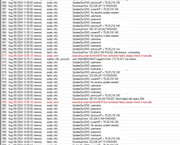
for a long time it works great, but now are experiencing problems; in the log files we can see errors:
So we just tried to use the new script:
# Set needed variables
	:global username "your-login-name"
	:global password "your-password"
	:global hostname "your-dyndns"

	:global dyndnsForce
	:global previousIP

# print some debug info
	:log info ("UpdateDynDNS: username = $username")
	:log info ("UpdateDynDNS: password = $password")
	:log info ("UpdateDynDNS: hostname = $hostname")
	:log info ("UpdateDynDNS: previousIP = $previousIP")

# get the current IP address from the internet (in case of double-nat)
	/tool fetch mode=http address="checkip.dyndns.org" src-path="/" dst-path="/dyndns.checkip.html"
	:delay 1
	:local result [/file get dyndns.checkip.html contents]

# parse the current IP result
	:local resultLen [:len $result]
	:local startLoc [:find $result ": " -1]
	:set startLoc ($startLoc + 2)
	:local endLoc [:find $result "</body>" -1]
	:local currentIP [:pick $result $startLoc $endLoc]
	:log info "UpdateDynDNS: currentIP = $currentIP"

# Remove the # on next line to force an update every single time - useful for debugging,
# but you could end up getting blacklisted by DynDNS!

#:set dyndnsForce true

# Determine if dyndns update is needed
# more dyndns updater request details http://www.dyndns.com/developers/specs/syntax.html

	:if (($currentIP != $previousIP) || ($dyndnsForce = true)) do={
		:set dyndnsForce false
		:set previousIP $currentIP
		:log info "$currentIP or $previousIP"
		/tool fetch user=$username password=$password mode=https address="members.dyndns.org" \
		src-path="nic/update?system=dyndns&hostname=$hostname&myip=$currentIP&wildcard=no" \
		dst-path="/dyndns.txt"
		:delay 1
		:local result [/file get dyndns.txt contents]
		:log info ("UpdateDynDNS: Dyndns update needed")
		:log info ("UpdateDynDNS: Dyndns Update Result: ".$result)
		:put ("Dyndns Update Result: ".$result)
	} else={
		:log info ("UpdateDynDNS: No dyndns update needed")
	}
but also this script log some errors:
the most strange things is that sometimes works, and sometimes not…We are using ROS 7.15.3 in all devices; does anyone have an a idea how to solve this?
Thanks
bye
I use a different script, but same core approach and have the same problem.
The failure (and resulting errors) happens at what seems to be random times.
I've been ignoring it, but my guess is it has something to do with whether there is or is not an updated (i.e., changed) IP address. But, it could be as simple as their service not always being reachable.

 but I like him...
 At least if I make a mistake it’s my fault…