mkx answer was perfectly accurate and fine for what he explained. You can’t make him responsible for not having superpowers inspecting your CRS from just little to no info. How could one expect a packet sniffer pcap file eating up internal flash which is not visible when executing /disk/print? This is a bug for sure and should not happen. I hope you have reported this to Mikrotik support so we can all benefit from a bugfix.
If a remote device cannot be rebooted due to lack of memory, it is sometimes possible to do a reboot if you enable it on a schedule
What's new in 7.19beta8 (2025-Apr-04 13:24):

*) system - fixed "/system reboot" when the system disk is completely full;
Well, at least now we can initiate NetInstall procedure remotely 
But only if you enabled routerboard device-mode feature flag before to change boot method. 
At least downgrade should be possible now.
However only if one first installs latest beta. So it doesn’t help devices, running older ROS versions, already in the “doomed” state.
But once 7.19 stable released and someone encounters the 0 space issue after upgrading from e.g. 7.16 (this version consumed remarkable less flash), you now can downgrade instead of netinstall your device.
Just for your information:
I was able to get the box out of the network.
Before using Netinstall I did a reset of the config and voila:
[admin@MikroTik] /system/resource> print
uptime: 1m52s
version: 7.18.2 (stable)
build-time: 2025-03-11 11:59:04
factory-software: 6.41
free-memory: 455.6MiB
total-memory: 512.0MiB
cpu: ARM
cpu-count: 2
cpu-frequency: 800MHz
cpu-load: 15%
free-hdd-space: 584.0KiB
total-hdd-space: 16.0MiB
write-sect-since-reboot: 2680
write-sect-total: 2680
architecture-name: arm
board-name: CRS326-24G-2S+
platform: MikroTik
Then I restored the .backup file and still there is memory available
[admin@KK_Home_Router_4] /system/resource> print
uptime: 1m41s
version: 7.18.2 (stable)
build-time: 2025-03-11 11:59:04
factory-software: 6.41
free-memory: 447.4MiB
total-memory: 512.0MiB
cpu: ARM
cpu-count: 2
cpu-frequency: 800MHz
cpu-load: 1%
free-hdd-space: 160.0KiB
total-hdd-space: 16.0MiB
write-sect-since-reboot: 575
write-sect-total: 2055
architecture-name: arm
board-name: CRS326-24G-2S+
platform: MikroTik
[admin@KK_Home_Router_4] /system/resource>
Conclusion: Netinstall is not needed and for me it’s a BUG in the software. Seems when it runs once against 0 byte free it never shows released space. This explains why I was till able to write configs to the flash ( NOT memory ). It seems, just a thought of me, that when the free space counter is not changed when space is available all internal functions just check the free size counter and then complains with system,error,critical could not save configuration changes, not enough storage space available.
I confirm reset works on my chateaus 5G and 5G R16, but I still have to be at the device and press it, since the device gets to a bricked (although working  ) state - I can do absolutely nothing with it remotely, cannot reset it, reboot, shutdown, change anything, remove scripts, certificates, uninstall packages.. nothing.
I’m really “happy” for buying like a dozen $485 Mikrotik devices, when the crap has less flash memory than any aliexpress $2 device, stupid sw bugs so I have to travel every month to the devices to netinstall it and Mikrotik denying the problem and advising netinstall as solution :-/
I’ll try the 7.16.2 and see how it works, I downgraded some of my routers to it too, since Mikrotik screwed ovpn
damn, so it is way worse - it bricks my RBcAPs too, I have hundreds of these :-/ Fortunately most of them are max. 7.16.2 or 7.17, but those are dumb APs, no routing, no firewall filtering etc, just bridged wifi + eth, and still got bricked with 7.18.2 - this is bad.. I have some of these running for more than 1000 days without a restart, running great before 7.18.2
We found a simple solution for those who have several packages installed.
After installing 7.19, a memory shortage error appeared on two hap ac 2.
Removing the wifi-qcom-ac package.
We are rebooting.
There is a lot of free space 
Install the wifi-qcom-ac package.
We do several reboots.
There is some free space, 90kib on one, 60kib on the other.
I was wrong in the previous message.
The solution helps for a couple of hours and then there is a lack of space again.
On hapac 2, I had to remove the wifi-qcom-ac package, and with it, the free space is running out.
The wireless package was installed instead.
Never go under 100k on flash, maybe even more is needed for temp files (depends what is used on ROS) and how often config is changed (config db can get fragmented).
You can downgrade to 7.16.2 with wifi-qcom-ac and you’ll have around 600kB and working device
Or to 7.17-7.17.2, you’ll have something over 200 kB, but it will probably still not eat all the free space and work (I now have some cAPs running for 60 days and still around 200 kB of space with 7.17.1 or 7.17.2).
I have tested this on cAPs and Chateaus, hAP should be the same, not sure about the switches - I don’t use capsman or wireless on those
Just another data point: on a hap ac2 with wifi-qcom-ac I have more than 300k free after netinstall. After about 3 months, with numerous config changes I have approx. 290k free. (And I even do logging to disk, but limited to 2x100 lines)
So the situation is very far from ideal, but to me at least seems to be manageable with careful configuration and no in-place updates…
EDIT: 7.18.2
it is important to write your ROS version in this issue.
I have checked one of my cAPs running probably something like 6.49.16 and in November updated to 7.16.2 - it has 560Kb of free space and seems pretty solid. With graphs and some logs saved to disk.

There are two problems in this issue:
1, We know Mikrotik made some changes to qifi-qcom-ac in 7.17, and 7.19. The update in 7.17 takes something around 300KB - so who had 500-600KB now has 200KB of space - which is not good when the device has less memory than any chinese aliexpress gadget for $0.50
2, something eats the free space. Probably not related to 1, since the same would happen, it would just take 3x the time - but 1 definitely makes it worse. It seems to me it started in 7.18.
You can’t see what is taking the space, everything is empty. Mikrotik support doesn’t help, they tell you to review your config or buy more powerful AX device - ignoring the fact, that with the same config, 7.16.2 devices run fine.
It seems 7.19.1 is slightly better in this, at least on my testing chateau, but it is probably too soon to make some conclusions, we’ll see.
btw - mikrotiks used to run for decades with 300KB
Sorry, meant to include version. It’s 7.18.2.
7.19.1 adds very little (4k or so) to the wifi package, but the base + wifi-ac together has grown by almost 100k.
Most of the grow between 7.16.x and 7.19.x that you observed are from the main RouterOS package. wifi-qcom-ac itself only increased 8KB in size (compressed size of the SquashFS archive that should be stored as it on the internal storage)
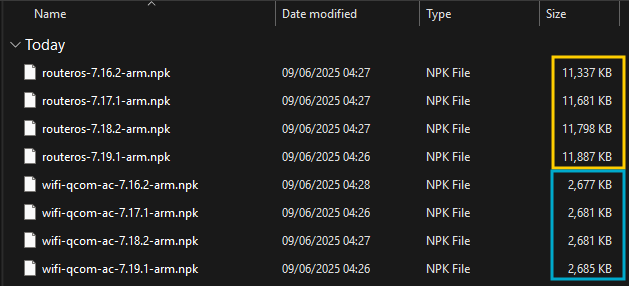
New functionalities of course bring more compiled code but also make support data like the .mem files for console and WinBox larger (I think they contain the parameter information, including names and help texts).
The biggest grow of the main package is between 7.16.x and 7.17.x. Also between 7.16.x and 7.17 WebFig has been completely redesigned with new HTML/JS/CSS/SVG as well as embedded Web Fonts (38KB of that  ) that increased the compressed size by 75KB for WebFig alone.
Even the built-in CA certificates that came with 7.19 require about additional 20KB (compressed size) that 7.18.x didn’t. That hasn’t taken into account the code/support data for the implementation of the feature.
I’m not blaming the wifi-qcom-ac package - it makes things a lot worse, since it reduces the free space to one third in 7.17, but the unanswered question is - what is eating the space? Mikrotiks support is worthless, I don’t know what is so big problem on simulating the behavior, looking to the file system and saying - bug in vpn logs / memory leak in certificate management etc.
The problem with wifi-qcom-ac package and it’s size is that it makes it almost unusable on 16MB devices
routeros package size is increasing. At a point even routeros+wireless is going to run into trouble.
Checked yesterday
Map running 7.18.1 incl wireless still has over 3.3Mb free.