ECMP - Load balancing not working properly

As many users in the forums I have run into problems with the load balancing example in the wiki: http://wiki.mikrotik.com/wiki/Load_Balancing_Persistent. I have configured a basic setup as per the example with the exception that I’m using interface routing to add the defaults gateways rather than IP addresses. The reason for this is that I’m using ADSL with PPPoE for which the internet addresses are assigned via DHCP.

The problems that I experience are:

  1. https connections does not work properly. I tried using Internet banking and the server logs me out the moment a packet is detected from another IP.
  2. SMTP connections do not work properly. Mails are dropped halfway while being sent.
  3. I cannot establish a PPTP connection from the PPTP client on my router (ROS3.19) to my PPTP server.

The moment I disable one of the PPPoE interfaces without changing anything else in the config, everything works 100%.

The Wiki example in my opnion is either incomplete or ECMP does not work properly for load balancing purposes. The problems that others have experienced as per the postings in this forum confirms this. It should either be fixed or completely removed from the Wiki because it creates more problems than what is solves in its current format.

I will therefore rather try my luck with http://wiki.mikrotik.com/wiki/Per-Traffic_Load_Balancing than waste further time on something that does not work.

If anybody has other examples that work well for them, please post them here.
ECMP does exactly what it is supposed to do. Maybe the Wiki article needs to have more warnings that you have to understand protocols better. The real problem is up at Layer 7 where applications make assumptions about source IP addresses which are incongruent with IP networking. As a network engineer, it’s your job to reconcile the lower layers of IP with the applications using it. I know none of that helps you, so here are some comments which might help.

First, try getting away from dynamic public IP addresses. Things get much easier.

Two, SMTP connections should not be affected in their basic form. The process of sending a message to an MTA should be a single TCP connection on port 25. When I say single connection I mean atomic for at least one whole email message. Now you may run into a problem with SPF or reverse DNS but given that you are a dynamic public IP, you pretty much can’t use SPF and the reverse DNS is never going to point to your MX. You should sniff the outbound traffic during a failure case and confirm that an SMTP session with a server stays on a single interface until the TCP session is closed. Note that the very next SMTP session to the same or to a different server can go out either ECMP route.

Three, PPTP is composed of two IP sessions, a TCP session on port 1723 for session control and encapsulated data in using the GRE protocol. You have to keep these on the same outbound interface using policy routing to get PPTP to work. You could try setting up a different type of tunneling which uses a single IP session or is session-less.

The config works better now that I have changed my config to do src-nat on interfaces as per the latest wiki config rather on the src-address and also based on what has been posted in http://forum.mikrotik.com/t/ecmp-over-2-adsl-gateways/26226/1

I use a RB600 as my “ECMP router” and I used the default route as per the detail below rather than what has been suggested in the post listed above.

/ip route
add check-gateway=ping comment=“” disabled=no distance=1 dst-address=0.0.0.0/0 gateway=ADSL1,ADSL2
add comment=“” disabled=no distance=1 dst-address=192.168.0.0/24 gateway=192.168.254.2 scope=30 target-scope=10

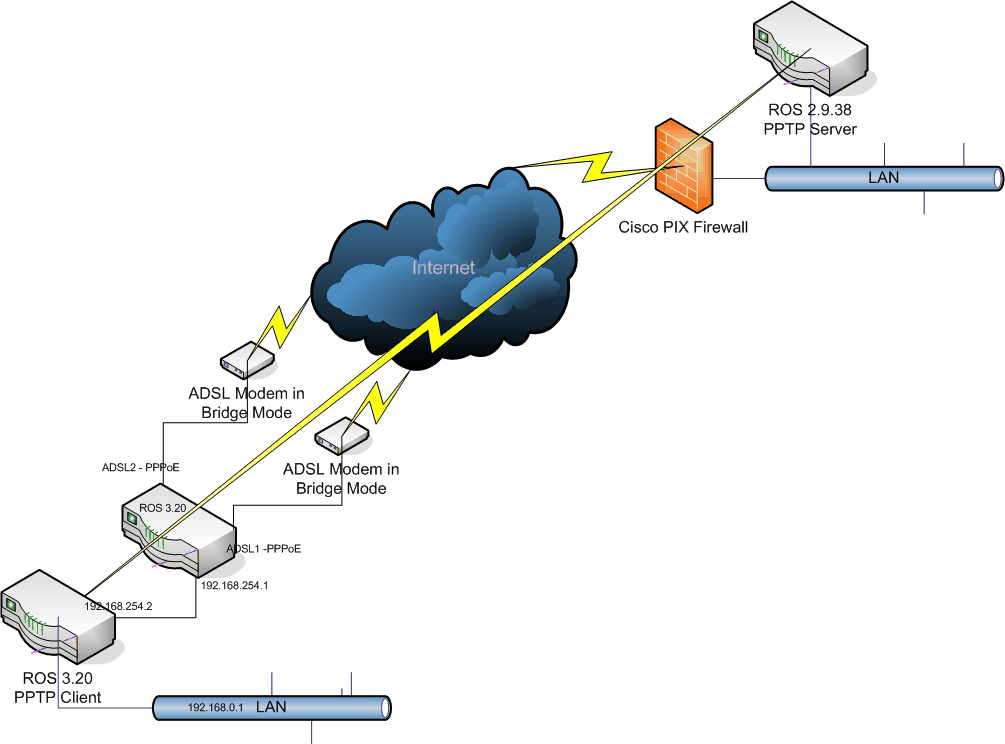
I then use a second router (RB532) which connects to the ECMP router as indicated in the attached picture. The reason for this is to get away from the problem where traffic that originates from the router itself (such as PPTP client from the ECMP router itself) is not handled correctly and creates all sorts of issues.

This config generally works well except that the tunnels that I create on the RB532 disconnect and re-connect at regular intervals (every 10 minutes or multiples thereof - i.e. 20 minutes).

I also intermittently experienced the following problems:

  • With a particular https site (Internet banking) once or twice during a period of a week the site logged me out for no reason, i.e. 99% of the time the site works without issues.
    I also experienced a problem twice where emails failed halfway through being sent

Failover works without any problems. Both DSL connections are to the same ISP and even though the one route (via ADSL1) shows as being not active (as shown below), traffic is routed via both ADSL interfaces.

[admin@MikroTik] /ip route> print
Flags: X - disabled, A - active, D - dynamic, C - connect, S - static, r - rip, b - bgp, o - ospf, m - mme,
B - blackhole, U - unreachable, P - prohibit

DST-ADDRESS PREF-SRC GATEWAY-STATE GATEWAY DISTANCE INTERFACE

0 A S 0.0.0.0/0 reachable ADSL1 1 ADSL1
reachable ADSL2 ADSL2
1 A S 192.168.0.0/24 reachable 192.168.254.2 1 local
2 ADC 192.168.254.0/24 192.168.254.1 0 local
3 ADC 196.x.y.1/32 196.x.z.66 0 ADSL2
4 DC 196.x.y.1/32 196.x.z.93 0 ADSL1

Has anybody else experienced something similar with PPTP and ECMP?
ECMP Config.gif

For the problem of connecting to the router from Internet and maybe connections from the router itself to Internet:


/ip firewall mangle
add action=mark-connection chain=input connection-state=new in-interface=ADSL2 new-connection-mark=ADSL2Con2R passthrough=yes
add action=mark-connection chain=input connection-state=new in-interface=ADSL1 new-connection-mark=ADSL1Con2R passthrough=yes
add action=mark-routing chain=output connection-mark=ADSL2Con2R new-routing-mark=ToADSL2 passthrough=yes
add action=mark-routing chain=output connection-mark=ADSL1Con2R new-routing-mark=ToADSL1 passthrough=yes

Then you must specify the default route for the ToADSL1 and ToADSL2 markings. You can see how I have done it a couple of days ago here: http://forum.mikrotik.com/t/ecmp-over-2-adsl-gateways/26226/9 - check out the screenshot.


For the PPTP problem:

This means: mangle policy route them over one of the ADSLs.

I wonder what the mangle rules will be for the PPTP to go through only one of the interfaces to work properly… If anyone has any suggestions and pointers… So the port is 1723 tcp and then theres a GRE along with it… hmm.. should work…

So I have followed along with this thread in hopes of making this work. I have most functionality setup as you guys do with a few odd instances.


Hosted services behind the network do not always get connections.

i.e. stmp, imap and ssh sessions forwarded to hosts behind the nat are very sparadic in accepting the connections. When I do get replys and attempt to auth ssh authenticates but seems to not know how to get back to me from internet. Sometimes is does but then times out after a few minutes and drops me.

All connection attempts are on the same ADSL interface and public IP.

I have this setup with 2 PPPOE connections over bridged modems. They are different providers with different public addresses and networks.


Outbound connections work well and get balanced okay with a few nuances. i.e sip traffic is confused from asterisk box. Will probably force this over one route with routing marks but then lose failover. I need to look at sip_nat.conf and see if I can setup both public addresses with success.


Should this setup give me persistent connections? And if so is there a time out? I have adjusted the Generic Timeout in the Firewall Connection Tracking with no success. I need to sniff the packets abit but iTunes and online gaming sessions get dropped after about 10 mins and have to be restarted.


RB433 ROS 3.20


/ip route
add check-gateway=arp comment=“Route All ToADSL1” disabled=no distance=1
dst-address=0.0.0.0/0 gateway=ADSL1 routing-mark=ToADSL1
add check-gateway=ping comment=“” disabled=yes distance=1 dst-address=
0.0.0.0/0 gateway=ADSL1,ADSL2
add check-gateway=arp comment=“Route All ToADSL2” disabled=no distance=1
dst-address=0.0.0.0/0 gateway=ADSL2 routing-mark=ToADSL2
add check-gateway=arp comment=“ECMP Test - BAD” disabled=no distance=1
dst-address=0.0.0.0/0 gateway=ADSL1,ADSL2
add check-gateway=arp comment=“Route All Else to ADSL1” disabled=no distance=
2 dst-address=0.0.0.0/0 gateway=ADSL1


/ip firewall nat
add action=masquerade chain=srcnat comment=“” disabled=no out-interface=ADSL1
add action=masquerade chain=srcnat comment=“” disabled=no out-interface=ADSL2
add action=dst-nat chain=dstnat comment=“” disabled=no dst-port=22
in-interface=ADSL1 protocol=tcp to-addresses=xx.xx.xx.21 to-ports=22
add action=dst-nat chain=dstnat comment=“” disabled=no dst-port=25
in-interface=ADSL1 protocol=tcp to-addresses=xx.xx.xx.21 to-ports=25
add action=dst-nat chain=dstnat comment=“” disabled=no dst-port=80
in-interface=ADSL1 protocol=tcp to-addresses=xx.xx.xx.21 to-ports=80
add action=dst-nat chain=dstnat comment=“” disabled=no dst-port=443
in-interface=ADSL1 protocol=tcp to-addresses=xx.xx.xx.21 to-ports=443
add action=dst-nat chain=dstnat comment=“” disabled=no dst-port=587
in-interface=ADSL1 protocol=tcp to-addresses=xx.xx.xx.21 to-ports=587
add action=dst-nat chain=dstnat comment=“” disabled=no dst-port=993
in-interface=ADSL1 protocol=tcp to-addresses=xx.xx.xx.21 to-ports=993
add action=dst-nat chain=dstnat comment=“” disabled=no dst-port=5004-5037
in-interface=ADSL1 protocol=udp to-addresses=xx.xx.xx.7 to-ports=
5004-5037
add action=dst-nat chain=dstnat comment=“” disabled=no dst-port=5039-5082
in-interface=ADSL1 protocol=udp to-addresses=xx.xx.xx.7 to-ports=
5039-5082
add action=dst-nat chain=dstnat comment=“” disabled=no dst-port=10000-20000
in-interface=ADSL1 protocol=udp to-addresses=xx.xx.xx.7 to-ports=
10000-20000


/ip firewall mangle
add action=mark-connection chain=input comment=
“Policy Routing All connections from ADSL1 to Router back to ADSL1”
connection-state=new disabled=no in-interface=ADSL1 new-connection-mark=
ADSL1Con2R passthrough=yes
add action=mark-routing chain=output comment=“” connection-mark=ADSL1Con2R
disabled=no new-routing-mark=ToADSL1 passthrough=yes
add action=mark-connection chain=input comment=
“Policy Routing All connections from ADSL2 to Router back to ADSL2”
connection-state=new disabled=no in-interface=ADSL2 new-connection-mark=
ADSL2Con2R passthrough=yes
add action=mark-routing chain=output comment=“” connection-mark=ADSL2Con2R
disabled=no new-routing-mark=ToADSL2 passthrough=yes


I have also added the following rule in to see if it drops the connection for iTunes and such and either way the apps still disconnect. And of course If I disable ADSL2 pppoe connection everything works just fine.


/ip firewall filter
add action=drop chain=forward connection-state=invalid


Update:: I have verified with torch that the forwarded packets coming in ADSL1 from internet through nat are at times getting routed back through ADSL2.

I have followed the same tutorial and was pretty excited that it got updated as the old one seemed to be broken.

My 2 links that I am trying to load balance are a 1.5M T1 and a 3M DSL. I understand that adding the 3M pipe in under gateway=WAN1,WAN2,WAN2 will force the router to make multiple use of that particular gateway to “weight” the higher throughput of the DSL line.

I have also implemented the same configuration with the suggested changes. and am seeing pretty much the same problems as what knects is seeing. When I used a Download Accelerator I see pretty close to the 4.5M of traffic that would be expected. As well as when I do an update in Debian.

However, my project based Webserver and email server seem to sporadically miss connections. As if I am using some sort of round-robin bonding without the other side being bonded. itunes and Zune Market place seem to also break and can stay sometimes connected for as little as 10 minutes, but as much as 1 hour. Everquest and WoW suffer from this as well and are playable for a short time, but then drop. It appears as if at some point the router just stiops following the routing marks.
I also still see the original of HTTPS, SSH and SMTP failing as indicated by the very first post and the very last post.

Does anybody have any idea or is this supposed to just be a port 80 only load balancer? No point posting the config as they probably all look the same. Someone Please help?

Otherwise I am thinking of using my overly priced Edimax BR724 Load Balancer.

Please Help I am desperate.

Preston

:slight_smile: It’s cool that you find our work useful.

Update:: I have verified with torch that the forwarded packets coming in ADSL1 from internet through nat are at times getting routed back through ADSL2.

So Policy Route them too :slight_smile:

DA dl-ing from same server or different mirrors!??

However, my project based Webserver and email server seem to sporadically miss connections. As if I am using some sort of round-robin bonding without the other side being bonded. itunes and Zune Market place seem to also break and can stay sometimes connected for as little as 10 minutes, but as much as 1 hour. Everquest and WoW suffer from this as well and are playable for a short time, but then drop. It appears as if at some point the router just stiops following the routing marks.
I also still see the original of HTTPS, SSH and SMTP failing as indicated by the very first post and the very last post.

Does anybody have any idea or is this supposed to just be a port 80 only load balancer? No point posting the config as they probably all look the same. Someone Please help?

Otherwise I am thinking of using my overly priced Edimax BR724 Load Balancer.

Please Help I am desperate.

Preston

Problem is probably due to the broken applications using multiple connections, some TCP some UDP some to different servers. Please Policy Route them correctly! over one of the links and Please report back here. Thank you.

P.S. How to know if for example a game makes multiple connections and how to know which they are - simply close all other apps and make mangle rules to log the new connections, etc.. etc.. Good luck.

P.S. 2. I myself policy route A-Bunch-of-Client-IPs over one line and Another-Bunch over the other, since I do all this, including ADSL modem bridging etc. etc. over the Internet, without the need for me to be behind their router. (Which is not best practice but I can handle it).

If by policy routing you mean something like this setup http://wiki.mikrotik.com/wiki/Per-Traffic_Load_Balancing. I have tried to set this up for my SSH sessions but have been unsuccessful. (One service at a time thing).I will be trying again this week. I also have thought about just setting up the services in a DMZ port on a 493 and see what happens.

I have 2 scenarios that I am working here. 1. Just load balencing for 2 connections and the other is load balancing with hosted services behind as in my current config.

I actually have been able to keep the applications up for more than 10 minutes but not more than an hour it is random.

If this is not what you mean then I guess I need a pointer :frowning:.

Thanks so much for the help. Would really love to get this working. Glad MT did something with the wiki those other configs were uh, interesting.

basic idea for ECMP load ballancing to work is

  1. make sure that incoming connections from internet gets out the same route they came in - mangle with routing marks, so if something fails, check what connections it has, that policy route it.
  2. special connections are routed to one interface, like pptp tunnels, different chat clients.

because, when you create connection it is assigned to one of the gateways and it stays there, forever. But when based on this connection another one is established, usually the other end is expecting that connection is coming from same ip address/host, it can be assigned to other gateway (as it is how ECMP works) , there for address changes and your both connections are dropped

IMHO - this covers all the basic knowledge that needs to be is covered

Ok, so policy routing has taken care of most issues but am still having problems with connections. Long file transfers via http, sftp, scp or ftp time out. If I use clients such as transmission or such they seem to work just fine. Downloading large files will time out after a period of time. This has happened from various hosts and servers. Seems to be random as to time or amount transfered. Files are > 500MB. Any ideas?

Could be unstable links… too much congestion… problem in upstream provider…

Ahh, but if I disable one of the links then everything is fine across each of them. Only when using the ECMP setup does this happen.

Can you view the connection log of the download program? Maybe there is a reconnect and resume, that is not obvious, unless you peek in the transfer log? So you tried this with what programs/browser/downloaders and what files did you download? Usually I test with Linux distribs ISO files. If you feel it will help, you could post a screenshot or two.

Yeah, I was doing a sftp of a linux iso from a box at my office. It ran for about 15 minutes then stalled and eventually timed out. I will try to get a log from it and post it. I do all my testing the same as you with linux iso files. I was having the issues via http doing the same. I have an RB600 with daughterboard at my office. It has a 6MB link not doing load balancing. I have an SSH connection open to the same box and it does not time out. Let me work on getting some log files. Right now my AppleTV is timing out trying to download movies. iTunes has been working just fine since policy routing the random ports. Forcing all http traffic over one link does not really help me “load balance”. At least at this point it is working “well enough” that we can start testing with customers.

Browsers - Firefox for OSX and Safari for HTTP downloads
Using Transmission for OSX for the torrent downloads of the linux iso’s.

I’m having the same issue as knects. Connections that last longer than 10 minutes or so tend to fail. Also a RB433, I’ve tried 3.20 and 4.0Beta1 with no change in results. All of my policy routing for PPTP and IPSec are working fine. Also if I tag a particular internal system to use a particular route, that works too.

I’ve contacted Mikrotik support and their best solution was to tell me to just set some of my internal clients to use one connection and some to use another (not really what I wanted to hear).

I’d be happy to try something out if anyone has any ideas…


pace

So far this morning upgrading to 3.22 has helped alot with my problem. I did not see anything specific in the changelog. I will update this after more thorough testing. I have made it well past any download sizes than I did on 3.20.


EDIT:


Spoke too soon. Hung at 325MB before I was only getting to around 80. Better but not complete. I will test some more. If I stop the download in Safari and resume it continues. I am trying my bittorrent client. Guess I am busting out wireshark.

so you are saying you have ECMP configured and you cannot download largr files, create pptp tunnel from client in your network, through ECMP router to server somewhere out in the wild, etc…

well..i tried simple configuration, without fancy configuration, simple basics:

router with ecmp:
set up 2 or more uplinks, masquerade them all (out-interface, rscnat, masquerade one rule for each of them)

tunnel was up for several hours, no reconnects, no nothing, traffic passed through without problems.

if possible, i would suggest you to make simple configuration and see what changes when and will continue to test configuration with ECPM

My only problem on 3.20 was downloading larger files i.e. linux iso’s via scp, sftp, wget, firefox/safari or bittorrent. I upgraded to 3.22 this morning and started trying agin. I was successful to about 300+ meg till it hung, If I stop it and resume it continues. I forgot to update the boot loader, I have now done that and am trying it again.
PPTP has been fine for me…

BTW thank you for fix on 493.

I’ve not tried 3.22 yet, but large file downloads stop after 10-20 minutes of downloading. Like knects, pausing and unpausing the download causes it to start going again. I also have problems with long ssh sessions being open.

Anyone out there with a 433 that has ECMP working?


pace