Hi
I’ve recently encountered a problem with Teamspeak6 P2P streaming, which was solved by adding this kind of srcnat/dstnat action and forward with nat-state=ein-dnat on a home router. But the docs lack information about the feature. Can anyone explain more briefly what it does and if it is secure to use (since it’s not in defconf).
The doc does have a link to RFC 5128, which you can read for longer explanation (including about security risks):
RFC 5128 - State of Peer-to-Peer (P2P) Communication across Network Address Translators (NATs)
I'll attempt a shorter explanation by comparing with the usual NAT method used in the defconf firewall, which uses a SRCNAT masquerade rule:
-
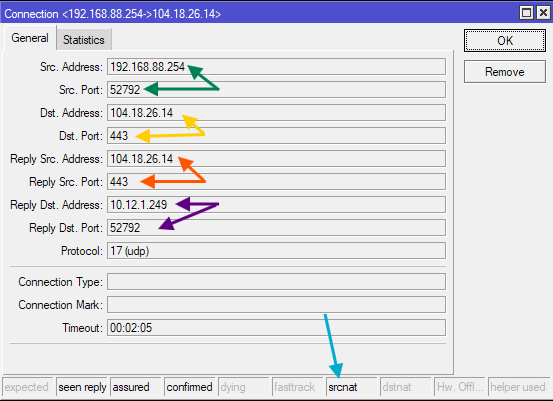
In this example the web browser running the PC with the LAN IP address 192.168.88.254 tries to open the web page https://cloudflare-quic.com/ at 104.18.26.14, which uses HTTP/3 & QUIC, thus UDP instead of TCP. The "public" IP address of the router is 10.12.1.249. A connection tracking (conntrack) entry will be created, that we can see in the following screenshot:
-
As we can see, on the PC the browser picks the port 52792 and sends the UDP packet with the source address & port pointed at by the green arrows. The destination of the packet is pointed at by the yellow arrows (104.18.26.14:443).
-
The SRCNAT masquerade rule will translate the source address and port, the address will be changed to the router's IP address on the WAN port, 10.12.1.249, and the source port to some free UDP port. In this case, it happens that the original 52792 is available on the WAN side of the router, so it will be used right away (but if the router is busy and has many active NAT mappings, then the port might not be available and a different port might be chosen). We see this mapping pointed at by the purple arrows, under Reply Dst. Address/Port. No DSTNAT has been performed, so Reply Src. Address/Port (orange arrows) have the same value als the original destination of the packet (yellow arrows). The srcnat flag is active (blue arrow).
-
When the Cloudflare server sends the response UDP packet, this packet, when it arrives at the router, will have source 104.18.26.14:443 and destination 10.12.1.249:52792. This reply packet will be associated with this existing conntrack entry, because it has the source matching the orange arrows, and the destination matching the purple arrows. The NAT will be reverse and the destination of this reply packet will be changed to the values of the yellow arrows. Because the conntrack entry is found, the packet has connection-state=established and will be let through by the rule of the defconf firewall. The router will then forward the packet to the original endpoint 192.168.88.254:52792 on the PC where the web browser is listening.
So this NAT with masquerade works fine for normal traffics, where most of the time applications running on client devices in LAN initiate connections to servers on the outside internet. But there are two important details to consider:
-
If, from the same original source address and port (green arrows), packets are sent to a different destination (different yellow arrows values), then the normal SRCNAT masquerade might decide to pick some other random port for the mapping, causing the purple arrows endpoint to be something different.
From the example above, if a the same time we browse to www.bbc.com (which also support QUIC) at the UDP destination 151.101.128.81:443, and the web browser uses the same source address and port 192.168.88.254:52792 to send the packet, NAT might pick 41918 as port on the WAN side of the router instead, causing the purple arrows values to be 10.12.1.249:41918.
-
When some other host from the internet, let's say from 123.45.67.89:1011 sends an UDP packet to your router and the packet arrives at the router with the destination being 10.12.1.249:52792, this packet will not be matched with the conntrack entry from the above screenshot. While the value of the purple arrows are ok, the orange arrows value do not match. The packet will be considered part of a new connection (connection-state=new) arriving at the input chain of the router (not the forward chain). It will rightfully be dropped by the defconf firewall.
Again, both behaviors are fine for normal usage, and even favorable from a security point of view. The browser process listening on 192.168.88.254:52792 (green arrows) doesn't have to handle packets from unsolicited sources.
Now about Endpoint-Independent NAT (EIN):
-
When you add the Endpoint-Independent SRCNAT rule (and move it above the masquerade rule)
/ip firewall nat
add action=endpoint-independent-nat chain=srcnat out-interface-list=WAN protocol=udp
This rule will do the same source address rewriting for packets leaving the WAN interface of the router, by translating the source endpoint (green arrows) to the IP address of the router on this interface and an available port (purple arrows). The port might be the same as the green original (if randomise-ports=no and the port is available) or not (if randomise-ports=yes or already used by other sources). But the important difference is that this green arrows to purple arrows mapping is consistent. A given green endpoint (address/port) will be translated to the same purple arrows endpoint, regardless of the destination address and ports (yellow arrows).
Which means the www.bbc.com situation above with masquerade will not happen. If the web browser uses the same green source socket 192.168.88.254:52792 to send packets to Cloudflare and BBC, the EIN SRCNAT will cause the outgoing packets to both destinations to have the same rewritten purple source 10.12.1.249:52792.
-
That consistent mapping will also be used by the EIN DSTNAT rule if added by you:
/ip firewall nat
add action=endpoint-independent-nat chain=dstnat in-interface-list=WAN protocol=udp
With this rule, and with the conntrack entry from above still active in the connection table, if an unknown host 123.45.67.89 from the internet uses the source port 1011 and sends a packet to your router and it arrives at your router with the destination 10.12.1.249:52792, this packet will be considered part of a connection-state=new connection, but the EIN DSTNAT rule will kick in, see the destination matching the purple values of the other conntrack entry. The new connection will have DSTNAT applied and the destination address will be changed to the green arrows value, 192.168.88.254:52792. If the firewall is configured to allow forwarding for connections with this NAT state, the packet will be forwarded to the PC.
Which means if an application running on a device in LAN opens a UDP socket and sends something to the internet, it can in turn accept incoming packets from anywhere to that same socket, provided that the other side uses the correct destination (the purple address & ports).
An application for this in RouterOS (because RouterOS for now only supports UDP for EIN) is to allow UDP hole punching (that the RFC above also explained). For applications that need low latency like multiplayer gaming or voice/video chatting, you would want the peers to be able to directly communicate with each other, even if both are behind NAT, without having to send everything through a 3rd relay server in the middle. With EIN this is possible:
-
The game or voice chat program as Peer A runs on the PC and use the UDP socket with the source 10.12.1.249:52792 to send packets to the server managing the service. EIN SRCNAT will translate the source address and port to the purple endpoint. The server will see this as the address and port representing Peer A.
-
The intermediate server communicates this information to the Peer B of the conversation, that sits somewhere, behind NAT or not.
-
Peer B can now directly initiate connections to this purple endpoint, by directly sending packet to it. The packet will be handled correctly by EIN DSTNAT, and forwarded to the application listening on 10.12.1.249:52792. Which means both peers can now directly talk to each other and send packets without needing the intermediate server as relay for every packets.
About the security implications, the RFC above can give much better descriptions than I.