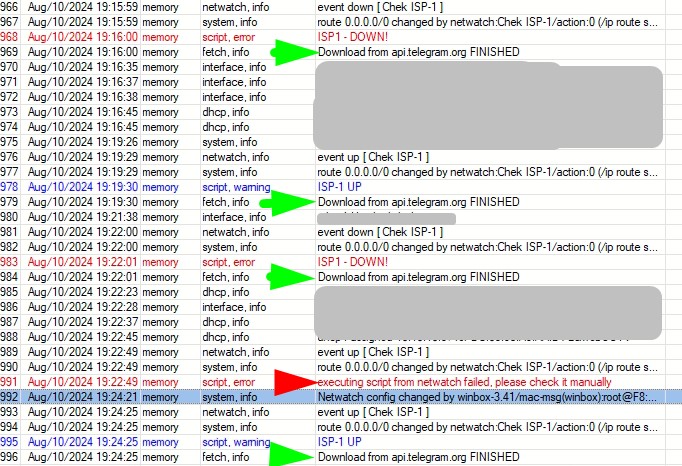
This problem is observed after updating to 7.15.3.
What can be the problem, this script is used in several projects and had no problems except for one case. Here the main channel ISP-1 wifi bridge, backup ISP-2 starlink. The script in netwatch switching can once work completely the second time causes an error message in the log.
The script disables/enables the default route through ISP-1, then clears all connections, and displays a message in the log and sends a message to telegram. According to the logs it turns out that the error is caused by line 2 connection clearing. Help me where to look
UP
/ip route set [find comment=ISP-1] disabled=no
/ip firewall connection {remove [find]}
:log warning  "ISP-1 UP"
/tool fetch url="https://api.telegram.org ....
Down
/ip route set [find comment=ISP-1] disabled=yes
/ip firewall connection {remove [find]}
:log error  "ISP1-DOWN!"
/tool fetch url="https://api.telegram.org ....
@rextended in first screenshot fetch logs successful execution which is strange if is not permitted, also if is fetch error, it will be logged “ISP-1 UP” or “ISP1-DOWN!” before script error message because :log warning “ISP-1 UP” or :log error “ISP1-DOWN!” commands are executed before fetch.
In my Netwatch event script there is also IP update script on DDNS provider with fetch and there is no issue, but fetch command is not directly executed in event script, event script runs other script with /system/script run ….
Anyway, I haven’t unequivocally found the problem yet.
what features I have found
1.The log outputs messages in a different order than the order of lines in the script.
2. I suspect that the problem lies in copy-paste through a remote session. Because I had to copy the line of sending to telegram again and the error disappeared, visually the lines are exactly the same.
3. I inserted an empty line with a comment and the error disappeared
there is an error in the log
It could happen that invisible characters are in script and when is edited in Winbox it looks fine, like this for eg.:
/system/script add name=error-script source=":log info \"test\"\81"
When backspace is pressed at EOL and saved, it will work without error.
But you are right it will always fail until is edited.
Then it could be that in some cases /ip firewall connection {remove [find]} produces error by some reason, you can find which error is produced if you put script in :onerror block as I written in #3, it will log actual error produced by command in script and you can post it here for examination.