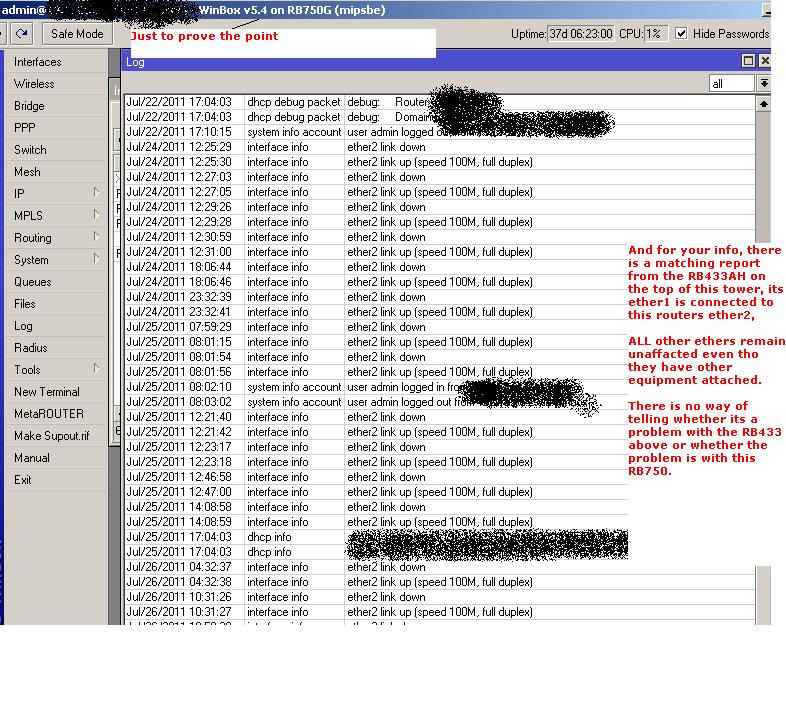
How many of us suffer from this?
30% of rb’s have the Ethernet port flap on a regular base. All > 5.4version.
Like the disconnect issue MT says they can’t reproduce, but it is definitely there…
Please report this issue to MT and this forum.
Not sure if my recent issue was ether port flapping or just port lock up as i had a ptp 433ah (os5.5) which i was monitoring with the dude and i could not open with winbox tried mac-telnet and after trying to establish a connection telnet would disconnect, the 433 is connected to a 493ah (os3.30) i disabled the port which the 433 was coming into the 493 and enabled it then my 433 was accessible again,
Rudy - If MT say once again they cannot reporoduce this issue could i suggest you post a screenshot of “port flapping” and if users experiencing this issue would list which board(s) is effected, maybe MT is trying to reproduce on the wrong board or it may require a combination of interconnected boards to reproduce??
I can say again, none of our other customer experience these problems. Even on this forum you are the only one who has this problem after we fixed it in v5.4
Check your cables, switches and other devices. The problem is not in the routerboard or routeros.
Well, I have about 40 units with the problem. These are not even touched for months and before 5.x they didn’t have the issue.
So now you are saying suddenly all these connections are bad…
And there are others with the same issue. They only gave up reporting or nagging about it since you guys ignore the issue.
I send you a support about it with 4 different routers .rif’s and the log files showing the issue and I don’t even get any reply on it.
This does not help at all. It has zero value to anyone. Send us debug logs and supout.rif files so we can fix the problem. Also, you have v5.4 not v5.5
Ticket#2011061766000064 This ticket already is created 17 of June.
The 30th of June I send you guys an e-mail with suppout.rif’s of 4 different routers with their log files.
We have been communicating about it. Don’t tell me you can’t trace it!
These were all running 5.4 a version previously claimed it has not such an issue…
Do any of you use Wireless in the affected routers? How about if you turn it off in one of them?
Do the clients see any issue at all? Could this be only a log-related issue? It’s possible that there is no port flapping, just the status is misreported.
The latest pre-release of v5.6 is available at support. It has additional wireless debug info. If the ethernet flapping issue is connected to Nv2 disconnects, you should upgrade to todays pre-release and send us supout.rif files when Nv2 disconnects.
wirelesswaves, do you read my posts? please answer my questions and stop posting the images.
Rudy - can i ask is all of your MT network using only one OS (eg 5.5), i ask this because i don’t appear to suffer from this port flapping and i have at present any MT board using NV2 @ 5.5 and all boards not using NV2 @ 3.30, this appears to be working for me on a routed ospf network?
Yes, I already reported in both my mails to you guys as well on several post on this forum that it indeed seems the clients doesn’t notice. People claim they can have skype calls for long times and never noticed line disconnects (they would definitely notice if the connection would brake!).
Indeed I even mentioned it could be merely a misreporting issue of the latest ros versions.
On the other hand, it can also be it just doesn’t happen when data traffic is running over the port. (Hence the client won’t notice, since when he is using the network it might not happen.)
The only router I have, a rb439AH which is not having any wireless cards has also the issue. Not that regular, but on all its 9 ports is see at times port flaps. And all attached units are routerboards again. All wired.
My whole network (approx. 250 units) is rb with 5.4 running. I am only slowly upgrading units with issues to 5.5 and now 5.6.
New units also get 5.5 and since 2 days 5.6.
Firmware upgrade everywhere.
Like i said using those two OS works for me, you could test on one to check if this will work for you, looks like a lot of work upgrading firmware everywhere, especially when MT say they cannot reproduce the issue,