Hi guys.
What is the expected throughput if I run routeros on a x86 board with 10GBE ports?
I was thinking Supermicro X10SDV-TLN4F
It has an Intel Xeon CPU and two 10GBE ports.
Has anyone tried that?
I was appalled by the performance of the MT CRS that come with SFP+ ports, I tried a couple, switching performance seems to be higher but routing performance was not so good.
I was thinking maybe an x86 board will do better.
The CRS is really designed for switching with some limited routing as the CPU in the CRS series is not very powerful. For 10 gig performance, look at the CCR1072 (or the CCR1036) as it can easily push 80 Gbps of traffic.
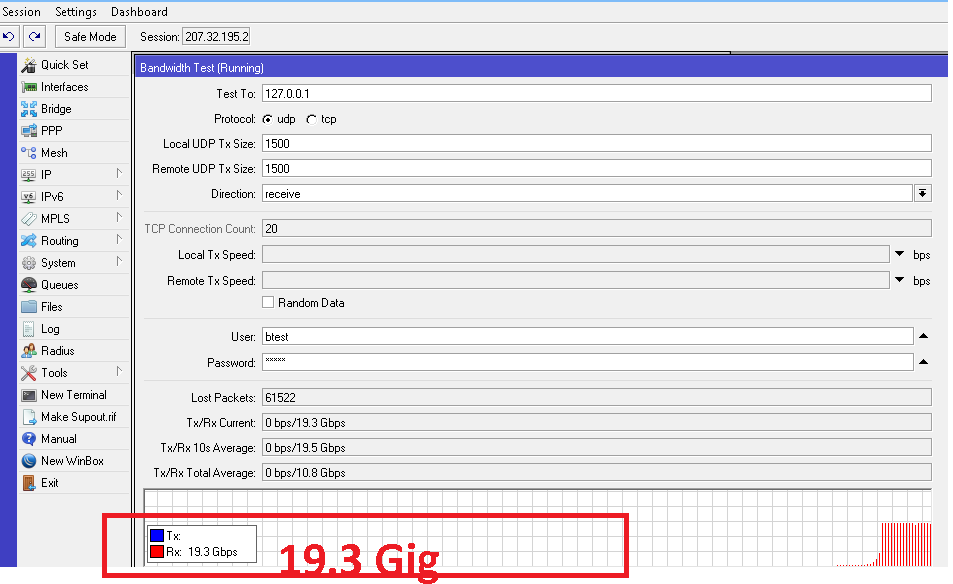
With this virtual server — when I perform a btest ( UDP ) to the local loopback IP address of 127.0.0.1 I get near 17 GIG
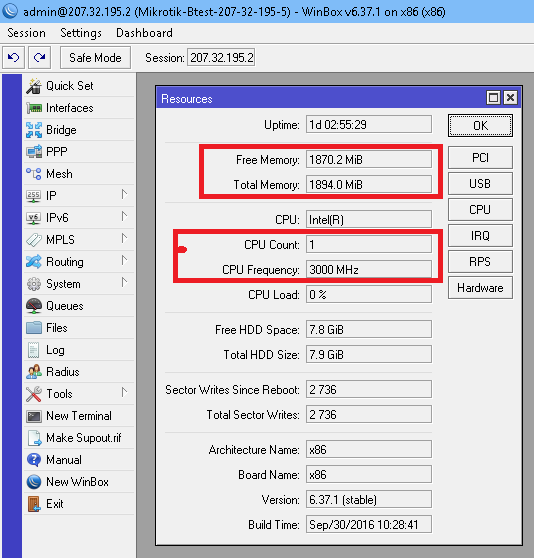
My physical VMware ESXi server has 127 gig ram and two 10-gig network cards installed.
I am allocating only 2 CPUs and 2 gig of ram to my ROS system.
When I perform a btest between to different ROS systems with each hosted on different physical VMware ESXi servers (communicating through 10-gig network cards with a Cisco 10-gig switch between the network adaptors - with both ROS systems on the same IP subnet, I get btest results around 7.5 gig up to 9.8 GIG. The speeds may vary depending on what my other virtual hosted operating systems with almost 40 other servers were doing at the time of the btest.
Note – I suggest to perform a UDP btest to 127.0.0.1 to get a pretty good idea just what the horse-power is of your Mikrotik/ROS platform.
Did my answer to you question answer your question ?
If a hardware platform has limitations on handling a physical port, then why that port is even there to begin with?
Just my thought of course.
I was not expecting much from the CRS, but at least to handling file transfers from two workstations connected to 1GB ports and a SAN connected to the 10GBE port, but the performance was poor and erratic.
Maybe that 10GBE port on the CRS was put there for something that couldn’t be done with the 1GB ports and I didnt notice.
Anyways, thanks for the idea, the CCR1036 looks good and under $1K, it might work.
The other is too expensive, I rather have a real 10GBE switch in that case because I dont need a router with these many ports.
Hi TomjNorthIdaho
Yes, that is very useful indeed!
I do have an ESXI 6 box with Mellanox 10GBE dual NICs, it didnt occurred to me doing that tests.
I also have 10GBE switches at my home lab, and a couple of Windows servers with 10GBE NICs as well.
That could give me a a good test environment, I can create RAMDISK on both Windows boxes and test performance and/or use your method with UDP.
Now that I think, is there any ways to make these 10GB interfaces act as Switches instead of routed ports? (on the x86 boxes)
is there any ways to make these 10GB interfaces act as Switches instead of routed ports? (on the x86 boxes)
X86 ROS does not have a physical Ethernet switch chip like many of the regular Mikrotiks.
However - you can bridge ports together.
ALSO - search these Mikrotik forums for another topic I put together – How to make a 10-port 10-Gig Mikrotik
I documented everything in simple step-by-step procedures to actually make a 10 port x86 Mikrotik router with ten 10-gig ports
Re: switching performance
For true wire-speed switching, you need to take a look at the Mikrotik block diagram and look for what ports are connected to a switch chip.
Those ports can be hardware bridged together using the hardware chip itself instead of a software bridge.
Hardware switching ports on a Mikrotik does not use any CPU time.
Software bridging ports on a Mikrotik uses lots and lots of CPU time.
Some Mikrotik devices have multiple switch chips with some ports on one switch chip and other ports on another switch chip. With those - you need to configure each switch chip to hardware switch the ports together per switch chip. Then you need to make a software bridge to connect one port from each switched port to the other switch chip. However - software bridging groups of switched ports so that you can combine all ports does again use lots and lots of CPU time. (look at the Mikrotik block diagram)
FYI - in my opinion.
Mikrotik products are the best for wireless.
Mikrotik switches and routers are best suited for very small ISPs or larger SOHO networks.
For large networks - I suggest the following:
Mikrotiks for remote customer CPE devices.
Heavy duty CORE high-throughput with more than 24 ports routing and switching 10-gig ports, I only suggest Cisco. (It is pretty hard to beat the throughput of an almost 3-foot tall Cisco device with hundreds of Ethernet ports.
For high-end routers between your primary Internet core router and your customer CPE devices/networks, I prefer BSD based PfSense captive-portal/routers virtual routers running under VMware ESXi. I have 60 plus PfSense routers (all with 10-gig network interfaces) talking/routing to hundreds of different customer networks. PfSense is free and it natively has built-in “Para-Virtual” drivers optimized for a hosted environment in a hyper-visor (VmWare ESXi) world.
So your first mistake was looking at the CRS as a routing device. The CPU is only capable of handling minimal layer 3 functionality, and is there more for management purposes than anything. Yes, it has enough power to serve most home or small office Internet connections, but it can’t handle more than 1 gbps, as all ports share a single 1 gbps connection to the CPU. The CRS is intended as a SWITCH, i.e. a layer 2 device, and as a switch, it can handle wire-speed communication across all ports, including the 10gb SFP+ ports. The best uses of the 10gb ports is either as a trunk port to a proper router (like the CCR 1036 or 1072), a trunk port to more CRS devices (essentially a stacking link), or as a high bandwidth connection to a storage server or hypervisor (hosting multiple virtual servers). I have no problem reaching 10 gbps across my SFP+ ports on my CRS, but then, I’ve got some decent hardware at the other end of those links. There’s more to running a 10 gbps link than simply having a switch that supports it.
Because the CRS are switches, not routers. You can get wirespeed - but only if using them as switches, and only if doing all the processing on the onboard switch chips. The CPU is there just to manage the hardware, not to be used with traffic.
IPANetEngineer
re: The CRS is really designed for …
What does the letter “R” stand for?
Am I correct from your statements in assuming that it is really not an “R” and can’t “R” very well especially under heavy “R” loads ?
Should the name then be changed from CRS to just CS ?
Although it is marketed as a Layer3 switch, the true dividing line between Layer 3 switching and Routing is the use of an ASIC which the CRS series doesn’t use for Layer 3. Most Layer3 switches can reach wirespeed on a large number of ports with some over-subscription in the ASIC. The CRS struggles to reach wirespeed in just one port.
It can handle routing depending on your throughput needs, but it’s definitely not a Layer 3 switch by most network engineering standards.
I for one would love to see Mikrotik come out with an Intel Xeon CPU with high clock rate and large cache available with HT Disabled)
24 or 48 10/100/1,000/10,000 ports (All ALL ports connected to Ethernet switch ships)
An optional pair of 40 or 80 or 100 GIG uplink/stack ports
2 to 8 (or more) SFP+ ports
Redundant power supplies
and another very simple product
Some computer PCI interface cards
one card with 8 10-gig Ethernet ports (all via switch chip) with an optional pair of 40 or 80 or 100 GIG uplink/stack ports
Same as above but with SFP+
The ROS operating could be x86 based or 64 bit based
With the two above products you could actually be able to run well in some large data centers.