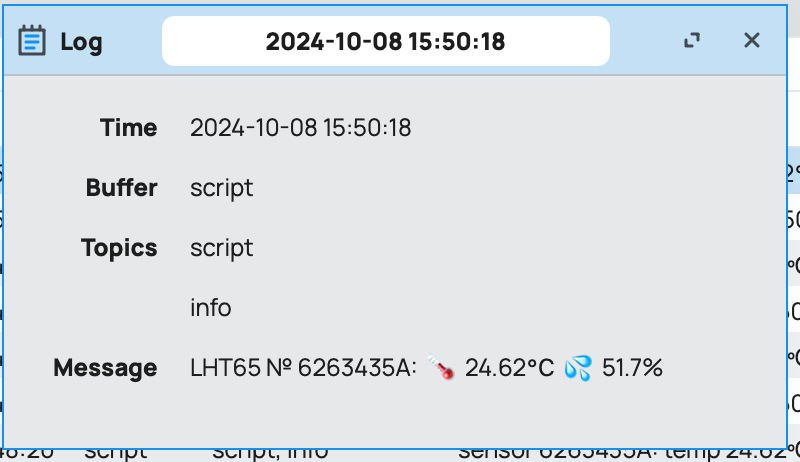
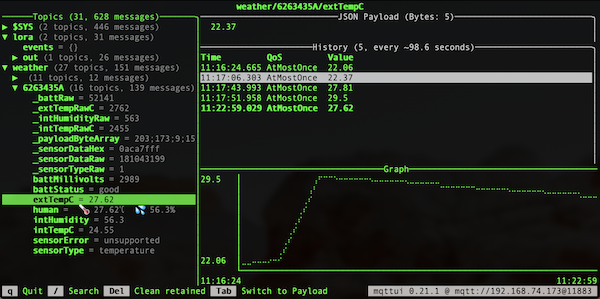
Mikrotik recently add newer to/from= in the still new [:convert] function adding to/from =byte-array, =num, =bit-array-msb, =bit-array-lsb ... so I thought I'd provide an concrete example of using them. The =num is new in 7.17, but think the rest are in 7.16.
I have a few Dragino LHG65-E1 and KNOT LR9/LoRa in the unused toy box, so I brought them I play with IoT stack again. The sensor read temperature and humidity, but to read those you need to parse a "hex strings" (i.e. Base16 represented in ASCII string) like: CBE90A6D019D0109E97FFF, with Dragino's spec that describes what's in those 11 bytes in hexstring mean. Now how you'd the hexstring to need the function below in a longer discussion  . But it currently comes from:
LoRa sensor --> KNOT LR9 --> old Eralng LoRa network server as /container --> a "hipster" MQTT broker as /container --> /iot/mqtt/subscription/on-message= script
Anyway in Mikrotik's tradition of dense/multilayered examples, here is one for [:convert] newer byte-array and bit-array-* & more like ... to=json options=json.pretty to see visualize RouterOS arrays:
:global decodeDriago do={
# input data
:local bytes [:convert to=byte-array from=hex $1]
# output parsed
:local data {"_payloadByteArray"=$bytes}
## BATTERY - stores BOTH mV and status
# size: 2 bytes - first 2 bits MSB are "status", next 14 bits are mV
# docs suggest:
#   BAT status = (0xCBA4cba4>>14) & 0xFF = 11b (00=bad ... 11=great)
#   Battery Voltage = 0xCBF6&0x3FFF = 0x0BA4 = 2980mV
# voltage: (ignoring first 2 bits)
:local battRaw [:convert from=byte-array to=num [:pick $bytes 0 2]]
:set ($data->"_battRaw") [:tonum $battRaw]
:set ($data->"battMillivolts") ([:tonum $battRaw] & [:tonum "0x3FFF"])
# status: (using new "to=bit-array-msb" to get 2 bits with status)
:local bits [:convert $bytes to=bit-array-msb from=byte-array]
:if (($bits->0) = 1 and ($bits->1) = 1) do={ :set ($data->"battStatus") "good" }
:if (($bits->0) = 1 and ($bits->1) = 0) do={ :set ($data->"battStatus") "fair" }
:if (($bits->0) = 0 and ($bits->1) = 1) do={ :set ($data->"battStatus") "low" }
:if (($bits->0) = 0 and ($bits->1) = 0) do={ :set ($data->"battStatus") "EOL" }

## TEMP - internal, "centi-celsius" (C in 1/100th)
# size: 2 bytes, MSB int
:local intTempRaw [:convert from=byte-array to=num [:pick $bytes 2 4]]
:set ($data->"_intTempRawC") $intTempRaw
:set ($data->"intTempC") "$[:pick $intTempRaw 0 ([:len $intTempRaw]-2)].$[:pick $intTempRaw ([:len $intTempRaw]-2) [:len $intTempRaw]]"

## HUMIDITY - internal, "deci-percentage" (% in 1/10th)
# size: 2 bytes, MSB int
:local intHumRaw [:convert from=byte-array to=num [:pick $bytes 4 6]]
:set ($data->"_intHumidityRaw") $intHumRaw
:set ($data->"intHumidity") "$[:pick $intHumRaw 0 ([:len $intHumRaw]-1)].$[:pick $intHumRaw ([:len $intHumRaw]-1) [:len $intHumRaw]]"

## EXT SENSOR TYPE - connected external sensor
# size: 1 bytes (docs have table)
:local sensorTypeRaw ($bytes->6)
:set ($data->"_sensorTypeRaw") $sensorTypeRaw
:local sensorType [:toarray ""]
:set ($sensorType->1) "temperature"
:set ($sensorType->4) "interrupt"
:set ($sensorType->5) "illumination"
:set ($sensorType->6) "adc"
:set ($sensorType->7) "counting-16bit"
:set ($sensorType->8) "counting-32bit"
:set ($sensorType->9) "temperature+datalog"
:set ($data->"sensorType") ($sensorType->$sensorTypeRaw)

## EXT SENSOR - RAW undecoded
# size: last 4 bytes MSB, sensor dependant
:local extSensorData [:convert from=byte-array to=num [:pick $bytes 7 11]]
:set ($data->"_sensorDataRaw") $extSensorData
:set ($data->"_sensorDataHex") [:convert from=num to=hex $extSensorData]

## EXT SENSOR - parsed data based on type
:if (($data->"sensorType") = "temperature") do={
    # size: 2 bytes MSB, starting at 7th (or 7, 0-based index)
    :local extTempRaw [:convert from=byte-array to=num [:pick $bytes 7 9]]
    :set ($data->"_extTempRawC") $extTempRaw
    :if ($extTempRaw != [:tonum "0x3FFF"]) do={
        :set ($data->"extTempC") "$[:pick $extTempRaw 0 ([:len $extTempRaw]-2)].$[:pick $extTempRaw ([:len $extTempRaw]-2) [:len $extTempRaw]]"
    } else={
        :set ($data->"sensorError") "disconnected"
    }
} else={
    ## OTHER SENSOR TYPES - NOT SUPPORTED
    :set ($data->"sensorError") "unsupported"
}

## STRIP "RAW" - if called with "debug=no"
:if ($terse="yes") do={
    :foreach k,v in=$data do={
        :if ($k~"^_") do={:set ($data->$k)}
    }
}

## OUTPUT
:return $data
}
output data to console
:put [$decodeDriago "CBE90A6D019D0109E97FFF"]
_battRaw=52201;_extTempRawC=2537;_intHumidityRaw=413;_intTempRawC=2669;_payloadByteArray=203;233;10;109;1;157;1;9;233;127;255;_sensorDataHex=09e97fff;_sensorDataRaw=166297599;_sensorTypeRaw=1;battMillivolts=3049;battStatus=good;extTempC=25.37;intHumidity=41.3;intTempC=26.69;sensorType=temperature
More usage examples, with "pretty" JSON output - to actually see what's been done...
# make it readable using new "json.pretty"
:global myDriagoData [$decodeDriago "CBE90A6D019D0109E97FFF"]
:put [:serialize to=json $myDriagoData options=json.pretty]
{
"_battRaw": 52201,
"_extTempRawC": 2537.000000,
"_intHumidityRaw": 413.000000,
"_intTempRawC": 2669.000000,
"_payloadByteArray": [
203,
233,
10,
109,
1,
157,
1,
9,
233,
127,
255
],
"_sensorDataHex": "09e97fff",
"_sensorDataRaw": 166297599.000000,
"_sensorTypeRaw": 1,
"battMillivolts": 3049,
"battStatus": "good",
"extTempC": 25.370000,
"intHumidity": 41.300000,
"intTempC": 26.690000,
"sensorType": "temperature"
}
... the function takes a "terse=yes" to not output the "raw" values to keep the output array cleaner (code for terse= also shows using function args & :foreach k,v as ".filter()" - in this multilayered scripting example):
# using "$decodeDriago terse=yes"
:put "... or using 'terse=yes' to not output raws ..."
:put [:serialize to=json [$decodeDriago "CBE90A6D019D0109E97FFF" terse="yes"] options=json.pretty]
{
"battMillivolts": 3049,
"battStatus": "good",
"extTempC": 25.370000,
"intHumidity": 41.300000,
"intTempC": 26.690000,
"sensorType": "temperature"
}
Another subtle note here: check out the floating pointing the JSON output – that a feature of the [:convert to=json] that a RouterOS string like "41.3" becomes a float in JSON.
Finally, FWIW, Dragino has example code for JavaScript to use cloud LoRa like TTN — I'll include the TTN one below – just to show RouterOS <=> JavaScript comparison in one post:
function str_pad(byte){
var zero = '00';
var hex= byte.toString(16);
var tmp = 2-hex.length;
return zero.substr(0,tmp) + hex + " ";
}function Decoder(bytes, port) {
var Ext= bytes[6]&0x0F;
var poll_message_status=(bytes[6]&0x40)>>6;
var Connect=(bytes[6]&0x80)>>7;
var decode = {};if(Ext==0x09)
{
decode.TempC_DS=parseFloat(((bytes[0]<<24>>16 | bytes[1])/100).toFixed(2));
decode.Bat_status=bytes[4]>>6;
}
else
{
decode.BatV= ((bytes[0]<<8 | bytes[1]) & 0x3FFF)/1000;
decode.Bat_status=bytes[0]>>6;
}if(Ext!=0x0f)
{
decode.TempC_SHT=parseFloat(((bytes[2]<<24>>16 | bytes[3])/100).toFixed(2));
decode.Hum_SHT=parseFloat((((bytes[4]<<8 | bytes[5])&0xFFF)/10).toFixed(1));
}
if(Connect=='1')
{
decode.No_connect="Sensor no connection";
}if(Ext=='0')
{
decode.Ext_sensor ="No external sensor";
}
else if(Ext=='1')
{
decode.Ext_sensor ="Temperature Sensor";
decode.TempC_DS=parseFloat(((bytes[7]<<24>>16 | bytes[8])/100).toFixed(2));
}
else if(Ext=='4')
{
decode.Work_mode="Interrupt Sensor send";
decode.Exti_pin_level=bytes[7] ? "High":"Low";
decode.Exti_status=bytes[8] ? "True":"False";
}
else if(Ext=='5')
{
decode.Work_mode="Illumination Sensor";
decode.ILL_lx=bytes[7]<<8 | bytes[8];}
else if(Ext=='6')
{
decode.Work_mode="ADC Sensor";
decode.ADC_V=(bytes[7]<<8 | bytes[8])/1000;
}
else if(Ext=='7')
{
decode.Work_mode="Interrupt Sensor count";
decode.Exit_count=bytes[7]<<8 | bytes[8];
}
else if(Ext=='8')
{
decode.Work_mode="Interrupt Sensor count";
decode.Exit_count=bytes[7]<<24 | bytes[8]<<16 | bytes[9]<<8 | bytes[10];
}
else if(Ext=='9')
{
decode.Work_mode="DS18B20 & timestamp";
decode.Systimestamp=(bytes[7]<<24 | bytes[8]<<16 | bytes[9]<<8 | bytes[10] );
}
else if(Ext=='15')
{
decode.Work_mode="DS18B20ID";
decode.ID=str_pad(bytes[2])+str_pad(bytes[3])+str_pad(bytes[4])+str_pad(bytes[5])+str_pad(bytes[7])+str_pad(bytes[8])+str_pad(bytes[9])+str_pad(bytes[10]);
}if(poll_message_status===0)
{
if(bytes.length==11)
{
return decode;
}
}}
(now someone should be fired for JS code like that... but for comparison with RouterOS script, it's great )
There are some annoying quirks in scripting, but I do think the RouterOS version is more readable, especially with the [:convert]'s. But, IDK, thought?