I’m wondering how I can export a list of all my existing PPPoE customers (users) with their usernames/passwords to view with a simple text viewer or a CVS spreadsheet. Any ideas?
From Mikrotik CLI:
# show in console
ppp secret export
# export in to file
ppp secret export file=ppp-users
I am looking for my user list from user-manager, not customer. I have about 100 PPPoE users in “users” tab on the Web Gui.
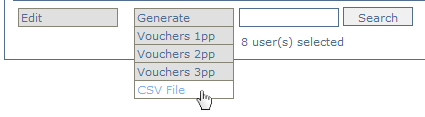
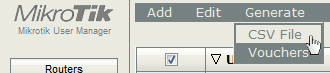
Put check mark next to all users, then click Generate > CSV File
In user manager v4.17 - link near bottom of page
In user manager v5.15 - link near top of page
Thanks Skot, this was exactly what I was looking for. I was just not selecting any users when I originally tried.
Hi
I have problem with export user list in user manager v5.16
When i go to export csv file it export always same voucher file .
I did add additional 1000 users but export is same file all time . Only Voucher file when i had 2000 clients only (now i have 3000)
i was desperate and clear UM database . I start from begining and add batch of new users .
Export is completly same file from first time
any idea ?
You can export users using Mikrotik Webfig
go to: PPP->Secrets
Deselect Hide Passwords (To show the passwords)

Select the table and paste it in excel sheet.
source: https://forum.zima.cloud/t/export-the-list-of-ppp-users-in-mikrotik/601