Hi there,
I’m really desperate now, Wifi to LAN driving me nuts. I made it work but still clueless why I have to do it that way.
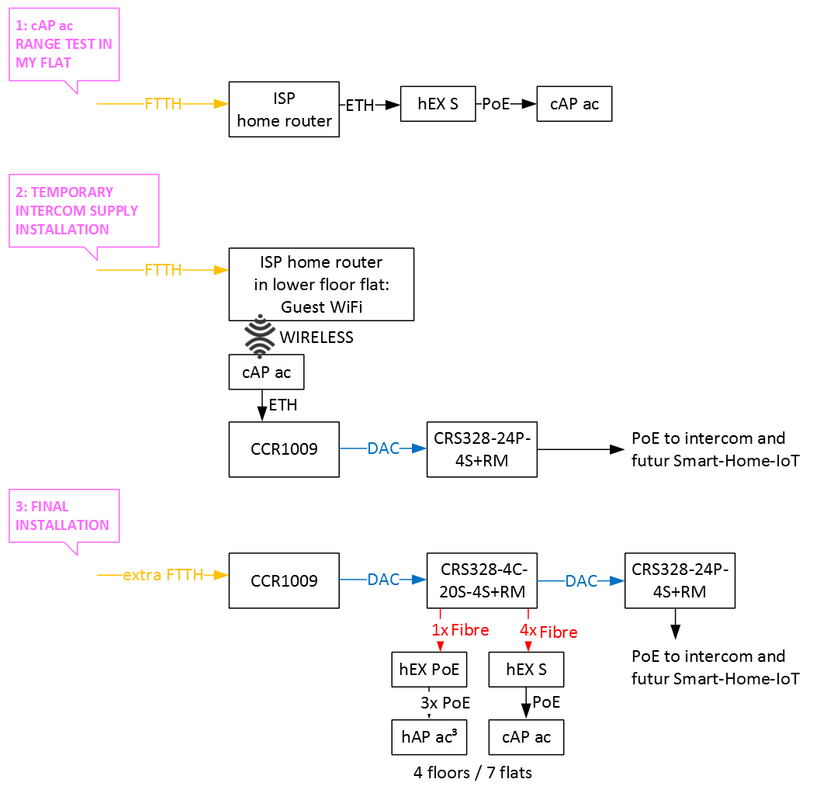
I’m coming from an hEX S configuration wherein all interfaces are on a bridge, which in turn is connected to a CCR1009. The is DHCP Client configured on this bridge.
The CCR1009 is connected to my home router as the new fibre optic cables are not pulled yet.
I used the CAPsMAN to configure a cAP ac, which is connected to the PoE port of the hEX S.
That works well when Local Forwarding in CAPs Datapath Configuration in the CAPsMAN is activated (see #1 and #2).
Right now, the CCR1009 is installed in the basement, in its new rack, so the hEX S is connected to my home router with exactly the same settings and the internet is still reachable through the hEX S.
Based on this experience I thought, I do the same on another cAP ac to connect its LAN port the CCR1009 and using its wireless interfaces to connect it to a Guest WiFi close to the new IT room, which origins in another flat as my flat is too far away from the new IT room.
This way, I could the primary configuration in real-life condition until the fibre optic cable is pulled.
Means, doing:
add all interfaces to a bridge
Wirleless / Wireless Tables → Security Profile: add a profile that contains SSID and Password of the WiFi it shall connect to
Interfaces / Interface List → selecting wlan2 (5 GhZ) → click Scan (opens Scanner) → Start → select WiFi → click on Connect —> select the tab Wireless → select previous created Security Profile
IP → DCHP Client → bridge
Interfaces / Interface List → Detect Internet → select all interfaces
DONE
but you’d think … I never got an IP when I connected to the cAP ac via wire but itself got an IP.
Based on my previous experience, I assumed that it would do everything by itself, since it now knows where the route to the www and to the DHCP server is, thus forwarding all requests coming from any port to that destination. This seems to be the case, can anyone explain why???
The switches should work fine, if they are not, its some firmware issue that should be resolved and finally you always have two options for configuring, swos or RoS.
Gotsprings you “got” to be more clear on what the current issues are with the switch and why you think they cannot be resolved.
Its not easy to replace switches (not everyone has a bottomless budget )
Concur on the wifi though, The only thing MT is promising is improving wifi5 to what everybody else has had for years and that promise is not for any existing models except hapac4 and chateau I think.
My advice is if you want wifi5 tplink eap245 is solid, and if interested in wifi6, try one of the eap620 or 660 models (as I intend to do when available and on sale LOL).
The WiFi standard is secondary at the moment, there won’t be that many clients pushing the devices to their limits.
I only want to understand why things have to be configured as they are but things can be done simpler on other devices but doing pretty much the same thing.
The reason you have configure it the way you have has to do with a limitation of the wireless standards. More specifically it has to do with the way MAC addresses are passed from the client to the connected network. In a normal connection, only the MAC of the connected device is seen by the network. This is how the mode=station behaves on your cAP ac connected to the guest network. Even if you bridge that interface on your network, your network device will have their MAC translated to the MAC of the wlan on cAP ac. As one result, the DHCP server of the guest network will see many request from the same MAC, and once the first request is given an IP, all others from that MAC will be ignored.
I suppose the standards when established, were only intended to have a single device per wireless connection. WDS (Wireless Distribution System) was intended to be a way to overcome this limitation, but each vendor implemented WDS (station-wds) in such way that compatibility between vendors is hit or miss or do not even offer it. Most vendors have also rolled their own way of handling this limitation (station-bridge), that is only compatibility with their devices.
In a nutshell, you have to handle the clients to the cAP ac (by DHCP Server) and route the request from the clients through the bridge to the connected Wifi Interface to allow that each request is served., isn’t it?

 )
)