We have a SIP service from our ISP.
The SIP server hosted with them so our phones (8 of them) need to connect through our router to their server.
But when I tested it my voice was going out to the one I called, but I could not hear anything. Except at first, I could hear them for about 20 seconds, but then nothing more.
I have a VoIP exchange in my network that connects to an external sip server. I had a similar problem that I was able to fix by turning on “qualify” on the exchange. If you are connecting directly to the sip server maybe they can turn it on and it might fix your problems.
The 20 second timeout sounds like one of the two SIP partners (device or server in this case) is not receiving all the SIP messages and a SIP timer fires, terminating the call; or a NAT connection is broken on the RTP stream after 20 seconds.
Here are some things to try (not in any particular order):
Turn off the SIP NAT helper:
/ip firewall service-port disable sip
Ensure you are allowing all traffic outbound from the LAN to the Internet and all “established” connections back to the LAN.
If you are trying to load balance among multiple Internet connections, then you have to sure all traffic to/from the SIP devices use the same connection (there are ways around this, but it violates the KISS principle).
Ensure you have Connection Tracking enabled.
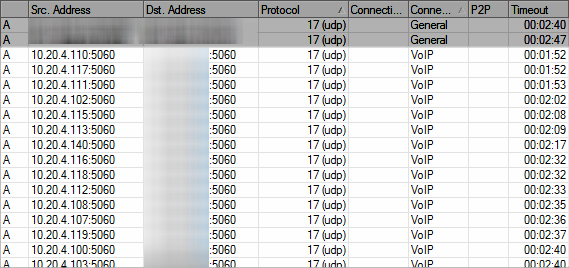
Make sure your provider supports NAT’ed devices with proper keepalives. You can detect this by watching the connection table and seeing at least 8 UDP “connections”, usually to port 5060. These timers should be getting reset by a periodic keep-alive being sent from the phone to the SIP server and/or vice versa. Here is an example of the connection table showing the tracking of 15 SIP sessions from 15 devices on a LAN to a single SIP server:
Disable any DST-NAT’s for “SIP” ports. If the provider truly supports NAT’ed devices, then no DST-NAT will be normally required. If your provider doesn’t support NAT’ed devices, then either find one that does or you’ll have to come up with a more complex solution.
Hi I follow this, do you how ever know what exactly mikrotik sip helper does in the backround?
like Sip ALG i understood this to be it modify the packet so that it works properly thu nat
can you shed some light?
is there any secret scripts that hacks it up and makes it work?