Good Day
I need some help please, I followed this video https://www.youtube.com/watch?v=amQUejVfgEk to do a clean setup for a network with fail over internet connection, all I had to do extra is add the bridge as all ports are on one network.
I can ping google and my LAN gives out IP’s, failover also works but my LAN clients are not getting internet.
Port 1 & 2 are my ISP connections and I have done masquerade on both under NAT.
What could be wrong?
- You clean the default configuration,
- You follow a youtube guide.
Sherlock puddy tat solves the mystery again. Luv the free entertainment.
Hahaha I see your point, I did follow the guide because I work on a mikrotik from time to time and not every day so I forget stuff.
I do believe that most of the setup is correct.
- You assume it is correct. (And why not, but if you don’t show it…)
ASS U ME
#PostYourConfig
For V7, “/export file=myconfig” might tell a better story than YouTube.
There we go, sorry for the stupidity, my Lan does seem to have internet now, its only my wireless that is not getting internet.
Thank you for the help
myconfig.rsc (3.09 KB)
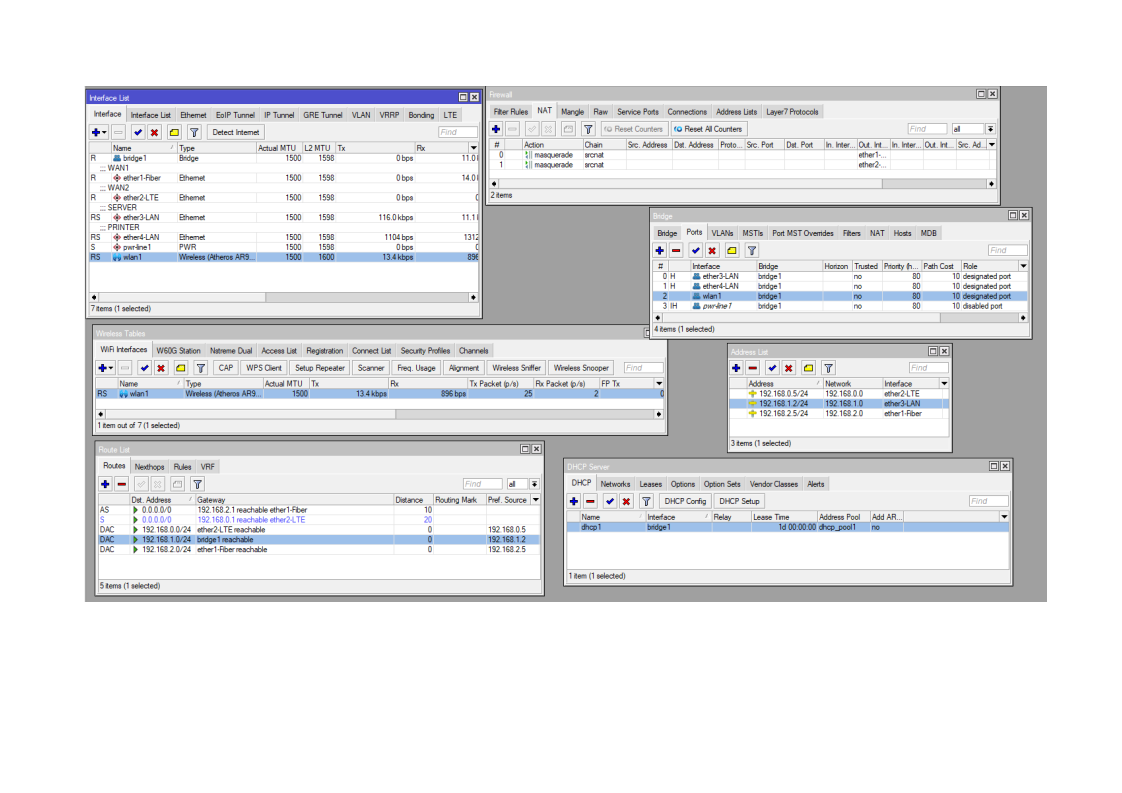
Your config file doesn’t match the screenshoot however, and shows a rather old version (although 6.47.10 was a great release, it’s no longer the long-term build). I’ll assume your screenshoot is “more accurate”, and your config is largely based on the defaults (like the included one).
So in the photo… you have a NAT rule for your LTE WAN on ether2, but it generally better to use /interface/list (Interface > Interface Lists in winbox) to add the 2nd WAN port to the “WAN” list – the default firewall then do filtering/NAT correctly. So you don’t need a seperate NAT rule and the firewall correctly filter by using the LTE ether2 WAN being a member of the WAN interface list.
You’d also want to make sure ether2 is not a port of the bridge (similar to how ether1 WAN is not part of bridge).
And for failover, make sure the DHCP client for ether2 uses default-route-distance=2 (or something bigger than the default-route-distance on the dhcp-client for ether1).
Why wireless won’t work, vs LAN, hard to guess with the wrong config.
It is weird that you say that because I did them at the same time.
Anyway thank you for the reply I will check and make changes as you suggested.