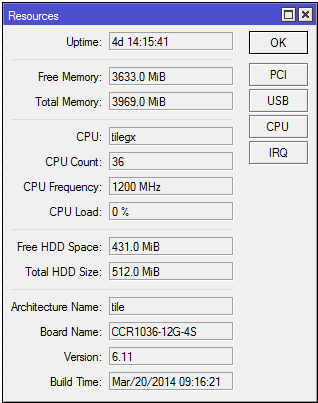
I started using the userman package this weekend on CCR1036-12G-4S-EM (6.11), and after only a few days it failed.
I get the error “failed to commit transaction: disk I/O error”. After this happened I get “failed to add log: unable to open database file”. It looks like this has caused the disk to switch to read-only, so other things like making a backup also fail.
Should I expect this service to work reliably? I’m only interesting in using radius authentication for routerboard logins, and thought it would be more convenient that a freeradius installation.
I’m getting the same issue with userman on cloudcore. It happened with one we’ve been running for awhile then it manifested itself again on a the brand new identical unit that I replaced it with 3 days later. It’s far from running out of space. Maybe the integrated storage literally can’t handle the IOPs needed to run radius and I need x86 router with and SSD and/or this is a 6.11-6.12 userman issue. I don’t think we started seeing this issue until after the recent upgrade.
I upgraded the new userman box to 6.12 and the same issue returned in less than an hour and happened 5 more times that morning before I decided to try downgrading router OS versions. I looked at the changlog and figured 6.8 would be a good starting point for further troubleshooting this dedicated userman router. I’ve been running 6.8 for 34hours with no errors. I’ll let it go 72hours before I’d conclude that this is a software bug.
Two cloud core units and 3 Router OS versions (6.11, 6.12, and now 6.8) the issue is resolved. It appears there is a bug in the later versions of Router OS. 115 hours have passed without any errors locking up userman. Please look into this userman DB issue Mikrotik, I’ll be watching release notes.
I have the same problem as well as traffic just stops going to the default route randomly on the ccr1016-12G have you guys had any luck with mikrotik support as I have sent numerous emails and responses like have you updated the firmware to 6.15, and when you answer you have already, you never hear back!
I simply downgraded to 6.8 as mentioned above and the the issue went away. I haven’t tried anything else because I haven’t seen anything in the change log addressing this issue yet. Has anyone that had this issue try 6.20 yet?
i am also facing disk i/o error issue in my dude database file. while i want to connect to my dude server i am getting error db failure disk i/o error : stopped.