Finally made DUAL WAN work!

Sorry for the members here for being lazy.

Finally had sometime earlier and I somewhat fix my config and check youtube for a simple dual wan config setp up.

I’ve used Recursive and Main routes for making dual wan work.
And I’ve removed the other bridges on other ports.

So my setup now is:

ether1 = ISP 1
ether2 and wlan = Bridge-eth2 with Own DHCP server
ether3 = Own DHCP server with just ether3 interface
ether4 = Own DHCP server with just ether4 interface
ether5 = ISP 2

I’ll try to study about VLANS next time, and maybe PCC for load balancing.
Thanks guys for pushing me to learn even simple setup like dual wan.

Edit: thanks to pcunite and Chupaka post.

Here’s my config:

# 2025-02-23 19:35:30 by RouterOS 7.17.2

/interface bridge
add name=bridge-eth2 port-cost-mode=short

/ip route
add comment="Recursive - ISP1" disabled=no dst-address=8.8.8.8/32 gateway=\
    ISP1 Gateway routing-table=main scope=10 suppress-hw-offload=no \
    target-scope=10
add comment="Recursive - ISP2" disabled=no distance=1 dst-address=\
    1.1.1.1/32 gateway=ISP2 Gateway routing-table=main scope=10 \
    suppress-hw-offload=no target-scope=10
add check-gateway=ping comment="Main - ISP1" disabled=no dst-address=\
    0.0.0.0/0 gateway=8.8.8.8 routing-table=main suppress-hw-offload=no \
    target-scope=11
add check-gateway=ping comment="Main - ISP2" disabled=no distance=2 \
    dst-address=0.0.0.0/0 gateway=1.1.1.1 routing-table=main \
    suppress-hw-offload=no target-scope=11

/interface list
add comment=defconf name=WAN
add comment=defconf name=LAN

/interface lte apn
set [ find default=yes ] ip-type=ipv4 use-network-apn=no

/ip pool
add name=eth2 ranges=192.168.2.10-192.168.2.100
add name=eth3 ranges=192.168.3.10-192.168.3.100
add name=eth4 ranges=192.168.4.10-192.168.4.100

/ip dhcp-server
add address-pool=eth2 interface=bridge-eth2 lease-time=12h name=eth2
add address-pool=eth3 interface=ether3 lease-time=12h name=eth3
add address-pool=eth4 interface=ether4 lease-time=12h name=eth4

/ip smb users
set [ find default=yes ] disabled=yes

/interface bridge port
add bridge=bridge-eth2 ingress-filtering=no interface=ether2 \
    internal-path-cost=10 path-cost=10
add bridge=bridge-eth2 comment=defconf ingress-filtering=no interface=wlan1 \
    internal-path-cost=10 path-cost=10
add bridge=bridge-eth2 comment=defconf ingress-filtering=no interface=wlan2 \
    internal-path-cost=10 path-cost=10

/ip firewall connection tracking
set udp-timeout=10s
/ip neighbor discovery-settings
set discover-interface-list=LAN
/ip settings
set max-neighbor-entries=8192
/ipv6 settings
set disable-ipv6=yes max-neighbor-entries=8192

/interface list member
add comment=defconf interface=bridge-eth2 list=LAN
add comment=defconf interface=ether1 list=WAN
add interface=ether2 list=LAN
add interface=ether3 list=LAN
add interface=ether5 list=WAN

/ip address
add address=192.168.2.1/24 comment=eth2 interface=bridge-eth2 network=\
    192.168.2.0
add address=192.168.3.1/24 comment=eth3 interface=ether3 network=192.168.3.0
add address=192.168.4.1/24 comment=eth4 interface=ether4 network=192.168.4.0

/ip dhcp-client
add add-default-route=no comment=defconf interface=ether1 use-peer-dns=\
    no
add add-default-route=no interface=ether5 use-peer-dns=no

/ip dhcp-server network
add address=192.168.2.0/24 comment=LAN gateway=192.168.2.1 netmask=24
add address=192.168.3.0/24 gateway=192.168.3.1 netmask=24
add address=192.168.4.0/24 gateway=192.168.4.1 netmask=24

/ip dns
set allow-remote-requests=yes servers=8.8.8.8,1.1.1.1

/ip dns static
add address=192.168.2.1 comment=defconf name=router.lan type=A

/ip firewall filter
add action=fasttrack-connection chain=forward comment="DNS UDP" disabled=yes \
    dst-port=53 hw-offload=yes protocol=udp
add action=fasttrack-connection chain=forward comment="DNS TCP" disabled=yes \
    dst-port=53 hw-offload=yes protocol=tcp
add action=accept chain=input comment="Allow established/related connections" \
    connection-state=established,related in-interface-list=WAN
add action=drop chain=input comment="defconf: drop invalid connections" \
    connection-state=invalid
add action=accept chain=input comment="defconf: accept ICMP" protocol=icmp
add action=accept chain=input comment=\
    "defconf: accept to local loopback (for CAPsMAN)" dst-address=127.0.0.1
add action=drop chain=input comment="defconf: drop all not coming from LAN" \
    in-interface-list=!LAN
add action=accept chain=forward comment="defconf: accept in ipsec policy" \
    ipsec-policy=in,ipsec
add action=accept chain=forward comment="defconf: accept out ipsec policy" \
    ipsec-policy=out,ipsec
add action=accept chain=forward comment=\
    "defconf: accept established,related, untracked" connection-state=\
    established,related,untracked
add action=drop chain=forward comment="defconf: drop invalid" \
    connection-state=invalid
add action=drop chain=forward comment=\
    "defconf: drop all from WAN not DSTNATed" connection-nat-state=!dstnat \
    connection-state=new in-interface-list=WAN
add action=drop chain=input comment="DNS UDP Block" dst-port=53 \
    in-interface-list=WAN protocol=udp
add action=drop chain=input comment="DNS TCP Block" dst-port=53 \
    in-interface-list=WAN protocol=tcp
add action=drop chain=input comment=\
    "Drop all traffic from WAN except established/related" in-interface-list=\
    WAN
add action=drop chain=input comment="Block SSH from WAN" dst-port=22 \
    in-interface-list=WAN log=yes log-prefix=SSH-Blocked protocol=tcp
add action=accept chain=input comment="Allow limited ICMP from WAN" \
    in-interface-list=WAN limit=5,2 protocol=icmp
add action=accept chain=input comment="Allow SSH from internal network" \
    dst-port=22 in-interface=bridge-eth2 protocol=tcp src-address=\
    192.168.0.0/16
add action=drop chain=input comment="Block spoofed private IPs from WAN" \
    in-interface-list=WAN src-address=10.0.0.0/8
add action=drop chain=input comment="Block spoofed private IPs from WAN" \
    in-interface-list=WAN src-address=172.16.0.0/12
add action=drop chain=input comment="Block spoofed private IPs from WAN" \
    in-interface-list=WAN src-address=192.168.0.0/16

/ip firewall mangle
add action=change-ttl chain=postrouting comment="No Hotspot - LAN" new-ttl=\
    set:1 out-interface=bridge-eth2
add action=change-ttl chain=postrouting comment="No Hotspot - eth3" new-ttl=\
    set:1 out-interface=ether3
add action=change-ttl chain=postrouting comment="No Hotspot - eth4" new-ttl=\
    set:1 out-interface=ether4

/ip firewall nat
add action=masquerade chain=srcnat comment="NAT for outbound traffic" \
    ipsec-policy=out,none out-interface-list=WAN

/ip ipsec profile
set [ find default=yes ] dpd-interval=2m dpd-maximum-failures=5


The correct way of doing recursive.

/ip route
add check-gateway=ping comment=“Main - ISP1” dst-address=0.0.0.0/0 gateway=8.8.8.8 routing-table=main scope=10 target-scope=12
add comment=“Recursive - ISP1” dst-address=8.8.8.8/32 gateway=ISP1 Gateway routing-table=main scope=10 target-scope=11
+++++++++++++++++++++++++++++++++++
add distance=2 dst-address=0.0.0.0/0 gateway=ISP2 Gateway routing-table=main

Since you want wan1 to be primary and wan2 to be backup. There is no point in doing any recursive or check-gatewayping with WAN2.
If WAN1 is not available, then the router falls to WAN2, if there is something amiss with WAN2, there are NO other options, except for waiting for WAN1 to come back up.

++++++++++++++++++++++++++++++
Now if you are using both WANS concurrently then a more complete recursive approach is warranted. Also quite cool is that if we remove the distance difference between the two WANS ( what currently drives ISP1 to be primary ) in version 7 firmware, this automatically creates ECMP load balancing, so DONE!!! Users will roughly equally use both WANs for their sessions.
Like SO.

/ip route
add check-gateway=ping comment=“Main - ISP1” dst-address=0.0.0.0/0 gateway=8.8.8.8 routing-table=main scope=10 target-scope=12
add comment=“Recursive - ISP1” dst-address=8.8.8.8/32 gateway=ISP1 Gateway routing-table=main scope=10 target-scope=11
+++++++++++++++++
add check-gateway=ping comment=“Main - ISP2” dst-address=0.0.0.0/0 gateway=1.1.1.1 routing-table=main scope=10 target-scope=12
add comment=“Recursive - ISP2” dst-address=1.1.1.1/32 gateway=ISP2 Gateway routing-table=main scope=10 target-scope=11

Note: Ensure you dont use 1.1.1.1,8.8.8.8 in IP DNS settings to avoid conflicts, 1.0.0.1 and 8.8.4.4 of course are available.

/ip dns
set allow-remote-requests=yes servers**=8.8.4.4,1.0.0.1**

Question: Did you add netmask to these manually,
/ip dhcp-server network
add address=192.168.2.0/24 comment=LAN gateway=192.168.2.1 netmask=24
add address=192.168.3.0/24 gateway=192.168.3.1 netmask=24
add address=192.168.4.0/24 gateway=192.168.4.1 netmask=24

If so remove and modify to:
/ip dhcp-server network
add address=192.168.2.0/24 comment=LAN gateway=192.168.2.1 dns-server=192.168.2.1
add address=192.168.3.0/24 gateway=192.168.3.1 dns-server=192.168.3.1
add address=192.168.4.0/24 gateway=192.168.4.1 dns-server=192.168.4.1

No idea why mangling is required???

Add this…
/tool mac-server
set allowed-interface-list=none
/tool mac-server mac-winbox
set allowed-interface-list=LAN

Firewall rules modify… Put rules within a chain in a logical order and KEEP chains together for easy reading/understanding and seeing errors. Dont keep old rules kicking around, clean up.

/ip firewall filter
{ default rules to keep }
add action=accept chain=input connection-state=established,related
add action=drop chain=input connection-state=invalid
add action=accept chain=input protocol=icmp
add action=accept chain=input dst-address=127.0.0.1

(admin rules)
add action=accept chain=input comment=“allow LAN users to router” in-interface-list=LAN
add action=drop chain=input comment=“drop all else”
{ insert this rule here only after above rule in place to avoid locking yourself out }
++++++++++++++++++++++++++++++++++
{ default rules to keep }
add action=fasttrack chain=forward connection-state=established,related
add action=accept chain=forward connection-state=established,related,untracked
add action=drop chain=forward connection-state=invalid

(admin rules)
add action=accept chain=forward comment=“internet traffic” in-interface-list=LAN out-interface-list=WAN
add action=accept chain=forward comment=“port forwarding” connection-nat-state=dstnat disabled=yes { enable if required or remove }
******* put any other allow rules required for forward chain, shared printer between subnets etc. ********
add action=drop chain=forward comment=“drop all else”

If you really have concerns about Private IP addresses coming in from the WAN side then suggest the following
a. make a firewall address list of all private IP subnets you are concerned with. Lets call it name=unexpected-src-address-hitting-ISP
b. add a raw rule in firewall
_/ip firewall raw
add action=drop chain=prerouting in-interface-list=WAN src-address-list=unexpected-src-address-hitting-ISP _

Hi Anav,
Let’s say that I have two VLANs, VLAN10 and VLAN20.
What if I want PCs on VLAN10 to always go to internet via WAN1, unless it is unavailable, and PCs on VLAN20 to always go to internet via WAN2, unless it is unavailable.
Do I need to set mangle rules, or will a small change to your setup above can do the trick?

Thanks

You don’t need mangle rules. This only requires routing rules and is compatible with fasttrack:

  • Create two routing tables WAN1 and WAN2, each containing a default route using the corresponding gateway (in this case the gateway can be 8.8.8.8 and 1.1.1.1 respectively)
  • Add routing rules:


/routing rule
add action=lookup min-prefix=0 table=main
add action=lookup dst-address=0.0.0.0/0 interface=VLAN10 table=WAN1
add action=lookup dst-address=0.0.0.0/0 interface=VLAN20 table=WAN2

Well you know that asking a specific question without context of your whole config is VERBOTTEN lol.
But I will indulge the faux pas…

Assuming no other factors…
/routing table
add fib name=useWAN1
add fib name=useWAN2

/routing rule
add action=lookup-only-in-table min prefix=0 table=main comment=“ensure all local traffic is not captured by next rules”
add action=lookup src-address=vlan10-subnet table=useWAN1
add action=lookup src-address=vlan20-subnet table=useWAN2

/ip route
add check-gateway=ping comment=“Main - ISP1” dst-address=0.0.0.0/0 gateway=8.8.8.8 routing-table=main scope=10 target-scope=12
add comment=“Recursive - ISP1” dst-address=8.8.8.8/32 gateway=ISP1 Gateway routing-table=main scope=10 target-scope=11
+++++++++++++++++
add check-gateway=ping comment=“Main - ISP2” dst-address=0.0.0.0/0 gateway=1.1.1.1 routing-table=main scope=10 target-scope=12
add comment=“Recursive - ISP2” dst-address=1.1.1.1/32 gateway=ISP2 Gateway routing-table=main scope=10 target-scope=11

++++++++++++++++
add dst-address=0.0.0.0/0 gateway**=ISP1**-gateway-IP routing-table=useWAN1
add dst-address=0.0.0.0/0 gateway=ISP2-gateway-IP routing-table=useWAN2

For these two you can reuse the two lines from the main table (with gateway 8.8.8.8 and 1.1.1.1 respectively, only routing table is changed) and it’ll also check the gateway and fall over.

No thanks bucko, its all well in hand.

First → If you will note, the routing rules state “lookup”
This means if the Route is not available, the router will go to the main table and find the next active available route.
So this is already taken care of.

Second → I have no idea what you mean.
a. are you saying you dont need special tables??
b. are you saying one should use special tables vice main in the recursive routing?

Like I said, your response is more confusing than helpful at the moment. What am I missing???

But to check if the route is available or not it needs to ping 8.8.8.8 or 1.1.1.1. Only with something like pppoe-out1 you can rely on the interface name alone to see if the route is available. The interface can be up, but no addresses is pingable. So with

add dst-address=0.0.0.0/0 gateway=ISP1-gateway-IP routing-table=useWAN1
add dst-address=0.0.0.0/0 gateway=ISP2-gateway-IP routing-table=useWAN2

the two routes in the two tables will still be in the active state (with letter A) even if the internet is not reachable. Which means action=lookup will happily pick them. Do this instead:

/ip route
add check-gateway=ping comment="ISP1" dst-address=0.0.0.0/0 gateway=8.8.8.8 routing-table=useWAN1 scope=10 target-scope=12
add check-gateway=ping comment="ISP2" dst-address=0.0.0.0/0 gateway=1.1.1.1 routing-table=useWAN2 scope=10 target-scope=12

(copies of the routes from main)

Two things:
A. You have to recall that one of the functions of the provided recursive was load balancing ECMP and this requires the routes be in the same table ( aka in this case main ).
So that is one reason to have the two recursive routes ( isp1 and isp2 using main table ).

B. I think you are incorrect but cannot put my finger on it at the moment. I know for wireguard that the router has no clue, in general whether its up or down and thus any routing rules the ACTION used matters little ( and one needs netwatch to actually monitor if wireguard tunnel is available for traffic ).

My understanding that is for standard ethernet local interfaces, the router is quite aware of the availability of both WAN1 and WAN2 due to existing onthe main table and being declared active/useable.
I cannot tell you exactly what this linkage or mechanism is but will investigate.

Let’s say the router is connected to the LAN ports of two modem routers of two ISP. Which means the two WAN ethernet ports of the router are part of the two LANs of the ISP modems. Which means ISP1-gateway-IP and ISP2-gateway-IP are just some private addresses like 192.168.10.1 and 192.168.20.1.

Both modem routers might still be up and running, serving their LAN, and be connected to the router. Which means the router can ping both those two addresses. But one/both of them have their PON or Cable line severed and cannot reach the internet.

With


add dst-address=0.0.0.0/0 gateway=ISP1-gateway-IP routing-table=useWAN1
add dst-address=0.0.0.0/0 gateway=ISP2-gateway-IP routing-table=useWAN2

both routes will still be marked as Active in the two corresponding table, because the two IP addresses 192.168.10.1 and 192.168.20.1 are fully ping-able. Which means action=lookup in the routing rules sees an available route in the table being referenced and will pick that route without hesitation. It’s only later, after this routing decision has been made, and after the firewall chain has processed all the rules, that the packet is sent to 192.168.10.1 or 192.168.10.2 to be forwarded to the internet. The modem(s) are unable to do that, but it’s too late at that point.

If instead you “reuse” the same checking mechanism already in place for the main table, with:


add check-gateway=ping comment="ISP1" dst-address=0.0.0.0/0 gateway=8.8.8.8 routing-table=useWAN1 scope=10 target-scope=12
add check-gateway=ping comment="ISP2" dst-address=0.0.0.0/0 gateway=1.1.1.1 routing-table=useWAN2 scope=10 target-scope=12

The two routes in the two tables will also perform the ping check with 8.8.8.8 / 1.1.1.1 as destination and the routes are only active if those are reachable. When you specify gateway=8.8.8.8 routing-table=useWAN1 the router knows to lookup the route for destination 8.8.8.8 in the main table and will then use ISP1 as the real gateway.

Oh I understand where you are coming from, just think its unnecessary, but will have to ascertain the logic/mechanism.

Thank you for you adjustment.

Here’s my update config with your help:

/interface bridge
add name=Bridge port-cost-mode=short

/interface wireless
set [ find default-name=wlan2 ] antenna-gain=0 band=5ghz-a/n/ac \
    channel-width=20/40/80mhz-eCee country=philippines disabled=no distance=\
    indoors frequency=5200 frequency-mode=manual-txpower installation=indoor \
    mode=ap-bridge skip-dfs-channels=all ssid="The Aerie" wireless-protocol=\
    802.11 wps-mode=disabled

/interface list
add comment=defconf name=WAN
add comment=defconf name=LAN

/interface lte apn
set [ find default=yes ] ip-type=ipv4 use-network-apn=no

/interface wireless security-profiles
set [ find default=yes ] authentication-types=wpa-psk,wpa2-psk mode=\
    dynamic-keys supplicant-identity=MikroTik

/ip pool
add name=Bridge ranges=192.168.2.20-192.168.2.150

/ip dhcp-server
add address-pool=Bridge interface=Bridge lease-time=12h name=Bridge

/ip smb users
set [ find default=yes ] disabled=yes

/queue type
add kind=fq-codel name=fq_codel
add kind=cake name=CAKE

/queue simple
add disabled=yes max-limit=575M/575M name=fq_codel queue=fq_codel/fq_codel \
    target=ether1
add disabled=yes max-limit=575M/575M name=CAKE queue=CAKE/CAKE target=ether1

/interface bridge port
add bridge=Bridge ingress-filtering=no interface=ether2 internal-path-cost=10 \
    path-cost=10
add bridge=Bridge ingress-filtering=no interface=wlan2 internal-path-cost=10 \
    path-cost=10
add bridge=Bridge interface=ether3
add bridge=Bridge interface=ether4

/ip firewall connection tracking
set udp-timeout=10s

/ip neighbor discovery-settings
set discover-interface-list=LAN

/ip settings
set max-neighbor-entries=8192

/ipv6 settings
set disable-ipv6=yes max-neighbor-entries=8192

/interface list member
add interface=Bridge list=LAN
add interface=ether1 list=WAN
add interface=ether5 list=WAN

/interface ovpn-server server
add auth=sha1,md5 mac-address=FE:F6:E6:CD:4C:2A name=ovpn-server1

/ip address
add address=192.168.2.1/24 comment=Bridge interface=Bridge network=\
    192.168.2.0

/ip dhcp-client
add add-default-route=no interface=ether1 use-peer-dns=no
add add-default-route=no interface=ether5 use-peer-dns=no

/ip dhcp-server network
add address=192.168.2.0/24 dns-server=192.168.2.1 gateway=192.168.2.1

/ip dns
set allow-remote-requests=yes servers=8.8.8.8,1.1.1.1

/ip dns static
add address=192.168.2.1 comment=defconf name=router.lan type=A

/ip firewall filter
add action=accept chain=input comment="Allow established/related connections" \
    connection-state=established,related in-interface-list=WAN
add action=drop chain=input comment="defconf: drop invalid connections" \
    connection-state=invalid
add action=accept chain=input comment="defconf: accept ICMP" protocol=icmp
add action=accept chain=input comment=\
    "defconf: accept to local loopback (for CAPsMAN)" dst-address=127.0.0.1
add action=drop chain=input comment="defconf: drop all not coming from LAN" \
    in-interface-list=!LAN
add action=accept chain=forward comment="defconf: accept in ipsec policy" \
    ipsec-policy=in,ipsec
add action=accept chain=forward comment="defconf: accept out ipsec policy" \
    ipsec-policy=out,ipsec
add action=accept chain=forward comment=\
    "defconf: accept established,related, untracked" connection-state=\
    established,related,untracked
add action=drop chain=forward comment="defconf: drop invalid" \
    connection-state=invalid
add action=drop chain=forward comment=\
    "defconf: drop all from WAN not DSTNATed" connection-nat-state=!dstnat \
    connection-state=new in-interface-list=WAN
add action=drop chain=input comment="DNS UDP Block" dst-port=53 \
    in-interface-list=WAN protocol=udp
add action=drop chain=input comment="DNS TCP Block" dst-port=53 \
    in-interface-list=WAN protocol=tcp
add action=drop chain=input comment=\
    "Drop all traffic from WAN except established/related" in-interface-list=\
    WAN
add action=drop chain=input comment="Block SSH from WAN" dst-port=22 \
    in-interface-list=WAN log=yes log-prefix=SSH-Blocked protocol=tcp
add action=accept chain=input comment="Allow limited ICMP from WAN" \
    in-interface-list=WAN limit=5,2 protocol=icmp
add action=accept chain=input comment="Allow SSH from internal network" \
    dst-port=22 in-interface=Bridge protocol=tcp src-address=192.168.0.0/16
add action=drop chain=input comment="Block spoofed private IPs from WAN" \
    in-interface-list=WAN src-address=10.0.0.0/8
add action=drop chain=input comment="Block spoofed private IPs from WAN" \
    in-interface-list=WAN src-address=172.16.0.0/12
add action=drop chain=input comment="Block spoofed private IPs from WAN" \
    in-interface-list=WAN src-address=192.168.0.0/16
add action=accept chain=input comment="allow LAN users to router" \
    in-interface-list=LAN
add action=drop chain=input comment="drop all else"
add action=fasttrack-connection chain=forward connection-state=\
    established,related hw-offload=yes
add action=accept chain=forward connection-state=\
    established,related,untracked
add action=drop chain=forward connection-state=invalid
add action=accept chain=forward comment="internet traffic" in-interface-list=\
    LAN out-interface-list=WAN
/ip firewall nat
add action=masquerade chain=srcnat comment="NAT for outbound traffic" \
    ipsec-policy=out,none out-interface-list=WAN
/ip ipsec profile
set [ find default=yes ] dpd-interval=2m dpd-maximum-failures=5
/ip route
add comment="Recursive - ISP1" disabled=no distance=1 dst-address=8.8.4.4/32 \
    gateway=112.201.176.1 routing-table=main scope=10 suppress-hw-offload=no \
    target-scope=11
add comment="Recursive - ISP2" disabled=no distance=1 dst-address=\
    1.0.0.1/32 gateway=192.168.100.1 routing-table=main scope=10 \
    suppress-hw-offload=no target-scope=11
add check-gateway=ping comment="Main - ISP1" disabled=no distance=1 \
    dst-address=0.0.0.0/0 gateway=8.8.4.4 routing-table=main scope=10 \
    suppress-hw-offload=no target-scope=12
add check-gateway=ping comment="Main - ISP2" disabled=no distance=2 \
    dst-address=0.0.0.0/0 gateway=1.0.0.1 routing-table=main scope=10 \
    suppress-hw-offload=no target-scope=12

/ip service
set telnet disabled=yes
set ftp disabled=yes
set ssh disabled=yes

/ip smb shares
set [ find default=yes ] directory=/flash/pub

/system clock
set time-zone-name=Asia/Manila

/system note
set show-at-login=no

/tool mac-server
set allowed-interface-list=none

/tool mac-server mac-winbox
set allowed-interface-list=LAN

I’ve to decided to Bridge all my ports. I think the looping problem that I used to have won’t happen anymore.
And I think that the Bridge is hardware offloaded by default. So I can postpone on learning VLAN using switch interface. :confused:

I have a question about ECMP, I’ve read that I might have a problem in using that approach for load balancing due to packets might use both ISP while having same source? Like in gaming or banking online. I’ll try on reading about PCC when I have time.

Thanks again anav.

Well, it seems that both setups need to be checked to make sure that at least one works as expected.
Thanks

ps: I’ll be waiting for your final thought on it (and CGGXANNX’s) before going ahead.

For both ECMP and PCC, all packets of the same connection will travel through only one of the available WAN (ISP) during the duration of the connection (as long as packets are still sent back and forth before the timeout values that you can see under IP → Firewall → Connections → Tracking have elapsed).

An IP “connection” from a device of yours to a server (or service at a remote host) is determined by the protocol (most common: UDP, TCP), an IP address of your device and a port number (there are protocols with no port number like ICMP) on your device, as well as the IP address of the remote host and a port number. For example, the browser on the local PC 192.168.10.46 makes a TCP connection to port 443 of 159.148.172.205 (mikrotik.com), for this connection the local TCP port 52930 on the PC is chosen. Because the connection originates from the local PC, in the connection tracking table (IP → Firewall → Connections) the connection entry will have Src. Address = 192.168.10.46, Src. Port = 52930, Dst. Address = 159.148.172.205, Dst. Port = 443. Until the timeout happens, both ECMP and PCC will direct all packets from the local endpoint to the remote endpoint through the same route, which means same WAN line. But when you browse mikrotik.com the browsers usually open multiple connections, to fetch different resources at the same time, those multiple connections have the same Src. Address = 192.168.10.46, Dst. Address =159.148.172.205, Dst. Port = 443, but all will have different Src. Ports which are different from 52930. Depending on the setting, those connections might be routed through the same route (same WAN) or distributed over the multiple WANs.

ECMP in the default setting (IP → Settings → IPv4 Multipath Hash Policy = L3 / IPv6 → Settings → Multipath Hash Policy = L3) will only use information from the source address and destination address when choosing a route (calculate a hash value and select the route based on this value). Which means when a browser at 192.168.10.46 makes multiple TCP connections to 159.148.172.205 at the same time, the source ports are all different but are not used in the calculation, all those connections have the same source and destination address, which means they produce the same hash value, which means the same route is selected for all of them, and they all use the same WAN line. If the browser also opens a connection to port TCP 80 of the server, this connection will also use the same route because the port number is ignored, same if additional QUIC connections (that uses UDP) are established between the two hosts because the protocol info is not used. In this case the remote server sees all those connections originating from the same source IP address (the public IP address of the router on this particular WAN line), and in most cases this causes the least trouble and should be compatible even with banking sites and gaming services that requires the originating IP address to be the same for all connections from the same client. However, this might fail if those sites/services use multiple servers (different Dst. Addresses), and still expect that all connections from the same customer have the same source IP addresses. Because there are multiple Dst. Addresses, there will be multiple hash values and connections from the same local PC to those different remote hosts may choose different routes (WANs), and as a result have different public IP addresses as source addresses.

If the setting parameter is set to L4, then all 4 attributes of the connection are used in the hash calculation. The parallel connections made by the browser to the same server have different Src. Ports, so they will produce different hash values, different hashes will lead two different routes being chosen. This enhances performance because all those downloads of CSS, JS and images even if they are not hosted on CDN but all on mikrotik.com, will be fetched over multiple WANs at the same time, aggregating the throughput of the WAN lines. Same thing applies if you download a large resource with a Download Manager software that splits the download in chunks and fetches them concurrently with multiple connections: the source and destination addresses are the same, with same destination port, but with multiple source ports, which means multiple WANs might be used. The downside is that the remote services see the same “customer”/“ciient” connecting to their server from different public IP addresses at the same time. They might not like it and block/ban the customer/client.

PCC in the both-addresses mode behaves like the ECMP L3 mode (only addresses are used for the calculation) and the both-addresses-and-ports mode is similar to ECMP L4. However, PCC also has many more modes that ECMP currently does not support, modes that only use one of the two Addresses, only the ports, only the source address/port ignoring the destination, only the destination ignoring the source, etc… The src-address mode of PCC for example will never have problem with banking or gaming services, because the same local device (with the same local IP address) will always pick the same route (because only the source address is used to calculate the hash) when connecting to everywhere on the internet (no regards for destination address/port or source port). But this will also be much less efficient because you can only take advantage of the throughput of the multiple WAN lines if you use multiple devices at the same time.

Thank you for explaining ECMP and PCC in such great detail. I think I’ll use PCC src address mode since I have 300mbps on both ISPs. And I have about 60 devices connected to my network, with a couple of work pc/laptop and a gaming pc. I think 50/50 split on both ISP is enough.

I’ve setup some tests. 10.12.1.10 is a pingable host (WAN IP address of OpenWrt) on one of my VLAN, but obviously won’t forward traffic, I’ll use it as ISP-Gateway-IP. Now let’s add routing table TEST1, add route with recursive check to the main table, and add only the route without checks to the TEST1 table:


/routing table
add disabled=no fib name=TEST1

/ip route
add check-gateway=ping comment="Main - ISP1" dst-address=0.0.0.0/0 gateway=8.8.8.8 routing-table=main scope=10 target-scope=12
add comment="Recursive - ISP1" dst-address=8.8.8.8/32 gateway=10.12.1.10 routing-table=main scope=10 target-scope=11

/ip route
add dst-address=0.0.0.0/0 gateway=10.12.1.10 routing-table=TEST1

In the route table we can see that the route in the TEST1 table is active (A flag) while the “Main - ISP1” route is unreachable (U flag).

route-test-1.png
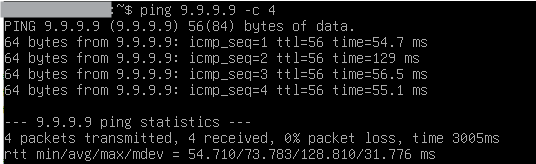
A client 10.14.2.31 by default still use the main table and use other working default route (not “Main - ISP1”) thus can ping 9.9.9.9 on the internet:

route-test-2.png
Now let’s add the rule to force 10.14.2.31 to use the TEST1 table:


/routing rule
add action=lookup disabled=no min-prefix=0 table=main
add action=lookup disabled=no dst-address=0.0.0.0/0 src-address=10.14.2.31/32 table=TEST1

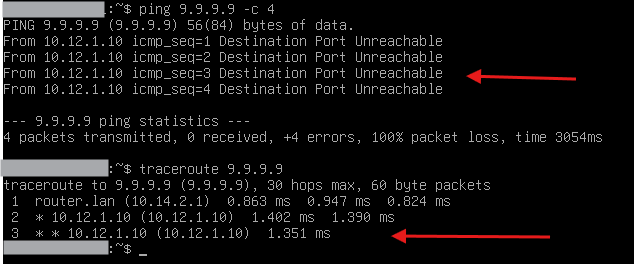
We now see that 10.14.2.31 can no longer reach the internet, traceroute stops at 10.12.1.10 (10.14.2.1 is the router).

route-test-3.png
Now let’s replace the rule in TEST1 with


/ip route
add check-gateway=ping comment="TEST1 - ISP1" dst-address=0.0.0.0/0 gateway=8.8.8.8 routing-table=TEST1 scope=10 target-scope=12

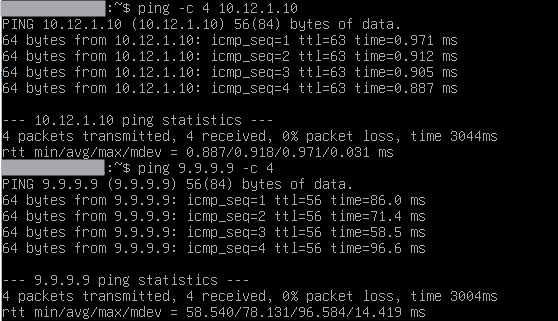
Route in TEST1 is now unreachable and ping 9.9.9.9 works again because of failover to main:

route-test-4.png
route-test-5.png
Now replace the non working ISP1 with a working one (10.24.10.1 can route). The route in TEST1 become active (due to ping test now working).

route-test-6.png
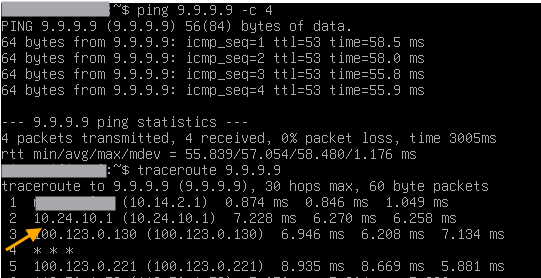
Ping from 10.14.2.31 still works and traceroute shows the route being taken through 10.24.10.1 of table TEST1.

route-test-7.png
Conclusion: With your rule in TEST1 (refering ISP1 Gateway IP directly as gateway, without ping check), client has no internet access. With my rule in TEST1 client correctly uses table main when ISP1 is down, and uses TEST1 when ISP1 is up :slight_smile:.

I would start with the simple ECMP approach, as its much easier to config, (mangling can get complex), and its much more efficient, mangling means you lose access to fasstrack which is a significant hit on performance. If users on your network actually experience issues while banking, then by all means PCC is the way to go. On the other hand if you want to learn about mangling, special tables etc… fill yer boots!

Ok, I’ll try ECMP 1st :laughing:

L3 is the default mode of ECMP right? I just have to change distance to 1 on the main route of 2nd ISP?

I think there’s something wrong with my firewall rules. fasttrack doesn;t do anything :frowning:

/ip firewall filter
add action=accept chain=input comment="Allow established/related connections" \
    connection-state=established,related in-interface-list=WAN
add action=drop chain=input comment="defconf: drop invalid connections" \
    connection-state=invalid
add action=accept chain=input comment="defconf: accept ICMP" protocol=icmp
add action=accept chain=input comment=\
    "defconf: accept to local loopback (for CAPsMAN)" dst-address=127.0.0.1
add action=drop chain=input comment="defconf: drop all not coming from LAN" \
    in-interface-list=!LAN
add action=accept chain=forward comment="defconf: accept in ipsec policy" \
    ipsec-policy=in,ipsec
add action=accept chain=forward comment="defconf: accept out ipsec policy" \
    ipsec-policy=out,ipsec
add action=accept chain=forward comment=\
    "defconf: accept established,related, untracked" connection-state=\
    established,related,untracked
add action=drop chain=forward comment="defconf: drop invalid" \
    connection-state=invalid
add action=drop chain=forward comment=\
    "defconf: drop all from WAN not DSTNATed" connection-nat-state=!dstnat \
    connection-state=new in-interface-list=WAN
add action=drop chain=input comment="DNS UDP Block" dst-port=53 \
    in-interface-list=WAN protocol=udp
add action=drop chain=input comment="DNS TCP Block" dst-port=53 \
    in-interface-list=WAN protocol=tcp
add action=drop chain=input comment=\
    "Drop all traffic from WAN except established/related" in-interface-list=\
    WAN
add action=drop chain=input comment="Block SSH from WAN" dst-port=22 \
    in-interface-list=WAN log=yes log-prefix=SSH-Blocked protocol=tcp
add action=accept chain=input comment="Allow limited ICMP from WAN" \
    in-interface-list=WAN limit=5,2 protocol=icmp
add action=accept chain=input comment="Allow SSH from internal network" \
    dst-port=22 in-interface=Bridge protocol=tcp src-address=192.168.0.0/16
add action=drop chain=input comment="Block spoofed private IPs from WAN" \
    in-interface-list=WAN src-address=10.0.0.0/8
add action=drop chain=input comment="Block spoofed private IPs from WAN" \
    in-interface-list=WAN src-address=172.16.0.0/12
add action=drop chain=input comment="Block spoofed private IPs from WAN" \
    in-interface-list=WAN src-address=192.168.0.0/16
add action=accept chain=input comment="allow LAN users to router" \
    in-interface-list=LAN
add action=drop chain=input comment="drop all else"
add action=fasttrack-connection chain=forward connection-state=\
    established,related hw-offload=yes
add action=accept chain=forward connection-state=\
    established,related,untracked
add action=drop chain=forward connection-state=invalid
add action=accept chain=forward comment="internet traffic" in-interface-list=\
    LAN out-interface-list=WAN

As always, I recommend posting full config each time you make changes and ask for support. The config is interrelated and snippets rarely hold the complete story.
That being said,I will look..

Compare line by line changes made. PS I always remove default comments for clarity of reading
You were missing the fasstrack rule???.
Keep chains together for easy troubleshooting and understanding/seeing order within chains easily.
By the way, I hope you see that add the block DNS rules in input chain way down, is
a. not with the other input chain rule so more difficult to piece together
b. useless, as above that you already have stated, block ALL not coming from the LAN, so these rules should be removed.
Same goes for any of the block rules you added for traffic coming from the WAN side.
Same goes for any rules you added to allow stuff like SSH to the router from the LAN, as LAN traffic is already allowed.
Lots of duplication of rules, ALL cleaned up!!


/ip firewall filter
add action=accept chain=input connection-state=established,related
add action=drop chain=input connection-state=invalid
add action=accept chain=input protocol=icmp
add action=accept chain=input dst-address=127.0.0.1
add action=accept chain=input comment=“allow users to router” in-interface-list=LAN
add action=drop chain=input comment=“drop all else”
{ insert this rule here, last, make sure previous rule is in place before you do! }
++++++++++++++++++++++++++
add action=fasttrack chain=forward connection-state=established,related
add action=accept chain=forward connection-state=established,related,untracked
add action=drop chain=forward connection-state=invalid
add action=accept chain=forward comment=“internet traffic” in-interface-list=LAN out-interface-list=WAN
add action=accept chain=forward comment=“port forwarding” connection-nat-state=dstnat disabled=yes
{ enable or remove if not required }
add action=drop chain=forward comment=“drop all else”


Optional and normally not required:
If your concerned about private addresses coming in on the wan side, then make a firewall address list called “not-authorized” of all the addresses, including own subnet LAN addresses,
that should have no business coming in on the WAN. Block these in raw.
Similarly you can block all traffic from LAN going out WAN that are not from local subnets. Will need a firewall address called: “MySubnets”
If your WANIPs are fixed its easy to add a rule blocking any destination IPs that are not valid. Use a firewall address list called MyWAN

/ip firewall raw
add action=drop chain=prerouting comment=“Block spoofed private IPs from WAN” in-interface-list=WAN src-address-list=not-authorized
add action=drop chain=prerouting comment=“Block spoofed private IPs from LAN” in-interface-list=LAN src-address=!MySubnets
add action=drop chain=prerouting comment=“Block incoming wrong WANIP” in-interface-list=WAN src-address=!MyWAN