Android rulz 
OK, moving on …
Read some snippets earlier today where I conclude Samsung and WPA3 can cause roaming issues on whatever brand of AP if you’re ‘lucky’ (ahem …).
Funny thing is that the same model/SW version works reliably but another user having the exact same device reports issues.
I’ve also seen reports about other brands/devices (not only smartphones, also tablets, smartwatches, …)
Various brands of APs, no common denominator.
So it looks like this is not an MT problem but more a client implementation problem ?
I do believe that this is a client problem. At least in my case, only one device have this problem. In my case we are talking about Xiaomi phone. Same model, year apart from my wife’s phone, her phone roams, my doesn’t.
I also noticed that it likes to hang onto 5GHz radio… When we are in our yard my phone disconnects but wife’s phone connects to 2.4GHz…
I tested today with my brothers S23 Ultra and it’s roaming without a problem.
Unfortunately I don’t have any iPhone to test… Maybe it’s OS problem ?

Not everyone desires to sell their soul to apple. Android asks for lesser portion of soul, than Apple. So, a better choice.
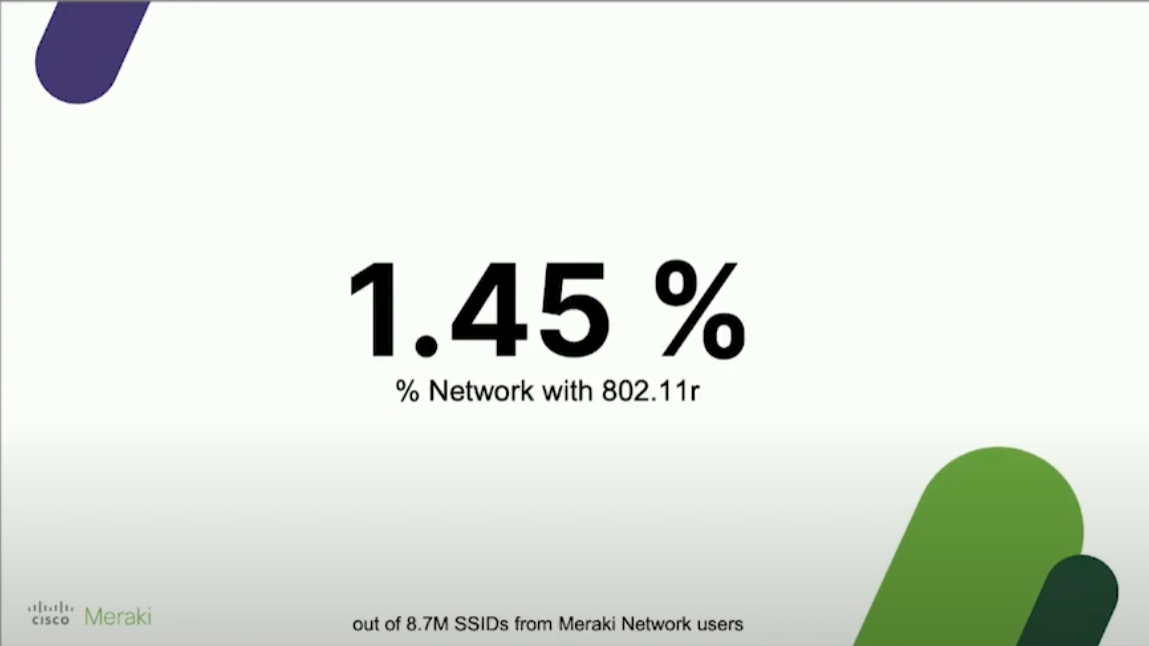
Given the amount of yelling Mikrotik users have been doing about the previous lack of 802.11r, check out this stat from the recent Wireless LAN Professionals conference in Prague. This is from a Cisco employee directly:
Of 8.7 million known SSIDS on Meraki gear, only 1.45% have enabled 802.11r.
@kravenmir,
Also interested in anav’s request below:
Can you draw a network diagram to see what is connected to what.
What is your main router
Does it run capsman
What is the difference in wifiwave2 setup on main router (running capsman) and the other devices?Can you provide /exports of all the MT wifi devices…
finally someone reasonable
I am strugling with roaming on Mikrotiks. I have five cAP ax, on one of them I setup CAPSMAN, everything seems to work nice. But I noticed from log that only 2 devices doing roaming (Samsung S10 and Samsung S22). So I uncheck WPA3 and used only WPA2 (according to advice). Now all mobile phones doing roaming well. But none of windows laptops. Is it normal behavior ? All kind of mobile types are OK, but none laptops ? Do I need setup something in windows registry ?
Thanks
Try Forget network and then connect again.
You should not change anything on the laptops, at least I didn’t have to.
Windows only supports FT over the networks with 802.1X (i.e. when using WAPx EAP), it does not work in open networks or networks with WAPx PSK. That does not mean Windows laptops does not roam at all, it just meas Fast BSS Transition is not supported in those cases.
When using the new CAPsMAN, however, I used to struggle with a couple of Windows laptops that were stuck on one AP and refused to roam even when the signal was dropping way below acceptable level, no matter if FT was enabled or not. This has been fixed for me with the following setting (follow this link if you need some explanation):
set ... security.connect-priority=0/1
Remember that only those who are dissatisfied for some reason write to us on the forum,
not those who are happy, who don’t give a damn about coming here to say thank you…
Instead, obviously, we only read the posts of those who complain…
@S8T8 Whatever you set the connect-priority to, the duplicate MAC addresses should not be allowed withing the same connect-group. But you are probably correct in your assumption that the connect-priority=0/1 setting is less secure than whatever the default setting is. Please note that the ‘MacStealer’ attack assumes that the attacker is already authenticated in your network, so it is up to you to decide whether this setting is acceptable to you in your specific use case.
Well, I did 2 changes, I installed wifi driver from my wifi card’s vendor (not M$ drivers) and did setup connect-priority=0/1 and seems to working on my laptop. On others computers I can see they sometimes roamed, but not so often as my laptop, they mostly disconnected/connected. I read that some of wifi adapters not support 802.11r/k/v.
Uhh... No.
Mikrotik has some serious apologists around here.
I tried to setup fast roaming (I’m on 7.13.3) and I have a strange behaviour: my Android phone successfully roams, but after exactly 10s it disconnects from the new AP and reconnects in a couple of seconds. Any idea?
roams from/to? config?
From hapax3 to hap ax lite.
Config hapax3 (capsman):
# 2024-01-26 15:33:59 by RouterOS 7.13.3
#
# model = C53UiG+5HPaxD2HPaxD
/interface bridge
add arp=proxy-arp name=bridge
/interface ethernet
set [ find default-name=ether1 ] poe-out=off
/interface wireguard
add listen-port=PORT mtu=1420 name=wireguard1
/interface vlan
add interface=ether1 name=vlan835-TIM vlan-id=835
/interface pppoe-client
add add-default-route=yes disabled=no interface=vlan835-TIM name=#####
/interface list
add name=WAN
add name=LAN
/interface wifi datapath
add bridge=bridge disabled=no name=datapath1
/interface wifi security
add authentication-types=wpa2-psk connect-priority=0/1 disabled=no ft=yes ft-over-ds=yes name=wifisec_FT wps=disable
/interface wifi configuration
add channel.band=2ghz-n .width=20mhz country=Italy datapath=datapath1 disabled=no mode=ap name=wificonf_FT security=wifisec_FT ssid=ssid24
/interface wifi
set [ find default-name=wifi1 ] channel.band=5ghz-ac .frequency=5170-5250 .skip-dfs-channels=all .width=20/40mhz-Ce configuration=wificonf_FT configuration.mode=ap .ssid=ssid5 disabled=no
set [ find default-name=wifi2 ] configuration=wificonf_FT configuration.mode=ap disabled=no
/ip pool
add name=default-dhcp ranges=192.168.1.200-192.168.1.222
/ip dhcp-server
add add-arp=yes address-pool=default-dhcp interface=bridge lease-time=3d name=dhcp_server1
/interface bridge port
add bridge=bridge interface=ether2
add bridge=bridge interface=ether3
add bridge=bridge interface=ether4
add bridge=bridge interface=ether5
add bridge=bridge disabled=yes interface=ether1
/ip neighbor discovery-settings
set discover-interface-list=LAN
/interface list member
add interface=bridge list=LAN
add interface=pppoe-TIM-out list=WAN
add interface=wireguard1 list=LAN
/interface wifi capsman
set ca-certificate=auto enabled=yes interfaces=bridge require-peer-certificate=no upgrade-policy=none
/interface wifi provisioning
add action=create-dynamic-enabled disabled=no master-configuration=wificonf_FT name-format=wifi%I slave-configurations=""
/interface wireguard peers
## edited
/ip address
add address=192.168.1.2/24 interface=bridge network=192.168.1.0
add address=192.168.1.224/28 interface=wireguard1 network=192.168.1.224
/ip cloud
set ddns-enabled=yes update-time=no
/ip dhcp-server config
set accounting=no store-leases-disk=never
/ip dhcp-server lease
## edited
/ip dhcp-server network
add address=192.168.1.0/24 dns-server=192.168.1.2 domain=home.arpa gateway=192.168.1.2
/ip dns
set allow-remote-requests=yes doh-max-server-connections=10 doh-timeout=10s max-concurrent-queries=200 max-concurrent-tcp-sessions=40 query-server-timeout=5s use-doh-server=edited verify-doh-cert=yes
/ip dns static
add address=45.90.28.0 disabled=yes name=dns.nextdns.io
add address=45.90.30.0 disabled=yes name=dns.nextdns.io
add address=2a07:a8c0:: disabled=yes name=dns.nextdns.io type=AAAA
add address=2a07:a8c1:: disabled=yes name=dns.nextdns.io type=AAAA
add address=38.175.119.129 name=dns.nextdns.io
add address=178.255.155.63 name=dns.nextdns.io
/ip firewall filter
add action=accept chain=input comment="defconf: accept established,related,untracked" connection-state=established,related,untracked
add action=drop chain=input comment="defconf: drop invalid" connection-state=invalid
add action=accept chain=input comment="defconf: accept ICMP" protocol=icmp
add action=accept chain=input comment="defconf: accept to local loopback (for CAPsMAN)" dst-address=127.0.0.1
add action=accept chain=input comment="Allow WireGuard" dst-port=PORT in-interface-list=WAN protocol=udp
add action=drop chain=input comment="defconf: drop all not coming from LAN" in-interface-list=!LAN
add action=accept chain=forward comment="defconf: accept in ipsec policy" ipsec-policy=in,ipsec
add action=accept chain=forward comment="defconf: accept out ipsec policy" ipsec-policy=out,ipsec
add action=fasttrack-connection chain=forward comment="defconf: fasttrack" connection-state=established,related hw-offload=yes
add action=accept chain=forward comment="defconf: accept established,related, untracked" connection-state=established,related,untracked
add action=drop chain=forward comment="defconf: drop invalid" connection-state=invalid
add action=drop chain=forward comment="defconf: drop all from WAN not DSTNATed" connection-nat-state=!dstnat connection-state=new in-interface-list=WAN
/ip firewall nat
add action=masquerade chain=srcnat comment="defconf: masquerade" ipsec-policy=out,none out-interface-list=WAN
/ip service
set telnet disabled=yes
set ftp disabled=yes
set ssh disabled=yes
set api disabled=yes
set api-ssl disabled=yes
/ipv6 firewall address-list
add address=::/128 comment="defconf: unspecified address" list=bad_ipv6
add address=::1/128 comment="defconf: lo" list=bad_ipv6
add address=fec0::/10 comment="defconf: site-local" list=bad_ipv6
add address=::ffff:0.0.0.0/96 comment="defconf: ipv4-mapped" list=bad_ipv6
add address=::/96 comment="defconf: ipv4 compat" list=bad_ipv6
add address=100::/64 comment="defconf: discard only " list=bad_ipv6
add address=2001:db8::/32 comment="defconf: documentation" list=bad_ipv6
add address=2001:10::/28 comment="defconf: ORCHID" list=bad_ipv6
add address=3ffe::/16 comment="defconf: 6bone" list=bad_ipv6
/ipv6 firewall filter
add action=accept chain=input comment="defconf: accept established,related,untracked" connection-state=established,related,untracked
add action=drop chain=input comment="defconf: drop invalid" connection-state=invalid
add action=accept chain=input comment="defconf: accept ICMPv6" protocol=icmpv6
add action=accept chain=input comment="defconf: accept UDP traceroute" port=33434-33534 protocol=udp
add action=accept chain=input comment="defconf: accept DHCPv6-Client prefix delegation." dst-port=546 protocol=udp src-address=fe80::/10
add action=accept chain=input comment="defconf: accept IKE" dst-port=500,4500 protocol=udp
add action=accept chain=input comment="defconf: accept ipsec AH" protocol=ipsec-ah
add action=accept chain=input comment="defconf: accept ipsec ESP" protocol=ipsec-esp
add action=accept chain=input comment="defconf: accept all that matches ipsec policy" ipsec-policy=in,ipsec
add action=drop chain=input comment="defconf: drop everything else not coming from LAN" in-interface-list=!LAN
add action=accept chain=forward comment="defconf: accept established,related,untracked" connection-state=established,related,untracked
add action=drop chain=forward comment="defconf: drop invalid" connection-state=invalid
add action=drop chain=forward comment="defconf: drop packets with bad src ipv6" src-address-list=bad_ipv6
add action=drop chain=forward comment="defconf: drop packets with bad dst ipv6" dst-address-list=bad_ipv6
add action=drop chain=forward comment="defconf: rfc4890 drop hop-limit=1" hop-limit=equal:1 protocol=icmpv6
add action=accept chain=forward comment="defconf: accept ICMPv6" protocol=icmpv6
add action=accept chain=forward comment="defconf: accept HIP" protocol=139
add action=accept chain=forward comment="defconf: accept IKE" dst-port=500,4500 protocol=udp
add action=accept chain=forward comment="defconf: accept ipsec AH" protocol=ipsec-ah
add action=accept chain=forward comment="defconf: accept ipsec ESP" protocol=ipsec-esp
add action=accept chain=forward comment="defconf: accept all that matches ipsec policy" ipsec-policy=in,ipsec
add action=drop chain=forward comment="defconf: drop everything else not coming from LAN" in-interface-list=!LAN
/system clock
set time-zone-autodetect=no time-zone-name=Europe/Rome
/system identity
set name=hapax3
/system leds settings
set all-leds-off=after-1h
/system note
set show-at-login=no
/system ntp client
set enabled=yes
/system ntp client servers
add address=it.pool.ntp.org
add address=europe.pool.ntp.org
/tool bandwidth-server
set enabled=no
/tool graphing
set store-every=24hours
/tool graphing interface
add allow-address=192.168.1.0/24
/tool graphing resource
add allow-address=192.168.1.0/24
/tool mac-server
set allowed-interface-list=LAN
Config hap ax lite:
# 2024-01-26 15:41:01 by RouterOS 7.13.3
#
# model = L41G-2axD
/interface bridge
add comment=defconf name=bridgeLocal
/interface wifi datapath
add bridge=bridgeLocal comment=defconf disabled=no name=capdp
/interface wifi
# managed by CAPsMAN
# mode: AP, SSID: ssid24, channel: 2462/n
set [ find default-name=wifi1 ] configuration.manager=capsman datapath=capdp disabled=no
/interface bridge port
add bridge=bridgeLocal comment=defconf interface=ether1
add bridge=bridgeLocal comment=defconf interface=ether2
add bridge=bridgeLocal comment=defconf interface=ether3
add bridge=bridgeLocal comment=defconf interface=ether4
/ipv6 settings
set disable-ipv6=yes
/interface wifi cap
set discovery-interfaces=bridgeLocal enabled=yes slaves-datapath=capdp
/ip cloud
set update-time=no
/ip dhcp-client
add comment=defconf interface=bridgeLocal
/ip service
set telnet disabled=yes
set ftp disabled=yes
set www disabled=yes
set ssh disabled=yes
set api disabled=yes
set api-ssl disabled=yes
/system clock
set time-zone-autodetect=no time-zone-name=Europe/Rome
/system identity
set name=hapaxlite
/system leds settings
set all-leds-off=after-1h
/system note
set show-at-login=no
/system ntp client
set enabled=yes
/system ntp client servers
add address=it.pool.ntp.org
add address=europe.pool.ntp.org
The smartphone is a Huawei P20
Thanks!
Thanks for sharing the config. But you did not say in which direction you have roaming issues. roaming from 5g to 2g and falling back to 5g after 10 secs? or the other way round? 2g to 5g and falling back to 2g again?
Or are you especially referring roaming on 2ghz from your your hap ax3 to hap lite ax?