wanna block 2 different network that each one have its own RB (RouterBoard1 and RouterBoard 2),
RouterBoard 2 should be accessed and managed from 1 PC in the second network. So, RouterBoard 2 is linked to the second network switch.
How to block any traffic coming from PC 2 side port (all port traffics) to the second network via the management port in RB2?
in other words, ports 1 & 2 in RB2 should be separated.
Tnx
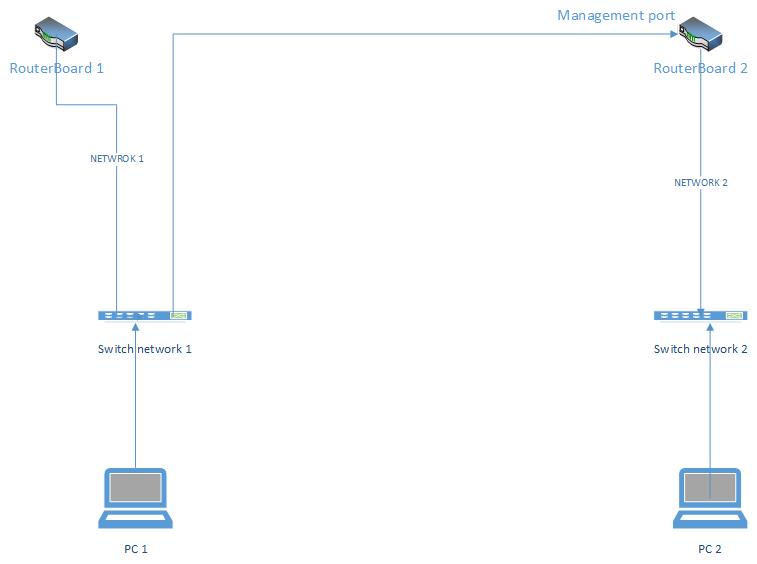
So, you want PC1 to talk to RouterBoard 1 only and PC2 to talk to RouterBoard 2 only?
And network1 is, for example, 192.168.1.0/24 and network2 is 192.168.2.0/24?
Is that what you mean?
if so, you just need something like this on routerboard 2 assuming PC2’s IP is 192.168.2.12. Untested and typed in by hand without a router around.
/ip firewall filter add chain=input action=deny src-address=192.168.1.0/24 \
   comment="prevent hosts in 192.168.1.0/24 from managing this RouterBoard"
/ip firewall filter add chain=input action=deny src-address=192.168.1.0/24 \
   comment="permit 192.168.2.12/24 permit manage this RouterBoard"
/ip firewall filter add chain=forward action=deny src-address=192.168.1.0/24 dst-address=192.168.2.0/24 \
   comment="prevent hosts in 192.168.1.0/24 from talking to hosts in 192.168.2.0/24"
/ip firewall filter add chain=forward action=deny src-address=192.168.1.0/24 dst-address=192.168.1.0/24 \
   comment="prevent hosts in 192.168.2.0/24 from talking to hosts in 192.168.1.0/24"
Is there any rule that can be done on the port itself?
what I mean in “PC1” is PCs in network 1 and includes AP, PC… (3 ranges of IPs are used)
Network 2 includes AP, PCs…
What I want is to block any traffics on RB2 between port 1 (management port) and port 2 (all the network)
Note that I want to access RB2 via management port from 1 computer (1 IP address). Can we block all traffics except this computer IP (1 IP).
In case there is no way to make the firewall rule on the port itself, how to block the traffics by selecting any network? can I do that by choosing 255.255.255.255? is yes, what is the command. and how to exclude 1 IP address from this rule.
Thank you.
I created the following rule on RB2:
chain:Forward.
In, Interface: ether1 (network 2 side)
Out. Interface: ether2 (Management port).
Action: Drop.
there is no ping after this rule created between both network
Can this rule stop any traffics between both ports? is it better to choose any other Chain or Action?
That one rule will not prevent traffic from the ether2 LAN getting to the ether1 LAN. You would have to write another rule with the in and out interfaces flipped to do that, if that is what you want.
Yes this is what I want. what is the rule..
Just copy this rule and swap the interfaces.
chain:Forward.
In, Interface: ether2 (Management port)
Out. Interface: ether1 (network 2 side).
Action: Drop.
Thank you!
It seems it’s working