First time configuring User manager

Hello, is there any tutorial that you can recommend for someone that would like to try and configure user manager for the first time.

My goal is to have one SSID for multiple VLAN’s and as far as i can see for now this is the only way.

My test setup includes RB4011 with installed wifiwave2 package, user manager package, and RB4011 acts as CAPsMAN controller, CAP is hAP ax2.

So I tried to play a little bit with user manager.

In Radius menu i created service “wireless”, IP address is 127.0.0.1 as service is local on the router so i presume 127.0.0.1 is a valid choice.

In incoming i selected accept, and in user manager i created new router with same address and secret as service in radius menu and enabled user manager. But now im stuck, how to define users, for eg my phone to be one user ?

I tried to export configuration but there is no user manager or radius section.

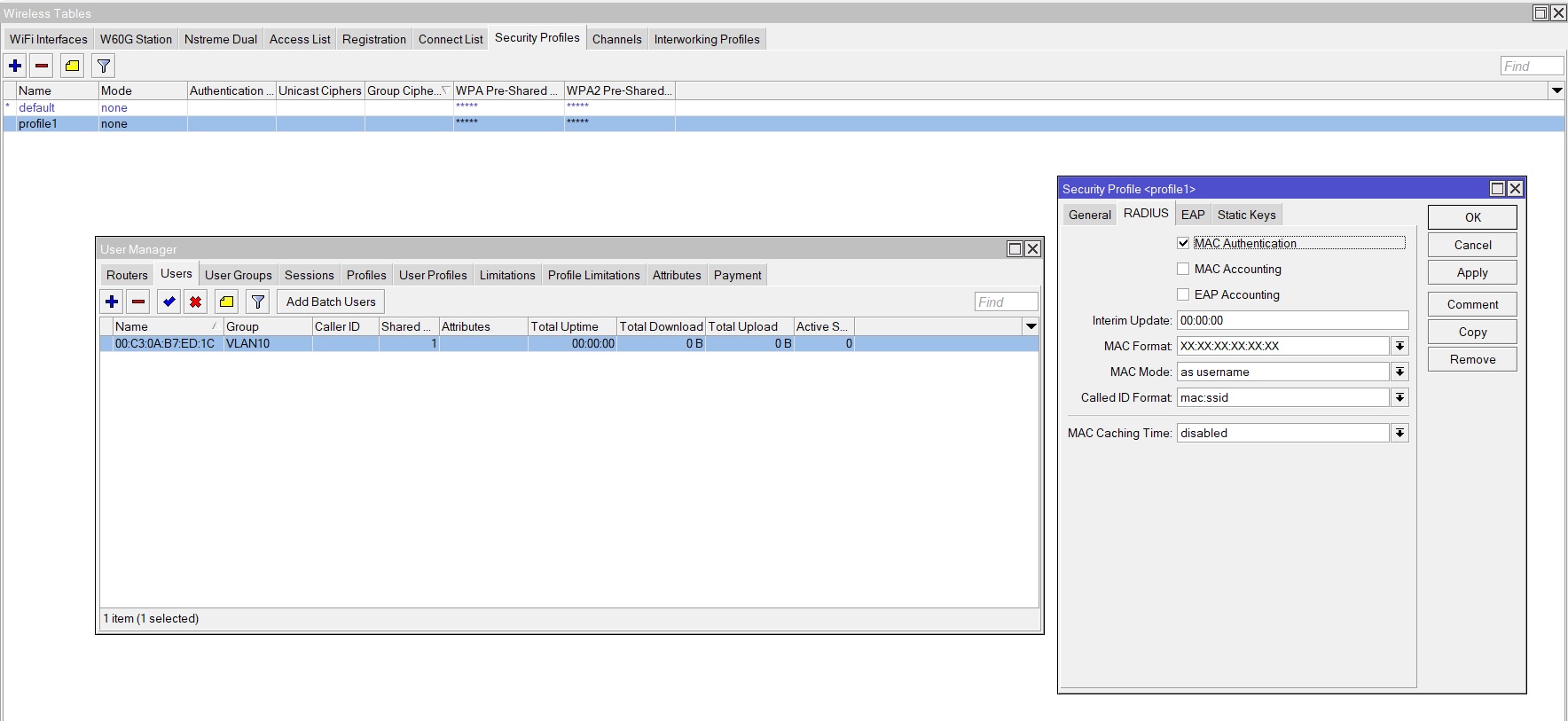
You need to enable “MAC authentication” in your wireless security profile, select a MAC format, MAC “as username”, and add “usernames” that are the MAC addresses of the devices you want to accept (in that same format). The users have no password.
To assign a VLAN to the users you put them in a group, and you define groups like this (that is the only tricky thing):

/user-manager user group
add attributes="Mikrotik-Wireless-Forward:1,Mikrotik-Wireless-VLANIDtype:0,Mikrotik-Wireless-VLANID:10" name=VLAN10 outer-auths=pap

The users who are member of group VLAN10 will be put in VLAN 10 when connecting to your WiFi SSID. Of course the name can be different.

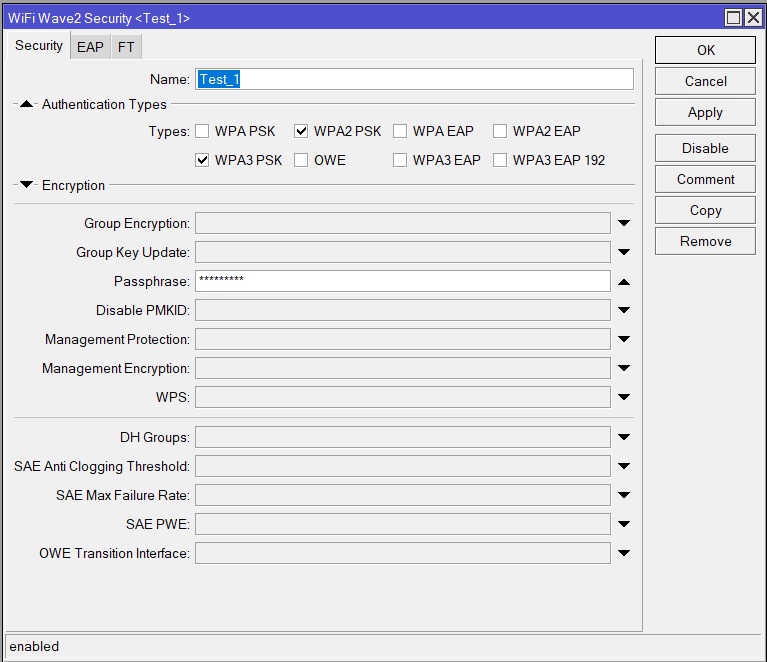
I presume that there should be RADIUS tab here:

RADIUS missing.jpg

Is it the problem that I’m using CAPsMAN ? I can’t find MAC authentication at all…

I found this video, and guy have RADIUS menu and everything but he is using legacy WiFi as far as I can see but I’m using wifiwave2

https://www.youtube.com/watch?v=XEqjPqxCcn0&ab_channel=AccessPointKft.

I don’t have any wifiwave2 devices so I can’t comment…

Okay, I took my old hAP AC3, it’s running legacy drivers for wifi, updated to latest beta version, installed user manager, did everything i did before on RB4011.

I created new security profile, only enabled MAC authentication, created VLAN10, set both of my wireless interfaces to this new profile, in User manager i created user with mac address of my phone and when i try to connect it says can’t connect to the network.

Setup_1.jpg
Also here is config:

# 2023-02-05 11:56:54 by RouterOS 7.12beta7
# software id = 
#
# model = RBD53iG-5HacD2HnD
# serial number = 
/interface bridge
add admin-mac= auto-mac=no comment=defconf \
    ingress-filtering=no name=bridge vlan-filtering=yes
/interface vlan
add interface=bridge name=VLAN10 vlan-id=10
/interface list
add comment=defconf name=WAN
add comment=defconf name=LAN
/interface lte apn
set [ find default=yes ] ip-type=ipv4 use-network-apn=no
/interface wireless security-profiles
set [ find default=yes ] authentication-types=wpa-psk,wpa2-psk eap-methods="" \
    radius-mac-authentication=yes supplicant-identity=MikroTik
add name=profile1 radius-mac-authentication=yes supplicant-identity=""
/interface wireless
set [ find default-name=wlan1 ] band=2ghz-g/n country=croatia disabled=no \
    distance=indoors frequency=2437 installation=indoor mode=ap-bridge \
    security-profile=profile1 ssid=Mikrotik wireless-protocol=802.11 \
    wps-mode=disabled
set [ find default-name=wlan2 ] band=5ghz-n/ac channel-width=20/40mhz-XX \
    country=croatia disabled=no distance=indoors frequency=5500 installation=\
    indoor mode=ap-bridge security-profile=profile1 ssid=Mikrotik5 \
    wireless-protocol=802.11 wps-mode=disabled
/ip pool
add name=dhcp ranges=192.168.88.10-192.168.88.254
add name=vpn ranges=192.168.89.2-192.168.89.255
add name=dhcp_pool2 ranges=10.10.10.2-10.10.10.254
/ip dhcp-server
add address-pool=dhcp interface=bridge lease-time=10m name=defconf
add address-pool=dhcp_pool2 interface=VLAN10 name=dhcp1
/user-manager user group
add attributes="Mikrotik-Wireless-Forward:1,Mikrotik-Wireless-VLANIDtype:0,Mik\
    rotik-Wireless-VLANID:10" name=VLAN10 outer-auths=pap
/user-manager user
add group=VLAN10 name=00:C3:0A:B7:ED:1C
/interface bridge port
add bridge=bridge comment=defconf ingress-filtering=no interface=ether2
add bridge=bridge comment=defconf ingress-filtering=no interface=ether3
add bridge=bridge comment=defconf ingress-filtering=no interface=ether4
add bridge=bridge comment=defconf frame-types=\
    admit-only-untagged-and-priority-tagged ingress-filtering=no interface=\
    wlan1 pvid=10
add bridge=bridge comment=defconf frame-types=\
    admit-only-untagged-and-priority-tagged ingress-filtering=no interface=\
    wlan2 pvid=10
/ip neighbor discovery-settings
set discover-interface-list=LAN
/ipv6 settings
set disable-ipv6=yes max-neighbor-entries=8192
/interface bridge vlan
add bridge=bridge tagged=bridge untagged=wlan1,wlan2 vlan-ids=10
/interface detect-internet
set detect-interface-list=WAN internet-interface-list=WAN
/interface list member
add comment=defconf interface=bridge list=LAN
add comment=defconf interface=ether1 list=WAN
/interface wireless cap
set caps-man-addresses=127.0.0.1
/ip address
add address=192.168.88.1/24 comment=defconf interface=bridge network=\
    192.168.88.0
add address=10.10.10.1/24 comment=TEST interface=VLAN10 network=10.10.10.0
/ip cloud
set ddns-enabled=yes
/ip dhcp-client
add interface=ether5
/ip dhcp-server lease
/ip dhcp-server network
add address=10.10.10.0/24 gateway=10.10.10.1
add address=192.168.88.0/24 comment=defconf gateway=192.168.88.1
/ip dns
set allow-remote-requests=yes
/ip dns static
add address=192.168.88.1 comment=defconf name=router.lan
/ip firewall filter
add action=accept chain=input comment=\
    "defconf: accept established,related,untracked" connection-state=\
    established,related,untracked
add action=accept chain=input comment="allow IPsec NAT" dst-port=4500 \
    protocol=udp
add action=accept chain=input comment="allow IKE" dst-port=500 protocol=udp
add action=accept chain=input comment="allow l2tp" dst-port=1701 \
    ipsec-policy=in,ipsec protocol=udp
add action=accept chain=input comment="allow pptp" dst-port=1723 protocol=tcp
add action=accept chain=input comment="allow sstp" dst-port=443 protocol=tcp
add action=accept chain=input comment="allow ipsec-esp" protocol=ipsec-esp
add action=drop chain=input comment="defconf: drop invalid" connection-state=\
    invalid
add action=accept chain=input comment="defconf: accept ICMP" protocol=icmp
add action=accept chain=input comment=\
    "defconf: accept to local loopback (for CAPsMAN)" dst-address=127.0.0.1
add action=drop chain=input comment="defconf: drop all not coming from LAN" \
    in-interface-list=!LAN
add action=accept chain=forward comment="defconf: accept in ipsec policy" \
    ipsec-policy=in,ipsec
add action=accept chain=forward comment="defconf: accept out ipsec policy" \
    ipsec-policy=out,ipsec
add action=fasttrack-connection chain=forward comment="defconf: fasttrack" \
    connection-state=established,related hw-offload=yes
add action=accept chain=forward comment=\
    "defconf: accept established,related, untracked" connection-state=\
    established,related,untracked
add action=drop chain=forward comment="defconf: drop invalid" \
    connection-state=invalid
add action=drop chain=forward comment=\
    "defconf: drop all from WAN not DSTNATed" connection-nat-state=!dstnat \
    connection-state=new in-interface-list=WAN
/ip firewall nat
add action=masquerade chain=srcnat
/ip upnp
set enabled=yes
/ip upnp interfaces
add interface=bridge type=internal
add interface=ether1 type=external
/ppp secret
add name=vpn profile=vpn service=l2tp
add name=l2tp profile=vpn service=l2tp
/radius
add address=127.0.0.1 service=wireless
/radius incoming
set accept=yes
/system clock
set time-zone-name=Europe/Zagreb
/system identity
set name=Mikrotik
/system leds
set 0 disabled=yes interface=wlan1 leds=led1,led2,led3,led4,led5 type=\
    wireless-signal-strength
set 1 leds=poe-led type=poe-out
set 2 interface=ether5 leds=led5
set 3 interface=ether4
set 4 interface=ether3 leds=led3
add interface=ether2 leds=led2 type=interface-activity
/system note
set show-at-login=no
/tool mac-server
set allowed-interface-list=LAN
/tool mac-server mac-winbox
set allowed-interface-list=LAN
/user aaa
set use-radius=yes
/user-manager
set certificate=*0 enabled=yes
/user-manager router
add address=127.0.0.1 name=router1

Under /system logging enable debug for wireless and radius (all topics) and you can see exactly what is happening.
(open the log window)
I keep logging for wireless enabled so I can see the devices joining the network performing the authentication.
Logging for radius I have disabled during normal use as it is quite a lot. But it shows you during setup what is happening.

I did like you advised and I get this:

 11:22:52 system,info UMS user <6E:23:D0:58:9D:E5> changed by tcp-msg(winbox):admi
n@192.168.88.201 (/user-manager user set *1 attributes="" disabled=no group=VLAN10
 name=6E:23:D0:58:9D:E5 shared-users=1)
 11:22:53 wireless,debug wlan2: must select channel
 11:22:53 wireless,debug wlan2: failed to select channel
 11:22:56 wireless,debug wlan1: 6E:23:D0:58:9D:E5 attempts to associate
 11:22:56 wireless,debug wlan1: 6E:23:D0:58:9D:E5 not in local ACL, query RADIUS
 11:22:56 wireless,debug send RADIUS request for 6E:23:D0:58:9D:E5 on wlan1
 11:22:56 radius,debug new request 58:11 code=Access-Request service=wireless call
ed-id=2C-C8-1B-7E-51-79:Mikrotik
 11:22:56 radius,debug sending 58:11 to 127.0.0.1:1812
 11:22:56 radius,debug,packet sending Access-Request with id 6 to 127.0.0.1:1812
 11:22:56 radius,debug,packet     Signature = 0x16b87b205296d337ab205455ba6f502c
 11:22:56 radius,debug,packet     Service-Type = 2
 11:22:56 radius,debug,packet     NAS-Port-Id = "wlan1"
 11:22:56 radius,debug,packet     NAS-Port-Type = 19
 11:22:56 radius,debug,packet     User-Name = "6E:23:D0:58:9D:E5"
 11:22:56 radius,debug,packet     Calling-Station-Id = "6E-23-D0-58-9D-E5"
 11:22:56 radius,debug,packet     Called-Station-Id = "2C-C8-1B-7E-51-79:Mikrotik"
 11:22:56 radius,debug,packet     User-Password = 0x
 11:22:56 radius,debug,packet     NAS-Identifier = "MRB_KPecar"
 11:22:56 radius,debug,packet     NAS-IP-Address = 127.0.0.1
 11:22:56 radius,debug resending 58:11
 11:22:56 radius,debug,packet sending Access-Request with id 6 to 127.0.0.1:1812
 11:22:56 radius,debug,packet     Signature = 0x16b87b205296d337ab205455ba6f502c
 11:22:56 radius,debug,packet     Service-Type = 2
 11:22:56 radius,debug,packet     NAS-Port-Id = "wlan1"
 11:22:56 radius,debug,packet     NAS-Port-Type = 19
 11:22:56 radius,debug,packet     User-Name = "6E:23:D0:58:9D:E5"
 11:22:56 radius,debug,packet     Calling-Station-Id = "6E-23-D0-58-9D-E5"
 11:22:56 radius,debug,packet     Called-Station-Id = "2C-C8-1B-7E-51-79:Mikrotik"
 11:22:56 radius,debug,packet     User-Password = 0x
 11:22:56 radius,debug,packet     NAS-Identifier = "MRB_KPecar"
 11:22:56 radius,debug,packet     NAS-IP-Address = 127.0.0.1
 11:22:57 radius,debug resending 58:11
 11:22:57 radius,debug,packet sending Access-Request with id 6 to 127.0.0.1:1812
 11:22:57 radius,debug,packet     Signature = 0x16b87b205296d337ab205455ba6f502c
 11:22:57 radius,debug,packet     Service-Type = 2
 11:22:57 radius,debug,packet     NAS-Port-Id = "wlan1"
 11:22:57 radius,debug,packet     NAS-Port-Type = 19
 11:22:57 radius,debug,packet     User-Name = "6E:23:D0:58:9D:E5"
 11:22:57 radius,debug,packet     Calling-Station-Id = "6E-23-D0-58-9D-E5"
 11:22:57 radius,debug,packet     Called-Station-Id = "2C-C8-1B-7E-51-79:Mikrotik"
 11:22:57 radius,debug,packet     User-Password = 0x
 11:22:57 radius,debug,packet     NAS-Identifier = "MRB_KPecar"
 11:22:57 radius,debug,packet     NAS-IP-Address = 127.0.0.1
 11:22:57 radius,debug timeout for 58:11
 11:22:57 wireless,debug got RADIUS timeout for 6E:23:D0:58:9D:E5 on wlan1
 11:22:58 wireless,debug wlan2: must select channel
 11:22:58 wireless,debug wlan2: failed to select channel
 11:22:59 wireless,debug wlan1: 6E:23:D0:58:9D:E5 attempts to associate
 11:22:59 wireless,debug wlan1: reject 6E:23:D0:58:9D:E5, banned (last failure - n
ot allowed by RADIUS)
 11:22:59 wireless,debug wlan1: 6E:23:D0:58:9D:E5 attempts to associate
 11:22:59 wireless,debug wlan1: reject 6E:23:D0:58:9D:E5, banned (last failure - n
ot allowed by RADIUS)
 11:22:59 wireless,debug wlan1: 6E:23:D0:58:9D:E5 attempts to associate
 11:22:59 wireless,debug wlan1: reject 6E:23:D0:58:9D:E5, banned (last failure - n
ot allowed by RADIUS)
 11:22:59 wireless,debug wlan1: 6E:23:D0:58:9D:E5 attempts to associate
 11:22:59 wireless,debug wlan1: reject 6E:23:D0:58:9D:E5, banned (last failure - n
ot allowed by RADIUS)
 11:23:03 wireless,debug wlan2: must select channel
 11:23:03 wireless,debug wlan2: failed to select channel
 11:23:08 wireless,debug wlan2: must select channel
 11:23:08 wireless,debug wlan2: failed to select channel
 11:23:09 wireless,debug wlan1: 6E:23:D0:58:9D:E5 attempts to associate
 11:23:09 wireless,debug wlan1: reject 6E:23:D0:58:9D:E5, banned (last failure - n
ot allowed by RADIUS)
 11:23:09 wireless,debug wlan1: 6E:23:D0:58:9D:E5 attempts to associate
 11:23:09 wireless,debug wlan1: reject 6E:23:D0:58:9D:E5, banned (last failure - n
ot allowed by RADIUS)
 11:23:09 wireless,debug wlan1: 6E:23:D0:58:9D:E5 attempts to associate
 11:23:09 wireless,debug wlan1: reject 6E:23:D0:58:9D:E5, banned (last failure - n
ot allowed by RADIUS)
 11:23:09 wireless,debug wlan1: 6E:23:D0:58:9D:E5 attempts to associate
 11:23:09 wireless,debug wlan1: reject 6E:23:D0:58:9D:E5, banned (last failure - n
ot allowed by RADIUS)
 11:23:13 wireless,debug wlan2: must select channel
 11:23:13 wireless,debug wlan2: failed to select channel
 11:23:18 wireless,debug wlan2: must select channel
 11:23:18 wireless,debug wlan2: failed to select channel
 11:23:23 wireless,debug wlan2: must select channel
 11:23:23 wireless,debug wlan2: failed to select channel
 11:23:28 wireless,debug wlan2: must select channel
 11:23:28 wireless,debug wlan2: failed to select channel
 11:23:33 wireless,debug wlan2: must select channel
 11:23:33 wireless,debug wlan2: failed to select channel
 11:23:34 wireless,debug wlan1: 6E:23:D0:58:9D:E5 attempts to associate
 11:23:34 wireless,debug wlan1: 6E:23:D0:58:9D:E5 not in local ACL, query RADIUS
 11:23:34 wireless,debug send RADIUS request for 6E:23:D0:58:9D:E5 on wlan1
 11:23:34 radius,debug new request 58:12 code=Access-Request service=wireless call
ed-id=2C-C8-1B-7E-51-79:Mikrotik
 11:23:34 radius,debug sending 58:12 to 127.0.0.1:1812
 11:23:34 radius,debug,packet sending Access-Request with id 7 to 127.0.0.1:1812
 11:23:34 radius,debug,packet     Signature = 0xb201a563629e2957d72f0c028ad8f136
 11:23:34 radius,debug,packet     Service-Type = 2
 11:23:34 radius,debug,packet     NAS-Port-Id = "wlan1"
 11:23:34 radius,debug,packet     NAS-Port-Type = 19
 11:23:34 radius,debug,packet     User-Name = "6E:23:D0:58:9D:E5"
 11:23:34 radius,debug,packet     Calling-Station-Id = "6E-23-D0-58-9D-E5"
 11:23:34 radius,debug,packet     Called-Station-Id = "2C-C8-1B-7E-51-79:Mikrotik"
 11:23:34 radius,debug,packet     User-Password = 0x
 11:23:34 radius,debug,packet     NAS-Identifier = "MRB_KPecar"
 11:23:34 radius,debug,packet     NAS-IP-Address = 127.0.0.1
 11:23:34 radius,debug resending 58:12
 11:23:34 radius,debug,packet sending Access-Request with id 7 to 127.0.0.1:1812
 11:23:34 radius,debug,packet     Signature = 0xb201a563629e2957d72f0c028ad8f136
 11:23:34 radius,debug,packet     Service-Type = 2
 11:23:34 radius,debug,packet     NAS-Port-Id = "wlan1"
 11:23:34 radius,debug,packet     NAS-Port-Type = 19
 11:23:34 radius,debug,packet     User-Name = "6E:23:D0:58:9D:E5"
 11:23:34 radius,debug,packet     Calling-Station-Id = "6E-23-D0-58-9D-E5"
 11:23:34 radius,debug,packet     Called-Station-Id = "2C-C8-1B-7E-51-79:Mikrotik"
 11:23:34 radius,debug,packet     User-Password = 0x
 11:23:34 radius,debug,packet     NAS-Identifier = "MRB_KPecar"
 11:23:34 radius,debug,packet     NAS-IP-Address = 127.0.0.1
 11:23:35 radius,debug resending 58:12
 11:23:35 radius,debug,packet sending Access-Request with id 7 to 127.0.0.1:1812
 11:23:35 radius,debug,packet     Signature = 0xb201a563629e2957d72f0c028ad8f136
 11:23:35 radius,debug,packet     Service-Type = 2
 11:23:35 radius,debug,packet     NAS-Port-Id = "wlan1"
 11:23:35 radius,debug,packet     NAS-Port-Type = 19
 11:23:35 radius,debug,packet     User-Name = "6E:23:D0:58:9D:E5"
 11:23:35 radius,debug,packet     Calling-Station-Id = "6E-23-D0-58-9D-E5"
 11:23:35 radius,debug,packet     Called-Station-Id = "2C-C8-1B-7E-51-79:Mikrotik"
 11:23:35 radius,debug,packet     User-Password = 0x
 11:23:35 radius,debug,packet     NAS-Identifier = "MRB_KPecar"
 11:23:35 radius,debug,packet     NAS-IP-Address = 127.0.0.1
 11:23:35 radius,debug timeout for 58:12
 11:23:35 wireless,debug got RADIUS timeout for 6E:23:D0:58:9D:E5 on wlan1
 11:23:35 wireless,debug wlan1: 6E:23:D0:58:9D:E5 attempts to associate
 11:23:35 wireless,debug wlan1: reject 6E:23:D0:58:9D:E5, banned (last failure - n
ot allowed by RADIUS)
 11:23:35 wireless,debug wlan1: 6E:23:D0:58:9D:E5 attempts to associate
 11:23:35 wireless,debug wlan1: reject 6E:23:D0:58:9D:E5, banned (last failure - n
ot allowed by RADIUS)
 11:23:35 wireless,debug wlan1: 6E:23:D0:58:9D:E5 attempts to associate
 11:23:35 wireless,debug wlan1: reject 6E:23:D0:58:9D:E5, banned (last failure - n
ot allowed by RADIUS)

As far as I understand, random MAC was on, i set it up to be device mac and again this error.
When you get no reply from the RADIUS server, usually the secret is wrong between them.
You have no secret configured in the radius server and user-manager, maybe that is mandatory (I do not know, I do have it).
Also I do not use 127.0.0.1 but the IP of the router on the LAN, but that should not be the problem.

I put some basic password, like 123456, both on RADIUS service I created and User Manager settings.

I tried again but same results, can’t connect to the network. I checked multiple times MAC address I entered and it’s correct one.

The problem is not the MAC address, the problem is that the RADIUS server does not answer your query.
So you need to fix that first. Try to use the router LAN address instead of 127.0.0.1
Make sure the input rules of the firewall don’t block RADIUS (UDP port 1812-1813,3799)

Changed addresses from 127.0.0.1 to 192.168.88.1 and I added firewall input rule:

chain=input action=accept protocol=udp dst-port=1812,1813,3799 log=no 
      log-prefix=""

Now when i tried to connect to network i get same error but i can see in filter rules that 6 packets are recieved in this new rule i created.

EDIT: Now I get to the point where it says obtaining IP address but it fail to obtain a IP address, LOG looks like this:

11:54:20 radius,debug,packet sending Access-Request with id 14 to 192.168.88.1:18
12
 11:54:20 radius,debug,packet     Signature = 0xc8254c5d8bcb3633c4caea374eac9874
 11:54:20 radius,debug,packet     Service-Type = 2
 11:54:20 radius,debug,packet     NAS-Port-Id = "wlan1"
 11:54:20 radius,debug,packet     NAS-Port-Type = 19
 11:54:20 radius,debug,packet     User-Name = "6E:23:D0:58:9D:E5"
 11:54:20 radius,debug,packet     Calling-Station-Id = "6E-23-D0-58-9D-E5"
 11:54:20 radius,debug,packet     Called-Station-Id = "2C-C8-1B-7E-51-79:Mikrotik"
 11:54:20 radius,debug,packet     User-Password = 0x
 11:54:20 radius,debug,packet     NAS-Identifier = "Mikrotik"
 11:54:20 radius,debug,packet     NAS-IP-Address = 192.168.88.1
 11:54:20 radius,debug,packet received Access-Accept with id 14 from 192.168.88.1:
1812
 11:54:20 radius,debug,packet     Signature = 0x8f2646f37c17e54e7dea8863aeed27e7
 11:54:20 radius,debug,packet     MT-Wireless-Forward = 1
 11:54:20 radius,debug,packet     MT-Wireless-VLAN-ID-Type = 0
 11:54:20 radius,debug,packet     MT-Wireless-VLAN-ID = 10
 11:54:20 radius,debug,packet     Class = 0xf9ac972a6230191e
 11:54:20 radius,debug,packet     Message-Authenticator = 0x5de7e598a5ce30fa103506
76807e2d18
 11:54:20 radius,debug received reply for 58:1d
 11:54:20 wireless,debug got RADIUS accept for 6E:23:D0:58:9D:E5 on wlan1
 11:54:20 wireless,info 6E:23:D0:58:9D:E5@wlan1: connected, signal strength -30
 11:54:27 dhcp,warning dhcp1 offering lease 10.10.10.254 for 6E:23:D0:58:9D:E5 wit
hout success
 11:54:39 wireless,info 6E:23:D0:58:9D:E5@wlan1: disconnected, received deauth: se
nding station leaving (3), signal strength -30

So I played a little bit more.

From User groups, where I created VLAN10 group in attributes I only left Mikrotik-Wireless-Forward:1 and now my phone connects without a problem.

Don’t know what is with VLANs, I created VLAN10, i tried to untag wireless interfaces to VLAN10 but that didn’t work. Also in user manager i can’t see that anything is connected.

But progress is made. Also phone reports that there is no security. Like network is open.

Of course you need to configure it so that the VLANs actually work. I did not check that in the config, but you would need a DHCP server on each VLAN etc.
I still do have a (common) WPA2-PSK password on the SSID, that makes it “secure”. Without password it will indicate insecure. And of course it is, anyone that spoofs the MAC can connect then.
It is not a replacement for DPSK etc, you cannot assign a PSK in the user manager entry.
(with wireless access-list that is possible, but then you have to keep the same config on every AP manually instead of in one place)

I do have VLAN10 configured and working, but in this case, how should be configured ?

Usually i assign PVID to port or wireless interface and i untag that port or interface, but here user manager is doing that ?

This is what I get now:

 20:00:18 wireless,debug wlan1: 00:C3:0A:B7:ED:1C attempts to associate
 20:00:18 wireless,debug wlan1: 00:C3:0A:B7:ED:1C not in local ACL, query RADIUS
 20:00:18 wireless,debug send RADIUS request for 00:C3:0A:B7:ED:1C on wlan1
 20:00:18 radius,debug new request 58:23 code=Access-Request service=wireless called-id=2C-C8-1B-7E-51-79:Mikrotik
 20:00:18 radius,debug sending 58:23 to 192.168.88.1:1812
 20:00:18 radius,debug,packet sending Access-Request with id 10 to 192.168.88.1:1812
 20:00:18 radius,debug,packet     Signature = 0xed17cd662fb1613b10a8836a7daa4d59
 20:00:18 radius,debug,packet     Service-Type = 2
 20:00:18 radius,debug,packet     NAS-Port-Id = "wlan1"
 20:00:18 radius,debug,packet     NAS-Port-Type = 19
 20:00:18 radius,debug,packet     User-Name = "00:C3:0A:B7:ED:1C"
 20:00:18 radius,debug,packet     Calling-Station-Id = "00-C3-0A-B7-ED-1C"
 20:00:18 radius,debug,packet     Called-Station-Id = "2C-C8-1B-7E-51-79:Mikrotik"
 20:00:18 radius,debug,packet     User-Password = 0x
 20:00:18 radius,debug,packet     NAS-Identifier = "Mikrotik"
 20:00:18 radius,debug,packet     NAS-IP-Address = 192.168.88.1
 20:00:18 radius,debug,packet received Access-Accept with id 10 from 192.168.88.1:1812
 20:00:18 radius,debug,packet     Signature = 0x841bb95d90408813130fd22003328c9c
 20:00:18 radius,debug,packet     MT-Wireless-Forward = 1
 20:00:18 radius,debug,packet     MT-Wireless-VLAN-ID-Type = 0
 20:00:18 radius,debug,packet     MT-Wireless-VLAN-ID = 10
 20:00:18 radius,debug,packet     Class = 0xd7756f72483d204a
 20:00:18 radius,debug,packet     Message-Authenticator = 0xae5ff7f3d5b477261cf3883ab29296ff
 20:00:18 radius,debug received reply for 58:23
 20:00:18 wireless,debug got RADIUS accept for 00:C3:0A:B7:ED:1C on wlan1
 20:00:18 wireless,info 00:C3:0A:B7:ED:1C@wlan1: connected, signal strength -38
 20:00:25 dhcp,warning dhcp1 offering lease 10.10.10.254 for 00:C3:0A:B7:ED:1C without success
 20:00:36 wireless,info 00:C3:0A:B7:ED:1C@wlan1: disconnected, received deauth: sending station leaving (3), signal strength -38

And this caught my attention when I untag wlan1 for VLAN10:

 20:00:25 dhcp,warning dhcp1 offering lease 10.10.10.254 for 00:C3:0A:B7:ED:1C without success

This is new config:

# 2023-09-25 20:03:04 by RouterOS 7.12beta7
# software id =
#
# model = RBD53iG-5HacD2HnD
# serial number = 
/interface bridge
add admin-mac=2C:C8:1B:7E:51:75 auto-mac=no comment=defconf \
    ingress-filtering=no name=bridge vlan-filtering=yes
/interface vlan
add interface=bridge name=VLAN10 vlan-id=10
/interface list
add comment=defconf name=WAN
add comment=defconf name=LAN
/interface lte apn
set [ find default=yes ] ip-type=ipv4 use-network-apn=no
/interface wireless security-profiles
set [ find default=yes ] authentication-types=wpa-psk,wpa2-psk eap-methods="" \
    radius-mac-authentication=yes supplicant-identity=MikroTik
add name=profile1 radius-mac-authentication=yes supplicant-identity=""
/interface wireless
set [ find default-name=wlan1 ] band=2ghz-g/n country=croatia disabled=no \
    distance=indoors frequency=2437 installation=indoor mode=ap-bridge \
    security-profile=profile1 ssid=Mikrotik wireless-protocol=802.11 \
    wps-mode=disabled
set [ find default-name=wlan2 ] band=5ghz-n/ac channel-width=20/40/80mhz-eeCe \
    country=croatia disabled=no distance=indoors frequency=auto installation=\
    indoor mode=ap-bridge security-profile=profile1 ssid=Mikrotik5 \
    wireless-protocol=802.11 wps-mode=disabled
/ip pool
add name=dhcp ranges=192.168.88.10-192.168.88.254
add name=vpn ranges=192.168.89.2-192.168.89.255
add name=dhcp_pool2 ranges=10.10.10.2-10.10.10.254
/ip dhcp-server
add address-pool=dhcp interface=bridge lease-time=10m name=defconf
add address-pool=dhcp_pool2 interface=VLAN10 name=dhcp1
/ppp profile
add local-address=192.168.89.1 name=vpn remote-address=vpn
set *FFFFFFFE local-address=192.168.89.1 remote-address=vpn
/user-manager user group
add attributes="Mikrotik-Wireless-Forward:1,Mikrotik-Wireless-VLANIDtype:0,Mik\
    rotik-Wireless-VLANID:10" name=VLAN10 outer-auths=pap
/user-manager user
add group=VLAN10 name=6E:23:D0:58:9D:E5
add group=VLAN10 name=00:C3:0A:B7:ED:1C
/interface bridge port
add bridge=bridge comment=defconf ingress-filtering=no interface=ether2
add bridge=bridge comment=defconf ingress-filtering=no interface=ether3
add bridge=bridge comment=defconf ingress-filtering=no interface=ether4
add bridge=bridge comment=defconf ingress-filtering=no interface=wlan1
add bridge=bridge comment=defconf ingress-filtering=no interface=wlan2
/ip neighbor discovery-settings
set discover-interface-list=LAN
/ipv6 settings
set disable-ipv6=yes max-neighbor-entries=8192
/interface bridge vlan
add bridge=bridge tagged=bridge untagged=wlan1 vlan-ids=10
/interface list member
add comment=defconf interface=bridge list=LAN
add comment=defconf interface=ether1 list=WAN
add interface=VLAN10 list=LAN
/interface wireless cap
set caps-man-addresses=127.0.0.1
/ip address
add address=192.168.88.1/24 comment=defconf interface=bridge network=\
    192.168.88.0
add address=10.10.10.1/24 comment=TEST interface=VLAN10 network=10.10.10.0
/ip cloud
set ddns-enabled=yes
/ip dhcp-client
add interface=ether5
/ip dhcp-server network
add address=10.10.10.0/24 gateway=10.10.10.1
add address=192.168.88.0/24 comment=defconf gateway=192.168.88.1
/ip dns
set allow-remote-requests=yes
/ip dns static
add address=192.168.88.1 comment=defconf name=router.lan
/ip firewall filter
add action=accept chain=input comment=\
    "defconf: accept established,related,untracked" connection-state=\
    established,related,untracked
add action=accept chain=input comment="allow IPsec NAT" dst-port=4500 \
    protocol=udp
add action=accept chain=input comment=RADIUS dst-port=1812,1813,3799 \
    protocol=udp
add action=accept chain=input comment="defconf: accept ICMP" protocol=icmp
add action=accept chain=input comment=\
    "defconf: accept to local loopback (for CAPsMAN)" dst-address=127.0.0.1
add action=drop chain=input comment="defconf: drop all not coming from LAN" \
    in-interface-list=!LAN
add action=drop chain=input comment="defconf: drop invalid" connection-state=\
    invalid
add action=accept chain=forward comment="defconf: accept in ipsec policy" \
    ipsec-policy=in,ipsec
add action=accept chain=forward comment="defconf: accept out ipsec policy" \
    ipsec-policy=out,ipsec
add action=fasttrack-connection chain=forward comment="defconf: fasttrack" \
    connection-state=established,related hw-offload=yes
add action=accept chain=forward comment=\
    "defconf: accept established,related, untracked" connection-state=\
    established,related,untracked
add action=drop chain=forward comment="defconf: drop invalid" \
    connection-state=invalid
add action=drop chain=forward comment=\
    "defconf: drop all from WAN not DSTNATed" connection-nat-state=!dstnat \
    connection-state=new in-interface-list=WAN
/ip firewall nat
add action=masquerade chain=srcnat
/radius
add address=192.168.88.1 service=wireless
/radius incoming
set accept=yes
/system clock
set time-zone-name=Europe/Zagreb
/system identity
set name=Mikrotik
/system leds
set 0 disabled=yes interface=wlan1 leds=led1,led2,led3,led4,led5 type=\
    wireless-signal-strength
set 1 leds=poe-led type=poe-out
set 2 interface=ether5 leds=led5
set 3 interface=ether4
set 4 interface=ether3 leds=led3
add interface=ether2 leds=led2 type=interface-activity
/system logging
add topics=radius
add topics=wireless
/system note
set show-at-login=no
/tool mac-server
set allowed-interface-list=LAN
/tool mac-server mac-winbox
set allowed-interface-list=LAN
/user aaa
set use-radius=yes
/user-manager
set certificate=*0 enabled=yes
/user-manager router
add address=192.168.88.1 name=router1

So I think I got it, I needed to tag wireless interfaces for VLANs, not untag them, now when I connect i get IP address from the VLAN i want, i created one more VLAN just for test and now it’s working.

But how safe is this way ? no password, just MAC address ?

Yes, you get the VLAN you assign to the user as a tagged VLAN on the bridge, so when you want to do anything with it you need to create a VLAN subinterface on the bridge and configure DHCP on it. And firewall rules.
As I mentioned, I use it with a PSK on the wireless. The only reason I use the user-manager is to assign a VLAN to different types of users (LAN, Guest, IoT, etc).