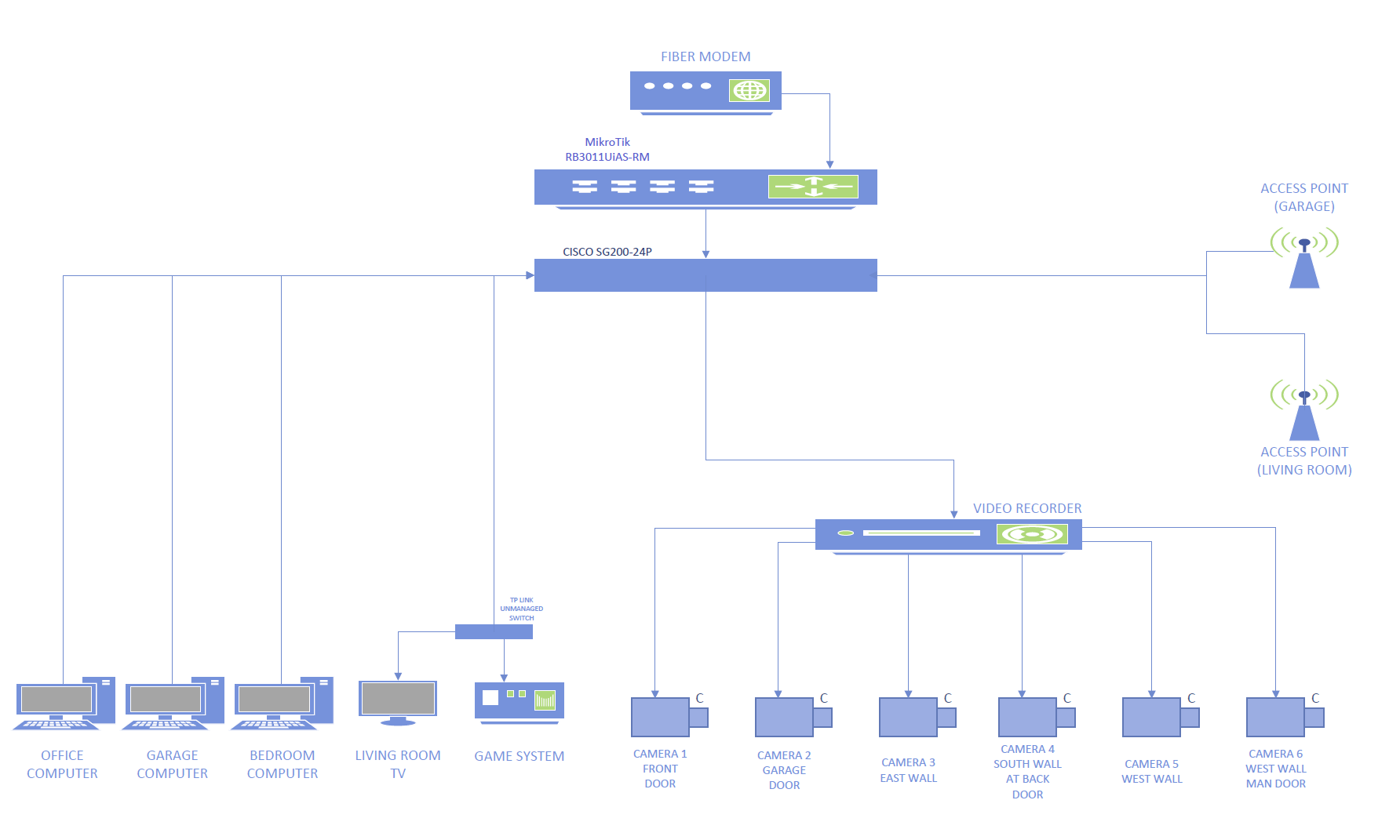
Not sure if this is the right place to ask, but I know damn near nothing about networking. I've been enlisted to help my friends install/setup a home network system, as indicated in the network diagram attached. I don't even know where to begin, when it comes to configuring the equipment that they've got, and neither do they.
Some features that they'd like to have, which I believe that this setup is capable of: The three PC's should be able to share files. The three PC's should be able to access the video recorder. The video recorder should not be able to access the internet. The two wireless access points, the living room TV & game system should be able to access the internet, but nothing else.
Welcome EngineBuilder...what are you expecting from us?
Your requirements are not far from default config. By adding some additional firewall filter rules you should be able to block the video recorder.
My (very limited) understanding is that in order to have the inter-communications limited as I’ve previously described, I need to set up VLAN’s (on the switch). First, is that true?
I’m only now beginning to familiarize myself with the RB3011 router, and RouterOS. My first order of business is going to be to achieve interface with it, and then to upgrade to the latest version of ROS, then the bootloader. That way I’ll at least be working with the latest version, which is what I think most configuration guides are working with.
I guess I’ve got two questions at this point-
Does anything seem out of sorts with the network map that I’ve included? For instance, I’m not sure if the wifi access points should even go to the switch, or straight to the router, since they’re not intended to have access to the internal network. Does it make a difference one way or the other?
Is setting up VLANs on the switch the optimal way of dealing with the network interconnectivity scheme that I’d previously described, or is there a better/simpler way?
I don’t expect help from the Mikrotik community on setting up the Cisco switch (though it’d be awesome if it happened), but any assistance at all in helping to configure the router to accomplish the goals outlined above would be extremely welcome.
VLAN is a great way to have network seperation. Still it does require adjustments to the firewall. Which makes perfect sense.
There is this great topic that describes VLAN's very thoroughly, I can recommend you readin it:
Using RouterOS to VLAN your network - MikroTik
It doesn't describe the Cisco configuration part (obviously) but that part is pretty straight forward.
Good luck and have fun!
You have a really tough one here
Let’s be honest here. For OP’s starting point, this is an incredible leap from a default config and a huge learning curve
I would make the following comments on the spec:
- For the computers to share files, use a NAS network file server. If you are clever, then you can put the user profiles on the NAS and any user will be able to log on and have their own profile consistently at any computer
- re “Wireless Access Points should only have access to the internet for a Guest network.” But what about a House network for tablets to have access to files and printers? Or for laptops to have access to files, printers and to the user profiles for the desktops?
- Printers. Local USB printers are such a waste. A heap of paper and a set of consumables near each computer. Better to get network capable printers - a laser and a photoquality printer?
That document should come with a big health warning. Undoubtedly it is correct and looks really good to people who are familiar with vLANs. It is beginning to look better to me now after 2 vLANs. But it confused the hell out of me when I started there, so much so, that what I have learned about vLANs I mostly have had to go elsewhere to learn. The 2 major deficiencies of the document are from my perspective:
- There is not enough emphasis laid on the fact that a vLAN is a Single Broadcast Domain and that in the preliminary analysis you have to make decisions of what will work together as a Single Broadcast Domain. Thus on Guest Wireless networks, every example out there configures the House network as a vLAN when this is usually completely unnecessary for a beginner or small home network [ - although it may be required here]
- There is a good description of the various types of port, ie Trunk, Hybrid and Access, plus the document is quite strong on showing their use. The configuration examples even include the settings they need. But given the Mikrotik way of doing things, the setup for a port is distributed across several different groups of settings, each group containing various port combinations. What is required is definitive examples of all the required settings for each of the port types.
So now back to the OP. It will not be a lot of work to set all of this up for a capable network tech. But for a beginner, the learning curve is more than huge. You need to break this up into smaller manageable chunks to even have a hope of implementing this and the expectation that you will come to a hiatus of understanding several times over. Where do you want to start?
That's exactly the point: document is intended to be a (reference) guide on how to properly configure VLANs on Mikrotik devices. But it's not in any way guide to VLAN concepts and basics ... reader should know those before attempting to configure MT devices. Just like ethernet device's user manual is not the place to reach about ethernet protocol and/or topology (but that one is a bit easier than VLANs).
I don't think that some hardware/OS vendor's forum is the right place to teach/learn networking basics.
The diagram is a great start as it allows one to define the requirements to sufficient detail to begin thinking about the config.
- Identify all the user(s)/device(s), including the admin
- Identify all their traffic needs.
- Any external users need access to the LAN?
- Will the admin need external access to the router (to config from remote)
- How may ISPs, one two or three
- Does the ISP give you a public or private IP, dynamic or static IP ??
Yes VLANs make perfect sense here, as by grouping like needs, you provide separation at layer2.
For firewall rules you only need to state ( as per your requirements ) what cross traffic, if any, is needed between vlans and everything is dropped by a drop all rule at the end of the forward chain. Hence now you have effective separation at layer3. Traffic flows securely.
The question I have is on the APs, are they smart or dumb. If dumb and you want to provide wifi for guests then you will have to dedicate each AP to the need ( aka one for home and one for guests ).
Then there is the need to provide IOT devices WIFI, and my advice if you cant get another dumb AP in the mix is to add them to the guest AP (aka not mix them with home users ). Clearly getting some smart APs is best in terms of being able to provide at any location wifi to various groups.
Then why is this document pushed so earnestly at people who are so obviously new to the world outside of consumer grade routers?
Strangely enough, for me it did a mostly reasonable job of that, missing only the emphasis on point 1
But it is the place to teach Mikrotik and my point 2 is very much a question of Mikrotik specifics
There are also great videos by the network berg, the network trip, and of course mikrotik videos.
Also this is available and not to bad Getting started - RouterOS - MikroTik Documentation
Just beecause if you are "new&fresh", you should take networking lessons in advance. Why do you expect that the forum users would prepare a free book "Networking in 21h" which you would understand at the first reading and become the natworking guru.
There is a very interesting article here https://sbwi.edu/blog/learning-by-doing-vs-learning-by-watching-or-reading#:~:text=Hands-On%20Learning%20and%20the,in%20better%20understanding%20and%20retention. , that explains the advantages of the experience "by doing".
P.S.
I've just spotted the error in "natworking" which is a quite good word BTW. 
Because that is what they are purporting to do.
Really?
Yes. Every time a “new&fresh” person comes along, up goes the link to the document if there is a remote possibility that a vLAN could be part of the solution. When sometimes it can be done other ways. And vLANs are just too complex for people who struggle beyond consumer grade routers. This section of the forum is called Beginner Basics. Perhaps you would be happier to shut it down rather than share knowledge?
These articles Topics tagged rtfum are the quintessence of knowledge.
You shouldn't complain that lots of peple sacrifice their time to teach/explain things just for fun in their free time.
"Beginer basic" does not mean that it's a kindergarden where each preschooler is supposed to be trained to the expert level. Books (read forum topics) are prepared to give people the rod, not the fish.
You assume that "beginer basic" means that you have the right to demand the help and others are obligated to explain all things to you. Wrong assumption. You can ask and people COULD answer you. The answer could be more or less fitting your expectations but it's the way the USER's forum work.
If you want more aattention then you should hire an networkin pro or attend some courses, invest in books and spend an enormous time testing things and gathering experience bu yourself.
quintessence: the most perfect or typical example of a quality or class.
No, they are not the quintessence. They are relatively good and probably the best available.
I am not making that complaint at all. I have offered some constructive suggestions for improvement. I am complaining that the link is being given with no concession to the possibility that it may be too advanced for some of the people seeking help here.
I am assuming no rights. If anyone is assuming, it is you assuming that I am assuming.
If you have read the thread, you will know that I am not asking for help here, but I do think your attitude is wrong. Let me refer you to the Forum Rules here Forum Rules / Guide Lines and particularly the bit headed If you are a regular.
vs
You do not ask for help but you ask for an assistance to configure network. Isn't it the same just differently worded ? So I am not assuming that you assume, I just state it. Fair enough?
Yes. But it is not a set of books/articles for begginers, intermediate & advanced users. It's kind of encyclopedia (Wiki for younger users who are not familiar with that old fashioned word) summarazing "all you have to know about VLANs". If you consider it too sophisticated then please write your own verison for beginers and we would be pleased to be able to send a link to it. Help others to understand VLAN's subject.
I am Duct View. I am not the OP. You quote Enginebuilder to “prove” that I am asking for help here? Go away and get your story straight.
Actually Bartosz is bang on, the motivation needs to be on the part of the OP. If the OP doesnt have a basic understanding of vlans, then he/she should do the work to learn them. Many other newbies have done so. This is before attempting to work on vlans on any router, same with networking knowledge. On the plus side, many here are helpful and if they see someone making an effort they gladly attempt to assist beyond what one could expect. The OP does not have a simple network but its not an unusual home network scenario which is quite reasonable ( the cisco switch maybe a tad over the top for a newbie to deal with and in fact, if there is no simple gui, will be more difficult to work on compared to the MT device). If you have a beef on the lack of beginner teaching information on MT products, then for phucks sake, please take up your issues with mikrotik and not the people taking their spare time to help others in the best way they know how ( not perfect and not necessarily with teaching degrees ). The vlan article was done with the best of intentions and much effort, and is quite useful once someone has a better grasp of what vlans are etc.... Lastly, you are distracting from the purpose of the thread and that is to help Engine with his plan etc.
In the future, this is planned, but for right now, each computer will need to communicate to share files/folders.
But what about a House network for tablets to have access to files and printers? Or for laptops to have access to files, printers and to the user profiles for the desktops?
Honestly, that is something that neither my friends or I had considered, but it makes absolute sense. Homeowner tablets, phones and or laptops should be able to access the camera system when connected to the local network.
Right now the only printer is going to be in the office, and it, too will need to be on the wifi.
Another device that will need to be on the wifi is the generac generator.
You need to break this up into smaller manageable chunks.. Where do you want to start?
The starting point, for me, is making sure I have properly answered these two questions:
I have already received helpful responses regarding the proposed network; there were considerations that I had not thought of (ie: homeowner use of wifi) that would not have been identified until after initial configuration, and so for that I thank you already!
Any external users need access to the LAN?
Will the admin need external access to the router (to config from remote)
How may ISPs, one two or three
Does the ISP give you a public or private IP, dynamic or static IP ??
The question I have is on the APs, are they smart or dumb?
No external users need to access the LAN at this time. In the future, we will likely try to set up a VPN in order to remotely access the network (mainly to remotely monitor the cameras).
The admin is likely to be me; I live a few houses down, and so if there’s a network issue, I’ll just pop over and see what I can do.
One ISP, using dynamic IP assignment and PPPoE.
The AP’s are (presumptively) smart AP’s- TP-Link EAP650 AX3000.
Regarding the VLAN article that was posted.
It is over my head, right now. It won’t be. There are terms in it that I do not know, and will work to rectify that. Even before my OP, I had read (well, skimmed) that article as it had come up in a search of this forum.
I have well over a month before the network system is expected to go live, and I intend to do a lot of studying/learning and asking questions here in the interim.
I’m not looking for anyone to spoon feed me the information that I need to know- I’m looking to find out what I need to know in order to successfully/appropriately configure the network hardware.
Advice that I would appreciate:
Identification of information that I need to know.
Identification of specific, reliable, sources of that information.
For instance, anav mentioned this:
There are also great videos by the network berg, the network trip, and of course mikrotik videos.
Also this is available and not to bad Getting started - RouterOS - MikroTik Documentation
These youtube channels have already proven to be a great resource, both for specific MT configurations, and for general networking fundamentals.
Taken at face value, what you are asking to do will require a more complex configuration than the default configuration. And I tend to agree with everything said by @DuctView, concerning the steep climb ahead.
What is your technical background?
Who prepared the network diagram?
For the firewall to be able to do its job, you will need to have at least three broadcast domains (either lans or vlans).
- The "trusted devices" (the 3 PC's and anything else that is trusted)
- The Video Recorder
- The Guest/IoT network with APs,TV and game system.
I also think that if you really know "near nothing" about networking, you should spend some time learning the fundamentals. Understanding them will make anything networking related much easier. Knowing how to configure the specific devices in the MikroTik way is useful and important, but it assumes a knowledge of the fundamentals. If you don't know the basics of what you are trying to configure, you won't know where to start, and even if you find a cookbook example and you are able to get a configuration that does most of what you want, if you don't understand how and why it works, you will be lost when you want to add to the configuration, or worse when something changes and things break, you won't have the necessary background to be able to troubleshoot.
Based on your handle "Enginebuilder", you should know the importance of understandibutng the fundamentals. For example, understanding the fundamentals of internal combustion engines is necessary for any auto mechanic working on gasoline powered vehicles, whether working on a Ford, Honda or Mercedes-Benz.
My recommendation for Networking Fundamentals is Ed Harmoush's free stuff on his Practical Networking web site and his youtube Networking Fundamentals videos Ed also explains vlans well - see his vlan-index.
@BartoszP recently posted this recommendation, but I haven't gone through them.