[FIXED] CCR1009-8G-1S-1S+ Port-Flapping/Ghost-Ports

Hi,

I’m configuring my first CCRs and with the default config (just changed IP) and physical ether1 connected, I get flapping ports on ether5 to ether8, which are not physically connected. I’ve got the same behavior on 6.19 and 6.20rc10 with firmware 3.18.
ccr_flaps.PNG

/system reset-configuration
is your friend, then try once more.

Thanks for the advice, but it’s the same:

00:04:10 interface,info ether8 link up (speed 1G, full duplex) 
00:04:15 interface,info ether8 link down 
00:04:45 interface,info ether8 link up (speed 1G, full duplex) 
00:04:50 interface,info ether8 link down 
00:05:30 interface,info ether8 link up (speed 1G, full duplex) 
00:05:35 interface,info ether8 link down 
00:06:20 interface,info ether8 link up (speed 1G, full duplex) 
00:06:25 interface,info ether8 link down 
00:06:45 interface,info ether8 link up (speed 1G, full duplex) 
00:06:50 interface,info ether8 link down 
00:06:55 interface,info ether8 link up (speed 1G, full duplex) 
00:07:00 interface,info ether8 link down

Interesting are the 5s for the “link down” after the “link up” event…

I’ve seen this many times with Mac’s and PC’s trying to sleep.
The interface attempts to enter a low power mode, often 10 or 100mbps.
Try finding the device that is on that port and disable the power management.

There are no devices on this ports, the only connected port is ether1, all other are unused.
PS: But are right with sleeping devices they can produce the same effect!

I missed that part. Very interesting. A few things to try…

  1. What happens when a PC is attached to the port?
  2. What happens if you disable the port and reboot?
  3. what happens if you disable auto-config on the port?

I saw on omnitiks that when eth1 went up then all other ports flap. I was told that it is not a bug but feature. Since then I don’t use the ether1 port. But it never took so long time. Maybe ccr has similar feature…

I had one doing something just like that. I was only using pets 5, 6, 7 and 8. They where constantly doing it. I returned it and hoping it was just an issue with the router itself. I will know once the replacement arrives.

Thank you very much for provided support output files, we are researching your problem.

Here is my output file as well. I would have the issue on ports 5, 6 and 7. I had closed and reopened 7 in this one and it stopped for a few hours but started right back up.

Problem: 17:06:27 interface,info ether6 link down 
17:06:32 interface,info ether5 link up (speed 1G, full duplex) 
17:06:32 interface,info ether6 link up (speed 1G, full duplex) 
17:07:07 interface,info ether5 link down 
17:07:07 interface,info ether6 link down 
17:07:12 interface,info ether5 link up (speed 1G, full duplex) 
17:07:12 interface,info ether6 link up (speed 1G, full duplex) 
17:10:09 interface,info ether5 link down 
17:10:09 interface,info ether6 link down 
17:10:14 interface,info ether5 link up (speed 1G, full duplex) 
17:10:14 interface,info ether6 link up (speed 1G, full duplex) 
17:10:24 interface,info ether5 link down 
17:10:24 interface,info ether6 link down 
17:10:29 interface,info ether5 link up (speed 1G, full duplex) 
17:10:29 interface,info ether6 link up (speed 1G, full duplex) 
17:10:39 interface,info ether5 link down 
17:10:39 interface,info ether6 link down 
17:10:44 interface,info ether5 link up (speed 1G, full duplex) 
17:10:44 interface,info ether6 link up (speed 1G, full duplex) 
17:11:34 interface,info ether5 link down 
17:11:34 interface,info ether6 link down 
17:11:39 interface,info ether5 link up (speed 1G, full duplex) 
17:11:39 interface,info ether6 link up (speed 1G, full duplex) 
17:11:45 system,info route changed by admin 
17:11:59 interface,info ether5 link down 
17:11:59 interface,info ether6 link down 
17:12:04 interface,info ether5 link up (speed 1G, full duplex) 
17:12:04 interface,info ether6 link up (speed 1G, full duplex) 
17:12:29 system,info address changed by admin 
17:12:44 interface,info ether5 link down 
17:12:44 interface,info ether6 link down 
17:12:49 interface,info ether5 link up (speed 1G, full duplex) 
17:12:49 interface,info ether6 link up (speed 1G, full duplex) 
17:13:49 interface,info ether5 link down 
17:13:49 interface,info ether6 link down 
17:13:54 interface,info ether5 link up (speed 1G, full duplex) 
17:13:54 interface,info ether6 link up (speed 1G, full duplex) 
-- Ctrl-C to quit. Space prints separator. New entries will app
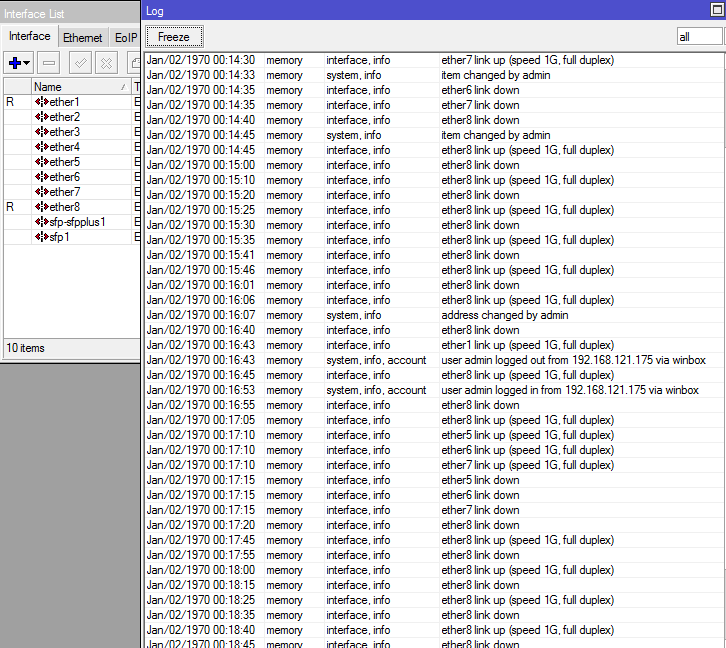
Same issue here.
We received 13 pieces of the CCR1009-8G-1S-1S+ some days ago and unpacked/tried 6 of them and 2 of them have those flapping problems. (with 6.18 and 6.19)

I’m working with Mikrotik Support on this issue and hopefully get a solution soon …
For the moment it looks not so good, the router has no more a kernel to load …

We have made new firmware for CCR1009 that will address this issue, firmware is available here,
http://www.mikrotik.com/download/share/tilegx_3_19.fwf

Upload it your router by FTP client or Winbox drag-n-drop, use commands to install it,

/system routerboard upgrade
/system reboot

plese check topic
http://forum.mikrotik.com/t/dont-rigister-and-connect-mikrotik-sxt-5hnd-to-server-ap/81250/1
and type sugestion

Hello,
i tried that new firmware (together with ROS6.19).
The messages of the unconnected interfaces disappeard, but if a cable is at port 5-8 the interface still goes down/up regularly and at least some pings that I do from a laptop connected at that port, get lost for some seconds.

Hello, i have the same problem with this CCR.

I’ve tried to upgrade the firmware and the software and no changes

If I connect to a switch with the ether1, the ether8 is flapping, and there is nothing connected to this port.

Here is the routerboard settings, and the log with only ether1 connected

[admin@MikroTik] > /system routerboard print
routerboard: yes
model: CCR1009-8G-1S-1S+
serial-number: 48FF04C39156
current-firmware: 3.19
upgrade-firmware: /var/pckg/tilegx_3_19


00:02:39 dhcp,info dhcp-client on ether1 got IP address 172.16.1.199
00:02:39 interface,info ether1 link up (speed 100M, full duplex)
00:02:42 interface,info ether8 link up (speed 100M, full duplex)
00:02:46 system,info,account user admin logged in from 172.16.1.148 via winbox
00:02:57 interface,info ether8 link down
00:03:02 interface,info ether8 link up (speed 100M, full duplex)
00:03:02 system,info,account user admin logged in from 172.16.1.148 via telnet
00:03:27 interface,info ether8 link down
00:03:32 interface,info ether8 link up (speed 100M, full duplex)
00:03:37 interface,info ether8 link down
00:03:42 interface,info ether8 link up (speed 100M, full duplex)
00:04:07 interface,info ether8 link down
00:04:12 interface,info ether8 link up (speed 100M, full duplex)
00:05:12 interface,info ether8 link down
00:05:17 interface,info ether8 link up (speed 100M, full duplex)
00:05:27 interface,info ether8 link down
00:05:32 interface,info ether8 link up (speed 100M, full duplex)
00:05:52 interface,info ether8 link down
00:05:57 interface,info ether8 link up (speed 100M, full duplex)
00:06:13 interface,info ether8 link down
00:06:38 interface,info ether8 link up (speed 100M, full duplex)

mabellan,
Please send a supout.rif from this CCR to MikroTik support.

CCR is alive again with Firmware 3.19 :slight_smile:
But still portflapping on ether8, but no more on ether5 to ether7!, It looks to me as MikroTik support is on the right way, thanks for that.
New suppout.rif sent to support.

Any news on this? I unpacked now 8 of the 13 routers i received lately and 4 of them show this behaviour.
On one them the interfaces only went down&up 2 times and since then not anymore.

Is is this a general issues of a production batch?

The serial numbers of all our CCR109-8G-1S-1S+ routers (the older we got some months ago that were always working + the new once we got some weeks ago that show the problems , as we wanted to use them now) start with: 48ff04xxxxxx/xxx
The rest of the numbers look quite random.

The serial numbers that are written on the lable on all of the “issue” devices end with …/433 (written on the device itself)
and …/435 on the carton box they were delivered in.

(eg. 48ff0436961f/435 is written on the box label and 48ff0436961f/433 is written on the device label)

Some older (working) ones I looked at have /425 written on the lable.
(this is not shown in /system routerboard, but only on the lables)

I have a lot of serial numbers and supout.rif files to offer if it is on any help. I really need to know if it can be fixed by a new firmware or I need to get new devices as I would need them soon. (yes.. i know.. stressing is of no big help :slight_smile: )

Try firmware 3.19 with ROS6.20.rc15.
This combination is working for me.The router is has only 45min uptime at writing this post, but with older versions i’ve got about 40 flaps in this time!
Ticket is still open and remote session with support is scheduled.