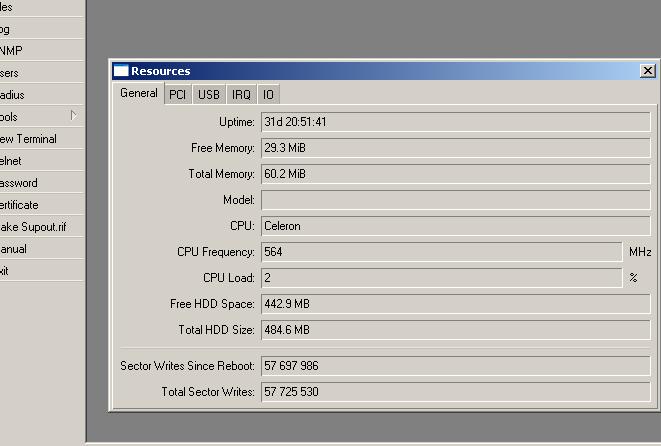
For any still wondering about “how many flash writes will kill a compact flash”, take a look at this:
(It’s a sandisk 512 mb compact flash.)
It’s like this because the hdd that it replaced it’s gone .. dead, and all logging on hdd remained on, from the backup copy, after restore to compact flash.
( oh, and not to forget, it’s up and running, at this time, and now sends everything to syslog. )
I have always used flash in my routers and as of yesterday I won’t any longer. I’ve had my 4th router affected in the same month.
Last month I had a Kingston 512MB CompactFlash die - Rebooted the router to try to see what was wrong, ‘Loading System E’ was presented, NetInstall couldnt partition or format drive. Completely toasted flash.
Last week I had a PNY 1GB USB stick - CRC checksums and unreadable sectors caused it to stop booting completely.
Last week I had a Lexar Pro 1GB CompactFlash die - just completely hung RouterOS after booting because it couldn’t recover from attempts to write.
This week I had a Kingston 128MB CompactFlash die - I could see the LED lights for IDE activity on solid after the router booted because it failed to write, it eventually crashes the router. Backups could not be written any longer.
I will no longer use flash in a router that I have in production, unless I have plans to replace them yearly. The problem with that is the license keys…
I wonder how the flash in the routerboards compare with CF and Usb sticks. I really would like to have the Critical logging topic actually tell me when there is a read/write error on the disk so we can proactively replace them.
Must be the graphing that’s causing all the writes. (I don’t use that personally).
We have 10 year old ciscos that use flash memory. I’ve got an EEEpc that uses flash as a hard drive. I’ve got bunches of mikrotik flash-on-ide-connectors that are working fine for 3 or so years now.
There are many many total junk CF-IDE adaptors on the market, perhaps that is part of the problem. I’ve gone through 3 readers in 6 years on my digital photography computer that gets no more than a few hours a week of use.
I never had a problem with a usb/sd/compact flash from sandisk. No, no advertising. Just opinion. I have had princeton and kingkston usb sticks fail by the douzins, in the corporate network.
As of the routerboards, it’s NAND in them, it should be ok for 100.000 writes, each sector. So, it should be ok.
I have a few, 3 or 4 rb133a with 1 and up to 4 bad blocks, wich work just fine. They are from the first samples distributed, with the l4 licence. No loging on them, and reduced the writes to a miminum. All up and working.
Just to be precise; its’ only the number of block erase operations performed on a single block that affects it’s reliability, so if a single sector is rewritten too many times then the whole block (multiple sectors) is usually worn out too. These values aren’t available to read in routeros.
Flash memory isn’t just flash memory. There are many different types and some come with logic that helps to reduce the total erase cycles per block. Some factors that greatly impact on your typical flash drives are;
wear leveling technologies greatly extending it’s expected life (Typically SSD’s and some rare IDE DOM’s),
bad sector remapping (most IDE DOM’s and most, if not all, CF’s).
singlelevel cells (great lifetime, more silicone, usually somewhere around one million writes per block ),
multilevel cells (poor lifetime, less silicone, usually somewhere around hundred thousand writes per block or less, some as little as ten thousand)
So don’t expect much from flash memory that have very small form factors.
The smallest kinds have no logic other than addressing which means no wear leveling or bad sector remapping.