So i recently got fibre and they provided me with a Mikrotik hap ac2 router.
I decided to start using it cause my previous router had an issue with one of the lan ports.
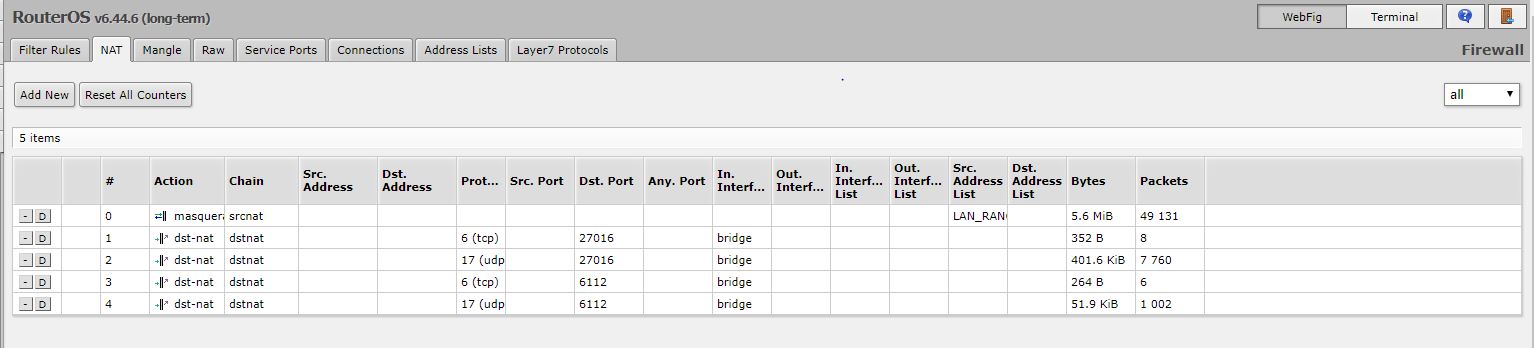
According to FSX and steam the ports i needed to forward was 27016 and 6112 on both tcp and udp.
See attachment 1 for the rules.
I used Nmap to see if the ports where open on these setting and it returned with “tcp filtered dtspc”.
I don’t have a static ip and went through all the In. Interfaces and bridge was the only one that showed the port as partially open, I have a ppp option (saw on one of the many tutorials that’s what i need to select but it does not work). If i use my current public IP address in Dst. Address it provides the same results.
My internal IP is 192.168.101.204 and i have my firewall set to allow both those ports although i have tested is as well with my firewall off and it gives the same results.
My issues seems to be that the port isn’t completely open, also when i have the forwards open i cant see any other servers on FSX. I also have two roommates so if i understand correctly this will also forward their traffic on those ports to my PC. Please correct me if I am wrong. If i use the steam service where you can add favorites services it shows my server but my friends still seem to struggle to connect to it.
Both housemates and i are directly connected to the router and the friends i am trying to host for is externally. I am not sure if I am missing something obvious also i use to be able to forward ports on my ASUS router with no issues.
Any advice will be greatly appreciated.
Kind Regards