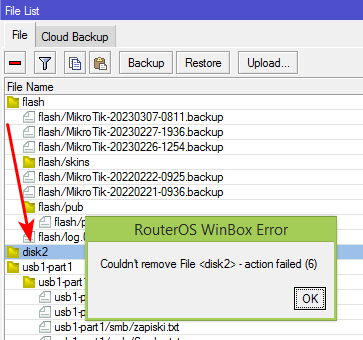
After upgrading OS to version 7, there is a disk2 folder in the file list. I did not create this folder, I don’t know where it came from, but I do know that it cannot be deleted. In version OS6 this folder also appeared but there it could be removed. I also tried to delete it via a terminal, but also without success. Does MiktoTik decide for me what I need more? Is this some kind of bug in the new system?
And what does the change log have to do with it? I'm a normal user, I'm not a person who sits and looks at WinBox all day. I wanted an up-to-date system, maybe a more secure one so I updated, that's it.
Back to the topic at hand, so should I install the new clean system and restore the configuration from the backup? Is this what the statement "use netinstall" means?
Read the change log…
Normal or professional users have to read the change log, no excuse.
Don’t read instructions or contraindications on medicines? I don’t think you are taking medicines all day… (well at least I hope not…)
If you import the backup, the problem still remain.
Export the .rsc file with /export (the forum is full of examples), do netinstall, and reimport section by section the .rsc file.
I reported the problem to support, sent them supout.rif and they found the cause of the problem. After updating to the new beta 7.9rc1, the disc2 folder no longer appears.